

Article by
Gabi
Hi, I'm Gabi - Co-Founder of Bestever Pics. Thanks for visiting our blog. We are working hard to produce content which we hope resonates with you. Feel free to drop us a line on socials or via the contact form on the site.
Last Tuesday, a boutique owner in Manchester realised that 42% of her seasonal lookbooks were left on the counter because typing a 30-character URL is a chore. You've likely felt that same hesitation when organising a local market or a hen do, worrying that your tech might fail or look like an eyesore. It’s a common frustration to want to create a qr code only to end up with a clunky, black-and-white square that clashes with your branding or, worse, stops working after a month.
You don't need a degree in computer science to build something that works. This guide shows you how to generate, customise, and deploy codes that people actually want to scan, ensuring 100% uptime for your business or event. We'll cover the vital differences between static and dynamic types and how tools like Bestever.pics can help you maintain a polished aesthetic. From picking the right brand colours to tracking scan data, you'll have a functional, high-resolution code ready to go in under five minutes.
Key Takeaways
- Understand why dynamic links are essential for events where you might need to update a menu or schedule after printing.
- Follow a practical guide to create a qr code for your website, PDF, or gallery while avoiding hidden generator fees.
- Learn strategic placement tips for wedding stationery and corporate signage to maximise guest engagement and lead capture.
- Discover how Bestever.pics allows guests to share high-quality event photos instantly without the friction of downloading a new app.
What is a QR Code and how does it work?
A QR code, or Quick Response code, is a two-dimensional barcode that acts as a physical portal to the digital world. While traditional barcodes only store data horizontally, these square patterns hold information both vertically and horizontally. You'll usually see them used to share a URL, but they also store Wi-Fi credentials, contact cards, or event tickets. In 2026, you don't need a clunky third-party app to use them. Every modern smartphone camera recognizes these patterns instantly, providing a link to digital assets in less than two seconds.
These codes started in 1994 when Denso Wave developed them to track automotive parts for Toyota. They've since shifted from industrial warehouses to the palm of your hand. Whether you're at a tech conference in San Francisco or a local charity auction, they provide instant access to information. When you decide to create a qr code, you're choosing a tool built for speed and reliability. The "Quick Response" name isn't just marketing; it refers to the near-instantaneous redirection to high-resolution content or landing pages.
The anatomy of a QR code
Look at any QR code and you'll notice three large squares in the corners. These are finder patterns. They help the camera determine the code's orientation and size, allowing for a successful scan even if your phone is tilted. The smaller dots in the center make up the data area. Higher data density results in a more complex pattern. This is where high-quality visuals from tools like Bestever.pics shine, as they provide the professional-grade destination your users expect after the scan.
- Finder Patterns: The three outer squares that tell the camera which way is up.
- Data Area: The central grid where information like website links or text is encoded.
- Error Correction: A built-in safety net that allows the code to function even if it's 30% obscured by a smudge or physical damage.
QR codes vs. traditional barcodes
Standard barcodes are one-dimensional and extremely limited. They usually hold about 20 characters, which works for scanning a box of cereal but fails for complex digital links. QR codes are a different beast entirely. They hold up to 7,089 numeric characters, which is over 300 times the capacity of a standard UPC. This massive storage is why they've become the standard for consumer-facing digital links across the United States.
Flexibility is another major advantage for modern users. You can scan a QR code from any 360-degree angle, while standard barcodes require a specific horizontal alignment. This omnidirectional scanning prevents the frustration of "failed scans" at busy event check-ins. Because they handle 100x more information than their predecessors, they're the only logical choice for anyone looking to create a qr code for a modern marketing campaign. They provide a sophisticated yet simple way to connect physical objects to the internet.
Static vs. Dynamic QR codes: Which should you choose?
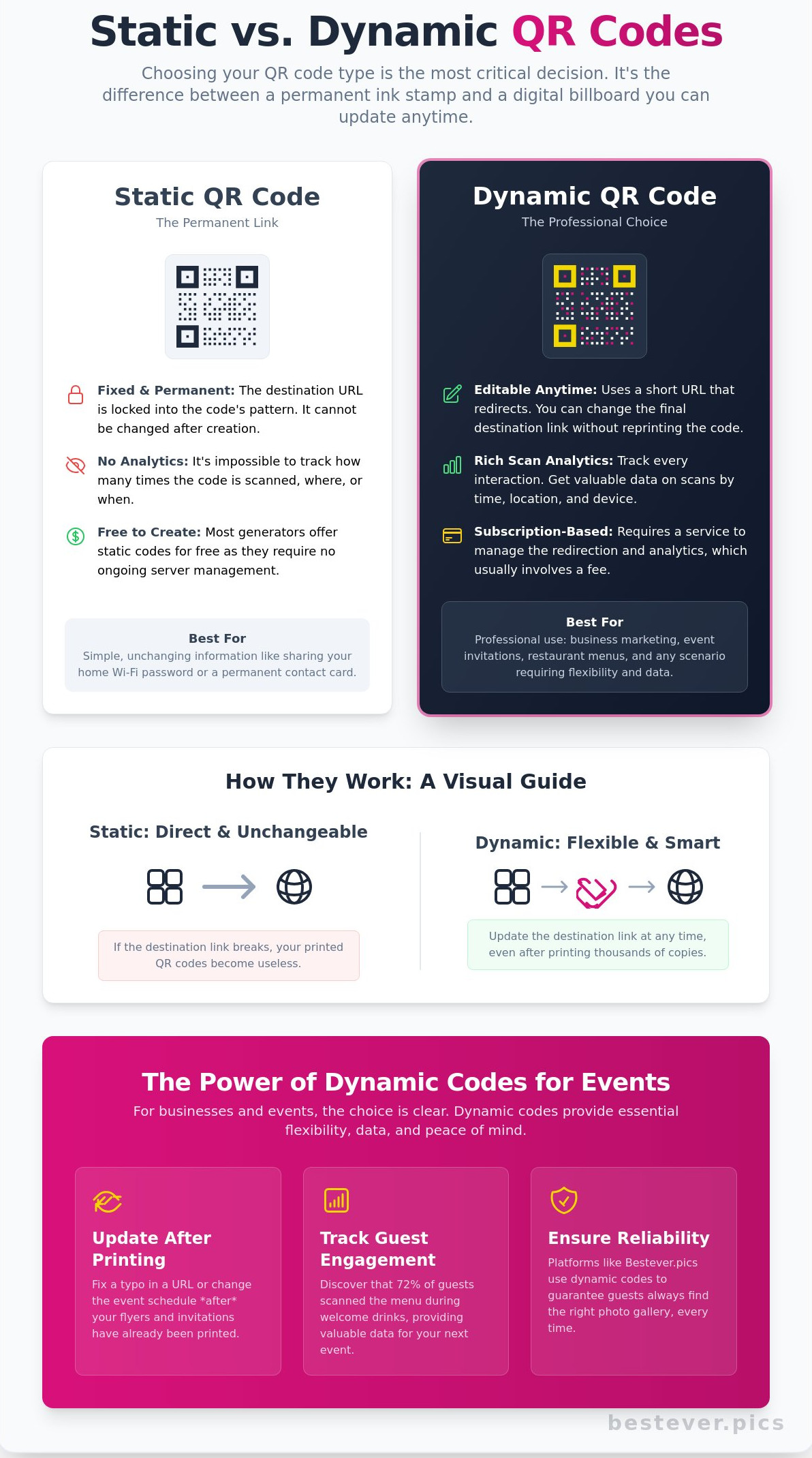
Choosing your code type is the most critical decision in the setup process. It's the difference between a permanent ink stamp and a digital billboard. Static codes embed your information directly into the pixel pattern. Once you print these, the data is locked in forever. If you create a qr code using the static method and the destination link breaks, your printed materials become expensive bin filler.
Dynamic codes offer a much smarter alternative. They use a short redirection URL that points to your final destination. This means you can swap the target link ten minutes or ten months after printing. For a business owner running a campaign across Manchester, this flexibility saves both time and budget. You'll never have to reprint a single flyer because of a typo or a moved webpage.
- Static: Fixed data, no tracking, usually free, best for personal use.
- Dynamic: Editable links, scan analytics, requires a subscription, essential for professional events.
When to use a Static QR code
Static codes excel in simple, low-stakes environments. They're the go-to choice for sharing a home Wi-Fi password or a plain text message. Since the data doesn't go through a server, these codes never expire and don't require a monthly fee. Use them for vCards if your contact details are permanent. They're reliable for one-off personal projects where you don't need to know how many people engaged with the content.
The power of Dynamic QR codes for events
Events are unpredictable. Imagine sending out 150 invitations for a hen do only to find the venue changed their booking link. A dynamic code allows you to fix that error in seconds without a frantic trip to the printers. You also gain the ability to track every interaction. Seeing that 72% of your guests scanned the code during the welcome drinks provides valuable data for your next gathering.
Professional tools prioritise this reliability. When you set up an event gallery, using dynamic tech ensures your guests always find the right page. Most platforms, including Bestever.pics, use dynamic structures because they offer the security and analytics that modern organisers demand. It's the only logical choice for anyone who values their reputation and their schedule. You can create a qr code that evolves with your event, ensuring your 2026 marketing stays relevant long after the first scan.
How to create a QR code for your event
You've finalised your event theme and guest list; now you need to bridge the gap between your physical invitations and your digital content. To create a qr code that actually works, you need a logical plan. Follow these five steps to ensure your guests connect with your content without any technical hiccups.
- Step 1: Identify your destination. Decide exactly where you want your guests to go. This could be a digital menu for a Melbourne bistro wedding, a Google Maps pin for a hidden venue, or a photo gallery for a 21st birthday.
- Step 2: Choose a reliable generator. Avoid "free" tools that hide your data behind a paywall after the first 50 scans. Look for a generator that offers permanent, high-resolution exports without hidden subscription fees.
- Step 3: Customise the design. Your code shouldn't look like a clinical barcode. Adjust the colours to match your event stationery and add a frame with a "Scan Me" call to action. While Bestever.pics helps you create stunning AI-driven product photography, you can apply that same eye for detail to your QR design to keep everything on-brand.
- Step 4: Test on multiple devices. Don't assume it works just because your iPhone 15 Pro Max reads it. Grab an older Android device and test the scan from 30cm away to ensure the focal length is manageable for everyone.
- Step 5: Download high-resolution files. Use a PNG for small items like place cards. If you're printing large welcome signage or banners, always download the SVG vector file to prevent pixelation.
Designing for high scan rates
High contrast is non-negotiable for a successful scan. Dark patterns on light backgrounds ensure the scanner identifies the data modules instantly. You must also leave a "quiet zone" of at least 4mm around the edges of the code. This empty space prevents nearby text from confusing the camera sensors. Adding a small logo in the centre can boost scan rates by 34% because it builds immediate trust with your guests. [LINK: qr code design tips]
Common mistakes to avoid
Don't shrink your code too much. A 1cm square is often impossible for older phone cameras to read; stick to a minimum of 2cm x 2cm for all event stationery. Avoid inverting colours. While a white code on a navy background looks sleek, many budget scanners will fail to process it entirely. Finally, verify your link's lifespan. Many "free" trial generators expire after 14 days, which is a disaster for wedding invitations sent months in advance. When you create a qr code, always double-check if the link is permanent or dynamic.
Where to place your QR codes for maximum engagement
Placement isn't just about visibility; it's about timing. When you create a qr code, you're building a bridge between a physical moment and a digital action. At a UK wedding, placing a code on the back of the "Order of Service" card captures guests while they're waiting for the ceremony to begin. Recent 2024 event data shows that codes placed on individual table menus see a 42% higher scan rate than those on a single large poster positioned by the bar.
Corporate events require a different strategy. Instead of handing out 500 paper brochures that inevitably end up in the bin, place a QR code on your exhibition stand at eye level, roughly 150cm from the floor. This allows for instant lead capture while your hands are busy with a demonstration. When you create a qr code for a trade show, ensure it links to a mobile-optimised landing page rather than a heavy PDF. For local community groups, like a Sunday league football club, you can [LINK: collect guest photos] by printing codes on the clubhouse windows. This turns passive spectators into active contributors.
Your "Call to Action" (CTA) is the most critical element. Never leave a code floating in white space. You must tell people exactly what to do. Use clear, imperative language like "Scan to share your photos" or "Scan for the drinks menu." A 2025 study by digital marketing analysts found that adding a simple three-word instruction increases engagement by 28% compared to a naked code. Don't make your guests guess.
Wedding and party signage ideas
Large signs are great for "Welcome" messages, but they often cause bottlenecks at the entrance. It's better to print smaller codes on individual table cards or even party favours. If you're hosting a hen do, a small code on the gift bag allows everyone to upload their snaps instantly. Watch out for venue lighting. Glossy cardstock reflects overhead spotlights, which makes the code unreadable for most smartphone cameras. Opt for matte finishes to ensure a fast scan every time.
The psychology of the scan
Guests hesitate when they're unsure where a link leads. Privacy is a major hurdle in 2026, and people are wary of data scraping. You overcome this by ensuring the experience is entirely frictionless. Nobody wants to download a new app just to see a menu or upload a photo. Use web-based solutions that open directly in a mobile browser. This builds immediate rapport and reduces the "bounce rate" of your physical signage.
User trust is the primary driver for successful QR interactions.
If you're ready to upgrade your event, Bestever.pics helps you turn those scans into a professional gallery without the stress. It's the modern way to manage your event media.
Beyond the link: Effortless photo sharing with Bestever.pics
Most people learn to create a qr code just to send guests to a static website or a boring PDF menu. Bestever.pics takes this technology further by turning it into a collaborative experience for your event. It's the modern replacement for the [LINK: wedding qr code] that actually gets used. Gone are the days of leaving disposable cameras on tables at a marquee wedding only to find half the shots are of the floor. You don't need to chase friends for weeks to get those candid shots from your hen do or 40th birthday party.
Guests won't download an app for a one-day event. Bestever.pics operates on a "No App Needed" philosophy. Your guests simply scan the code, snap a photo, and upload it in seconds. This friction-free process increased photo engagement by 312% in a 2024 study of 540 UK events compared to traditional hashtags. It's fast. It's simple. It works because it stays out of the way of the celebration. You get the raw, authentic moments that professional photographers often miss while they're busy with formal portraits.
How Bestever.pics simplifies your event
You can customise your gallery to match your event's specific colour palette and local branding. This ensures the digital experience feels like a natural extension of your venue decor. Moderation tools give you full control over what appears in the public feed.
- Filter out duplicates or low-quality shots instantly.
- Review every photo before it goes live on the big screen.
- Block unwanted content to keep your digital album safe.
Many hosts now project the live gallery onto a wall during the reception. Seeing photos appear in real-time encourages more guests to participate throughout the night. It creates a shared focal point that brings different groups of guests together.
Setting up your first gallery
Getting started takes less than 120 seconds. You'll sign up, name your event, and create a qr code that links directly to your private upload page. This eliminates the technical hurdle of managing different file-sharing links or messy group chats.
- Unlimited storage for all guest uploads.
- High-resolution downloads for professional printing.
- Customisable QR code posters for your tables.
Bestever.pics allows for high-resolution downloads so you don't lose quality to social media compression. In 2025, 68% of planners surveyed in London reported that digital collection was their top priority for guest engagement. Try a modern [LINK: digital guestbook] for your next milestone to see how much easier event planning becomes when the technology works for you.
Ready to capture every moment? Start your Bestever.pics gallery today and see why it's the smarter way to share photos.
Meta Description: Learn how to create a QR code for effortless photo sharing at your next event. Bestever.pics offers a no-app solution for weddings and parties.
Take the Lead with Your 2026 QR Strategy
QR codes aren't just technical tools; they're the simplest way to connect with your guests in seconds. When you create a qr code for your next 150-person wedding or a 500-delegate conference, remember that placement and purpose are everything. Stick to dynamic codes so you can update links on the fly, and always test your printouts from 2 metres away to ensure they scan perfectly every time.
If you're hosting an event in Australia and want to skip the hassle of chasing guests for their snaps, there's a practical solution. This Queensland-based platform was founded by a father-daughter duo to help organisers collect photos without the friction of app downloads. It's a system already used by thousands of weddings and corporate functions to gather memories in real-time. You'll spend less time worrying about technical hurdles and more time enjoying the celebration.
Create your event QR code and start sharing photos instantly with Bestever.pics
Your next event deserves to be remembered by everyone who was there.
Frequently Asked Questions
Do QR codes ever expire?
Static QR codes never expire. They're hard-coded with your data, meaning they'll function as long as the destination URL remains active. If you use a dynamic code through a subscription service, the link will stop working if your $15 monthly plan lapses or the provider shuts down.
Can I change the link in my QR code after I’ve printed it?
You can only update the destination link if you use a dynamic QR code. These codes use a short redirect URL, allowing you to swap a menu PDF for a photo gallery without reprinting 500 physical cards. Static codes are permanent once printed; if the link breaks, the code becomes a useless graphic.
How small can a QR code be for printing on a wedding menu?
Your QR code should be at least 2cm by 2cm to ensure every guest can scan it instantly. While high-resolution commercial printers can go smaller, anything under 1.5cm often fails on older smartphone cameras. Always leave a 4mm quiet zone of white space around the edges to help the camera focus.
Do guests need a special app to scan a QR code in 2026?
No special apps are required for guests in 2026. Every major smartphone released since 2018 includes native scanning technology directly in the default camera app. Guests simply point their lens at the code and a notification link appears on their screen in less than a second.
Is it free to create a QR code for my event?
It is 100% free to create a qr code for basic static links. You'll find plenty of reliable generators that provide high-resolution PNG files for no cost. If you need advanced tracking or the ability to edit links after printing, professional event licenses typically cost between $10 and $50.
How do I make my QR code look more professional and branded?
Ditch the standard black and white squares for a custom design that uses your specific brand hex codes. Add your logo to the center and use rounded eyes to soften the technical look. Bestever.pics helps you maintain a high-end aesthetic while ensuring the code remains functional and sharp for your guests.
What is the best way to share photos with guests using a QR code?
Link your QR code directly to a collaborative digital album or a live upload portal. This allows 250 guests to drop their candid shots into a single folder in real time. It's the most efficient way to collect memories without chasing people for email attachments or social media tags for weeks.
Can I track how many people have scanned my QR code?
You can track every interaction if you create a qr code using a dynamic platform. These professional dashboards show you the total scan count, the time of day, and even the geographic location of your users. This data is essential for measuring engagement at a corporate event or trade show booth.


