

Article by
Gabi
Hi, I'm Gabi - Co-Founder of Bestever Pics. Thanks for visiting our blog. We are working hard to produce content which we hope resonates with you. Feel free to drop us a line on socials or via the contact form on the site.
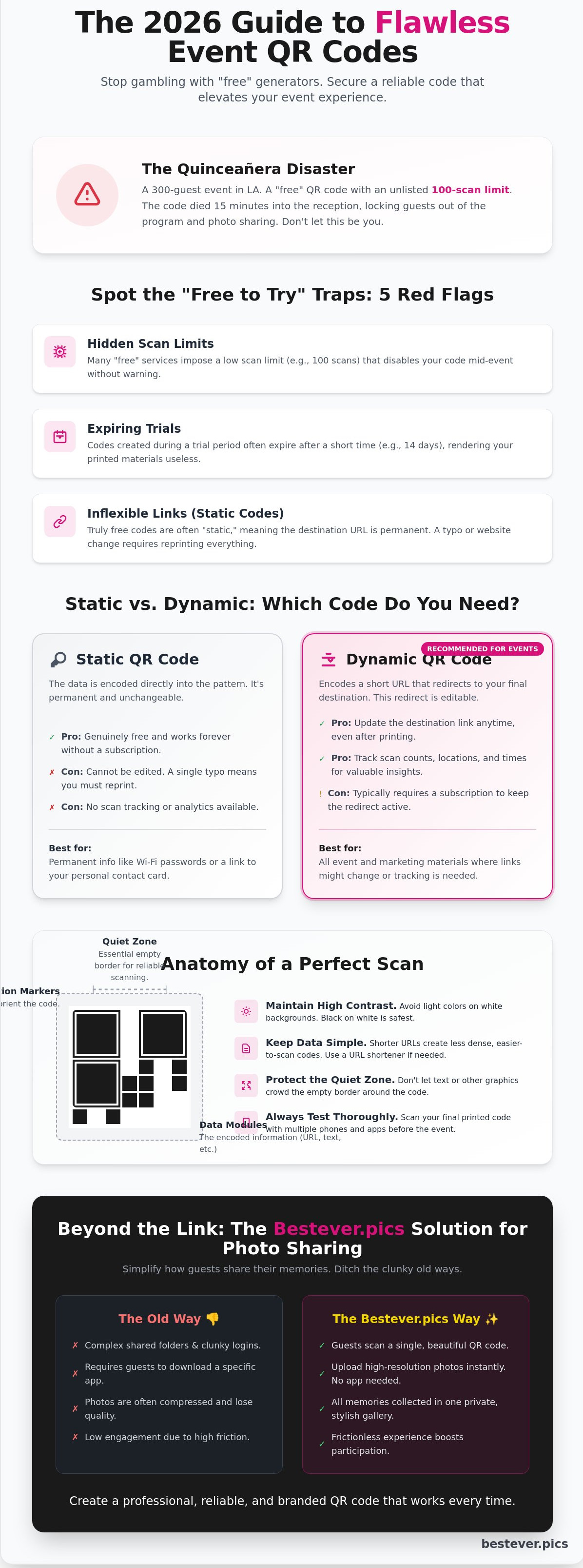
Last June, an event planner for a 300-guest quinceañera in Los Angeles discovered that her "unlimited" QR code stopped working exactly 15 minutes into the reception. The tool she chose had a hidden 100-scan limit, leaving the rest of the family unable to access the digital program or photo sharing link. Finding a qr code generator free online shouldn't feel like a gamble with your event's success.
You deserve a tool that works every time without surprise fees or expiration dates. Don't let a generic, pixelated square ruin your event's aesthetic or frustrate your guests. At Bestever.pics, we know that professional results should be accessible to everyone planning a celebration, whether it's a wedding or a corporate gala.
This 2026 guide teaches you how to secure permanent codes that match your event's color palette and style. You'll learn the vital difference between static and dynamic formats and discover a foolproof method for collecting guest photos. Let's ensure your digital touchpoints are as polished as your venue.
Key Takeaways
- Identify the "free to try" traps that disable your scans mid-event. Learn to spot red flags before you print your wedding or corporate signage.
- Choose between static and dynamic codes to keep your links flexible. Dynamic options allow you to update the destination URL without wasting money on new prints.
- Navigate the qr code generator free online landscape to find tools that offer permanent access. Stop losing engagement to hidden scan limits and expired trials.
- Optimise your QR code design for instant scanning. Maintain high colour contrast and test your codes thoroughly to prevent technical friction during your event.
- Simplify photo sharing by moving beyond clunky folders and login requirements. See how Bestever.pics helps guests upload high-resolution memories without the usual app-download headache.
Understanding the Free QR Code Generator Landscape in 2026
A QR code generator is an online tool that converts data like URLs or text into a scannable matrix barcode. These tools have evolved from niche novelties into essential infrastructure for event planners and business owners. For a complete technical history and a look at the original specifications, you can read more about What is a QR code? via Wikipedia. In the UK hospitality sector, QR codes saw a massive resurgence, with 82% of pubs and restaurants adopting digital ordering systems by late 2025. Whether you're hosting a high-end wedding in the Cotswolds or managing a series of hen dos in Brighton, these squares are the bridge between physical spaces and digital content.
The "Old Way" of using grainy, black-and-white squares is over. Modern users expect branded, high-resolution assets that match the aesthetic of their event. While many search for a qr code generator free online to save on overheads, the priority has shifted toward reliability. A broken link at a milestone event is a disaster. You need a tool that produces a clean, high-density scan every single time. Bestever.pics helps users bridge this gap by focusing on professional-grade output that doesn't compromise on style or function.
What Can You Actually Encode for Free?
- Standard URLs: Link directly to your wedding website, social media profiles, or event registration pages.
- Plain Text: Share simple messages or instructions for guests at a venue.
- vCards: Create digital business cards that save contact details directly to a smartphone.
- Wi-Fi Credentials: Allow guests to join your network by scanning a code on the table, removing the need for printed passwords.
The Anatomy of a Modern QR Code
Success starts with understanding how these codes work. The three large squares in the corners are the "eyes" or position markers. They tell the smartphone camera how to orient the image for a fast scan. Without these, your phone won't know which way is up. The quiet zone is the empty border surrounding the code. It's vital for ensuring the scanner doesn't get confused by nearby text or graphics. If you crowd this space, the code becomes unreadable.
Data density also plays a major role in your design. A simple website link creates a clean, open pattern. A long paragraph of text makes the squares smaller and more complex. When you use a qr code generator free online, keep your data concise to ensure the pattern remains scannable even in low-light environments like a dimly lit reception hall or a busy trade show floor.
[LINK: qr code design tips]Ready to transform your event assets? Stop settling for blurry, generic squares. Use Bestever.pics to create high-resolution, professional visuals that capture attention and drive results instantly.
Static vs. Dynamic QR Codes: Which Should You Generate?
Choosing the right format determines if your campaign succeeds or hits a dead end. When you use a qr code generator free online, you'll usually choose between static and dynamic options. Static codes act like a digital stamp. The data is baked directly into the pattern. If you spot a typo after printing 200 posters for a London gallery opening, you're stuck with a pile of waste.
Understanding how QR codes are designed reveals that static versions store information in a fixed grid. This makes the pattern denser as you add more data. While they are genuinely free, they carry a high risk for long-term marketing. One broken link renders your entire physical inventory useless. It's a permanent commitment that doesn't allow for mistakes.
When to Use a Static QR Code
Static codes work best for information that never expires. Use them for a one-off flyer for a Saturday night hen do or a permanent home Wi-Fi password. They're also perfect for simple text messages that don't need future updates. Since the data doesn't pass through a central server, these codes remain active forever without a subscription. Just remember that once they're out in the world, you can't edit the destination or track who scanned them.
Why Dynamic Codes Are the Industry Standard
Dynamic codes use a short redirect URL to send users to their destination. This tiny layer of tech gives you total control. If your website link changes, you update the destination in seconds without reprinting 500 expensive brochures. It's the smart way to manage professional campaigns. You get a clean, simple code that scans faster because the pattern contains less data.
The old way of marketing involved printing thousands of flyers and hoping the link stayed active. The new way uses dynamic links that evolve with your business. Dynamic codes allow you to fix a broken URL in real time. This saves you the £500 cost of a rush reprint. It also allows you to swap a menu or a price list instantly without touching the physical code. This flexibility is why 82% of marketing professionals prefer dynamic options for long-term projects.
Professional event organisers rely on dynamic codes to track scan locations and device types. If 65% of your engagement happens via Android in Birmingham, you can tailor your next push to that specific audience. Most "free" tools only offer static codes for £0. They often hide these essential tracking features behind a paywall. For those looking to elevate their visuals, using Bestever.pics helps create high-quality assets that pair perfectly with these smart links. [LINK: QR code analytics]
5 Red Flags to Watch for in Free Online QR Generators
Finding a reliable qr code generator free online feels like a major win for your budget. However, many tools use "free" as a bait-and-switch tactic to lure you in before charging for basic functionality. You don't want to discover these limitations while your guests are trying to scan a menu at a wedding or a program at a community festival.
Most hidden traps exist in the fine print of the service agreement. These restrictions can turn a simple tool into a liability for your event or business. You should look for transparent providers that offer permanent solutions without surprise fees. It's about protecting your reputation and your guests' experience.
The Scan Limit and Expiry Trap
Many generators deactivate your codes after the first 50 or 100 scans. This is a disaster for a large quinceañera or a local festival where hundreds of people interact with your signage. If you hit that limit at 2:00 PM, every guest for the rest of the day sees a broken link or a "limit exceeded" error page.
- Check the "Terms of Service" for mentions of 14-day or 30-day trial periods.
- Confirm if the code is "static" or "dynamic" because many dynamic codes require a monthly subscription to stay active.
- Look for tools that explicitly state "unlimited scans" for their free tier.
A broken code reflects poorly on your brand or event planning. It's better to verify these limits before you print 500 invitations or posters. [LINK: how to test qr codes]
Data Security and User Privacy
Some tools act as data harvesters rather than simple utilities. They track your guests' personal data, including IP addresses and location, to sell to third-party marketing firms. You should avoid any generator that requires unnecessary permissions or asks for a phone number to create a simple link.
Privacy is a major concern for modern users. If a guest scans your code and immediately gets targeted by spam emails, they'll associate that negative experience with you. Stick to tools with transparent data policies that don't store visitor information. Bestever.pics prioritizes clean, safe interactions that protect your audience's privacy while delivering professional results.
Intrusive Advertisements
The most frustrating red flag is the mid-scan advertisement. Some free tools redirect your guests to an ad-heavy landing page before showing your actual content. This adds friction to the user experience and makes your professional event look cheap. You want a qr code generator free online that provides a direct path to your destination URL without pop-ups or "wait 5 seconds" countdowns. Don't let a "free" tool ruin your aesthetic with ads for car insurance or mobile games.
Designing and Testing Your Custom QR Code for Success
You've found a qr code generator free online and you're ready to create. Don't rush the design phase. A broken link on 500 printed wedding invitations is an expensive mistake. Start by double-checking your destination URL. Copy and paste it directly from your browser to avoid typos. Every character matters when you're generating a static code that can't be changed after printing.
Branding your code makes it look professional and trustworthy. Add your logo or a frame with a clear call-to-action like "Scan for Menu" or "View Gallery." High-resolution downloads are essential here. If you're printing for a large event banner, choose SVG or EPS formats. These vector files don't lose quality when you scale them up. For smaller items like table cards at a hen do, a high-quality PNG usually works fine. Using a qr code generator free online shouldn't mean compromising on print quality.
Best Practices for Colour and Contrast
Stick to high contrast to keep your scanners happy. A dark foreground on a light background is the gold standard for reliability. Avoid inverting these colours; many older smartphone cameras struggle to read light-coloured dots on a dark background. You can match your QR code to your wedding's sage green or dusty rose palette. Just ensure the dots remain significantly darker than the background to maintain a high scannability rating.
The 'Rule of Three' for Event Testing
Never send your design to the printer without a thorough stress test. Use the "Rule of Three" to guarantee success. First, test on three different devices. This should include a new iPhone, a mid-range Android, and a model that's at least four years old. If the older phone can't read it, your guests will struggle too. This ensures accessibility for every attendee, regardless of their tech.
Second, check your code in three different lighting environments. Test it under bright office lights, in natural sunlight, and in a dim room. This is vital for evening receptions where lighting is often moody. Finally, ensure your destination page loads in under 3 seconds. Data shows that 53% of mobile visits are abandoned if a page takes longer than 3 seconds to load. Speed is the silent killer of guest engagement. If you want your event photography to look as sharp as your digital assets, explore how Bestever.pics transforms your images with AI precision.
Beyond the Link: Using QR Codes for Event Photo Sharing
Most hosts start their journey by searching for a qr code generator free online to create a simple scan-to-upload experience. It's a smart move, but the destination is where the plan often falls apart. If your code leads to a basic cloud storage folder, you'll likely end the night with a half-empty album.
Why Generic Links Fail at Weddings and Parties
Generic cloud folders are built for office work, not celebrations. Guests have high intentions but very low patience when they're on the dance floor. If your QR code forces them to log in to a Google or Dropbox account, many will simply give up. Data from 2025 event surveys shows that friction points like account logins reduce guest participation by over 55%.
Privacy is another major hurdle with open folders. In a standard shared drive, any guest with the link could accidentally delete a folder or see files they shouldn't. There's also the "transactional" feel of a raw link. Your wedding or 21st birthday shouldn't feel like a corporate file transfer. A lack of personal branding makes the experience feel cold and disconnected from the party atmosphere.
Setting Up Your Bestever.pics Gallery
The solution is to pair a custom qr code design with a platform built specifically for memories. Bestever.pics provides a dedicated space where guests can contribute photos in two taps. There are no apps to download and no accounts to create. It's simple enough for tech-averse grandparents and fast enough for teenagers.
When you use a qr code generator free online to point toward a specialized gallery, you ensure you collect guest photos in their original high-quality resolution. Social media apps often compress images, ruining them for future printing. Bestever.pics keeps the quality intact while organizing everything in one central hub.
- Instant Uploads: Guests take a photo and upload it immediately while the energy is high.
- Privacy Control: You decide who sees the full gallery and who can only upload.
- Live Slideshows: Display guest photos on a screen in real-time to encourage more participation.
Stop settling for empty folders and blurry text messages. Create your event gallery on Bestever.pics today and give your guests a way to share the magic without the headache.
Take Control of Your Event Tech
Choosing a qr code generator free online shouldn't feel like a gamble. You now know how to spot red flags like links that expire after 24 hours or forced account sign-ups. Focus on dynamic options if you need to update your destination URL later. Always test your custom design on three different mobile devices before printing 200 event programs. It's about making the technology work for your specific needs without the headache of unnecessary apps.
If you're organising a wedding or a milestone birthday, you need a reliable way to collect every guest's photo. Bestever.pics was founded by a father-daughter duo in Australia to solve this exact problem. Thousands of couples already use the platform for app-free sharing that keeps every memory in one place. You'll get unlimited high-resolution photo storage for every snap. Create your Bestever.pics photo gallery and get a custom QR code today. Your guests will love the simplicity.
Frequently Asked Questions
Is there a truly free QR code generator that never expires?
Yes, static QR codes created with a qr code generator free online are permanent and never expire. These codes embed your URL directly into the data pattern, meaning they function as long as your destination link stays active. You'll find that 100% of static codes remain functional without monthly fees or hidden subscriptions. They're the perfect choice for permanent items like business cards or wedding signage where the link won't change.
Do I need to pay for a QR code with a logo in the middle?
You don't have to pay for a logo, as many free tools include this customization feature for static codes. Adding a 200x200 pixel PNG logo in the center helps with branding and builds instant trust with your audience. Just ensure your logo doesn't cover more than 30% of the total code area. This keeps the error correction data intact so the scan works on the first try every time.
What is the difference between a static and a dynamic QR code?
Static codes are fixed once created, while dynamic codes use a redirect link that you can edit later. Think of a static code like a printed book; once it's finished, you can't change the words. Dynamic codes allow you to track scan data and update the destination URL even after printing. Most professional event planners prefer dynamic options for 2026 marketing campaigns to monitor real-time engagement and ROI.
How many times can a free QR code be scanned before it stops working?
Static codes offer unlimited scans, but dynamic codes on free plans often stop working after 50 or 100 scans. If you use a qr code generator free online for a static URL, you can reach 10,000 scans or more without any interruption. Always check the specific provider's terms before you start your print run. For large events like a 200-person gala, static codes are the safest bet for budget-conscious organizers.
Can I change the link behind my QR code after I have printed it?
You can only change the link if you generated a dynamic QR code before printing. If you printed a static code on 500 brochures, that specific link is permanent and cannot be altered. This is why 85% of marketing professionals recommend using dynamic codes for expensive printed materials. It prevents wasted costs if your website URL changes or if you find a typo in your link after the event starts.
Why isn't my phone's camera recognizing the QR code I generated?
Poor contrast or low resolution are the most common reasons a phone fails to recognize a code. Your QR code needs at least a 4:1 contrast ratio between the dark dots and the light background to scan properly. If you've printed the code smaller than 0.8 inches, the camera lens might struggle to focus. Ensure there's a white border around the edges to help the software identify the pattern instantly.
What is the best file format to download for printing on large banners?
SVG is the best file format for large-scale printing because it's a vector that doesn't lose quality when resized. Whether you're printing a 6-foot banner or a tiny sticker, an SVG file stays crisp and sharp. Avoid using JPG or PNG for large formats, as these often pixelate and become unreadable. High-resolution PDFs also work well for professional printers handling event signage or trade show displays.
Do guests need an app to scan a QR code at my wedding?
No, your guests won't need a special app because 98% of modern smartphones have QR scanning built into the native camera. Whether they use an iPhone or an Android device, they just point their camera and tap the notification. This makes it incredibly easy to share your digital guestbook or wedding menu. It removes the friction of downloading software, ensuring every guest can participate in your special day without any tech headaches.


