


Article by
Gabi
Hi, I'm Gabi - Co-Founder of Bestever Pics. Thanks for visiting our blog. We are working hard to produce content which we hope resonates with you. Feel free to drop us a line on socials or via the contact form on the site.
The best way to collect wedding photos Australia couples can use is one guests can understand and follow without an app download or a complicated sign-up. Otherwise, candid moments can end up scattered across messages, social platforms and individual camera rolls.
A simple collection plan gives you guests’ perspectives to enjoy alongside your professional photographs, without turning photo sharing into another job on the day. This guide compares common options, explains what to consider at your venue and walks you through a setup guests can follow.
Key Takeaways
- Choose a collection method that’s easy for guests to understand and simple for you to organise.
- Compare professional photography, disposable cameras, messaging and QR galleries by guest effort and host workload.
- Make a QR code visible and pair it with clear instructions, while remembering that participation can’t be guaranteed.
- Prepare the gallery, test the QR code and make the upload instructions easy to spot.
- Match your collection process to the event, whether you’re planning one wedding or managing events regularly.
Best ways to collect wedding photos in Australia
You might want the unposed laugh during the speeches, the cousins dancing before the formal photos or the view from the back row. Asking guests to send pictures later can leave you chasing messages, while a complicated upload process adds another task to the celebration. Choose a method that gives guests one clear place to share their photos and takes little attention from you once the day begins.
There’s no single setup for every wedding. A backyard lunch, a regional venue and a city reception have different layouts and rhythms. Think about where guests will gather, how comfortable they are with phone features and how much organising you want to do after the event.
What should a wedding photo collection method do?
Guest photos offer personal viewpoints; a professional photographer provides planned coverage, portraits and the key moments they’ve been hired to capture. Guests might catch an affectionate glance from their table or a funny moment on the dance floor. Those images can add to your professional photographs, but they aren’t a substitute for them. For background on the history and styles of wedding photography, consider how different kinds of images can complement one another.
A shared digital album gives guests one destination instead of leaving photos scattered across chats and personal accounts. Bestever.pics lets hosts create a custom QR code that guests scan to upload photos to a shared album, without downloading an app. Whatever method you choose, explain where photos go and how to contribute in plain language. Set it up before the wedding so you’re not answering upload questions during the reception.
Which Australian wedding details affect the choice?
Picture the spaces guests will use. At a backyard celebration, people might move between the patio and lawn; at a regional venue, the ceremony and reception may be in separate areas; at a city reception, everyone could be in one room. The layout helps you decide where to display instructions and whether guests will see them once or at several points during the day.
Make the instructions clear for guests with different levels of confidence using phone features. A QR code can offer a quick route for guests who are comfortable scanning one, while a short printed explanation gives everyone context. Avoid assumptions based on age or role. If someone would like help, they can ask a trusted person without that person becoming the event’s photo manager.
- Guest effort: How many steps does it take to contribute a photo?
- Organisation: Will pictures arrive in one place or across multiple conversations?
- Venue setup: Where will guests have time to see and read the instructions?
- Collection timing: Do you want guests to share during the event, afterwards or both?
For practical ideas on making photo collection easier to manage, exploring our guide on event photo sharing tips can help you shape a seamless process around your venue and plans.
Compare the best ways to collect wedding photos in Australia
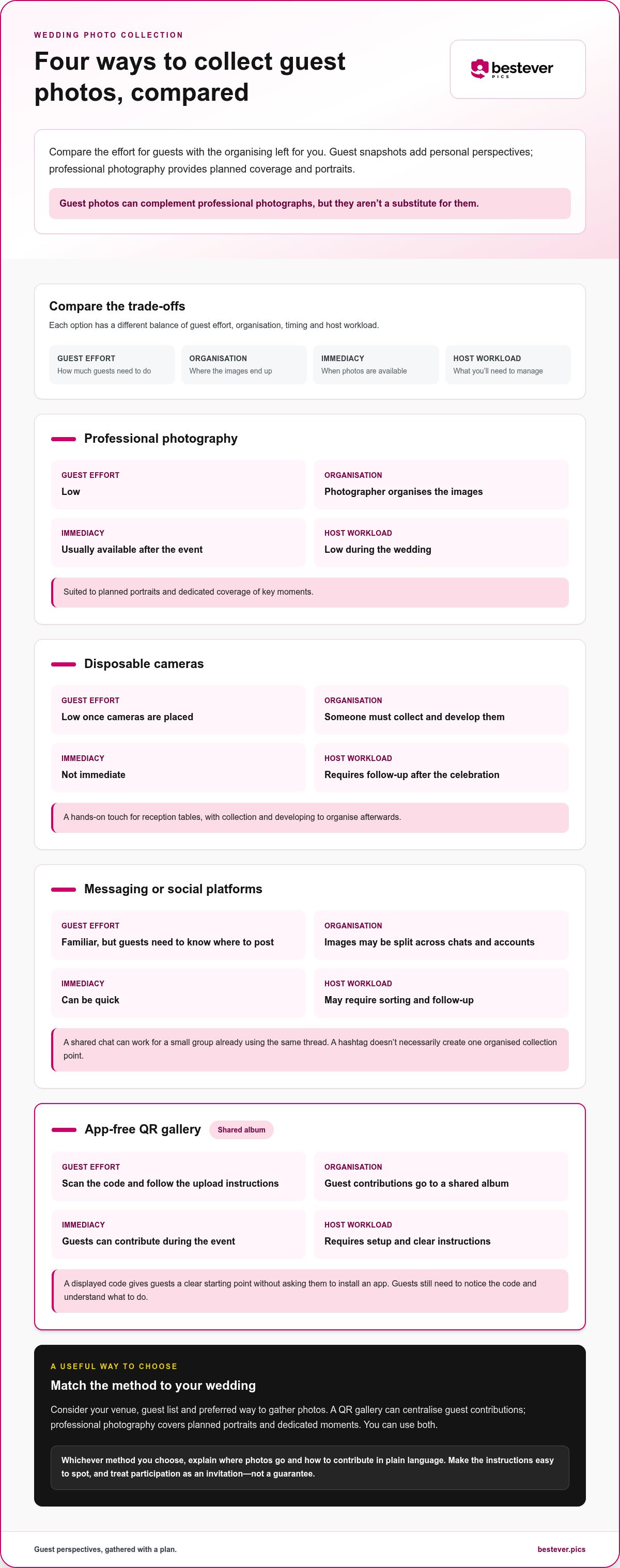
To choose a collection method, compare the effort for guests with the organising left for you. Professional photography provides planned coverage; guest snapshots add personal perspectives. A method that suits one couple might not suit another, so weigh the trade-offs against your venue, guest list and preferred way to gather photos.
| Method | Guest effort | Organisation | Immediacy | Host workload |
|---|---|---|---|---|
| Professional photography | Low | Photographer organises the images | Usually available after the event | Low during the wedding |
| Disposable cameras | Low once cameras are placed | Someone must collect and develop them | Not immediate | Requires follow-up after the celebration |
| Messaging or social platforms | Familiar, but guests need to know where to post | Images may be split across chats and accounts | Can be quick | May require sorting and follow-up |
| App-free QR gallery | Scan the code and follow the upload instructions | Guest contributions go to a shared album | Guests can contribute during the event | Requires setup and clear instructions |
Use the comparison to decide which trade-offs work for your wedding, rather than searching for a universal winner. Disposable cameras add a hands-on touch to reception tables, but you won’t see the photos during the evening. A QR gallery gathers digital contributions in one album, while professional photography is suited to planned portraits and dedicated coverage. You can use professional photography alongside a guest collection method.
When do messaging and social platforms work well?
A shared chat can work for a small group that already uses the same thread. It’s familiar, but photos can arrive across separate conversations, and social posts depend on each guest’s habits. A hashtag can help people find public posts, but it doesn’t necessarily create one organised collection point.
When does a QR gallery make collection easier?
A displayed QR code gives guests a clear starting point: scan, then follow the upload instructions. App-free access avoids asking them to install another app, though guests still need to notice the code and understand what to do. Bestever.pics provides a custom QR code that leads to a shared wedding album, giving guests a central place to contribute their photos.
Consider whether a QR gallery fits your venue and sharing preferences. It’s one way to collect guest photos, not a replacement for professional coverage.
Explore a private wedding photo gallery for gathering guest snapshots alongside your professional photographs.
Will guests actually share photos? Plan for real wedding-day conditions
A QR code can make sharing straightforward, but it can’t make guests notice it. People are chatting, finding their seats and following the day, so a code tucked beside a guest book may go unseen. Treat participation as an invitation, not a guarantee. Put the prompt somewhere guests naturally pause and make the next step obvious.
Keep the wording brief and specific. “Scan here to add your wedding photos” explains the purpose; a decorative sign with no instructions may leave guests wondering whether it’s a menu, seating plan or album link. Use a clear heading, a short direction and, if you like, a note that sharing is optional.
How can couples make sharing feel effortless?
Place the QR code where guests naturally pause, such as near reception tables, the welcome area or a guest book. Don’t tuck it somewhere guests have to move a sign or interrupt a conversation to reach. Ask the celebrant, MC or someone in the wedding party to mention the gallery at a suitable moment, such as after the ceremony or before the reception gets underway. One friendly reminder is enough; guests shouldn’t feel responsible for documenting the day.
For more ideas on making a code easy to spot, see these wedding QR code display ideas.
What if the venue has patchy internet access?
Internet access can vary between venues and spaces, especially when a celebration moves between indoor and outdoor areas. Check the connection in the areas where guests are likely to scan and upload, and choose a collection plan that suits what you find. Keep the code visible throughout the event so guests can return to it later. Don’t promise that uploads will work offline or sync later unless the gallery service explicitly supports that.
Before choosing how to collect photos, think through three practical questions:
- Privacy: Who should be able to view the shared album, and what should guests know before contributing?
- Access: How will guests reach the upload page, and what instructions will make the process clear?
- Storage: How long do you want to keep the images, and where will you save any photos you want to retain?
These details matter as much as the sign itself. Review the gallery’s settings and instructions rather than assuming every service handles access or storage the same way. A dependable plan fits the venue, explains the process clearly and lets guests contribute at their own pace.
Set up a wedding photo collection plan guests can follow
A good plan takes photo collection off your wedding-day to-do list. Decide where images should go, make the instructions easy to spot and give one trusted person a small reminder role. That keeps the process clear without asking you to manage uploads between the ceremony, speeches and dance floor. Follow these steps to make a plan that fits your celebration.
- Choose the collection method. Consider your guest list, venue layout and how you’d like to gather photos. A shared chat may suit a small group that already uses one; a QR gallery gives guests a shared album to contribute to. Pick a method you can explain in a sentence. Too many collection routes can leave people unsure where to send their pictures.
- Prepare the collection point. Set up the gallery or other destination before the wedding. If you’re using a QR code, scan it with a phone and follow the upload steps yourself. Confirm that it leads to the intended place and that the instructions make sense from a guest’s perspective. Test it before printing or sharing the code, so you have time to fix any mistakes.
- Write a friendly prompt. Keep it short and tell guests what to do. For example: “Scan the code to share a favourite photo from today.” You could suggest candid moments such as the speeches, table celebrations or dancing, but make contributing optional. Clear wording helps guests understand the purpose without making them feel responsible for recording the event.
- Choose visible sign placement. Match the format to your venue. A welcome sign can introduce the gallery as guests arrive; table cards keep the instructions close during the reception. If the celebration spans different spaces, place the prompt where guests are likely to pause rather than relying on one sign they may not pass. Make the code and instruction easy to see together.
- Assign a light-touch reminder. Ask a trusted member of the wedding party or the MC to mention the collection at a natural moment, such as after guests are seated. They can point out the sign without interrupting a key part of the day. Agree on the wording beforehand, then leave the rest to guests.
- Gather contributions after the event. If your gallery supports later uploads, share the same route with guests who want to add photos afterwards. Avoid sending several links or asking people to post in different places. Keep the route consistent, then set aside time to review and save the images you’d like to keep.
For more practical planning ideas, these event photo collection best practices can help you plan instructions and placement around your celebration. A simple, tested process makes it easier for guests to contribute without adding another job for you.
Choose a wedding photo gallery that fits your plans
A wedding photo gallery should suit the way you and your guests will use it. For a one-off celebration, look for a clear route to contribute and a shared destination that keeps guest photos together. If you manage weddings regularly, a repeatable process for each event matters too. Choose a gallery that fits your day without making photo sharing another responsibility.
Which gallery features matter most to DIY couples?
Keep your shortlist practical. Can guests understand how to contribute? Will their photos arrive in one shared place? Can a custom QR code fit the signs or table cards you’re planning? These questions matter more than a long feature list. A simple guest route can work well for a backyard gathering or a formal reception, as long as the instructions suit the setting.
Think about the moments you’d love guests to capture, too. Candid photos from different tables can add a guest’s-eye view of speeches, dancing and small interactions alongside the formal photographs. Share a gentle prompt, but let guests enjoy the celebration instead of asking them to cover every moment. These wedding photography tips for guests can help you suggest useful moments without turning friends and family into your photography team.
- Guest effort: Is the upload route clear and easy to explain?
- Organisation: Will you be able to find contributions together after the wedding?
- Display: Can the QR code fit naturally into your venue’s signs or table cards?
- Sharing style: Do you want a dedicated album or a familiar group conversation?
There’s no need to choose the most elaborate setup. Pick the option that matches your plans and that you can explain in a few words.
What should planners and venues consider for repeat weddings?
A planner or venue managing recurring weddings has a different job from a couple organising one celebration. Each event needs a clear collection point, while the overall process should be straightforward to repeat. A consistent approach helps a team explain photo sharing from one wedding to the next without mixing up separate celebrations.
Bestever.pics Pro is designed for planners and venues managing recurring events. For broader ideas about shared albums and QR-led guest contributions, explore modern event photo sharing. Keep the workflow suited to your team and the couples you support; a system that works for a busy venue may be more than a DIY couple needs.
Choose a gallery that fits your wedding and gives guests a clear way to contribute.
Make space for the moments you’ll remember
Your photo plan should support the way you want to remember the day, not direct it. Leave room for spontaneous moments and let guests be present instead of watching everything through a screen. Choose a collection method that fits your celebration and doesn’t ask you to plan every detail around gathering pictures.
Think about what you’d love to look back on. Maybe it’s the joyful chaos of the dance floor, a relative’s speech or little moments between friends. That intention can guide your choice and help you keep the photo plan simple.
Set up a clear, app-free way for your guests to share their photos with a Bestever.pics wedding photo gallery.
Frequently Asked Questions
Can wedding guests upload photos without downloading an app?
Yes. Guests can use a web-based wedding photo gallery that opens from a QR code instead of installing a dedicated app. This makes sharing simpler for people who don’t want to download an app for a single event. Before the wedding, follow the upload route yourself so you know what guests will see after scanning.
How do I encourage wedding guests to share their photos?
Invite guests to contribute, but make it clear that sharing is optional. Add a short note to your wedding information, such as, “We’d love to see the day through your eyes.” You could suggest a particular moment, like a table photo with friends, to give guests an easy idea to start with. A warm invitation feels more personal than an instruction to photograph everything.
Is a QR code a good way to collect wedding photos?
A QR code can work well if guests can see it and quickly understand what it’s for. It gives them a direct route to a shared album and avoids an app download when the gallery supports app-free uploads. The right choice depends on your venue, your guests’ preferences and how clearly you explain the upload process.
Can guests upload wedding photos after the reception?
That depends on the gallery’s upload settings and how long its collection window stays open. Review those details before the wedding, then tell guests whether they can add photos later and how to return to the album. If later uploads are available, one follow-up message with the same album route can help guests find it without searching old chats or posts.
What should a wedding photo QR code sign say?
Keep the sign friendly and direct. Try: “Share a favourite moment from our wedding. Scan to add your photo.” Make the purpose clear in the heading and place the instruction close to the code so guests connect the two. Avoid long explanations or several different links. If sharing is optional, say so; guests can join in without feeling expected to document the celebration.
Should guest photos replace a professional wedding photographer?
No. Guest photos offer another perspective, not a replacement for professional coverage. Friends might capture a spontaneous moment from their table, while a photographer works to your planned shot list and captures key parts of the day. If certain portraits or family combinations matter to you, discuss them with your photographer rather than relying on guests to notice and record them.
How can I collect wedding photos from guests who do not use QR codes?
Offer a simple personal alternative without creating several competing collection points. A guest who’d rather not scan can ask someone they trust to help add a photo to the album, if that suits the gallery. Another option is to ask guests to send their pictures to one nominated person, who can gather them for you. Tell guests which route to use so contributions don’t end up scattered.


