


Article by
Gabi
Hi, I'm Gabi - Co-Founder of Bestever Pics. Thanks for visiting our blog. We are working hard to produce content which we hope resonates with you. Feel free to drop us a line on socials or via the contact form on the site.
What if collecting guest photos took one clear link, not a trail of messages, app requests, and reminders? It’s easy for photos to get scattered across chats, social posts, and phones, while busy hosts have little time to troubleshoot uploads during the event.
An easy photo upload link for guests gives everyone a direct route to one shared event gallery, without asking them to install an app or follow a multi-step process. In this guide, you’ll learn how to set up a simple collection before the event, share the link where guests will notice it, and use a QR code as an extra option for people who’d rather scan than type; we’ll also look at how a web-based gallery such as Bestever.pics can bring candid photos together while keeping the setup straightforward for you.
Key Takeaways
- Give guests one clear destination for event photos so candid shots don’t get lost across chats and social feeds.
- Compare upload links, QR codes, group chats, and shared folders by guest effort and how easily you can keep photos together.
- Set up an easy photo upload link for guests before the event, then share it where people can find it quickly.
- Use a brief invitation and a well-timed reminder to make uploads visible without interrupting the event.
- Choose a gallery setup that fits your priorities for guest steps, privacy, link sharing, and collecting contributions.
Why an easy photo upload link for guests beats chasing pictures later
Great candid photos often end up scattered. One guest sends a few by text, another posts to social media, and someone else keeps their best shots on their phone. Without an obvious destination, collecting those moments later means tracking down individual guests and sorting through separate conversations.
An upload link gives guests a direct route from their phone or computer to a collection for the event. Instead of sending each photo privately to the host, guests can add it to the same shared gallery. That gives you one place to look for contributions when you want to revisit them.
An easy photo upload link for guests is one clear route to an event gallery, with simple instructions and as few steps as possible. A guest should be able to understand what the link is for before tapping it. Clear wording makes the invitation easier to act on while the moment is fresh.
Photo sharing can happen in many ways, from messages to online collections. Photo sharing offers a broader overview of those methods. For an event, the useful question is whether guests can quickly understand where to send their pictures and whether you can find them together later.
What makes a guest photo upload link feel easy?
Make the invitation clear: say that guests can add photos to the event gallery, then show them exactly where to go. Keep instructions short enough to understand at a glance. Guests shouldn’t have to work out whether you want a text message, a social post, or a gallery upload.
- Use one obvious destination for contributions.
- Write a brief invitation with a clear action.
- Keep the route short, especially for guests using a phone one-handed while socializing.
Uploading to a shared gallery differs from sending pictures directly to you. Private messages can be useful for a personal note or a favourite shot, but they leave you to gather files from separate conversations. A shared destination gives guests a common place to contribute.
Which events benefit from one shared photo destination?
Weddings are a natural fit. Whether you’re planning a DIY celebration, a backyard gathering, or a micro wedding, guests can capture small moments you may not see yourself. That might be a lively table conversation, a spontaneous dance, or friends sharing a laugh between formalities.
Give guests a little guidance on what to capture, too. Suggestions for candid moments can help them take photos that feel thoughtful without turning the celebration into a photo assignment. These wedding photography tips for guests can help you offer friendly direction.
The same idea works for birthdays, work events, and community gatherings. Guests can contribute to a common collection instead of leaving the host to piece together photos from separate messages and social posts. The event may change, but a shared destination gives everyone a recognizable place for their pictures.
How to choose the right guest photo upload method
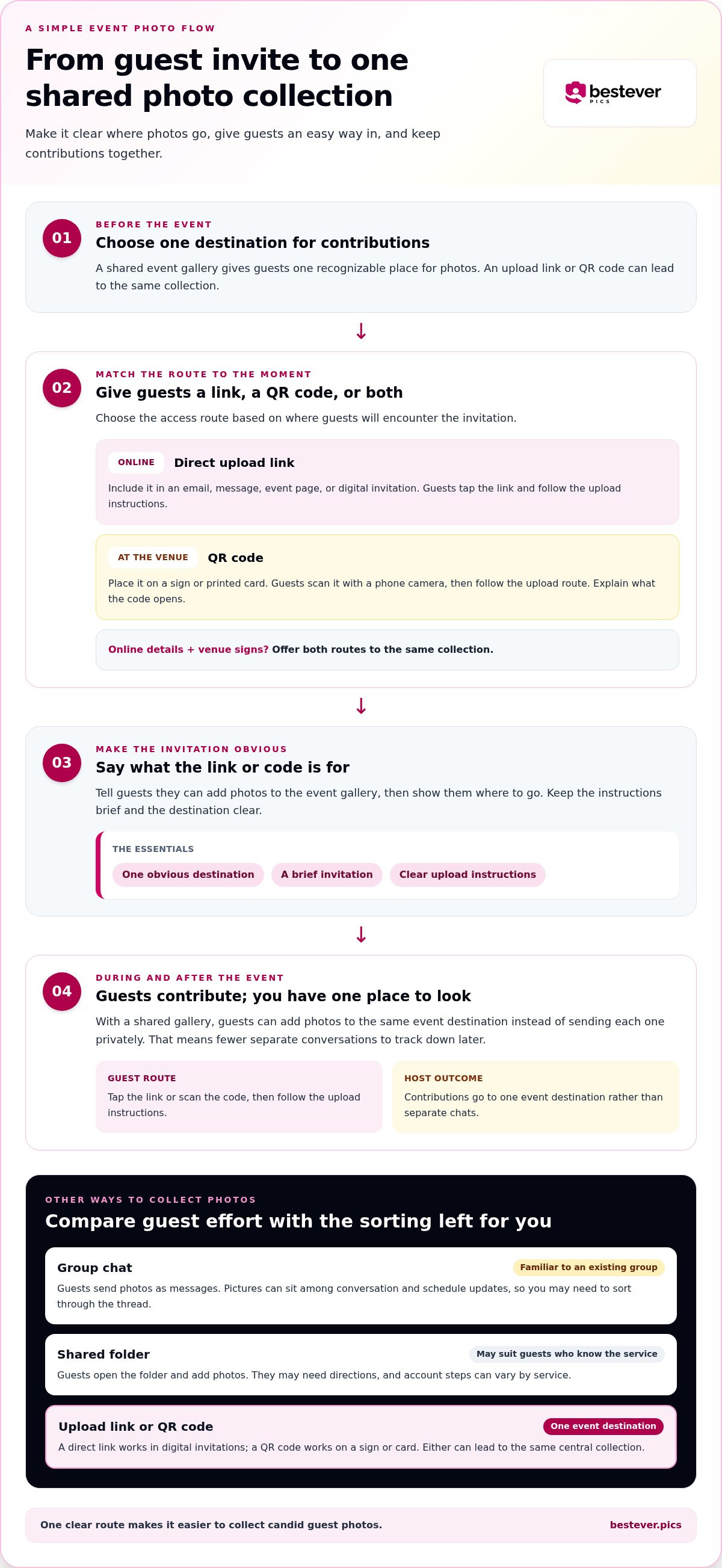
Choose a method based on where guests will encounter it and how you want to manage contributions afterward. A link or QR code can point to an event gallery, while a group chat or shared folder may suit a gathering where everyone already uses the same tool. Compare guest effort with the amount of sorting each option leaves you.
| Method | Guest steps | Host organization | Visibility and less tech-confident guests |
|---|---|---|---|
| Direct upload link | Open the link and follow the upload instructions. | Contributions go to one event destination. | Easy to include in digital invitations; keep instructions clear. |
| QR code | Scan the code with a phone camera, then follow the upload route. | Can lead to the same central collection as a link. | Useful on a sign or card; explain what the code opens. |
| Group chat | Open the chat and send photos as messages. | Photos sit among other messages and may need sorting. | Familiar to an existing group, but contributions can be harder to find. |
| Shared folder | Open the folder and add photos, following any service-specific steps. | Files share a location, though guests may need directions. | Can suit guests who already use the service; account steps may vary. |
Direct link or QR code: which should guests use?
A direct link works well in an email, message, event page, or digital invitation. Guests can tap it rather than type an address, which is handy when they’re reading details on their phone. A QR code suits a sign or printed card at the venue, where guests can scan it when they notice it.
Choose the access route that matches how guests will encounter the invitation. If guests will receive details online and see signs in person, offer both routes to the same collection. A web-based gallery can pair a link for digital sharing with a QR code for display, as with this private wedding photo gallery.
Why not rely only on messages or a shared folder?
Messages can be a comfortable choice for a small group that already shares photos that way. In a busy event chat, though, pictures can disappear among schedule updates and conversation. Later, you may need to search through the thread to find particular images.
A shared folder can also suit guests who know the service, but folder permissions or account steps may add friction for others. Consider how familiar the group is with the tool, not just how tidy it looks from your side. If you want to keep the images accessible beyond the event, the National Archives guidance on digitizing photographs offers a useful reference for organizing and preserving digital images.
For a one-off celebration, pick the method guests are most likely to recognize and that you can manage comfortably. The easy photo upload link for guests is a practical fit when you want contributions gathered in one event destination. A small group may still prefer a familiar chat, so choose the approach that suits both the people attending and your plans for their photos.
Set up an easy photo upload link for guests in five steps
A little preparation can spare you a lot of follow-up later. Set up the destination before event day, test it as a guest would, and make the instructions easy to spot. Treat this as a short pre-event check, not another planning project.
- Choose one event gallery. Pick a shared collection that will hold guest contributions for this event. Give it a recognizable name, such as “Maya and Jordan’s Wedding” or “Community Picnic Photos,” so guests can tell they’ve reached the right place. Keeping one destination avoids asking people to decide where each picture belongs.
- Create and test the upload route. Copy the direct link, then open it on your phone in the way a guest might. Follow the guest-facing path from opening the page to selecting a photo and starting an upload. Don’t rely only on the host view; it may show settings or controls guests won’t see. If anything feels unclear, simplify the instructions before sharing.
- Write a short, specific invitation. Tell guests what the link is for and what to do next. For example: “Got a photo from the party? Add it to our event gallery here.” Avoid vague wording such as “Share your photos,” which leaves people guessing whether you mean a text, social post, or gallery upload. The invitation should make sense even if someone sees it without other event details.
- Share it in the places guests will look. Add the link to digital invitations, event updates, or a wedding information page. For the venue, you can also pair it with a readable QR code on a sign or table card, with a brief instruction beside it. Guests who prefer to tap can use the link; those who spot the sign can scan instead. Learn more about QR-code photo sharing if you’re deciding how to offer that second route.
- Plan a light follow-up and say thanks. Decide in advance who will share a reminder and where, so you’re not composing messages while hosting. A brief note after the event can thank guests for contributing and point them back to the gallery if they have photos to add. Keep the tone warm, not demanding; people may choose to share at different times.
Before the event, make sure the link appears correctly in your invitation and that the QR code leads to the same destination. A clear label beside a sign helps guests understand its purpose before they scan. Once those pieces are in place, guests can focus on the event instead of figuring out how to contribute.
Make event-day uploads simple without turning reminders into a chore
Guests are there to enjoy the event, not follow a string of instructions. Make the upload route easy to spot, explain it in plain language, and choose a calm moment for one reminder. The aim is to make sharing feel like an option guests can act on, not another task competing with the celebration.
Use this quick event-day checklist:
- Place the sign thoughtfully. Put the QR code where guests naturally pause, such as near the welcome table or seating area. Avoid spots where people have to stop traffic or interrupt an activity to scan.
- Keep the invitation brief. Try: “Scan here to add your event photos.” If you’re sharing a direct link aloud or in a message, use the same simple instruction.
- Choose one suitable reminder. Ask a host, MC, or planner to mention the gallery during a transition, such as after guests arrive or before the next activity begins.
Signs can be missed, especially if guests arrive at different times or focus on the people around them. Repeated announcements have the opposite problem: they can start to feel intrusive. A visible sign plus one well-timed reminder gives people a chance to notice the option without letting photo collection take over the event.
Write guest instructions people can act on quickly
Use one direct action: “Scan the code or open the link, then add your event photos.” Keep the words readable on a phone screen and skip technical terms guests may not recognize. A friendly note can explain why you’re asking, too: “We’d love to see the moments you capture.” For more help keeping prompts simple, see these best practices for collecting event photos.
Give guests more than one natural chance to see it
Share the link before the event in an invitation or update, then make the QR code visible at a relevant gathering point. These routes work together: guests can open the link beforehand or scan the sign when they’re there. A host or planner can mention the gallery once at a natural pause, without talking over speeches, meals, or activities.
For a wedding, that might be a brief note after guests arrive, rather than an announcement during a speech. At a work or community event, a welcome message or a break between activities may feel more fitting. Adjust the timing to the schedule and the crowd; not every event needs an announcement.
Planners, venues, and vendors managing multiple events may need a repeatable way to organize photo sharing across occasions. Pro is intended for those recurring event needs, while one-off hosts can focus on setting up a clear route for their own gathering.
An easy photo upload link for guests works best when the invitation is visible but never demanding. Keep the sign in place, let guests choose whether to contribute, and save your attention for the event itself.
Choose a private, app-free guest gallery for an easier upload experience
The right gallery should fit the way you want guests to contribute, not add another task to your event checklist. If your priority is gathering candid photos in one place, choose a shared event destination with a guest route that’s clear on a phone and doesn’t require an app download. A private wedding gallery, such as the one offered by Bestever.pics, is one option to consider.
Before you settle on a setup, think through four practical points:
- Guest steps: Can someone understand how to open the destination and add a photo without you explaining it in person?
- Privacy expectations: Is it clear to guests who the collection is intended for and where you’ll share its link? If privacy matters to your event, make the invitation personal and share the route with the people you intend to include.
- Link visibility: Will guests see the link in a digital invitation, event update, or information page? Can you also display a QR code at the venue for in-person access?
- Collection style: Do you want photos gathered in an event gallery, or would you rather receive individual messages and organize them yourself?
There’s no need to choose a more elaborate setup than your event calls for. A small gathering with a familiar group may be comfortable using a shared chat, while a larger celebration can benefit from a destination guests can find without scrolling through conversations. Match the method to both guest habits and the amount of sorting you’re willing to do afterward.
When does a private event gallery fit better than scattered uploads?
A shared gallery suits hosts who want guest contributions brought together around one occasion. At a wedding, it gives friends and family a common place for the moments they capture alongside the formal photos. The same approach can work for birthdays, milestone celebrations, work events, and community gatherings, especially when the host wants a clear collection point instead of a trail of separate messages.
Take the next step with a no-app-needed wedding gallery
Keep your choice simple: give guests an easy route, write an invitation that tells them what to do, and make access visible before and during the event. A direct link can reach guests through digital updates, while a QR code can provide an in-person option. Together, those details help guests decide quickly whether to add their photos, without making you manage every contribution.
For a wedding, explore a private gallery designed for photo sharing without an app download.
Make space for the moments you didn’t see
Guest photos often catch the small, spontaneous details that make an event feel like yours. Before the day arrives, decide how you’d like guests to share those moments and make that choice part of your event plan. A clear invitation gives people the confidence to contribute without needing you to manage every photo.
An easy photo upload link for guests can support that plan by giving everyone one destination for their event pictures. With a shared digital album, contributions come together in one place. Guests can also scan a custom QR code to upload without downloading an app, offering a simple option for people who see the invitation at the venue.
Choose a setup that feels natural for your gathering, then give yourself permission to enjoy it. You’ve prepared the route; guests can add the moments they want to share while you stay present for the celebration.
Here’s to fewer follow-up messages and more time enjoying the moments as they happen.
Frequently Asked Questions
Can guests open a photo upload link on an iPhone or Android phone?
Usually, guests can open a web-based upload link on either type of phone through its browser. The exact steps may vary by device, so test the guest route on a phone before sharing it widely. Check that you can reach the upload page and select a photo from the device. If guests will rely on venue Wi-Fi, test that connection too, if practical.
How can I share an upload link with guests who do not use social media?
Send the link directly by email or text, or include it in a printed invitation or event handout. You don’t need a social media account to share a web link this way. For an easy photo upload link for guests, make sure the message explains what the link opens, so recipients can recognize it and feel comfortable tapping it.
Should I send the photo upload link before or during the event?
Send it before the event if you want guests to know about the gallery in advance, then keep a way to access it available on the day. An early message gives people context, while an event-day option can help guests who missed the first note. Avoid sending frequent reminders; one clear update is easier to notice than a stream of repeated messages.
What should I do if some guests do not want to upload photos?
Let them opt out without pressure. Guests may prefer to enjoy the event, keep photos on their own phones, or avoid sharing images altogether. Make the invitation welcoming rather than assigning anyone a photo-taking role. You can still collect contributions from guests who choose to share, and your event doesn’t need everyone to participate for the gallery to be useful.
Can I use one upload link for a multi-day event?
You can plan around one shared destination if it remains available for the full event and guests can tell which occasion their photos belong to. Before sending the link, review the gallery’s event dates and any upload or access settings. If the schedule includes separate activities or locations, add a short note asking guests to identify the day or moment in their contribution, if the upload process allows it.
What should I tell guests before they upload event photos?
Explain what the collection is for, who the event is, and what guests should do with the link. If you know who can view the gallery, state that clearly rather than leaving people to guess. You might say, “Add your favourite moments from Sam’s birthday to the event gallery.” Invite guests to share photos they’re comfortable contributing, without implying that uploading is required.


