


Article by
Gabi
Hi, I'm Gabi - Co-Founder of Bestever Pics. Thanks for visiting our blog. We are working hard to produce content which we hope resonates with you. Feel free to drop us a line on socials or via the contact form on the site.
The easiest-looking way to collect wedding photos can leave gaps: guests may forget a hashtag, spell it differently, or prefer not to post publicly. That’s why couples consider wedding hashtag alternatives that give candid moments a clearer home.
Hashtags can make social sharing fun, but posts may be scattered across platforms or never shared at all. Asking guests to download an app adds another step, too.
This guide compares practical ways to invite photo sharing, from QR-linked galleries and online albums to private groups and disposable cameras. We’ll look at the effort each option asks of guests, how photos are gathered, and which approach may suit your wedding.
Key Takeaways
- Compare wedding hashtag alternatives by guest effort, privacy, and how photos are collected.
- See how a QR-linked gallery, shared online album, or private social group could fit your celebration.
- Choose a sharing method that feels comfortable for guests who prefer not to post publicly or download an app.
- Make participation clearer with simple instructions, well-placed reminders, and a quick test of the guest experience.
- Explore an app-free QR gallery as one way to give guest photos a shared destination.
Why couples look for wedding hashtag alternatives
Wedding hashtag alternatives give guests other ways to share photos, especially when couples want candid moments gathered beyond public social posts. A hashtag still has real appeal: it’s familiar, easy to say aloud, and gives friends a simple prompt to join in. At the reception, guests can add one short phrase to a post. The catch is that the collection depends on them remembering the tag, spelling it consistently, and sharing on a platform where you can find it.
What a wedding hashtag does well
A memorable phrase can act like a label for public posts. Guests who enjoy sharing online can add it to photos and browse other posts using the same tag. That works best when everyone uses the same spelling and posts on the same platform. Couples considering wedding hashtag alternatives can explore wedding photography approaches, from formal portraits to candid images, and decide which guest moments they hope to collect.
Not every guest wants to publish wedding photos for a broad audience. Some may prefer to keep personal moments within a smaller group, while others may take pictures without posting them. A hashtag can invite sharing, but it can’t make public posting feel right for everyone. Wedding hashtag alternatives give couples another route, so guests can choose what feels comfortable without turning photo sharing into an obligation.
Where hashtags can fall short
Hashtags rely on small actions that are easy to miss during a busy celebration. A guest might forget the tag, leave out a character, or use a slightly different version. Another might post on a different social platform or keep their account private, making their photos difficult for you to discover. The images may exist, but they’re not necessarily easy to gather in one place.
A wedding hashtag is a social label, not a complete photo collection system. It helps people group posts where the tag is used, but it doesn’t create a private album or gather images shared elsewhere. That distinction matters if your goal is to keep guest photos together, rather than just make them easier to find on social media. For practical ways to invite contributions and keep instructions clear, see these event photo collection tips.
Before choosing wedding hashtag alternatives, decide what matters most: encouraging public sharing, making photos easier to find, or keeping them together for later. These goals overlap, but one method may not serve all of them equally well. If you love the social buzz, keep a hashtag and add another sharing option. If a central collection is the priority, start with a shared destination and treat social posting as optional.
- Sharing: Make it easy for guests who want to post.
- Finding: Choose a clear way to locate contributions later.
- Keeping: Give photos a shared destination beyond a social feed.
That quick priority check makes choosing among wedding hashtag alternatives feel less like replacing a tradition and more like shaping photo sharing around your guests and the memories you want to keep.
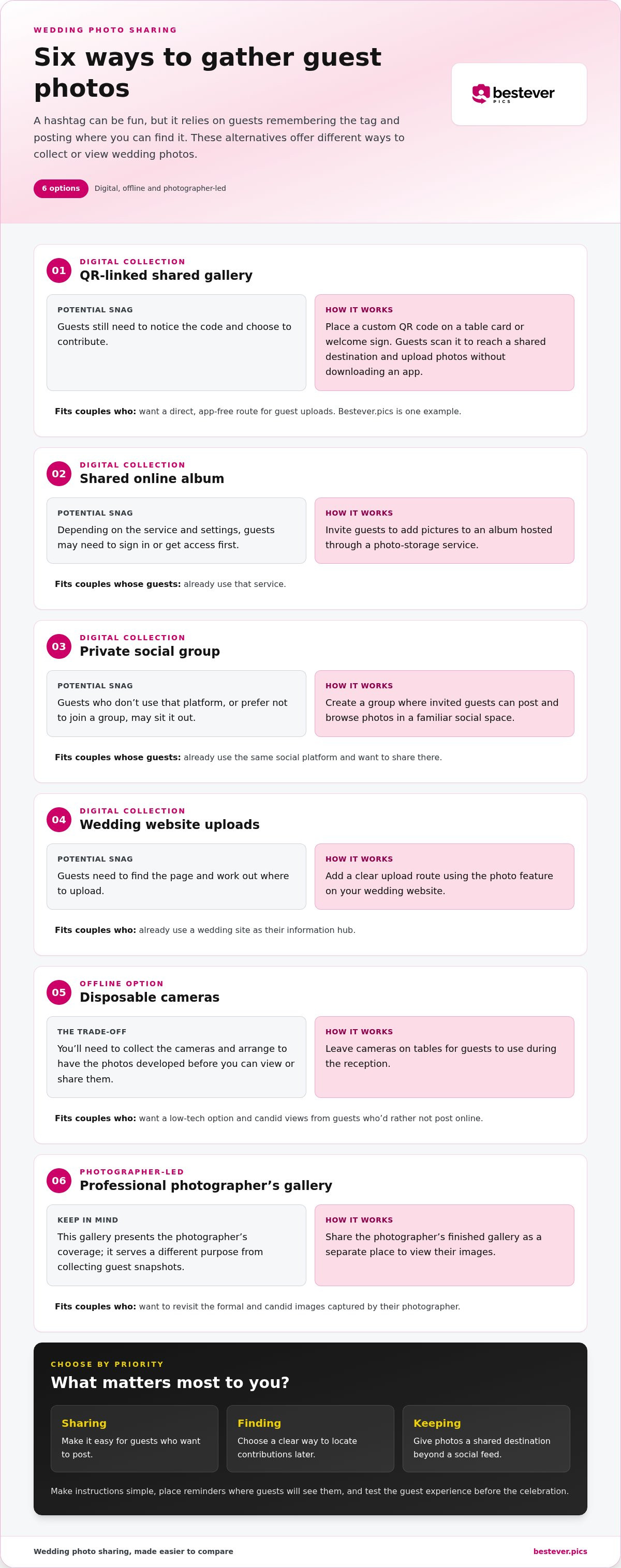
Wedding hashtag alternatives: 6 ways to gather guest photos
These wedding hashtag alternatives offer different routes for guests to share photos, from a phone upload to a camera left on the table. None is right for every wedding. Consider how your guests prefer to take part, how much follow-up you want to handle, and where you’d like to view the photos later.
Digital options for collecting photos together
Digital collection methods can give guests a shared place to contribute, but each asks them to follow a slightly different path. A QR code keeps the route visible at the venue, while an album or social group may feel familiar to guests who already use those tools. For more ideas on digital collection, see our guide on digital photo sharing for modern events.
- QR-linked shared gallery: A custom code on a table card or welcome sign takes guests to a shared destination where they can upload photos. With Bestever.pics, guests scan the QR code and upload to a shared digital album without downloading an app. It suits couples who want a direct, app-free route. Guests still need to notice the code and choose to contribute.
- Shared online album: Invite guests to add pictures to an album hosted through a photo-storage service. This can suit family and friends who already use that service. Depending on the platform and settings, guests may need to sign in or get access first.
- Private social group: Create a group where invited guests can post and browse photos. It suits a crowd that already uses the same social platform and wants to share in a familiar space. Guests who don’t use that platform, or prefer not to join a group, may sit it out.
Offline and photographer-led alternatives
Not every photo-sharing idea needs guests to post from their phones. Physical cameras and a photographer’s gallery can complement a digital collection, though they serve different purposes. One captures guest perspectives; the other presents the photographer’s coverage. Consider how much follow-up you’re happy to handle after the celebration.
- Wedding website uploads: Add a clear upload route to your wedding website so guests can contribute through its photo feature. This suits couples who already use a wedding site as their information hub. The trade-off is that guests need to find the page and work out where to upload.
- Disposable cameras: Leave cameras on tables for guests to use during the reception. They suit couples who want a low-tech option and candid views from people who’d rather not post online. You’ll need to collect the cameras and arrange to have the photos developed before you can view or share them.
- Professional photographer’s gallery: Share the photographer’s finished gallery as a separate place to view their coverage. It suits couples who want to revisit the formal and candid images captured by their photographer. It won’t automatically gather guest snapshots, so treat it as a complement rather than a guest-upload method.
If a shared, app-free destination feels like the best fit, explore setting up a private wedding photo gallery as one QR-based option.
How wedding hashtag alternatives compare for privacy and ease
Comparing wedding hashtag alternatives means looking beyond how quickly guests can share. Think about who can see the photos, how much effort it takes to contribute, and whether the method brings pictures into one place. Public discovery and private collection are different goals: a social post may be easy to find publicly, while an album is designed to gather contributions in a shared destination.
| Method | Access | Privacy | Guest effort | How photos are gathered |
|---|---|---|---|---|
| Hashtag | Social platform | Depends on post and account visibility | Remember and type the tag | Search posts using the same spelling |
| QR-linked gallery | Scan a code | Shared gallery; audience depends on its setup | Scan, then upload | Uploads go to a shared digital album |
| Online album | Album invitation or link | Depends on album access settings | Open album and add photos | Guests contribute to the album |
| Private social group | Group membership | Shared within the group | Join or open group, then post | Posts appear in the group |
| Wedding website | Website upload route | Depends on the site and access | Find the page and upload | Photos go through the website |
| Disposable camera | Camera at the venue | No online post required | Take photos; couple handles developing | Images are collected from the cameras |
| Photographer’s gallery | Gallery shared by photographer | Depends on gallery access | Open gallery to view | Shows photographer’s coverage, not guest uploads |
Which option asks the least of guests?
Guest effort depends on what they already know and use. A hashtag asks guests to remember and type the right phrase; a social group or online album can involve opening a link and following that service’s access steps. With Bestever.pics, guests scan a custom QR code and upload photos to a shared digital album without downloading an app. That removes the download step, though guests still need to notice the code and choose to contribute.
Which option fits your privacy and collection goals?
If you want public discovery, social posts and a hashtag may suit guests who enjoy sharing online. If you want one shared place to gather photos, an album or gallery may fit better, while the intended audience depends on how that option is set up. A camera avoids online posting but means handling the images later. Match the method to your guests’ habits and your privacy preference. For practical collection pointers, use these guest photo-sharing best practices.
How to introduce a hashtag alternative so guests use it
Even a simple photo-sharing option can get overlooked if guests aren’t sure what to do. Make the next step obvious, repeat it where guests naturally look, and keep sharing optional. A little preparation helps guests understand how to send a photo and where it will go.
- Choose the method. Decide whether guests will use a QR code, album, social group, website, or another option. Keep the route consistent so they aren’t choosing between competing instructions.
- Write the instructions. Use plain language to say what to do and where photos will be gathered. If you’re using a hashtag, show its exact spelling.
- Place reminders. Put the instructions on the invitation or wedding website, then repeat them on the welcome sign or table cards.
- Test the guest journey. Ask someone you trust to follow the directions as if they were attending. Fix any confusing steps before the wedding.
Write guest instructions people can follow at a glance
Start with an action verb: “Scan to share a photo,” “Upload your pictures here,” or “Tag your post with #ExampleName.” Then explain the destination in a few words, such as “Photos go to our shared wedding album.” Keep the wording large enough to read and avoid adding a long explanation beside the code or link. Guests should understand the next step between conversations, not study a block of text.
Use the same instructions wherever they appear. If the hashtag has a specific spelling, copy it exactly from the invitation to the sign. If you’re using a QR code, pair it with a short instruction rather than assuming everyone will know why it’s there. For inspiration on making a code visible without letting it take over your decor, browse these creative wedding QR code display ideas.
Test the experience before the wedding
Ask a friend or relative who hasn’t helped plan the photo collection to try it. Watch where they pause. Can they find the instruction? Do they know what happens after they scan the code or open the link? Their first reaction can reveal a missing step that’s easy to overlook when you already know how the setup works.
Check the physical reminders, too. A sign near the entrance may be easy to spot on arrival, while a table card gives guests another chance to notice the instructions once they sit down. Check that the text is readable from where guests will stand or sit, and that the sign isn’t hidden behind flowers, menus, or other decor.
Finally, think about guests who don’t use social media or would rather not post. Give them an alternative if your main method depends on public sharing. A photo-sharing invitation should feel like an open door, not another wedding-day task. Guests can join in, take pictures for themselves, or simply enjoy the celebration.
Choose an app-free wedding photo gallery instead of relying on a hashtag
A QR photo gallery can suit couples who want guest pictures gathered in one shared destination, with a direct route from the reception to the upload. That doesn’t mean a hashtag has no place. If guests enjoy public posting, keep one for social sharing and offer the gallery as another way to contribute candid shots. Choose based on what you want to collect and how your guests prefer to take part.
When a QR photo gallery may suit your wedding
This option is worth considering if you’d like guests to share photos without installing an app or remembering a phrase. With Bestever.pics, guests scan a custom QR code and upload photos to a shared digital album without downloading an app. The scan gives guests a direct invitation, and the shared destination gives you a place to bring contributions together.
A visible code can work well for the quick moments guests capture between the ceremony, dinner, and dancing. Put it where people can pause and read the instruction, such as on a welcome sign or table card. Keep the wording friendly and specific: “Scan to add your photos to our wedding album.” Guests who’d rather post publicly can still use your hashtag, so the two methods can suit different preferences rather than compete.
Make sharing part of the wedding, not another task
Keep the invitation short. Tell guests what to do and where their photos will go, then let the sign or card do the reminding. Repeating the request over a microphone or placing instructions everywhere can make sharing feel like an obligation. One clear prompt, positioned where guests naturally look, is a more comfortable way to invite participation.
Before settling on the gallery, consider the mix of people attending. Some may be quick to scan and upload; others may prefer a hashtag, a camera, or simply to enjoy the day without taking photos. A QR gallery is useful when your priority is a shared destination and guests are comfortable using their phones to contribute. It can’t guarantee every guest will upload, and it doesn’t have to replace other ways of sharing.
- Choose a gallery if bringing guest uploads together is the main goal.
- Keep a hashtag too if public posts and social discovery matter to you.
- Make participation optional so guests can join in at their own pace.
The right setup should feel natural for your wedding, not like another task on the schedule. If an app-free QR route fits your guests and your collection goals, create a shared place for their photos.
Make your photo-sharing plan feel like you
The best wedding hashtag alternatives aren’t necessarily the most elaborate. Choose a sharing plan that fits the way your guests communicate and the kind of memories you want to revisit. If public posts are part of the fun, keep the hashtag. If you’d rather give candid photos a shared destination, make that route clear and easy to spot. You can offer both, so guests can take part in the way that feels comfortable to them.
Before the wedding, picture the moment a guest takes a photo. What would make sharing feel natural right then? A simple prompt and a clear place for photos to go can help your plan feel like part of the celebration, not another job for guests or hosts. Choose the approach that suits your day, then let everyone enjoy it.
Here’s to a day full of real moments, and a collection you’ll love looking back on.
Frequently Asked Questions
Is a wedding hashtag still worth using?
Yes, a hashtag can still be useful if you want guests to label public social posts with a phrase that’s easy to remember. Treat it as a way to encourage social sharing, not as your only photo archive. Wedding hashtag alternatives can complement it for guests who prefer not to post publicly. For example, include the hashtag for social posts and offer a separate upload option for photos you’d like gathered together.
Can we use a wedding hashtag and a QR photo gallery together?
Yes, you can offer both because they serve different sharing habits. A hashtag helps label public social posts, while a QR gallery gives guests a route to a shared photo destination. Make the distinction clear on your signs: “Tag public posts with…” and “Scan here to add photos to our album.” Guests can choose either, both, or neither, without feeling expected to document the day.
How do we make a wedding hashtag easy to remember?
Choose a short, readable phrase and keep its spelling identical across your invitation, website, and venue signs. Before printing anything, show it to someone who hasn’t helped plan the wedding and ask them to read it aloud. If they hesitate or interpret a name differently, simplify the wording. Seeing the tag in print gives guests a reference instead of asking them to remember an announcement.
What if some wedding guests do not use social media?
Offer a way to share that doesn’t depend on a public post. A QR-based gallery can work for guests comfortable using a phone browser, while disposable cameras provide an offline choice. You might also ask a trusted family member to help a guest who wants to upload but isn’t sure how. Keep the invitation low-pressure, and make clear that guests are welcome to enjoy the celebration without sharing photos.
Do wedding hashtags collect every guest photo automatically?
No. A hashtag only helps identify posts that guests tag with the intended phrase, and it won’t gather pictures that stay on someone’s phone or appear elsewhere. Set a realistic expectation: a hashtag can help you find some public posts, but it can’t guarantee a complete record. If you’re hoping to collect candid moments from different guests, provide a separate place for people to contribute them.
Should our wedding hashtag be unique?
A distinctive hashtag can make your guests’ public posts easier to tell apart from unrelated posts with similar wording. Keep it clear enough to read at a glance, especially on a small table card, and use the same spelling everywhere. A unique phrase still relies on guests remembering to add it. If you want a collection beyond tagged social posts, pair it with another sharing route that suits your guests.


