


Article by
Gabi
Hi, I'm Gabi - Co-Founder of Bestever Pics. Thanks for visiting our blog. We are working hard to produce content which we hope resonates with you. Feel free to drop us a line on socials or via the contact form on the site.
What if capturing behind-the-scenes wedding moments didn’t mean asking everyone to pose, pause the party, or remember to send photos later? Some of the most memorable candid moments happen at the same time: while you’re getting ready, guests are chatting across the room, and the dance floor is getting started.
It’s natural to want those small memories without turning your wedding into a photoshoot. Professional photography remains essential for the images you’ll treasure, but one photographer can’t be everywhere at once. Guests may also forget to share the photos they take, especially if sharing means downloading an app or uploading everything after the celebration.
This guide will help you plan for genuine moments, give guests an easy way to contribute candid photos, and bring everyone’s snapshots together without adding a pile of instructions to a busy day. You’ll learn how an app-free photo-sharing option can complement your photographer’s work and give you more perspectives while keeping the day focused on celebrating.
Key Takeaways
- Plan for genuine moments before, between, and after formal events instead of staging candid shots.
- For capturing behind-the-scenes wedding moments, choose the moments you hope to remember and coordinate coverage boundaries with your photographer.
- Compare professional photography, disposable cameras, and guest uploads by perspective, guest effort, timing, and limitations.
- Make sharing easy: choose a collection method, prepare clear instructions, display them where guests will see them, and invite uploads.
- After the celebration, check and organize guest images alongside your professional photos, treating each as a different view of the day.
How to capture behind-the-scenes wedding moments without staging them
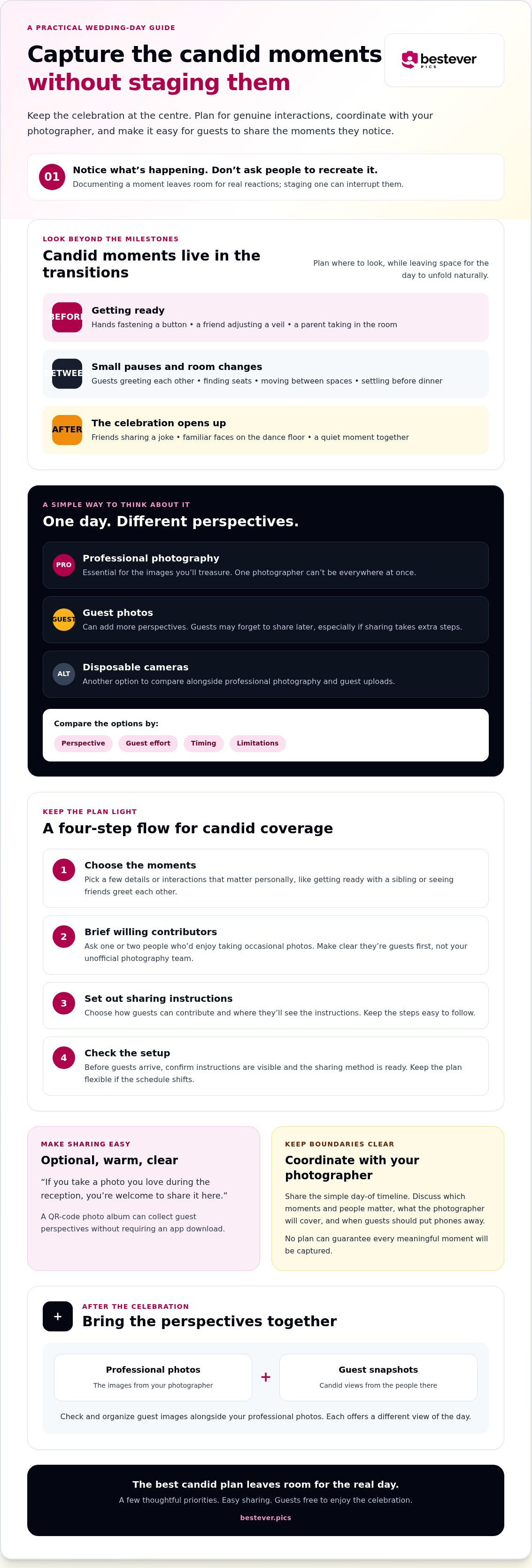
You want candid memories, not a day where family and friends feel they have to perform for the camera. Behind-the-scenes moments are genuine interactions before, between, and after formal events: a quiet check-in while getting ready, a shared laugh during a room change, or friends finding each other on the dance floor.
Documenting a moment means noticing what’s happening; staging one means asking people to recreate it for the camera. The first leaves room for real reactions. The second can interrupt them. The history of wedding photography traces a shift from formal portraits toward styles that also record events as they unfold. Candid coverage can capture the day as it happens without turning it into a photoshoot.
- Getting-ready details: hands fastening a button, a friend adjusting a veil, or a parent taking in the room.
- Quiet reactions: a smile during a toast, a deep breath before the ceremony, or a family member watching from their seat.
- Transitions: guests greeting each other after the ceremony, moving between spaces, or settling in before dinner.
- The dance floor: familiar faces joining in, friends sharing a joke, and the couple taking a moment together.
Which wedding-day moments are easy to miss?
Map the day by transitions, not just milestones on the schedule. The walk from getting ready to the ceremony, the pause while guests find their seats, and the shift from dinner to dancing can all create space for small interactions. Think about who might be together in those moments: siblings helping each other, friends checking on the couple, or the wedding party sharing a quick laugh. You can plan where to look, but no plan can guarantee every meaningful moment will be captured.
How can you keep candid photos feeling natural?
Let guests enjoy the celebration instead of assigning them constant camera duty. Offer optional prompts about moments they may already want to photograph, such as the room before guests arrive or friends meeting after the ceremony. Keep the day-of timeline simple, and share it with your photographer so you can discuss coverage and boundaries. For more guest-friendly ideas, visit Bestever.pics to explore additional wedding photography tips for guests.
Build a simple wedding-day plan for capturing candid moments
A little planning can help you capture behind-the-scenes wedding moments without making photography another job for you or your guests. Make a short plan, agree on priorities with your photographer, and leave room for the day to unfold differently than expected.
Use this simple workflow:
- Choose the moments. Pick a few details or interactions that matter personally, such as getting ready with a sibling or seeing friends greet each other after the ceremony.
- Brief willing contributors. Ask one or two people who would enjoy taking occasional photos. Make clear they’re guests first, not your unofficial photography team.
- Set out sharing instructions. If you’re gathering guest photos, decide how people will contribute and where they’ll see the instructions. Keep the steps easy to follow.
- Check the setup. Before guests arrive, confirm the instructions are visible and the sharing method is ready. Keep the plan flexible in case the schedule shifts.
A clear, optional prompt gives guests a helpful idea without making them responsible for documenting the day. For example: “If you take a photo you love during the reception, you’re welcome to share it here.” A QR-code photo album can offer a straightforward way to collect guest perspectives without requiring an app download. If that suits your plans, take a look at this wedding photo-sharing gallery.
What should you decide before the wedding day?
Start with what you care about, not a shot list for every hour. Tell your photographer which moments or people matter most, then ask what they’ll cover and where guest photos could offer a different perspective. Agree on any boundaries, such as when guests should put phones away. A flexible plan leaves room for delays, changed plans, and unscripted moments.
How do you brief guests without giving them a job?
Keep the wording warm and optional. Let guests know which moments they’re welcome to photograph and when you’d prefer everyone to put their phones away and be present. You can share more ideas in these wedding photography tips for guests. For practical guidance on anticipating a moment and focusing on the scene rather than technical perfection, see Digital Photography School’s advice on how to capture candid photos.
Professional photos, disposable cameras, or guest uploads: what fits?
Each approach gives you a different view of the day. Professional photography offers planned coverage and portraits; disposable cameras add a tactile, film-based option; guest uploads can bring in snapshots from across the room. For capturing behind-the-scenes wedding moments, choose based on the perspectives you want, how much effort you’re comfortable asking of guests, and when you’d like to see the images.
| Option | Perspective | Ease for guests | When you can view photos | Trade-offs |
|---|---|---|---|---|
| Professional photographer | Experienced, planned coverage and directed portraits | Guests can focus on celebrating | Depends on the photographer’s delivery arrangements | One photographer can’t be in every place at once |
| Disposable cameras | Film snapshots from wherever cameras are placed | Simple to pick up and use, though guests need to return the camera | After the film is developed and scanned or printed | Film has to be processed, and results depend on how the camera is used |
| Guest uploads | Different viewpoints from tables, the dance floor, and other parts of the celebration | Depends on the sharing steps; a QR code can let guests upload without downloading an app | Depends on the collection method and when guests contribute | Photos vary in style and quality, and guests may not all choose to share |
Optional sharing can preserve the celebration’s natural flow. Guests can take photos if they feel like it, then return their attention to the people around them. For more ideas on combining collection methods, see this modern wedding photo sharing guide.
What does a professional wedding photographer capture best?
Your photographer can plan coverage around key parts of the day, adapt to changing light and busy moments, and guide portraits when you want them. Talk through must-have people, moments, and boundaries beforehand, including when guests should put phones away. That coordination helps avoid asking a guest to recreate a shot your photographer is already covering. To see how an experienced artist approaches capturing personal moments and milestones, discover Behl Frédérique Photographe.
When are disposable cameras or digital guest photos useful?
Disposable cameras suit couples who like the feel of film and don’t mind waiting for development. Guest uploads are useful when you’d like perspectives from different tables or moments happening at once. Neither replaces professional coverage; each adds a different layer. Adobe also shares practical tips for candid wedding photography, including ways to stay ready for unscripted moments.
How to collect behind-the-scenes wedding moments from guests
Guest photo collection works best when people can understand what to do at a glance. Keep the process short, explain it in a few places guests will notice, and make sharing an invitation rather than an expectation. That way, capturing behind-the-scenes wedding moments can happen alongside the celebration instead of taking it over.
- Choose a collection method. You might use a shared album, a QR-code gallery, or another approach that suits your guests. An app-free QR gallery lets guests scan a code and upload photos to a shared digital album without downloading an app.
- Prepare clear instructions. Use one short sentence to explain how to share and what kinds of photos you’d love to see.
- Display the instructions. Put the QR code and directions at gathering points where guests have a moment to notice them.
- Invite uploads. Ask your celebrant, MC, or a member of the wedding party to mention the option naturally, then let guests decide whether to take part.
Each extra step gives busy guests another reason to put off sharing. A simple scan-and-upload route can make contributing easier, but it can’t guarantee that everyone will participate. For ideas on making the code visible without disrupting your décor, browse these creative wedding QR code display ideas.
How can you make photo sharing easy for guests?
Keep the invitation friendly and specific: “Got a photo you’d like to share? Scan here to add it to our wedding album.” Display the code somewhere guests naturally pause, such as near the welcome area or reception tables, and place the instructions beside it. Avoid a long explanation or several competing ways to upload.
What should you check before sharing a gallery?
Before the wedding, use a phone to test the guest journey from scanning the code through to the upload step. Check the gallery’s product page for details about access, privacy, and uploads, and make sure the printed instructions match how the gallery works. A brief, kind invitation is enough. Guests may be busy talking, eating, or dancing, so treat contributions as a welcome extra rather than a promise.
Bring the wedding’s candid perspectives together after the celebration
After the wedding, guest photos can help you revisit small moments you didn’t see in person. Set aside a relaxed time to look through the contributions together instead of trying to sort everything while you’re still catching up on post-wedding tasks. Professional photos and guest snapshots tell different parts of the story: one offers planned coverage and portraits, while the other can show the day from across the room.
How can couples make the collection easier to revisit?
Keep your review simple. Start by checking where guests contributed images and what steps the gallery allows, then sort them in a consistent way that makes sense to you. You could group photos by part of the day, such as getting ready, the ceremony, dinner, and dancing. Add a brief note about a moment or person if it helps you remember the context.
There’s no need to turn the process into a second project. Pick a convenient time, look through the images together, and save the ones you’d like to return to using options available through your chosen service. Don’t assume how long a gallery keeps images or what you can download; check its current product details first. For more practical ideas, read these best practices for collecting event photos.
How does an app-free wedding gallery fit the plan?
Bestever.pics is one option for collecting guest perspectives: guests scan a custom QR code and upload photos to a shared digital album without downloading an app. It’s a photo-sharing method, not a photography service, so it can sit alongside the work of your professional photographer. Before choosing any gallery, check its product page for the details that matter to you, including access, privacy, and upload information.
For capturing behind-the-scenes wedding moments, choose one next step now: decide how you’d like guests to contribute, then check that the gallery’s instructions and terms match your plans.
Make room for the moments you didn’t plan
Capturing behind-the-scenes wedding moments doesn’t require a packed shot list or guests on permanent camera duty. Choose a few moments that matter, coordinate priorities and boundaries with your photographer, and make any guest photo invitation clear and optional.
Professional photographs and guest snapshots offer different perspectives, so let them complement each other. A simple collection plan can help you gather photos from across the celebration without adding a complicated task to an already full day. With an app-free QR gallery, guests can scan a code to upload photos to a shared digital album without downloading an app.
Start by deciding how you’d like guests to share their photos, then check that the instructions are easy to follow. Keep the plan flexible, and let the celebration come first. The most meaningful candid images are often the ones nobody had to stage.
Make it simple for guests to share their view of the day, and enjoy discovering those extra moments together.
Frequently Asked Questions
How can you capture candid moments at a wedding?
Plan around moments and transitions, but leave people free to act naturally. Share a few priorities with your photographer, such as getting-ready interactions or guests greeting each other, and agree on when guests should put phones away. You can also invite one or two willing guests to take occasional photos. Keep the invitation optional so nobody feels responsible for documenting the whole celebration.
What are some behind-the-scenes wedding moments to photograph?
Look for small interactions before, between, and after formal events. Getting-ready details, a loved one’s quiet reaction, friends catching up after the ceremony, or the couple sharing a moment between reception events can all make meaningful images. Transitions are easy to overlook because they aren’t usually listed as milestones. You don’t need to capture everything; choose the details and people you’ll most want to remember.
Should wedding guests take photos if there is a professional photographer?
Yes, if the couple welcomes it and guests respect any guidance about phones. Dedicated specialists such as The Photography Co can plan comprehensive coverage and direct portraits, while guests may see moments from another table or part of the room. Guest photos add another perspective; they don’t replace professional photography. Ask the photographer about priorities and boundaries in advance, especially during the ceremony and any planned portraits.
How do you ask wedding guests to share their photos?
Make a friendly, optional invitation and explain the next step in one sentence. For example: “If you take a photo you love, you’re welcome to add it to our wedding album using this QR code.” Put the instructions where guests can notice them, such as near a gathering point. Keep the process simple, and don’t assume every guest will have time or want to contribute.
Are disposable cameras a good way to capture wedding moments?
They can be a good fit if you like the tactile feel and look of film. Place cameras where guests can easily find them, and decide in advance who will collect them afterward. The trade-off is timing: you’ll need to arrange film development before seeing the images. Results can also vary depending on how and where guests use the cameras, so consider whether that suits your plans.
How can guests upload wedding photos without downloading an app?
Choose a browser-based photo-sharing option that lets guests scan a QR code and upload images to a shared digital album without downloading an app. Before the wedding, test the steps on a phone and make sure the printed instructions match the upload process. Keep the invitation visible and brief. An app-free option removes one barrier, but guests still choose whether they’d like to share.
Will guest photos distract from the wedding ceremony?
They don’t have to. Set clear expectations with guests and your photographer about when phones should be put away, especially during the ceremony or formal portraits. You can invite photos during more relaxed parts of the day, such as the reception, while asking everyone to stay present during key moments. A clear, polite request helps guests understand when taking photos is welcome and when it isn’t.


