


Article by
Gabi
Hi, I'm Gabi - Co-Founder of Bestever Pics. Thanks for visiting our blog. We are working hard to produce content which we hope resonates with you. Feel free to drop us a line on socials or via the contact form on the site.
Wedding qr code sign ideas are creative design concepts used to display scannable codes that link guests to a digital photo album. These signs serve as a visual call to action, encouraging friends and family to upload candid shots instantly without downloading an app. Effective 2026 designs focus on high-contrast graphics and strategic placement to maximize guest engagement.
What if your wedding gallery didn't depend on a single photographer or a clunky app that guests refuse to download? Most couples worry that tech-heavy solutions will ruin their aesthetic or leave guests feeling frustrated. You'll soon discover the best wedding qr code sign ideas to design signage that looks like high-end decor while providing a zero-friction path to a full gallery.
We analyzed the latest 2026 trends to ensure your signage feels like an inevitable evolution of your theme. Bestever.pics makes this transition effortless by removing the need for accounts or downloads. This guide gives you the blueprint for a guest-sourced gallery, proving that 20 strategic placements is the new gold standard for maximizing your results.
Key Takeaways
- Catch guests where they linger, like the bar or cocktail lounge, to ensure they have the time and headspace to scan and share.
- Discover unique wedding qr code sign ideas that match your 2026 aesthetic without sacrificing the clarity your tech-hesitant guests need.
- Ditch the "app fatigue" by choosing browser-based platforms that let guests upload their best candid shots in just a few taps.
- Master the art of creative wording to transform a simple instruction into a warm invitation that captures the spirit of your big day.
- Learn how to integrate high-resolution codes into your DIY designs using simple tools to create professional-grade results.
Why Wedding QR Code Sign Ideas Matter for Your Guest Gallery
Your wedding day flies by in a blur of laughter and quick glances. While your professional photographer captures the big milestones, the tiny, unscripted moments often happen when the camera isn't looking. This is where wedding qr code sign ideas come into play. They act as the primary bridge between a guest’s candid phone shot and your shared digital album.
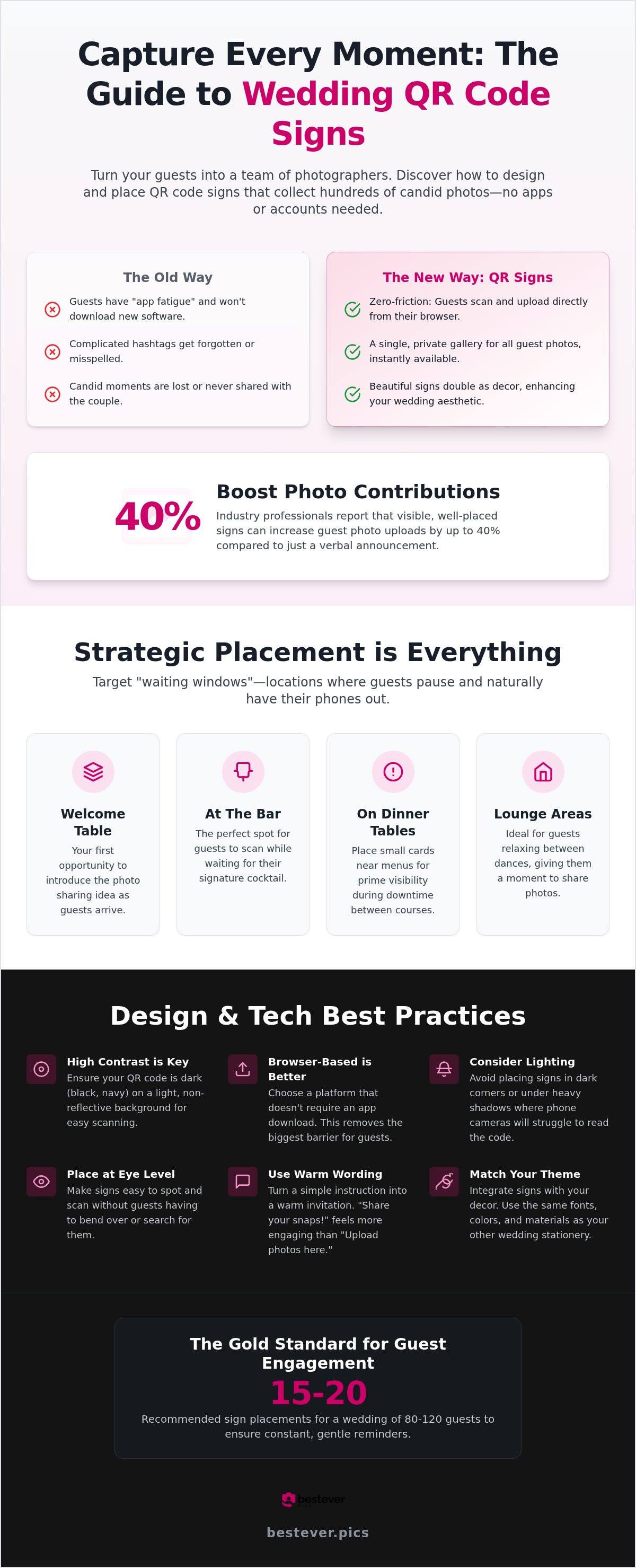
Think of these signs as the high-speed digital evolution of the clunky disposable cameras from the 90s. Back then, you'd wait weeks for grainy prints; now, you get instant uploads. Couples who use physical signage often see a massive jump in participation compared to just mentioning it in a speech. Some industry professionals report that well-placed signs can increase photo contributions by up to 40%. It's about making the process visible and easy for everyone involved.
The Definition of a Modern Wedding QR Sign
At its core, a modern wedding sign is a physical display that features a unique scannable code. If you aren't familiar with what a QR code is, it stands for Quick Response; a matrix barcode that stores a web link. When guests point their phone camera at it, they're instantly directed to your bestever.pics gallery. This eliminates the awkward need for guests to exchange phone numbers or remember complicated social media hashtags. It's a direct, private line for sharing media that keeps the focus on the celebration.
Bridging the Gap Between Decor and Utility
The best wedding qr code sign ideas prioritize both beauty and function. Your signs need to be legible from a distance, yet they shouldn't clash with your floral arrangements or table settings. High-quality materials like frosted acrylic or thick, textured cardstock signal to guests that this is a premium part of the experience. You can find more inspiration for your layout through these creative qr code display ideas.
Strategic placement is the secret to high engagement. You want to put these signs where guests are already stationary. This gives them the few seconds needed to scan and upload without feeling rushed. Consider these prime locations:
- On every dinner table near the menu or place setting.
- Propped up at the bar while people wait for their signature cocktails.
- In the lounge area where guests relax between dances.
A well-designed sign ensures your tech feels like an intentional part of the decor. It's not a last-minute addition; it's a curated tool for memory making. By treating the sign as a piece of stationery, you turn a functional requirement into a beautiful detail of your 2026 big day.
Strategic Placement for Maximum Photo Uploads
Finding the right spots for your signage is just as vital as the design itself. While high-traffic areas like the entrance are obvious, the real magic happens in high-engagement locations where guests actually have a moment to pause. If you place a code in a hallway where people are rushing to the dance floor, they won't stop to scan. You need to target the "waiting windows" where guests are naturally looking for something to do with their hands.
Lighting is another technical hurdle that often gets overlooked. Avoid tucking your wedding qr code sign ideas into dark corners or placing them under heavy shadows. Phone sensors struggle to read patterns in low light; this leads to guest frustration and fewer photos. For the best results, ensure signs are at eye level or angled slightly upward on tables so they're easy to scan without anyone having to bend over awkwardly.
As you look at current wedding technology trends, it's clear that physical placement drives the digital result. For a wedding of 80 to 120 guests, aim for approximately 15 to 20 placements across the venue to keep the reminder constant but not overwhelming. This saturation ensures that no matter where a guest is standing, a prompt to share is nearby.
The Welcome Table and Guest Book Station
The welcome table is your first opportunity to introduce the photo sharing concept. Since this is where guests often leave cards or sign a book, they're already in a "contribute" mindset. Use a larger, clear sign here to act as the primary instructions hub. Pairing the digital code with a physical guest book offers a nice balance between traditional keepsakes and modern digital galleries.
Table Settings and Centerpieces
Individual table cards are the most effective way to keep the gallery top of mind. When guests are seated for dinner, they have their phones nearby and plenty of downtime between courses. You can integrate the code directly into the menu card for a sleek, minimalist look. Small acrylic blocks are perfect here because they stand upright without blocking the view of the person sitting across the table.
The Cocktail Bar and Late-Night Snack Station
The bar is a goldmine for candid shots. Guests waiting for a signature cocktail have the perfect 30 second window to scan and upload the photos they just took during the ceremony. Place a code near the drink menu to act as a natural visual anchor. Using a private wedding photo gallery link here shows guests that their uploads are secure and shared only with the couple.
Creative Wording and Design Styles for Every Theme
Your wedding qr code sign ideas should do more than just provide a link. They need to speak your language. Whether you're planning a black-tie gala or a barefoot beach party, the wording on your signage sets the expectation for the photos you'll receive. While a clever pun might work for your friends, remember that clear instructions are vital for older or tech-hesitant guests who might not be familiar with instant browser uploads.
Design cohesion is where these signs truly shine as decor. Utilize your existing wedding font suite and color palette so the technology feels like a natural extension of your brand. The material you choose also carries weight. Consider reclaimed wood for a rustic barn setting, sleek glass or acrylic for a modern city loft, or even plush velvet frames for a touch of classic glam. This ensures the sign looks like a curated detail rather than an afterthought.
Formal and Elegant Wording Templates
For a sophisticated event, keep your language refined and polite. You want guests to feel like they're contributing to a curated collection. Focus on words like "contribution," "perspective," and "gallery" to elevate the request. A high-end look usually pairs serif fonts with gold foil accents or letterpress textures on thick cardstock. It's a quietly confident way to invite participation without breaking the formal atmosphere.
- Example: "Kindly share your perspective of our special day. Scan to upload your photos to our gallery."
- Example: "Help us capture the magic. Please share your favorite moments from this evening."
Whimsical and Fun Wording for Candid Shots
If your vibe is more relaxed, use playful language to encourage guests to hunt for those "unseen" moments. This style works perfectly with hand-lettered fonts and watercolor illustrations. It transforms a simple upload into a fun activity, making people more likely to snap photos of the dance floor or the late-night snack bar. It's about sparking joy and creativity in your guests.
- Example: "I spy with my little eye... something you caught on camera! Scan to share your snaps."
- Example: "We want to see the party through your eyes! Share your best shots here."
Minimalist and Modern Designs
Sometimes less is truly more. For couples who want the technology to be present but nearly invisible, a minimalist approach is best. Use a simple, high-contrast code with three punchy words. This style fits perfectly into creative qr code display ideas like small metallic stands or integrated menu corners. It's clean, efficient, and direct.
Example: "Scan. Snap. Share." followed by the code and nothing else. This direct call to action removes all hesitation. It mirrors the speed of bestever.pics, where the goal is to get the photo from the phone to the album as quickly as possible without any unnecessary fluff. You don't need a paragraph when a clear visual cue does the job better.
Tech Etiquette: Making Guest Photo Sharing Simple
The biggest barrier to guest participation isn't a lack of interest; it's app fatigue. Nobody wants to download a new app for a four-hour event, especially when they're already busy celebrating. This is where your wedding qr code sign ideas need to prioritize simplicity over everything else. If the process takes more than two taps, you'll lose half your potential photos. Web-based platforms like bestever.pics remove this friction entirely. Guests scan. They pick. They upload. It's over in seconds.
Privacy also plays a massive role in how guests interact with your tech. Many people are hesitant to share candid moments if they think the images will end up on a public social media feed. Your signage should act as a quiet reassurance that the gallery is private, secure, and for your eyes only. When guests feel safe, they share more freely.
Why App-Free is the Only Way to Go in 2026
Guests value their storage space and battery life. Forcing a download is a big ask that often results in zero engagement. By using a browser-based system, you ensure that even guests with older phones or limited data plans can join the fun. It's the most inclusive way to capture every angle of your big day. You can read more about digital photo sharing for modern events to understand why the industry has moved away from dedicated apps.
Addressing Privacy and Security Concerns
Clearly state on your signs that photos are for your private collection. This removes the anxiety of public exposure and encourages guests to be themselves. Avoid using public social media tags that might expose your loved ones to unwanted attention from strangers. Guests also appreciate that they don't need to create an account or provide an email address to contribute. It’s a simple, anonymous way to share the love without any strings attached.
Helping Non-Tech Savvy Guests
Don't assume everyone knows how a QR code works. A tiny line of instructional text like "Open your camera and point it at the code" can be a lifesaver for older relatives. It removes the hesitation that comes with trying something new and ensures Grandma doesn't feel left out. You might even designate a "photo captain" at each table to lead the way and help those who are struggling. Check out these best practices for collecting event photos for more ways to boost guest engagement.
How bestever.pics Simplifies Your Wedding Sign Strategy
Choosing the right platform is the engine that drives your wedding qr code sign ideas from concept to reality. bestever.pics is engineered for pure speed, allowing guests to bridge the gap from scan to upload in mere seconds. This efficiency transforms a potential tech hurdle into a natural part of your 2026 celebration. You don't just get a code; you get a professional-grade system that handles the heavy lifting while you focus on the "I dos."
The result is a high-quality, organized gallery that you can access the moment the reception ends. It replaces the chaos of hunting through social media with a streamlined, digital-native output. Whether you're a DIY couple or a busy host, the platform provides the technical grounding needed to ensure every candid moment is captured and stored securely.
Creating Your Code in Three Simple Steps
- Create your event on the bestever.pics platform and customize your gallery settings to match your specific wedding style.
- Download your unique, high-resolution QR code, which is ready to be dropped into any design software like Canva for your custom signage.
- Print your signs using a private wedding photo gallery no app needed template to ensure professional-grade results.
The Advantage of High-Resolution Downloads
A common mistake in DIY wedding stationery is using low-quality, pixelated QR codes. These often fail to scan under dim reception lighting, leaving guests frustrated and your gallery empty. bestever.pics provides vector-quality codes that stay razor-sharp even when scaled up for large welcome signs. This technical precision is what separates a market disruptor from a basic link generator.
Always test your code on your chosen material before the big day. Whether you're printing on frosted acrylic, reclaimed wood, or textured cardstock, a quick test scan ensures a perfect user experience for your guests. Sharp edges on the code's matrix are the secret to reliability in every environment. It's about providing a zero-friction path that respects your guests' time and your creative freedom.
For professional wedding planners and venue managers, the bestever.pics pro version offers scalable systems to manage multiple events simultaneously. You can maintain custom branding across different galleries, ensuring a consistent, sophisticated look for every client. This inevitable evolution of the guest book allows pros to deliver more value with less administrative effort.
Capture Every Unscripted Moment of Your 2026 Celebration
Your wedding gallery shouldn't be limited to just the formal shots captured by a professional. By implementing smart wedding qr code sign ideas, you turn every guest into a high-octane contributor. Focus on high-engagement spots like the bar and dinner tables to ensure you don't miss a single candid smile. It's about providing a zero-friction path so guests don't have to think twice before sharing a memory.
Ditching the friction of app downloads is the only logical path forward for modern couples. Guests want to celebrate with you, not struggle with outdated software or clunky account sign-ups. bestever.pics provides instant high-res uploads and is trusted by professional wedding planners to deliver professional-grade results. You'll love seeing your big day through the eyes of the people who matter most.
It's time to abandon the compressed, low-quality images of social media tags and embrace the digital evolution of the guest book. Start designing your signs today and get ready for a gallery full of authentic, high-energy moments. Your future self will thank you for capturing the magic from every possible angle.
Frequently Asked Questions
Where is the best place to put a wedding QR code sign?
The best locations for your signage are high-engagement areas where guests naturally pause. Think about the bar during cocktail hour, the dinner tables between courses, or the welcome station near the guest book. These "waiting windows" provide the perfect opportunity for guests to scan and share. Avoid placing codes in narrow hallways or near the dance floor where people are moving too quickly to stop and scan.
What should the wording be on a wedding photo QR sign?
Your wording should match the vibe of your celebration while remaining clear. Use punchy calls to action like "Scan to share your favorite moments" or "Help us see our wedding through your eyes." If you want something more playful, try "I spy with my little eye something you caught on camera!" The goal is to make the invitation feel warm and personal rather than like a technical instruction manual.
Do guests need an app to scan a wedding QR code?
No, guests don't need to download any apps to contribute to a Bestever.pics gallery. They simply open their phone's native camera app, point it at the code, and follow the link to an instant browser upload page. This removes the app fatigue that often stops people from participating. It's a zero-friction process that works on any modern smartphone without requiring a new account or sign-up for your friends and family.
Can I make my own wedding QR code signs?
You can absolutely design your own signs using tools like Canva or Photoshop. Once you create your event on Bestever.pics, you'll receive a high-resolution, vector-quality QR code. Just drop that code into your custom design, ensuring there's plenty of contrast between the code and the background. This gives you total creative freedom to match your signage to your specific 2026 wedding theme and font suite while maintaining a professional look.
How many signs do I need for a 100-guest wedding?
For a wedding of 100 guests, aim for approximately 15 to 20 placements across your venue. This includes one sign on every dinner table and a few larger displays at the bar and welcome areas. Having multiple prompts ensures that the idea stays top of mind throughout the night. It's better to have a few extra signs than to leave guests searching for a code when they have a great candid photo ready to upload.
Will older guests know how to use a QR code sign?
Most older guests are now familiar with QR codes from restaurants, but a little help goes a long way. Include a short, one-sentence instruction like "Point your phone camera here to share photos" on your signage. You can also ask your bridal party or a photo captain at each table to give a quick demonstration. This small effort ensures everyone feels included in capturing your big day without any technical frustration or confusion.
Is it better to use a QR code or a wedding hashtag?
A QR code is far more effective than a hashtag for collecting high-quality images. Hashtags often result in compressed, low-resolution photos that are difficult to download later. Plus, many guests have private social media profiles, meaning you might never see their posts. Using wedding qr code sign ideas ensures you get the original, high-res files delivered directly to a private gallery that you own and control immediately after your reception ends.
How do I ensure the QR code works in low lighting?
To ensure your codes work during a dim reception, prioritize high contrast and avoid glossy finishes. Print your wedding qr code sign ideas with black ink on a light-colored, matte background to prevent camera glare. Ensure the code is at least 2 inches square for table signs so phone sensors can pick up the pattern easily. Testing your signs with a phone in a darkened room before the event is a smart way to guarantee success.


