


Article by
Gabi
Hi, I'm Gabi - Co-Founder of Bestever Pics. Thanks for visiting our blog. We are working hard to produce content which we hope resonates with you. Feel free to drop us a line on socials or via the contact form on the site.
Engagement parties, showers, and rehearsal dinners create lovely candid moments, but the photos can end up scattered across chats and social feeds, or never get sent at all. A simple plan for how to share photos from pre-wedding events gives guests one clear way to contribute and makes the pictures easier to find later.
This guide compares practical ways to collect photos, organise them by celebration, and make sharing manageable for you and your guests.
Key Takeaways
- Compare messaging, shared albums, social posts, and QR-linked galleries by guest effort, access needs, and how easy photos will be to find later.
- Choose one collection for every celebration or create separate ones, then label each with the event name and date.
- Give guests clear instructions before and during each gathering, with an alternative for anyone who does not want to scan a QR code.
- Send one friendly follow-up after the event so guests have another chance to contribute without making photo collection the host’s job.
- Before choosing a method, consider guest effort, event setting, organisation, access, and who will handle questions.
Why share photos from pre-wedding events instead of chasing them later?
A practical plan for how to share photos from pre-wedding events gives guests a clear place to send pictures and helps you keep them organised. Start by listing the gatherings, choosing a collection method for each, and sharing simple instructions before the celebrations begin. This small amount of preparation can reduce the need to chase people afterward.
Guests may take photos, but those pictures can stay on phones, get buried in message threads, or disappear into social feeds. Decide on a collection method in advance so you are not tracking down each guest to ask for pictures. For more collection ideas, see best practices for collecting event photos.
Which pre-wedding events should you include?
List the celebrations you’re hosting or attending before the wedding. These might include an engagement party, bridal shower, hen and stag dos, or rehearsal dinner. Consider each event’s size, formality, and guest mix. A small gathering may suit one shared destination, while separate events or guest groups may be easier to organise separately.
- Write down each event and its guest mix.
- Decide whether to use one collection or separate albums.
- Choose who will share the instructions with guests.
Separate albums make it easier to browse one event at a time. One shared destination keeps the celebrations together and gives guests a single place to visit. Choose based on how you expect to revisit the photos.
What can guest photos capture that hosts might miss?
Guests see each celebration from different places. A friend might catch a quiet conversation, a relative might notice a detail you’re busy enjoying, and someone across the room may capture a spontaneous group moment. Not every guest will contribute, and no collection will capture everything, but extra viewpoints can add warmth and context.
More guest perspectives can reveal the little moments happening beyond the couple’s view. These images complement, rather than replace, professional wedding photography. A photographer brings skill and direction; guest photos add informal angles and behind-the-scenes memories. The overview of wedding photography discusses approaches such as documentary photography.
Thinking through how to share photos from pre-wedding events also helps you decide which moments and perspectives you’d like to make easier to collect.
Share Pre-Wedding Photos Without Guest Friction
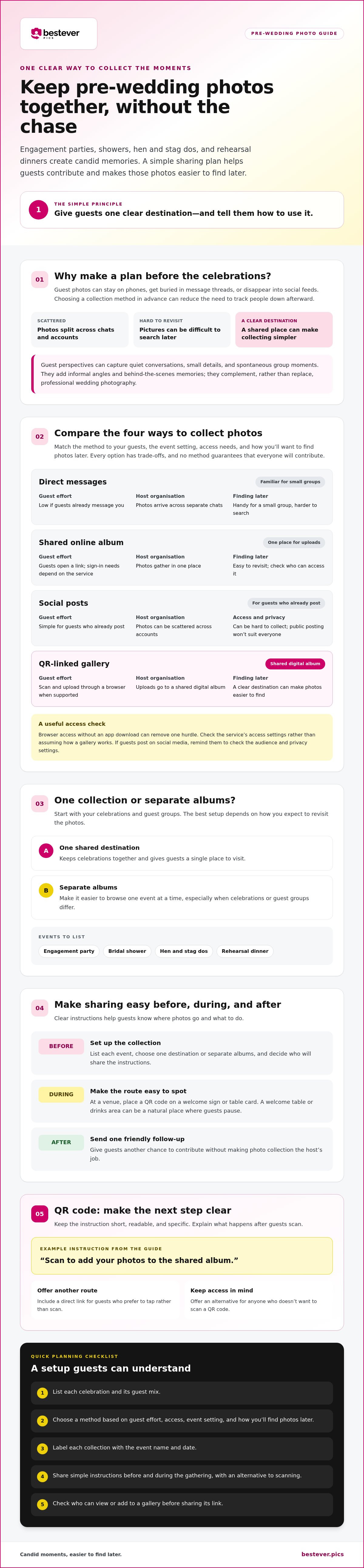
Choose a collection method guests can use without interrupting the celebration. Each option has trade-offs: messaging is familiar but can scatter photos, while a shared gallery brings uploads together but still depends on guests choosing to contribute.
| Method | Guest effort | Host organisation | Access and finding photos later |
|---|---|---|---|
| Direct messages | Low if guests already message you | Photos arrive across separate chats | Handy for a small group, harder to search later |
| Shared online album | Guests open a link; sign-in needs depend on the service | Photos gather in one place | Easy to revisit, but check who can access it |
| Social posts | Simple for guests who already post | Photos can be scattered across accounts | May be hard to collect, and public posting won’t suit everyone |
| QR-linked gallery | Guests scan a code and upload through a browser when supported | Uploads go to a shared digital album | A clear destination can make photos easier to find |
Browser access without an app download can remove one hurdle, but no method guarantees that every guest will share photos. Consider what feels comfortable for your group. If guests use social media, remind them to check the audience and privacy settings before posting. For wider ideas, read this guide to digital photo sharing.
Which photo-sharing method fits each gathering?
Match the method to the setting and the people attending. At a venue gathering, place a QR code on a welcome sign or table card where guests can see it. For a smaller event, a direct link in a group message may be simpler. Social posts may suit guests who enjoy sharing publicly, but offer another route for anyone who would rather keep photos private.
How do you make a QR code easy for guests to use?
Place it where people naturally pause, such as near the welcome table or drinks area. Add a short instruction explaining what happens after scanning, such as “Scan to add your photos to the shared album.” Make the wording readable and include a direct link for guests who prefer to tap rather than scan. For more display inspiration, see these creative QR code display ideas.
Organize and Secure Your Pre-Wedding Photos
A collection is useful only if you can find the right photos later and understand who can view or add to it. Before sharing a gallery link, check its access settings and decide whether guests should be able to contribute, view, or do both. Controls vary by service, so confirm what is available instead of assuming every gallery works the same way.
Should each pre-wedding event have its own album?
Separate albums make sense when you want to browse each gathering on its own. You can find the engagement party without sorting through shower or rehearsal dinner photos. One shared destination may be simpler if the same friends and relatives attend several events and you’d rather give them one place to go.
There’s no universal right choice. Think about the guest lists and how you’ll revisit the pictures. If you use separate albums, label each with the event name and date, for example, “Engagement Party, 14 June.” If you choose one destination, use the same naming convention for folders or files where your chosen method allows it. This is a simple organisational habit, not a feature to assume every platform provides.
How can hosts set clear expectations for guest photos?
A short, friendly note can explain who the collection is for and how you plan to share the photos afterward. For example: “We’d love your candid photos. We’ll keep the collection for our wedding guests to enjoy.” Adjust the wording to match your actual plans, and respect anyone who doesn’t want their image shared.
Before sending the link, check who can open it and whether contributors need to sign in or follow other steps. Test the instructions yourself or ask someone else to try them. For more practical tips, read these best practices for collecting event photos.
Online guidance can help you plan, but verify access and privacy details directly with the service you choose. Reviewing official documentation ensures you understand all sharing controls. For a browser-based option, review this private wedding photo gallery provided by Bestever.pics and decide whether it fits your sharing plan.
Encourage Guest Photo Sharing at Every Event
Guests are more likely to understand what to do when the instructions are ready before the celebration gets busy. Mention the collection naturally on the day, then send one friendly follow-up so photos don’t get lost in the rush home. Keep participation optional and the steps easy to follow.
- Before the event, choose and test your method. Decide where photos should go, then try the instructions on a phone as if you were a guest. If you’re using a QR code, check that it opens the right destination. Prepare a short message to send ahead of time and a visible sign for the gathering. Ask a trusted friend or family member to handle basic questions so you can focus on hosting.
- During the event, give a light reminder. Display the instructions where people will notice them, such as near the welcome table or drinks. A brief welcome or toast is a natural time to mention the collection. You could say, “If you’ve taken any photos, we’d love you to add them here.” Then let guests get back to enjoying the celebration. Repeat the invitation only when it feels natural.
- Afterward, send one warm follow-up. Thank guests for celebrating with you and include the collection link or instructions again. A simple note such as “We’re still gathering photos from the evening, add yours here if you’d like” makes the next step clear without pressure. Send it while the event is still fresh in everyone’s mind.
For a QR-based, app-free option, Bestever.pics lets guests scan a host-created code and upload photos to a shared digital album through a browser. It’s one possible setup, not a requirement; choose the method that suits the event and your guests. A visible prompt and a gracious reminder can make contributing feel easier without turning the celebration into a photo-collection task.
For more ways to present a code clearly, explore these creative QR code display ideas.
Choose a simple photo-sharing setup for all your pre-wedding events
The best setup is one your guests can understand and you can manage between celebrations. Use the same collection method for every gathering to keep instructions consistent, or adapt it to each event. A small shower with a familiar group may call for a shared link, while a larger gathering may benefit from a visible QR code. Choose based on the people and setting rather than assuming one method suits every event.
Before sharing the collection details, check the following:
- Guest effort: Are the steps short, readable, and clear to someone unfamiliar with QR codes? Include a direct link or simple alternative if scanning isn’t comfortable for everyone.
- Event fit: Can guests easily see or receive the instructions in this setting? Consider where they’ll gather and whether they’re likely to have a moment to contribute.
- Organisation: Will you use one destination or separate collections? Pick a consistent naming approach, such as “Bridal Shower, 14 June,” so each event is easy to identify later.
- Access: Does the gallery suit the audience you intend to share it with? Check who can view or contribute, and make sure that matches your preferences.
- Follow-up: Who will send a reminder and answer questions? Decide this before the event instead of adding it to the host’s to-do list afterward.
What should you check before sharing the collection link?
Test the instructions on a phone and read them as if you’ve never used the chosen method. Keep the wording direct: tell guests what to do and where their photos will go. If the collection is intended for a particular group, say so clearly. Ask a trusted guest to help anyone who gets stuck, so you’re not troubleshooting while greeting people or keeping the celebration moving.
How can couples keep the process manageable?
Ask one willing organiser to check whether photos are arriving and respond to basic questions. That person can also keep event names consistent across albums or folders. A repeatable plan is often easier than remembering different instructions for each gathering. For more help shaping a guest photo collection workflow, adapt the steps to your guest list and venue.
Use these checks to decide how to share photos from pre-wedding events without turning collection into another hosting job. Choose a method, make the instructions clear, and give guests a simple way to take part if they choose.
Make photo sharing simple for every celebration
A little planning can turn engagement parties, showers, hen and stag dos, and rehearsal dinners into an easy-to-browse collection of candid memories. Choose one method for every event or adapt it to each gathering. Make the instructions clear, check who can view or contribute, and ask someone to help guests if needed.
The practical heart of how to share photos from pre-wedding events is simple: give guests a straightforward way to join in without making photo collection another job for the host. A host-created QR code can lead guests to a shared digital album, and Bestever.pics lets them upload through a browser without downloading an app. Participation is optional, but fewer steps can make sharing more approachable.
Ready to give your guests a simple place to contribute their photos?
Keep the setup easy, enjoy the celebrations, and let the memories come together one event at a time.
Frequently Asked Questions
How can I collect photos from a bridal shower or engagement party?
Choose one clear destination for guests to send their photos, then share the instructions before the event and display them during it. For a small gathering, send a link in the invitation or a group message. At a venue, a QR code on a welcome sign can be easy to spot. Ask a trusted guest to help with questions so you can enjoy hosting.
Can guests share photos without downloading an app?
Yes. Some web-based photo-sharing services let guests scan a host-created QR code and upload photos through a browser without downloading an app. Check the steps yourself before sharing the link, since access requirements vary between services. Browser access can remove an extra task for guests, but clear instructions still matter, especially for anyone unfamiliar with QR codes.
What is the easiest way to share photos from several pre-wedding events?
Pick a setup guests can repeat and you can keep organised. Use one shared destination if the same people attend several events, or create separate collections if you want to find each gathering’s photos independently. Keep the instructions consistent where possible, and label each collection with the event name and date. The best fit depends on your guests, events, and preferred organisation style.
How do I encourage guests to upload candid photos?
Make the invitation warm, brief, and optional. Share the collection instructions before the event, display them somewhere guests will notice, and mention them during a welcome or toast without interrupting conversations. Try: “We’d love to see the little moments you capture, add your photos here if you’d like.” Afterward, send one friendly reminder while the gathering is still fresh in everyone’s mind.
Should I make one photo album for every pre-wedding event?
Not necessarily. Separate albums make it simpler to browse photos from a particular event, such as the shower or rehearsal dinner. One shared destination can be more convenient if many of the same guests attend each gathering. Consider who’s invited and how you’ll look through the pictures later, then choose the setup that feels easiest to maintain. Either approach works best with clear event labels.
How do I keep shared pre-wedding event photos private?
Before sharing a gallery link, check who can view the collection and who can contribute, then confirm those settings match your intentions. Tell guests who the photos are for and how you plan to share them. Avoid relying on public social posts if you want a more limited audience, and respect anyone who doesn’t want their image shared. Access options vary, so check the service’s own instructions.


