


Article by
Gabi
Hi, I'm Gabi - Co-Founder of Bestever Pics. Thanks for visiting our blog. We are working hard to produce content which we hope resonates with you. Feel free to drop us a line on socials or via the contact form on the site.
The disposable camera is dead, and the "download our app" sign at your wedding is its equally annoying successor. We agree that chasing guests for photos is exhausting, making free event photo sharing via browser-based QR codes the inevitable evolution of the guest book. You'll learn how to use Bestever.pics to set up a digital hub in under 60 seconds and capture every candid moment from your quinceañera or corporate gala without spending a penny on hardware.
Key Takeaways
- Replace legacy hardware with the inevitable evolution of guest books. Capture raw, authentic energy without the high costs of traditional booths.
- Learn how free event photo sharing eliminates the friction of app downloads. Guests simply scan and upload, keeping the focus on the celebration.
- Build your digital photo hub in less than a minute. This sophisticated simplicity allows you to create a professional-grade album that works on every smartphone.
- Use strategic table placement and MC announcements to drive record-breaking participation. Small setup tweaks lead to a massive increase in the variety of candid shots you collect.
- Stop chasing guests for photos weeks after the event has ended. Digital QR codes provide instant access to high-quality memories before the last song even finishes.
Free event photo sharing is an app-free digital collection method where guests scan a QR code to upload media directly to a shared album. It replaces physical disposable cameras and manual photo chasing, providing original-quality files instantly. This modern approach works across all smartphones, making it ideal for weddings, corporate functions, and community milestones.
What is Free Event Photo Sharing?
Free event photo sharing is a browser-based system that allows attendees to contribute to a digital album without downloading software. By scanning a simple What is a QR code?, guests can upload high-resolution media directly from their mobile device. This method ensures you collect authentic, candid shots from every angle of your hen do or quinceañera. It effectively bridges the gap between physical celebrations and lasting digital memories.
The End of the App Download Era
Guests often resist installing new applications for a single day, creating a massive barrier to guest participation. Modern solutions use the phone's native camera and browser to provide an instant upload experience without requiring account creation. This eliminates the technical hurdles that once plagued shared folders, social media groups, or complex cloud logins. You can see how this works in practice on the [LINK: how it works] page.
Why 'Free' Doesn't Mean Low Quality
There is a persistent misconception that cost-free tools limit the resolution or clarity of your photos. Modern cloud-based galleries are designed to maintain print-ready quality, ensuring your memories look professional in any physical or digital format. This is a vital feature for budget-conscious DIY wedding planners who refuse to compromise on their high-fidelity archives. It allows you to build a comprehensive gallery without the financial overhead of physical booth rentals.
- Original file sizes are preserved for future physical printing.
- No hardware rentals or film development fees are required.
- Media is organized automatically by the time of upload.
Capturing Authentic Moments
Traditional professional photography often misses the raw energy of the dance floor or quiet conversations at the bar. These digital hubs empower your guests to act as secondary photographers, capturing the fun moments that happen when the pro isn't looking. You'll receive a diverse collection of perspectives that a single camera person simply cannot cover. This collaborative approach turns every attendee into an active participant in your event's storytelling.
Why Free Event Photo Sharing Beats Traditional Methods
Legacy methods like WhatsApp groups act like a black hole where memories vanish into a sea of irrelevant chatter. When you use free event photo sharing, you bypass this chaos and the technical friction of shared cloud folders. These specialized hubs allow guests to contribute without being "invited" to specific folders or exposing their phone numbers to strangers.
The Problem with WhatsApp and Google Drive
Messaging apps often use aggressive compression that leaves you with pixelated files useless for printing. Google Drive and Dropbox introduce "permission friction" that kills guest participation by requiring sign-ins. A dedicated gallery keeps your photos organized by event and date automatically without these hurdles.
Digital Guest Books vs. Physical Booths
Physical photo booths are expensive and only capture moments inside a small, stationary box. A [LINK: digital guestbook] transforms every smartphone into a roaming camera for your celebration. This is especially vital for micro-weddings where a four-figure booth rental isn't justifiable.
Public social media hashtags expose your private moments to the entire internet and potential data scraping. Private digital galleries provide total control over your media while keeping the interactive feel of a live feed. For more on the standards of this technology, you can review the government guidance on QR codes.
How to Set Up Your Digital Photo Hub in 60 Seconds
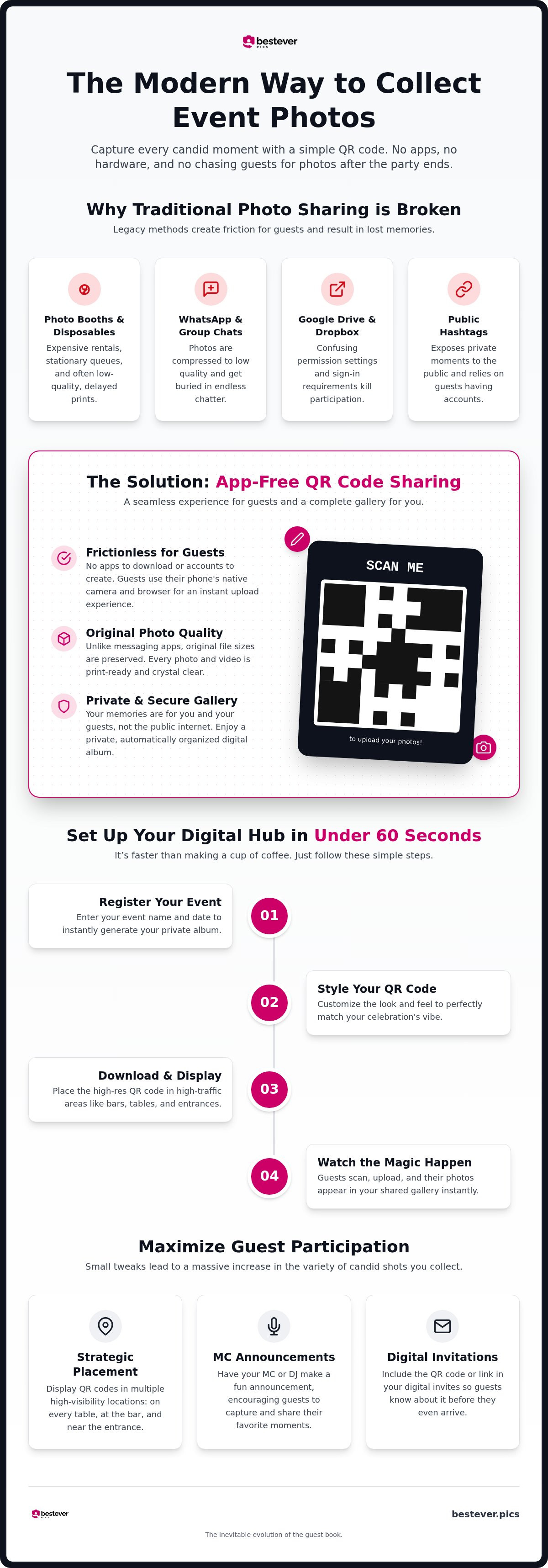
Setting up your free event photo sharing hub is faster than making a cup of coffee. We've designed the process at Bestever.pics to be intuitive so you can spend your time on the guest list rather than technical troubleshooting. This simple workflow is why free event photo sharing has become the standard for modern hosts who want to capture every angle without the stress. Follow these five steps to get your digital album live:
- Register your event. Head to Bestever.pics and enter your event name and date to generate your private album.
- Style your QR code. Customise the look and feel to fit your celebration's specific vibe.
- Download the file. Save your unique code as a high-resolution image for easy printing.
- Display your signage. Place the code in high-traffic areas like the bar, dining tables, or the entrance.
- Watch the magic happen. Guests scan the code and their photos appear in your shared gallery instantly.
Customising Your QR Code
Your QR code shouldn't look like a boring technical requirement. It should feel like a natural part of your event's aesthetic. You can integrate specific colours to match your wedding palette or corporate brand guidelines to keep everything on-theme. Always include a clear, bold "Scan Me" instruction to guide your guests toward the gallery. If people don't know what the code is for, they won't use it. For more inspiration on making your signs stand out, check out these creative QR code display ideas.
Testing Your Gallery Before the Big Day
Don't wait for the first guest to arrive to see if your setup works. Run a quick "dress rehearsal" with your physical signs a few days before the event. Place your codes in their intended spots and check for glare; harsh lighting or glossy paper can sometimes make scanning difficult for older phone models. Open your phone's camera, scan the code, and perform a test upload. This gives you peace of mind that the connection is solid and the gallery is ready for action. As the host, you'll find it incredibly easy to manage the incoming stream, allowing you to hide any blurry shots or duplicates with a single tap.
Maximising Guest Participation at Your Celebration
A digital gallery is only as powerful as the number of people using it. Even the best free event photo sharing system fails if your guests don't know it exists. Visibility is your primary driver for success. You need to move beyond a single sign at the entrance where people are busy greeting hosts or dropping off coats. Instead, bring the technology to where the action happens: the dining tables, the bar, and the dance floor.
Strategic placement creates constant reminders. Table cards are more effective than entrance signs because they sit in front of guests for the duration of the meal. At a corporate gala, utilize digital displays or large monitors to show the live feed of incoming shots. This creates a feedback loop that encourages more uploads. If you're hosting a footy final party in Australia or a stag do in the UK, tailor your signage to the occasion. Use punchy, localized calls-to-action like "Snap the winning goal" or "Capture the groom's best moments" to build instant rapport.
Creative Display Strategies
Don't limit your QR codes to paper signs. Integrate them into your menus, bar coasters, or even small wedding favours. High-traffic areas like the buffet line or the cocktail bar are prime real estate. Guests often have their phones out while waiting, making it the perfect window for a quick scan. For corporate events, including the code in the digital program or on the back of name badges ensures every attendee has the link in their pocket.
Overcoming Technical Anxiety
Some guests might hesitate if they assume they need to create an account or provide personal data. You must emphasize the app-free nature of the service. A simple instruction like "Scan, Snap, Upload" clarifies that there are no hurdles. This simplicity is vital for older relatives or non-techy attendees who just want to share a nice photo of the family. If they see that it takes less than 30 seconds to contribute, they'll be much more likely to participate throughout the night.
Verbal cues from your MC or host can double your engagement levels. A simple 30-second announcement about the gallery drives 2x more uploads than signage alone. Have the MC mention a photo challenge to gamify the experience. Ask for the "best dance floor fail" or the "sweetest moment at Table 5." This transforms the gallery from a passive collection into an active part of the entertainment. For more ways to help your guests, share these wedding photography tips for guests to ensure you get the highest quality shots possible.
The Bestever.pics Advantage for Every Celebration
Bestever.pics represents the inevitable evolution of the guest book. Steve and Chloe, a father-daughter duo, founded the platform in 2023 to bridge the gap between technical sophistication and extreme accessibility. This isn't just about storage; it's about creative freedom. We've replaced legacy processes with a system that prioritizes the user experience above all else. You get professional-grade results without the friction of traditional methods.
Our commitment to sophisticated simplicity means you don't have to choose between a high-tech solution and a user-friendly one. We believe the most powerful technology should be the easiest to use. By focusing on an app-free environment, we ensure that your memories are captured by everyone, not just the tech-savvy few. It's a results-driven approach designed to turn your event anxiety into pure excitement.
For DIY Hosts and One-Off Events
Whether you're organizing a milestone birthday, a hen do, or a quinceañera, you need a system that works the first time. The "no app" promise is our core benchmark for quality because it guarantees quick guest adoption. You can set up your free event photo sharing gallery in under a minute and start seeing shots appear instantly. This allows you to stay present in the moment while your digital album grows in the background.
- Eliminate the need for guests to clear phone storage for new apps.
- Collect high-resolution media that beats compressed social messages.
- Keep your celebration intimate with private, secure galleries.
You can see the speed of our platform for yourself by visiting our how it works page. It's the simplest way to ensure you don't miss a single candid moment from your big day.
Pro Solutions for Planners and Venues
Professional wedding planners and venue managers require a scalable system that handles recurring events without a hitch. While our DIY tiers are perfect for one-off celebrations, our Pro features offer the administrative control and branding required for high-volume business. Offering a private digital gallery as a value-add perk sets your venue apart from competitors who still rely on outdated hardware. It's a low-effort, high-impact way to provide a modern experience for every client who walks through your doors.
If you're looking to integrate a professional-grade photo sharing system into your service offering, explore our business inquiries page. We provide the tools you need to manage multiple galleries while maintaining the high standards your clients expect.
Don't let your guests' best shots vanish into the "black hole" of their camera rolls. You've spent months planning every detail; make sure you see the results from every perspective. Start your free event photo sharing album today and capture the raw, authentic energy of your celebration before the last song ends. It's time to choose the inevitable evolution of guest photography.
Own Your Memories with Instant Photo Sharing
You've seen how free event photo sharing eliminates the technical hurdles that once killed guest participation. By choosing a web-based, app-free approach, you're ensuring that every candid laugh and dance floor fail is captured in high resolution. It's about moving past the chaos of group chats and into a streamlined digital hub that you control. This sophisticated simplicity is what makes the difference between a few blurry texts and a complete digital archive.
Setting up your gallery takes less than 60 seconds, giving you more time to focus on the celebration itself. This simple shift in how you collect photos transforms your celebration into a collaborative story that everyone can be part of. Trusted by event planners worldwide, this method is the most efficient way to gather the memories you'd otherwise miss from your special day.
We can't wait to help you see your event through your guests' eyes. It's time to stop chasing photos and start enjoying them. You've done the hard work of planning; now let the technology do the hard work of collecting your best moments.
Frequently Asked Questions
Is there really a free version of event photo sharing?
Yes, several platforms offer free event photo sharing tiers to help you get started without any upfront costs. These plans are perfect for smaller gatherings like a backyard BBQ, a micro-wedding, or a stag do. While free versions often have limits on storage or the number of uploads, they provide a professional-grade digital album experience without the price tag of a physical booth. It's the inevitable evolution of the guest book for your footy finals party.
Do my guests need to download an app to upload photos?
No, your guests never need to download an app or create an account to share their moments. They simply scan your custom QR code using their phone's native camera and upload directly through their mobile browser. This frictionless approach removes the biggest barrier to participation, ensuring that even your least tech-savvy guests can contribute to the shared gallery in under 60 seconds. It's the inevitable evolution of the disposable camera experience.
How many photos can my guests upload to the digital album?
The number of uploads depends on the specific plan you choose for your celebration. Free tiers typically offer a set number of photos, often ranging from 50 to 100 images per event. If you're hosting a larger event like a corporate gala or a big wedding, you can easily upgrade to a Pro plan for unlimited storage. This flexibility ensures you only pay for the capacity you actually need without any hidden fees or hardware costs.
Will the photos be high enough quality for me to print later?
Yes, photos uploaded through our platform maintain their original high-resolution quality. Unlike messaging apps like WhatsApp that compress images to save data, our system preserves the file integrity so you can print them in a physical album later. You'll receive the full-sized, vibrant files exactly as they were captured on your guests' smartphones. This makes the digital gallery a high-fidelity archive of your most important memories and authentic moments.
Can I use this for corporate events with strict IT policies?
Absolutely, the app-free nature of our platform makes it the perfect choice for corporate environments. Since guests don't need to install software, you won't run into the hurdles of strict company IT policies or security firewalls. Attendees can safely upload photos from their devices using a standard web browser. It's a scalable system that works just as well for a small team lunch as it does for a massive industry conference or CNY celebration.
What happens to the photos after the event ends?
Your photos are stored securely in your private digital hub, allowing you to download and save them whenever you're ready. Most free event photo sharing plans keep your gallery active for a specific window, such as 30 days, giving you plenty of time to curate your favorites. For hosts who want permanent hosting, Pro subscriptions offer extended storage options. You always retain ownership of your media and can export the entire collection with a single click.
Is it possible to moderate the photos before they appear in the gallery?
Yes, you have full administrative control over your digital album to ensure the content stays appropriate and high-quality. As the host, you can review incoming uploads in real-time and hide or delete any blurry shots, duplicates, or unwanted images. This moderation feature is essential for keeping your gallery curated and professional. It gives you peace of mind knowing that your shared screen or public feed only displays the best moments of the night.
How do I make sure my older guests know how to use the QR code?
Helping older guests is easy when you use clear, physical signage with simple instructions. Place your QR codes on table cards or menus with a bold Scan to Share call-to-action. Since there's no app to install, most guests will find the process as familiar as taking a standard photo. Having your MC make a quick announcement or having younger guests demonstrate the scan-and-upload flow also helps drive participation across all generations at your quinceañera.


