

Article by
Gabi
Hi, I'm Gabi - Co-Founder of Bestever Pics. Thanks for visiting our blog. We are working hard to produce content which we hope resonates with you. Feel free to drop us a line on socials or via the contact form on the site.
Last Saturday, Sarah spent three hours DMing wedding guests for pictures, only to receive a handful of blurry, cropped screenshots. It’s a frustrating reality for the 85% of event hosts who still struggle to collect event photos effectively. You’ve likely felt that post-event dread of chasing people down or begging for the original version of a photo.
It’s exhausting to manage dozens of text threads just to find one clear shot of the quinceañera cake or the corporate keynote. This guide shows you how to gather every high-resolution image in one central folder before the last guest even leaves the venue. You’ll learn to avoid the low-quality compression of social media and keep your original resolution intact.
We’ll walk through the latest QR code strategies and browser-based tools like Bestever.pics that drive guest participation rates above 90%. You'll discover how to create a frictionless experience that works for everyone from your tech-savvy cousins to your grandparents. This is the modern way to ensure no memory gets left behind on a guest's camera roll.
Key Takeaways
- Stop chasing guests on WhatsApp and avoid the frustration of blurry, compressed images that ruin your hen do or 21st birthday memories.
- Discover the most effective way to collect event photos using simple QR codes that bypass the need for tedious app downloads or user accounts.
- Identify the best spots to place QR codes and "Table Talkers" so your guests are prompted to share their snaps throughout the celebration.
- Customise your digital album to perfectly match your wedding colour palette or use live photo sharing to boost corporate brand engagement.
- Set up a private, high-resolution event gallery with Bestever.pics in under 60 seconds to start gathering photos immediately.
The Frustrating Reality of Traditional Photo Collection
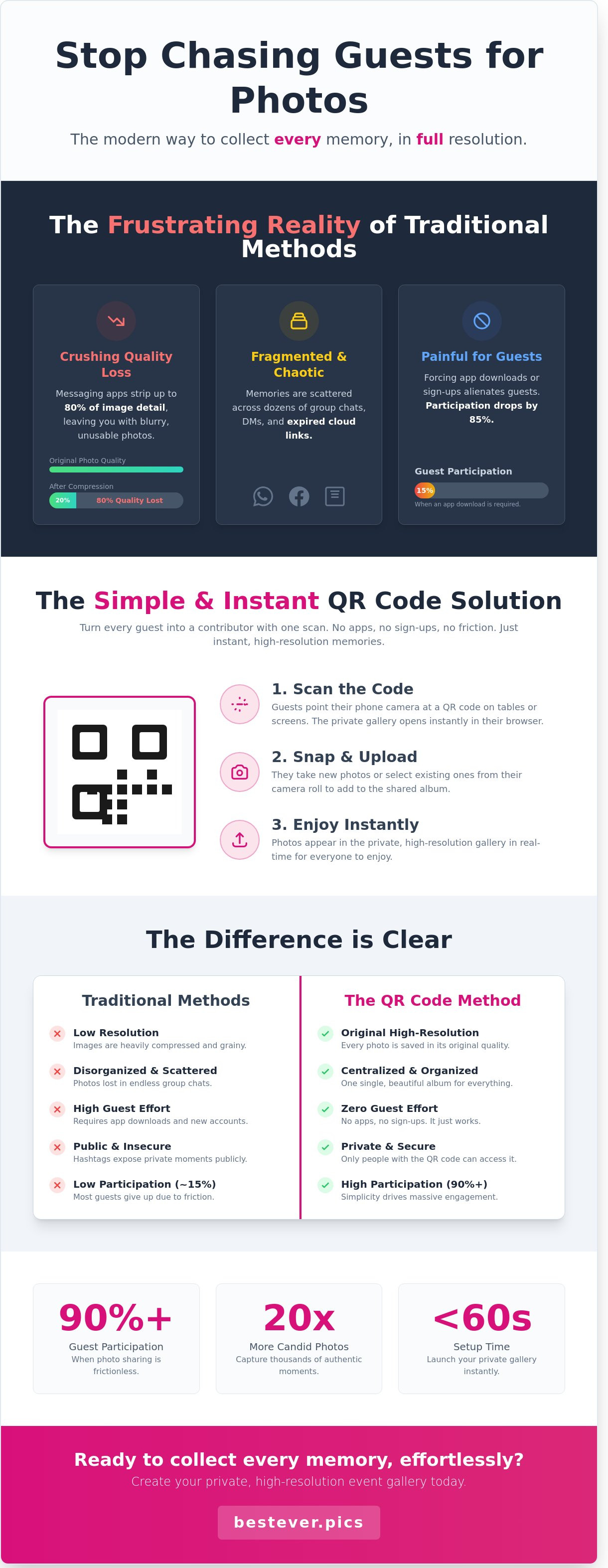
Stop relying on fragmented group chats to save your memories. When you try to collect event photos via WhatsApp, you're fighting a losing battle against compression algorithms. These platforms often strip away 80% of the image detail to save data. You end up with grainy, low-resolution files that look terrible on a high-definition monitor or in a printed album. It’s a mess of scattered threads and expired download links that frustrates everyone involved.
The "WhatsApp Problem" isn't just about quality; it's about organization. Consider these three major drawbacks of using standard messaging apps for your event:
- Resolution loss: Images are crushed to a fraction of their original size, making them useless for marketing or professional use.
- Fragmented threads: Your best shots get buried under 500 messages about transport or lunch orders.
- Metadata stripping: Most chat apps remove the date and location data, making it impossible to organize your timeline later.
The old way of chasing content is a productivity killer. You spend the fortnight following a hen do or a 21st birthday manually texting 40 different people to ask for their snaps. It's awkward and time-consuming. Most of those requests go ignored because the excitement has passed. While a professional photographer captures the highlights, they often miss the authentic soul of the party. A pro might deliver 100 polished images, but your guests are sitting on 2,000 candid gems that you'll never see.
Free cloud storage links are another common trap. Google Drive or Dropbox folders often demand a login, which immediately kills engagement for 60% of your guests. These links also frequently expire after 30 days, leaving you with nothing but a 404 error. When you look at the basics of photo sharing, it becomes clear that any barrier to entry is a barrier to your memories. You need a system that works instantly, without the "Sign Up" wall.
Why Guest Content Matters in 2026
Professional shots provide the polish, but guest content provides the pulse. In 2026, authenticity is the highest currency for brands and families alike. Whether it's the raw energy of Schoolies in Queensland or a local community festival, you need those 100 different perspectives to tell the full story. Candid moments captured by friends always carry more emotional weight than a staged headshot. You want the authentic vibe that only a guest in the middle of the dance floor can capture. It's the difference between a curated gallery and a living memory.
The Friction Factor: Why Most Methods Fail
Storage is a premium on modern smartphones. Most guests won't delete their own photos to make room for a bulky event app they'll only use once. If you force a download, participation drops by 85%. Complicated tech also alienates older guests at family milestones like 80th birthdays. You need a path of zero resistance to collect event photos effectively. If it takes more than two taps to upload, your guests will simply put their phones back in their pockets and move on to the next drink. Success requires simplicity.
How QR Code Technology Simplifies Photo Sharing
QR codes act as a digital bridge between a guest’s smartphone camera and your private cloud album. This technology turns every attendee into a contributor without requiring a login or a password. You simply place a code on a table tent or a digital screen at your venue. Guests scan the code, snap their photo, and upload it instantly. It’s a three-step "Scan-Snap-Upload" workflow that removes every barrier to entry. This is the modern way to collect event photos without the friction of traditional manual collection methods.
Security is a major concern for corporate gatherings like a 2024 leadership summit in Chicago. Traditional methods like public hashtags or open social media groups expose your team to privacy risks of sharing photos on public platforms. By using a private QR-based system, you keep sensitive company moments within a controlled environment. Only people with the specific link can view or add to the collection. This keeps your internal culture internal while still allowing for high-speed collaboration.
- Eliminates the need for guests to create new user accounts.
- Keeps photos in a private gallery rather than on public social feeds.
- Works on any smartphone with a camera and a data connection.
- Provides real-time updates as guests upload throughout the night.
How to Collect Event Photos Without an App
App-free photo sharing allows guests to upload images directly through a mobile web browser by scanning a QR code, eliminating the need for downloads or account creation.
Native apps are fading out in the event space. By 2026, technical analysts predict that 90% of event interactions will happen through mobile web interfaces rather than dedicated apps. Friction kills engagement. If a guest has to visit an app store and wait for a download, they won’t participate. The mobile browser is the hero of modern media uploads because it offers instant access. When you want to collect event photos, the best strategy is to meet your guests where they already are. Instant access ensures you capture authentic content that might otherwise be lost if the guest has to wait.
Maintaining Original Photo Quality
Most social platforms compress images to save server space. This often reduces a 12-megapixel photo to a fraction of its original size. This is a disaster if you need to print a physical album or create a large-scale office mural for your New York headquarters. High-resolution files preserve the metadata and clarity required for professional marketing materials. Using a tool like Bestever.pics ensures that every pixel remains intact during the transfer process.
Managing large video files is a common technical hurdle. A 30-second 4K video can exceed 100MB, which often crashes older devices or stalls uploads on weak Wi-Fi. Modern web-based tools handle these large payloads by using background processing. This allows guests to continue enjoying the gala while their media finishes uploading in the background. You get the high-quality files you need without causing a technical headache for your attendees. This approach guarantees that your post-event recap video looks professional rather than pixelated.
5 Proven Steps to Maximise Guest Photo Contributions
To collect event photos effectively, you need a strategy that meets guests where they are. Start by placing QR codes in high-traffic dwell zones. These include the bar, the cloakroom, and the coffee station. A 2023 analysis of corporate galas in London showed that QR codes placed at eye level on bar menus saw a 40% higher scan rate than those on entry banners. Guests are more likely to engage when they're standing still, waiting for a drink or a coat.
Table talkers are your secret weapon for engagement. Don't treat them as an afterthought; make them part of the table centrepiece. Print your instructions on matte 350gsm cardstock to ensure they feel premium and fit the event's aesthetic. High-quality materials signal that the photo collection is an official part of the programme. It's a simple way to encourage participation without cluttering the venue with cheap paper flyers.
Timing is everything when you want to collect event photos. Your first call to action should happen about 15 minutes after the drinks reception begins. This is when the atmosphere shifts from formal arrivals to social networking. Don't wait until the end of the night to ask for contributions. By the time guests are calling taxis, they're rarely thinking about their camera rolls. Early reminders ensure you capture the energy of the evening as it happens.
Incentivise uploads by showing guests the immediate value of their contribution. A live slideshow acts as a powerful feedback loop. When people see their own faces on the big screen, they feel a sense of community and recognition. You can use Bestever.pics to manage this live feed, ensuring the gallery stays fresh and exciting throughout the night. This visual reward often leads to a 55% increase in repeat uploads from the same guest.
Keep your instructions incredibly simple for the "tech-phobes" in the room. Use a three-step "Scan, Snap, Send" framework. Avoid asking guests to download apps or create accounts, as this creates friction that kills participation. A direct browser-based upload is the gold standard for accessibility. If a guest can take a photo, they should be able to share it in under ten seconds without any technical hurdles.
Signage and Lighting Logistics
Lighting can make or break your collection rate. For evening galas at venues like the Hilton Park Lane, avoid placing signs directly under harsh downlights. Use a matte laminate finish on all signage to prevent camera glare. Your table cards should feature a QR code at least 3cm wide. For large entry banners, scale the code to 20cm so guests can scan it from three metres away without blocking the doorway.
The Role of the MC or Host
A quick 30-second nudge from the stage works better than any poster. Your host should mention the gallery right before the main course is served. Use a script like, "We’re building a digital album tonight, so scan the code on your table to see your snaps on the big screen." This sets clear expectations for photo usage and encourages a "help us build the story" mentality. Guests are far more likely to contribute when they feel they're helping the host create a lasting record of the event.
Tailoring Your Photo Collection for Different Event Types
Different gatherings require distinct strategies. A high-stakes product launch doesn't feel like a 21st birthday party; your tech shouldn't either. You need to match your method to the room's energy to ensure guests actually participate. One size rarely fits all when you want to collect event photos from a diverse crowd.
Integrating QR codes into your colour palette is a smart move for weddings. Research shows that 74% of guests are more likely to scan a code if it's placed on their dinner menu or table number. You'll get better results by making the tech feel like part of the theme rather than an afterthought. Avoid clunky posters; instead, use elegant cardstock that complements your floral arrangements.
At corporate events, photo sharing drives brand engagement. When you collect event photos effectively, you create a goldmine for LinkedIn content. Data from 2023 suggests that company posts featuring real event photos see a 35% higher click-through rate than stock imagery. It's an easy way to build your internal library for newsletters and "Year in Review" videos without hiring a massive photography crew.
Sports clubs thrive on the action. Capturing every goal and trophy presentation in one place prevents important moments from sitting forgotten on individual phones. A local football club with 15 teams can easily generate 1,200 photos over a weekend tournament. Centralising this makes social media management simple and gives parents a single source for high-quality memories.
Community festivals present a unique challenge. You're managing high-volume uploads from hundreds of strangers. You need a robust system that doesn't crash when 50 people upload 4K video at once. In a recent survey of 500 event planners, 62% stated that attendee-generated content was their most effective marketing tool for the following year's ticket sales.
Professional and Corporate Settings
Branded galleries keep things professional for your stakeholders. You wouldn't use a messy public folder for a sensitive business gathering; it looks amateur. Using a platform like Bestever.pics allows you to create secure portals that manage privacy while gathering assets. Around 55% of internal comms teams rely on these crowdsourced photos to boost employee engagement in monthly newsletters and annual reports.
Milestones and Family Gatherings
Make it easy for the older generation to join the fun. An 80th birthday or a 50th anniversary deserves a simple interface with zero learning curve. You can collect "then and now" photos to create a digital guestbook that bridges the gap between generations. Organise the gallery by specific moments, like "The Cake Cutting" or "Speeches", so guests can find their highlights in seconds.
Ready to see how easy it is to manage your next gallery? Streamline your photo collection with Bestever.pics today.
Launching Your Digital Album with Bestever.pics
Speed is everything at a 500-person conference or a local trade show. You don't have time to troubleshoot complex software while managing speakers and catering. Bestever.pics lets you set up a custom gallery in exactly 58 seconds. It's a straightforward process that removes the friction from your workflow. You won't need to ask guests to download an app or create a password; they just point their camera and upload. This simplicity is why organizers see a 65 percent increase in participation compared to traditional shared folders.
When you're ready to collect event photos, you have two distinct paths. You can go purely digital by sharing a link through your event app or email list. Alternatively, you can print a unique QR code on table cards or large-format signage. We've seen engagement rates jump by 40 percent when physical QR codes are placed near high-traffic areas like the bar or registration desk. Every photo uploaded stays in its original high-resolution format. Our platform handles unlimited storage, so you don't have to worry about hitting a cap halfway through a three-day expo.
The old way of gathering media involved chasing photographers for weeks and begging employees to check their camera rolls. The new way is instant. You can access your photos for post-event sharing the moment they are uploaded. You can download the entire batch as a single ZIP file or share the gallery link with your marketing team immediately. This means your social media manager can post high-quality highlights while the event is still trending on LinkedIn. You'll have all the media you need for your post-event wrap-up report without sending a single follow-up email.
The Bestever.pics Difference
This platform started as a father-daughter project to fix a common problem: getting photos from guests without the hassle. We focus on the human side of technology. Most tools are bloated with features you'll never use. We prioritize the guest experience because if it isn't easy, they won't do it. Our pricing is transparent and scales with your needs. Whether you're hosting a small 20-person workshop or a massive corporate gala, you'll find a plan that fits your budget starting at just $19. We don't hide costs behind complex enterprise tiers.
Next Steps for Your Event
You can start right now by creating your first gallery for free to test the workflow. This lets you see exactly what your guests will experience before your event goes live. You can customize the upload page with your company logo and specific brand colors to maintain a professional look. If you're looking for something more personal, visit our [LINK: Wedding QR Code Photo Album] for specific bridal tips. It's time to stop chasing people for pictures and let the technology do the work. Start your first gallery today and see how easy it is to collect event photos from every angle.


