


Article by
Gabi
Hi, I'm Gabi - Co-Founder of Bestever Pics. Thanks for visiting our blog. We are working hard to produce content which we hope resonates with you. Feel free to drop us a line on socials or via the contact form on the site.
Did you know that requiring guests to download an app to share their snapshots slashes participation by 40 percent? You deserve every candid moment from your big day, and you shouldn't have to act like tech support for your wedding party just to learn how to collect guest photos on wedding website platforms without friction or compression. This is the inevitable evolution of wedding memories, designed for speed and professional-grade quality.
This guide reveals the exact strategy to build a high-resolution digital gallery that populates itself in real time without a single download. We are ditching legacy processes and account registrations for a faster, more sophisticated way to crowdsource your celebration. You will learn how to deploy a Bestever.pics system that turns every guest's phone into a contributor while maintaining zero tech stress. Stop chasing missing images and start building a gallery that captures the raw, unposed magic of your wedding with sophisticated simplicity.
Key Takeaways
- Stop losing candid shots to the camera roll black hole where 70% of guest photos typically disappear forever.
- Master how to collect guest photos on wedding website hubs using app-free technology that doubles participation by removing the friction of downloads.
- Evaluate 2026 photo sharing platforms to ensure your memories are stored in high-resolution without messy compression.
- Implement a simple five-step integration process to connect your digital gallery with your wedding website builder in minutes.
- Discover creative QR code placement strategies that drive guest engagement at every stage of your event, from the ceremony to the reception.
Why You Need a Plan to Collect Guest Photos on Your Wedding Website
Learning how to collect guest photos on wedding website pages involves integrating a browser-based QR hub that bypasses app stores. By placing a simple scan-to-upload link on your site, you invite guests to contribute high-resolution files instantly. This strategy transforms your website from a static info page into a live, interactive gallery of candid wedding moments.
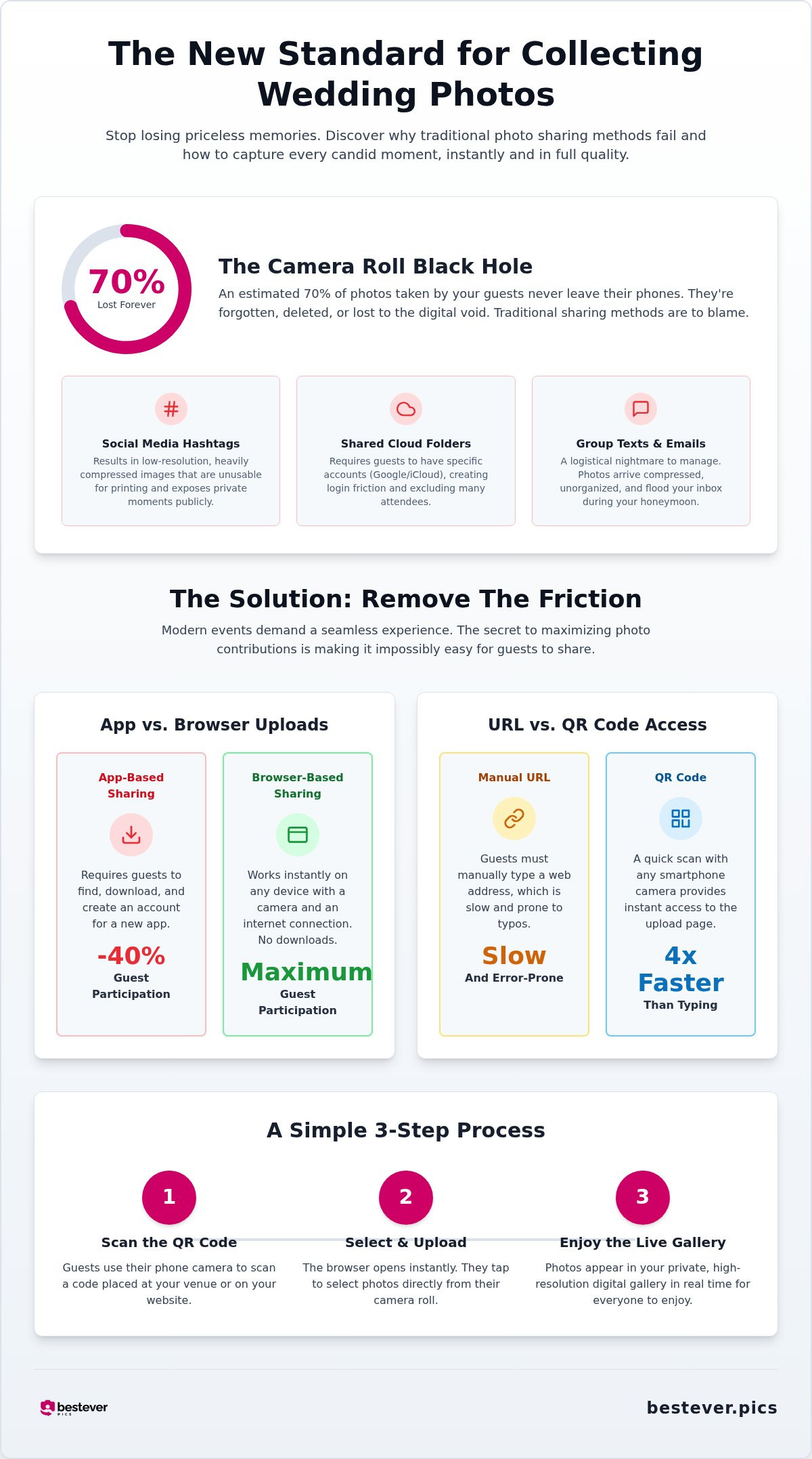
Most couples lose 70 percent of their guest photos to the camera roll black hole. These images sit on phones until they're eventually deleted or forgotten. App fatigue is the primary culprit. Your guests are tired of downloading new software or creating accounts just to share a few snapshots. Bestever.pics eliminates this friction entirely. It uses a lightning-fast browser upload that keeps the momentum of the party going without technical hurdles.
The Problem with Traditional Sharing Methods
Social media hashtags are dead. They once seemed clever, but they now result in low-resolution, heavily compressed images that look terrible in print. Shared iCloud or Google Drive folders often fail because they require specific logins or brand-specific hardware. This excludes a huge chunk of your guest list. Texting photos is even worse. It creates a logistical disaster for you to manage during your honeymoon. Throughout the history of wedding photography, the focus has always been on capturing and preserving high-quality memories. Legacy sharing methods simply don't respect that standard.
Why Your Wedding Website is the Perfect Hub
Your wedding website is the digital headquarters for your celebration. Guests already visit it for travel details and RSVPs. Use that existing traffic to your advantage. Placing your gallery link here ensures it's the first place people look when they want to see the highlights. It centralises your communication into one powerful destination.
- Consistency: Guests don't need to remember a separate app name or login.
- Accessibility: A single link on your homepage works for every device and every guest.
- Speed: You can link your digital photo sharing gallery directly to your site menu for instant access.
Don't let your wedding memories scatter across a dozen different platforms. Focus on a single, professional-grade hub. This is the only way to ensure you get every shot from the dance floor to the cake cutting. It's time to demand more from your tech and make the process effortless for everyone involved. Mastering how to collect guest photos on wedding website platforms is the smartest way to protect your visual legacy.
Comparing the Best Ways to Collect Guest Photos in 2026
Choosing how to collect guest photos on wedding website platforms is a decision between speed and friction. 2026 weddings demand a balance of privacy and high-definition quality. Free platforms like Google Photos or iCloud often feel like an afterthought. They lack the branding and dedicated support of a professional system. Research on how people share photos online highlights that guests act as both creators and curators. You need a system that respects their role without compromising your privacy. Public social media tags expose your intimate moments to strangers. Private galleries keep your circle tight while ensuring every file remains high-resolution. They provide a curated experience that free alternatives simply can't match.
QR Codes vs. Manual Links
Speed is the ultimate metric for guest participation. Scanning a code is four times faster than manually typing a URL. This tiny difference in effort is the gap between a full gallery and a total blackout. When you refine how to collect guest photos on wedding website hubs, the focus should be on this scan-and-upload speed. Static QR codes are a legacy mistake. Dynamic links are the modern standard. They allow you to update the gallery destination without reprinting your physical signage. Ensure your qr codes for wedding photos are mobile-optimised to work instantly in low-light reception environments.
App-Based vs. Browser-Based Uploads
App fatigue is real. Data shows that 40 percent of guests abandon the process when forced to download software. They don't want another icon on their home screen for a one-day event. Browser-based uploads are the inevitable evolution of this industry. They work instantly on any device with a camera and an internet connection. This approach even bypasses corporate IT restrictions that often block app downloads on work-issued phones. It's about accessibility. It's about getting the shot without the headache of account registration or password resets during the party.
Capturing these fleeting moments shouldn't feel like a chore for your friends and family. If you want maximum engagement, consider a private wedding photo gallery that prioritises the guest experience. This shift toward frictionless tech is why modern couples are ditching legacy apps for good. Your wedding is a high-stakes event. Use the technology that matches that energy and ensures no memory is left behind on a guest's camera roll.
Step-by-Step: How to Collect Guest Photos on Wedding Website Hubs
Setting up a system that actually works doesn't require a degree in computer science. You can establish a professional-grade gallery in under a minute, ensuring your digital hub is ready for the first arrival. Here is exactly how to collect guest photos on wedding website pages without the technical friction of legacy apps.
Setting Up Your Digital Gallery
Start by choosing a provider that offers unlimited storage and browser-based uploads. Bestever.pics allows you to create a gallery in about 60 seconds. Once your event is active, customise the branding. Match the background colours and fonts to your invitation suite for a cohesive look. Pro subscribers can use their dashboard to manage multiple galleries at once; this is a massive time-saver for busy wedding planners or venue managers who need a scalable way to handle recurring events.
- Create: Launch your event and set your specific date.
- Customise: Add your names and choose a theme that fits your wedding vibe.
- Generate: Download your high-resolution QR code instantly from the dashboard.
- Test: Scan the code with an iPhone and an Android to ensure the flow is perfect.
- Deploy: Move the link to your website and prepare your physical signage.
Integrating the Gallery into Your Website
Most website builders allow for custom pages or navigation links. Create a dedicated section titled "Share Your Photos" so guests don't have to hunt for it. Use high-contrast buttons with clear text like "Upload Your Memories Here" to drive action. This is much more effective than a tiny text link buried in a menu. Speed is the goal here. The fewer clicks it takes to reach the upload screen, the more photos you'll receive.
You should also consider collecting guest photos by embedding the QR code image on your digital RSVP page. This introduces guests to the process before they even arrive at the venue. Before the big day, grab a few different phones and test the link yourself. Check that the upload works on various browsers like Safari and Chrome. This simple verification step ensures that when the first toast happens, your gallery is ready to capture it without a hitch. Mastering how to collect guest photos on wedding website hubs is about creating a path of least resistance for your friends and family.
Creative Ways to Display Photo QR Codes at Your Venue
Physical implementation is where your digital strategy meets the real world, so you must point people toward the hub you've built. Visibility is the only way to ensure success across any venue style. This is the practical side of learning how to collect guest photos on wedding website platforms. You want your QR codes to be as omnipresent as the champagne.
Signage and Table Decor Ideas
Small, intentional placements work best. Don't just stick a single poster at the back of the room. Place elegant QR cards directly on reception tables next to the centrepieces. This catches guests when they're seated and likely looking for something to do between courses.
- Acrylic Signs: Use high-contrast designs at the bar and entrance areas.
- Table Talkers: Place small cards near the centrepieces for easy access during the meal.
- Printed Materials: Include codes on the back of menus, programs, and place cards.
For a more modern aesthetic, use large 'Capture the Love' acrylic signs at the bar and entrance. If you're planning a UK event, these same tactics work perfectly for hen and stag dos to capture the pre-wedding chaos. Keep the design consistent with your seasonal decor. If you're marrying during the cooler months or the vibrant colours of autumn, match your signage to the floral arrangements.
Interactive Display Moments
Technology should be a part of the party, not an obstacle. Ask your DJ or celebrant to make a quick announcement during a transition. A 10-second shout-out can trigger a wave of uploads while the energy is high. You can also project a live slideshow of guest photos during the evening party.
The collection process doesn't end when the lights go up. Place a QR code on 'thank you' cards sent out after the honeymoon. It gives guests one last chance to share any hidden gems they might have missed on the day. By diversifying your placements, you ensure that every guest knows exactly how to collect guest photos on wedding website galleries.
The Ultimate Wedding Website Companion for 2026
You've seen the data. Now you need the engine to power it. The platform was founded by father-daughter duo Steve and Chloe to fix the broken process of event sharing. They understood that the secret to how to collect guest photos on wedding website pages isn't complex code; it's human-centric design. By removing the app download hurdle, they've created a system where participation isn't just possible, it's inevitable. This is the sophisticated evolution of the wedding album, designed to transform your anxiety about missing shots into excitement for your creative gallery.
Professional Quality, Human Touch
High-octane events don't have time for technical delays or registration screens. You can finish your gallery setup in about 60 seconds, leaving you free to focus on the guest list and the decor. While the interface is simple for guests, the backend is a technical powerhouse. It preserves every pixel of your high-resolution files, making them ready for professional printing and large-scale albums later. This ensures your memories aren't trapped in the low-quality compression of social media or text threads.
For industry experts, the Pro subscription provides a scalable system to manage dozens of events. This is the standard for wedding venues and planners who need to deliver professional-grade output for every client. It offers the speed and reliability required in modern digital markets. Whether you're hosting a micro-wedding or a grand ballroom event, the technology adapts to your scale. You get the confidence of a market disruptor with the approachability of a family-run business.
Start Your Gallery Today
Don't wait for the ceremony to start your collection process. You can use your gallery for every pre-wedding milestone, from the engagement party to the rehearsal dinner. This builds momentum and gets your inner circle comfortable with the scan-and-upload flow early. It's the most effective way to ensure you don't miss a single candid moment from the entire wedding journey. Guests love seeing their photos populate the gallery in real time, which drives even more participation.
- App-free technology: Eliminates friction for 100 percent guest accessibility.
- High-resolution storage: Preserves original quality for professional printing.
- Instant setup: Launch your branded gallery in under 60 seconds.
Setting up your hub early also allows you to test your QR code placements and website integration. You want everything to be perfect before the first guest arrives. Mastery of how to collect guest photos on wedding website hubs starts with a single, bold decision to prioritise ease of use. Ditch the legacy apps and embrace a faster, more sophisticated way to capture your celebration with bestever.pics. Your future self will thank you when you're downloading a complete, high-resolution archive of your most important day.
Launch your private wedding gallery and start collecting memories now.
Secure Your Wedding Memories Today
The inevitable evolution of your wedding album starts with a single scan. You've seen why legacy apps fail and how a browser-based QR hub transforms guest participation. By centralising your gallery on your main wedding hub, you eliminate the confusion that often leads to lost memories. This isn't just about storage; it's about giving your friends and family a sophisticated, friction-free way to contribute to your visual legacy.
Now that you understand how to collect guest photos on wedding website hubs with professional-grade speed, you can focus on the celebration. Your guests will love the instant, app-free experience, and you'll love the high-resolution archive that populates in real time. Bestever.pics is trusted by thousands of 2026 couples because it simply works. It's time to stop worrying about missing shots and start getting excited about the raw, candid magic your guests will capture.
Your future self will thank you for making this choice today. Happy planning!
Frequently Asked Questions
Do guests need to download an app to upload photos to my wedding website?
No, your guests never need to download an app. Bestever.pics uses a sophisticated browser-based system that works instantly on any smartphone. This eliminates the friction of account registration and app store downloads. You'll see much higher participation rates because the process is effortless. Just scan, select, and upload. It's the inevitable evolution of event sharing that keeps the energy focused on your celebration, not technical troubleshooting.
How do I get my older wedding guests to use a QR code?
Visibility and simplicity are your best tools. Most smartphones now have QR scanning built directly into the camera app, so there's no learning curve. Place clear, well-lit signage at the bar and on reception tables. Ask your celebrant to mention the gallery during the transitions to prompt action. When guests see how fast the browser-based upload works, they'll feel confident joining in on the fun.
Can I download the guest photos in high resolution for printing?
Yes, you can access every file in its original quality. Unlike social media or text threads that crush images with heavy compression, Bestever.pics preserves the full resolution. This means your candid guest shots are ready for professional printing or inclusion in a high-quality physical album. You get the best of both worlds: the raw energy of guest photography with the professional-grade output you expect for your visual legacy.
Is there a limit to how many photos guests can upload to the gallery?
There are no storage caps or upload limits for your event. Your guests can share as many photos and videos as they like throughout the day and evening. This unlimited capacity encourages people to capture every angle of the celebration without worrying about space. You'll end up with a massive, diverse archive that documents your wedding from the first arrival to the final dance floor moments.
How do I put a QR code on my wedding website for photo sharing?
It's a straightforward process that takes less than a minute. First, download your high-resolution QR code image from your Bestever.pics dashboard. Then, upload that file to a dedicated "Photos" page on your chosen website builder. Adding a clear button that says "Upload Your Memories" provides a direct path for guests. This is the most effective way to teach guests how to collect guest photos on wedding website hubs before the big day.
What happens if someone uploads an inappropriate photo to my wedding gallery?
You maintain total authority over your digital gallery. The Bestever.pics dashboard gives you instant access to view, hide, or permanently delete any uploaded content. If a guest accidentally shares a blurry shot or something inappropriate, you can remove it in seconds. This ensures your final collection is a curated, high-quality reflection of your wedding day. You get the benefits of crowdsourced content without losing control over the final professional-grade output.
Can I use the same QR code for my hen and stag dos?
Absolutely, and it's a great way to build excitement. You can keep the same gallery active for your hen and stag dos, rehearsal dinner, and even the morning-after brunch. This centralises your entire wedding journey into one high-resolution hub. It also gets your wedding party comfortable with the upload process early. By the time the ceremony starts, your inner circle will already be experts at contributing to your shared album.
Is it better to use a hashtag or a QR code for wedding pictures?
QR codes are the superior choice for quality and participation. Hashtags often result in compressed, low-quality images that are difficult to track down across private accounts. A QR code provides a direct, private path to a high-resolution gallery. It's the inevitable evolution of how to collect guest photos on wedding website pages, ensuring you actually own your memories instead of leaving them scattered across social media platforms.


