


Article by
Gabi
Hi, I'm Gabi - Co-Founder of Bestever Pics. Thanks for visiting our blog. We are working hard to produce content which we hope resonates with you. Feel free to drop us a line on socials or via the contact form on the site.
The best wedding photo competition feels like part of the celebration, not another task on a guest’s list. If you’re planning how to organize a wedding photo competition for guests, make two things simple: joining in and choosing a winner. Clear entry steps and fair rules help guests share candid moments without making the contest feel like a chore.
It’s natural to want plenty of guest photos without having everyone glued to a phone, especially during the ceremony and other meaningful moments. Set a clear time for the competition to begin, then choose an easy way to share photos so guests can take part without missing the day.
This guide covers prompts, fair rules, photo collection and judging. You’ll have a practical plan for how to organize a wedding photo competition for guests while keeping the activity fun and in the background.
Key Takeaways
- Use a focused photo prompt to help guests spot candid moments throughout the celebration.
- For how to organize a wedding photo competition for guests, set the entry criteria, deadline and judging method before the day.
- Compare direct messages, shared albums and QR-linked uploads to choose an entry method that suits your guests and your workload.
- Display the instructions where guests will see them, make one brief announcement and close entries without interrupting the celebration.
- Gather contest entries alongside other guest photos in a shared wedding gallery.
Why organize a wedding photo competition for guests?
A wedding guest photo competition is a lighthearted challenge that invites friends and family to capture the day from their own perspective. A prompt can help guests notice laughter between speeches, carefully chosen table details or an unexpected dance-floor moment. The aim is to collect personal snapshots and add a little shared fun, not to turn the wedding into a photography assignment.
Guests see parts of the day the couple may miss, from a quiet catch-up between relatives to the view from the back of the room as everyone starts dancing. Their photos can add another perspective to the professional images, not replace them. Wedding photography includes different approaches; a guest contest simply adds informal, guest-led snapshots. Keep participation optional, and make clear that no photo is worth missing the ceremony, speeches or another moment guests want to experience fully. For practical inspiration, share these wedding photography tips for guests.
Choose a contest style that fits your wedding
One open-ended challenge is easy to explain: invite guests to capture a candid moment that sums up the celebration. It gives people freedom, but judging can feel subjective if entries range from funny dance moves to beautiful décor. A few simple categories add direction, such as “best candid reaction,” “favourite wedding detail” or “most joyful reception moment.” Keep categories distinct so guests know what kind of photo fits each one.
Match the format to the day you’re hosting. A small backyard wedding may suit one prompt and a quick review, while a longer reception with a varied guest group may have room for several categories. Think about who will track entries and help judge them. If no one has time to manage multiple categories, choose one clear challenge instead. The contest should fit the schedule, not compete with it.
Set a light-touch goal for guest participation
Before settling on a prompt, decide what you want the activity to add. If candid memories are the priority, ask guests to notice unposed reactions and small interactions. If guest connection matters more, use a prompt that encourages friends from different tables to join in, such as a creative group photo during the reception. You can aim for both, but a simple focus makes the contest easier to explain and judge.
Success doesn’t have to mean reaching a particular number of entries. It could mean collecting a few photos you’d otherwise have missed, giving guests a fun way to join in or seeing contributions from different parts of the celebration. Make it clear that taking part is a choice. Guests who prefer to put their phones away should still feel welcome, and those who join should never feel they have to leave an important moment to get a winning shot.
How to organize a wedding photo competition for guests: set the rules
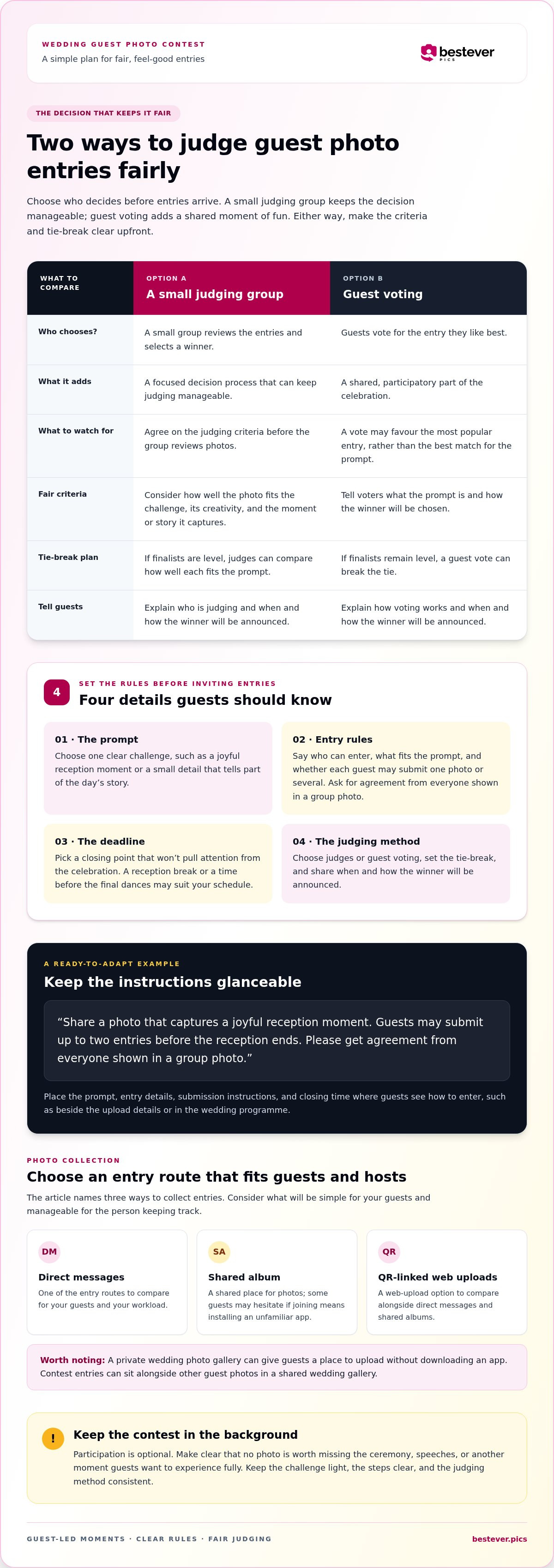
Clear rules make a contest feel playful rather than pressured and give everyone the same chance to join. Set the details before inviting entries so guests know what to capture, how many photos they can submit, when entries close and how you’ll choose a winner. Keep the instructions short enough to read at a glance.
- Define the prompt. Choose one clear challenge, such as capturing a joyful reception moment or a small detail that tells part of the day’s story.
- Set entry rules. Say who can enter, what subjects fit and whether each guest may submit one photo or several. Ask guests to get agreement from everyone shown in a group photo before submitting or sharing it.
- Choose a deadline. Give guests time to take part, then close entries at a planned point that won’t draw attention away from the celebration. A reception break or a time before the final dances may suit your schedule.
- Pick the judging method. Decide who will judge and what they’ll look for, or invite guests to vote. Set a tie-break rule before entries arrive.
Make the rules fair and easy to follow
Write rules guests can understand at a glance
Put the instructions wherever guests see the invitation to enter, such as on a sign beside the upload details or in the wedding programme. Include the prompt, who may enter, the photo limit, how to submit and the closing time. Avoid fussy restrictions on equipment or editing. The aim is a welcoming challenge, not a test of photography skills.
A concise rule could read: “Share a photo that captures a joyful reception moment. Guests may submit up to two entries before the reception ends. Please get agreement from everyone shown in a group photo.” Adjust the details to suit your plans. If you’re using a shared gallery, place the entry instructions beside the upload details. A private wedding photo gallery gives guests a place to upload without downloading an app.
Choose fair judging criteria before entries arrive
Pick criteria that match the prompt, then apply them consistently. Judges might consider how well a photo fits the challenge, its creativity and the moment or story it captures. A small judging group can keep decisions manageable; guest voting can add shared fun, but may favour the most popular entry. Choose the approach that suits your guests and explain it upfront.
Agree on a tie-break before the contest begins. You might ask judges to compare prompt fit first, or use a guest vote if finalists remain level. Tell guests when and how you’ll announce the winner. These decisions help keep the focus on enjoying the photos, not questioning the result.
Compare photo collection and voting methods for wedding guests
Choose the entry route separately from the judging method. Direct messages, a shared album and QR-linked web uploads all collect photos, but they ask guests and hosts to do different things. Guests may hesitate if joining means finding and installing an unfamiliar app, so make the steps easy to explain and follow. Here’s a practical comparison to help you decide how to organize a wedding photo competition for guests.
| Method | Setup effort | Guest steps | Entry visibility | Host organisation |
|---|---|---|---|---|
| Direct messages | Low to start | Open a message and send a photo | Entries arrive in separate conversations | Gather and track each submission |
| Shared album | Create and share an album | Open the album and add a photo | Entries are collected in one album | Review entries in a central place |
| QR-linked web uploads | Create a QR code linked to an upload route | Scan the code and upload through a browser | Entries go to the linked collection | Keep submissions together in the shared album |
The best fit depends on how much sorting you’re happy to do. Direct messages can feel familiar, but photos may be buried among other wedding-day chats. A shared album brings entries together, while a QR code gives guests a quick route to a web-based upload without downloading an app. Put the code where people naturally pause, such as near the guest book or reception entrance, and add a short instruction beside it.
Make submitting a photo easy for different guests
Some guests will be ready to join in; others won’t want another app or account to manage. A QR code that opens a browser upload page offers a straightforward alternative. Test the code before the wedding, then make sure the printed instructions are readable and easy to spot. A clear prompt helps too, so share practical wedding photography tips for guests alongside it.
Choose between judges, guest voting, or a combination
A small judging group works well when you want consistent decisions based on criteria such as prompt fit or storytelling. Guest voting can build shared excitement, though it may reward the most widely seen entry. For a hybrid, let guests shortlist favourites, then have judges select the winner using the published criteria. Say clearly whether votes decide the result or only help narrow the field.
Keep the collection route and the voting route clear in your instructions. For example, guests could upload to a shared album while a small judging group reviews entries after submissions close. If you want one place for wedding guest uploads, a private wedding photo gallery can collect photos through QR-linked web uploads without an app download.
Launch the wedding photo competition without interrupting the celebration
A little planning keeps the contest easy to join and firmly in the background. Decide when entries open and close, put the instructions out before guests arrive and ask one trusted helper to handle basic questions. Then make a brief announcement at a natural pause and let guests take part if they wish.
Place prompts where guests naturally pause
Choose spots guests will notice without having to search: the welcome area, a table beside the guest book or reception tables. Pair the QR code with a short explanation, the photo prompt and the closing time. Keep the sign readable and place it where guests can scan without blocking a walkway or interrupting a conversation. These wedding QR code display ideas can help you choose a spot that fits your venue.
For a web-based upload route, guests scan the host-created QR code and upload photos to the shared album without downloading an app. Test the code and instructions before the event, then ask your helper to make sure guests can find the entry point. This can help you avoid troubleshooting while greeting guests or enjoying the reception. A shared wedding gallery can keep contest submissions together with other guest memories.
Keep entries and judging on a simple timeline
Fit the entry window around the wedding schedule. You might open the contest during cocktail hour, when guests have a natural pause, and close entries before a planned reception moment that deserves everyone’s attention. Choose times that suit your run sheet, and tell guests the deadline clearly so they don’t need repeated reminders.
- Before guests arrive: Place the signs and QR code where guests can spot them, and make sure the prompt and deadline are visible.
- At a natural pause: Ask the MC or another trusted person to make one short announcement explaining the challenge and where to enter.
- During the entry window: Let guests take part at their own pace. Your helper can answer questions and direct anyone who needs help to the instructions.
- At the stated deadline: Close entries, then give judges or guests time to review eligible photos using the method you’ve already chosen.
- At a suitable reception moment: Announce the winner briefly, away from key moments such as speeches or formalities.
That’s how to organize a wedding photo competition for guests without turning the reception into a series of reminders. A helper gives guests a friendly point of contact while leaving you free to enjoy the day. Keep the contest optional, stick to the published timeline and let the celebration lead.
Use a shared wedding photo gallery to collect entries and memories
A shared gallery gives guests one place to contribute contest photos alongside candid moments and details from the wedding. With a web-based option, guests scan a QR code created by the host and upload photos without downloading an app. That keeps the entry route simple while bringing guest memories together.
Bestever.pics is an app-free wedding photo gallery that uses this QR-code upload workflow. To plan how to organize a wedding photo competition for guests around a shared collection, decide whether contest entries and other guest photos will go into the same album. If they do, tell guests exactly which photos count for judging and apply the same rules to those submissions.
Decide how the gallery supports the competition
Using one submission route can make it easier for guests to share photos, but you’ll need to identify eligible contest entries when judging. Make the distinction clear in the prompt or entry instructions, such as asking guests to label a contest photo with its category if your chosen method supports it. For broader planning on gathering guest contributions, you can read more about best practices for collecting event photos.
Think about the couple’s experience after the celebration, too. A gallery with more than contest submissions can preserve small moments from different tables and parts of the day, not just the photos guests think might win. The trade-off is that a wider collection may take longer to review, so keep your judging criteria focused and set aside time to look through eligible entries rather than trying to decide during the reception.
Make the next steps clear after the wedding
Once entries close, compare eligible photos with the criteria you shared before the event. If you chose guest voting or a hybrid process, follow the voting steps and tie-break rule you announced. Then share the result as promised, whether that’s a brief announcement at the reception or a message to guests afterward.
Keep the result light. Thank everyone who took part, recognise the winning photo and let the gallery remain a collection of shared memories, not just a record of the contest. Clear follow-through helps guests know their contributions were seen, even if they didn’t win.
Setting up a private wedding photo gallery ensures that all your contest entries and guest snapshots remain secure and easily accessible only to those you invite to the celebration.
Make room for the moments guests notice
A guest photo contest can give friends and family a reason to look beyond the planned highlights and capture the small moments that feel like your wedding: a shared laugh, a favourite detail or a dance-floor surprise. Keep the invitation light, and let guests decide how they want to take part. The best entry is one they’re happy to capture, not one that pulls them away from the celebration.
If you’re working out how to organize a wedding photo competition for guests, choose a collection method that feels as simple as the prompt. Bestever.pics is designed for wedding guest photo sharing, with uploads through a host-created QR code and no app download required. Guests have a clear next step when they’re ready to contribute, while the celebration stays in the foreground.
Give your guests an easy place to share the moments you’ll be glad to remember.
Keep it joyful, keep it easy, and let your guests add their own perspective to the day.
Frequently Asked Questions
Can wedding guests enter a photo competition without downloading an app?
Yes. A web-based upload page opened from a QR code lets guests submit photos without installing an app. Print a backup instruction for anyone who can’t scan the code, such as asking them to show their photo to the designated helper, who can explain another way to submit it. Keep the prompt and closing time beside the QR code so guests don’t have to search for contest details.
What are good categories for a wedding photo competition?
Choose categories that reflect the couple’s style and the parts of the day guests can photograph comfortably. For example, try “best candid laugh,” “favourite table detail” or “most creative group photo.” A small set is easier to remember than a long menu. Explain each category with a quick example, and avoid prompts that could encourage guests to photograph private, emotional or unwanted moments.
How do you choose a fair winner in a wedding photo competition?
Choose the judging approach and criteria before entries come in, then apply them the same way to every eligible photo. Reviewing entries without focusing on who submitted them can help keep personal familiarity from becoming the deciding factor. Explain the tie-break rule and when you’ll announce the result. A clear process is a key part of how to organize a wedding photo competition for guests fairly.
When should a wedding photo competition start and end?
Start after guests have had a chance to arrive and settle, then set the closing time around your reception schedule. For instance, you might open entries during cocktail hour and close them before a planned speech or special dance. Avoid running the contest during the ceremony or other moments when guests should be present. Build in a separate review window so choosing the winner doesn’t feel rushed.
How can we encourage guests to take part without making the wedding feel like a contest?
Keep the invitation warm and make participation clearly optional. Ask the MC to introduce it as a fun extra, not an activity everyone needs to complete. A prompt such as “capture a detail you love” lets guests join in naturally, while those who prefer to keep their phones away can simply enjoy the day. Avoid tracking who has entered or repeatedly reminding guests to submit photos.
Should wedding guests vote for the winning photo?
Guest voting can add excitement, especially if you want attendees to share in the result, but it may reward the most familiar entry rather than the strongest match for your prompt. Judges can apply set criteria more consistently. A hybrid option is to let guests choose finalists, then ask judges to select the winner. Explain how people can vote, who makes the final decision and how a tie will be resolved.


