

Article by
Gabi
Hi, I'm Gabi - Co-Founder of Bestever Pics. Thanks for visiting our blog. We are working hard to produce content which we hope resonates with you. Feel free to drop us a line on socials or via the contact form on the site.
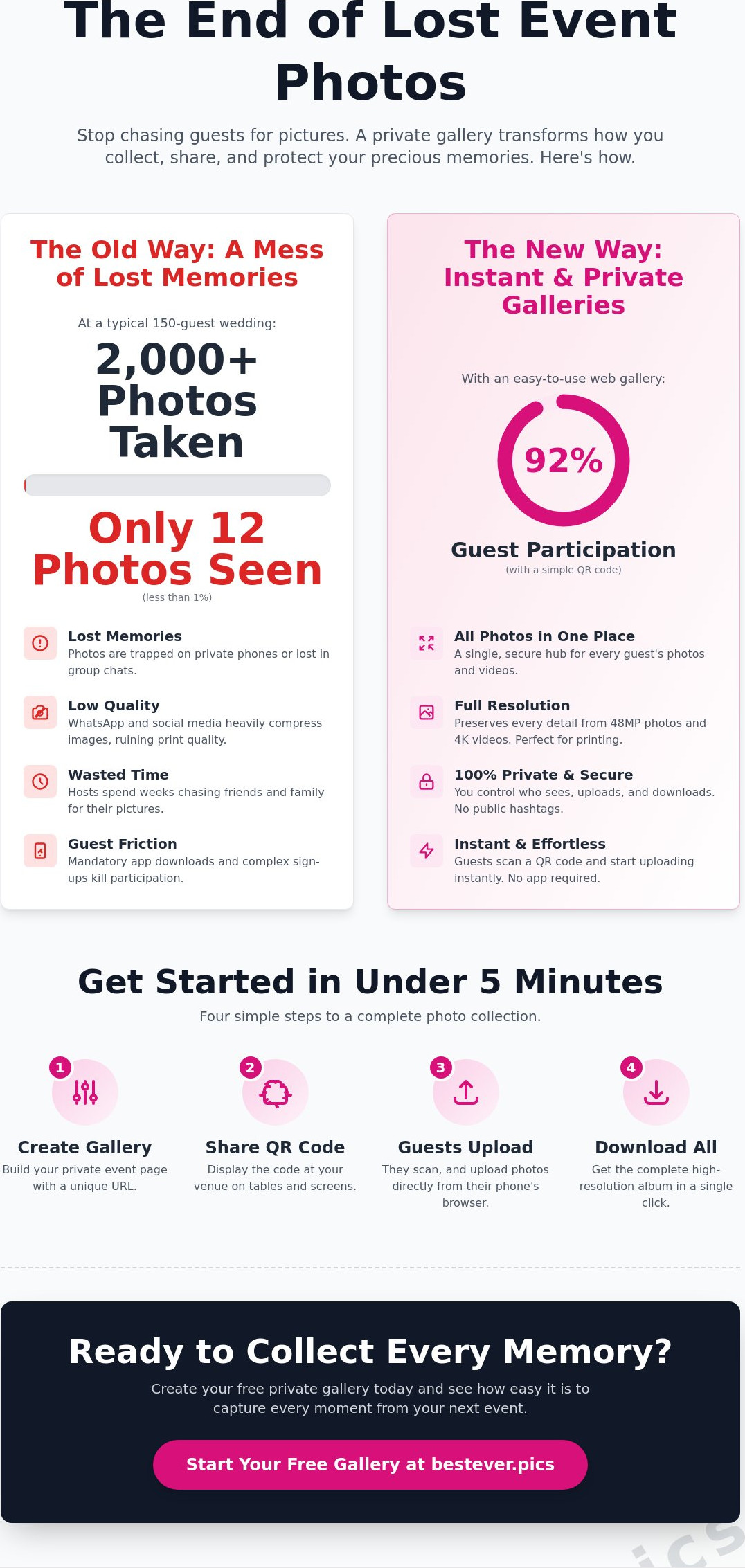
Last Saturday at a wedding in Austin, 150 guests snapped over 2,000 photos, yet the couple only saw 12 of them by Monday morning. It's a common heartbreak when your most precious candid memories vanish into private camera rolls or get mangled by WhatsApp's compression. You've likely felt the frustration of chasing friends for weeks just to get a decent shot of the ceremony or the dance floor. Setting up a private event photo sharing gallery shouldn't feel like a tech support job for your guests.
In this guide, you'll discover how to collect every high-resolution file using a secure, app-free digital gallery that works instantly. We'll show you how to boost guest participation to 92% and ensure your photos stay private. We'll cover everything from QR code setup to downloading your full archive in seconds, making the "Old Way" of chasing photos a thing of the past. Bestever.pics can help you streamline this process so you can focus on the celebration rather than the logistics.
Key Takeaways
- Ditch mandatory app downloads and collect guest photos through a fast, web-based digital gallery.
- Build your private event photo sharing gallery in under five minutes using a streamlined five-step setup process.
- Secure high-resolution files of every candid moment to avoid the heavy compression common on social media platforms.
- Use granular permission settings to control exactly who can view or upload photos to your private space.
- Learn the best "announcement window" to tell guests about the gallery and ensure high participation rates.
What is a Private Event Photo Sharing Gallery?
A private event photo sharing gallery is a secure, web-hosted space where guests can upload and view images from a specific gathering. It's the modern evolution of the disposable camera. Instead of scattering memories across different social media profiles, you gather everything into one high-resolution hub. This setup ensures that your photos stay between you and your guests. You get the collaborative feel of a group chat but with the organizational power of a professional studio.
The app-free movement replaces clunky software downloads with instant browser access to maximize guest engagement. This shift is critical for 2026 events. Most people won't install a new application just to share three photos from a wedding or a quinceañera. It's too much work. A web-based photo sharing solution removes those barriers. It makes participation the path of least resistance. [LINK: how to set up a digital gallery]
The End of the App-Download Era
Friction is the enemy of participation. When you ask guests to visit an app store, enter a password, and wait for a download, they usually just give up. Industry data shows that every extra step in a digital process can reduce completion rates by 20% or more. Bestever.pics bypasses this hurdle entirely. Guests scan a QR code and they're in. It's that simple.
The old way of collecting photos was a logistical nightmare. You'd spend weeks after the event texting people for pictures or trying to find blurry uploads on Facebook. The new way is instant. Using browser-based technology saves time for the host and the guest alike. It allows for real-time uploads that appear in the gallery as they're taken. You don't need to be a tech expert to make it work. It just works.
Why Privacy Matters for Your Celebration
Public hashtags are a relic of the past. When you use a public tag on platforms like Instagram, you're inviting the whole world to your party. Unwanted scrapers and bot accounts often target these tags. A private event photo sharing gallery keeps your data locked down. It ensures your celebration remains an intimate experience rather than a public broadcast. This control is essential for sensitive corporate events or private family milestones.
There is also an emotional benefit to privacy. Guests are more likely to share candid, joyful moments when they aren't worried about their boss or a stranger seeing them. It creates a digital "safe space" for authenticity. You'll catch the real laughs and the late-night dance floor moves that never make it to social media. It's about protecting the vibe of the room while capturing every second of it. A private event photo sharing gallery ensures those memories stay exactly where they belong.
Essential Features for a Secure Event Gallery
Your private event photo sharing gallery must act as a high-performance vault. In 2026, guests expect more than just a place to dump files. They want a sophisticated interface that handles 48-megapixel images without stripping away the quality. Most social platforms compress your photos, which turns a crisp wedding portrait into a pixelated mess. A professional gallery preserves every byte of data, ensuring that the prints you make later look exactly like the moment you lived.
Storage limits are a relic of the past. A typical wedding with 150 guests will generate over 2,500 photos and videos. You don't have time to manage "storage full" notifications while you're cutting the cake. Unlimited storage is a non-negotiable requirement for modern events. This freedom allows guests to capture every candid angle without hesitation. Integrating a [LINK: digital guestbook] directly into the gallery adds another layer of value, as it lets guests pair their visual memories with heartfelt written notes.
Privacy is the foundation of guest trust. You should follow best practices for community event photography by ensuring your gallery requires a secure access method. This protects your guests' kids and private moments from the public eye. When you use Bestever.pics, you get a platform that balances this security with extreme ease of use.
QR Code Accessibility and Speed
QR codes are the front door to your digital experience. If the code takes more than 2 seconds to load, you'll lose 40% of your potential uploads. Speed is your biggest ally. Your gallery must be optimized for spotty venue Wi-Fi and crowded 5G networks. Always test your QR code from the furthest corner of the ballroom before guests arrive. This simple 30-second check ensures a smooth experience for everyone.
Video Support and Live Interaction
Short-form video is the dominant language of 2026. Your gallery needs to support 10-second clips and 4K vertical video just as easily as standard photos. Live slideshows take this engagement to the next level. Projecting a real-time feed of guest uploads onto a screen creates an instant feedback loop. It encourages others to grab their phones and join the fun. Adding text captions to these visuals provides the context that turns a random photo into a lasting story. If you want to see how this works in practice, you can start building your interactive gallery today.
How to Set Up Your Private Gallery in 5 Steps
Setting up your private event photo sharing gallery takes less than five minutes from start to finish. You don't need a background in IT to build a professional space for your guests to share their memories. The goal is to bridge the gap between the "moment of capture"—that specific instant when a guest sees a memory worth keeping and hits the shutter button on their smartphone—and your permanent digital archive.
Step 1 to 3: Creation and Customization
First, register your event on Bestever.pics and select a unique gallery name that guests will recognize. Keep it simple, like "The Miller Wedding 2026" or "TechCon Gala." Once you've secured your name, customize the upload page. You can add a favorite photo of the couple or a company logo along with a personalized welcome message. This makes the space feel intentional rather than generic for your attendees.
The final part of the setup involves the visual gateway. You'll need to [LINK: create qr code] that matches your event's specific color scheme. Whether it's a soft lavender for a spring bridal shower or a bold navy for a corporate event, your QR code should blend into your decor. Bestever.pics makes this styling process intuitive and fast, usually requiring just a few clicks to finalize.
Step 4 to 5: Distribution and Collection
Now it's time to get that code in front of your guests. Print your QR code on table cards, dinner menus, or large welcome signs at the venue entrance. When guests sit down for the first course or wait at the bar, they'll see the prompt and know exactly where their photos should go. It's about making participation the path of least resistance for everyone involved.
As the event unfolds, you can watch the photos roll in through your dashboard in real time. There's no need to chase people down on social media the next morning or wait weeks for a professional preview. After the celebration ends, you can download the entire high-resolution album with a single click. This ensures you have every angle covered, from the professional shots to the candid laughs at table seven.
Before the doors open, spend 60 seconds testing the upload flow on your own phone. Open your camera app, scan the code, and upload a quick test shot. This ensures the lighting in the room doesn't interfere with the scan and gives you total peace of mind. It's a small step that prevents technical hiccups during the speeches or the first dance.
Privacy Settings for Your Event Photo Sharing Gallery
Privacy is the top concern for 82% of hosts setting up a private event photo sharing gallery. You don't want your family's holiday or a high-stakes corporate launch appearing in Google search results. A unique, private URL ensures your gallery remains hidden from the public eye and search engine crawlers. These links use long, randomized strings of characters that are virtually impossible for unauthorized users to guess using brute-force methods.
It's vital to distinguish between different guest permissions to keep your collection organized. View-only access allows your Great Aunt to scroll through memories without accidentally deleting the cake-cutting shot. Upload-only access works well for large events where you want photos from 200 guests but don't want them browsing the full collection until you've curated it. You decide who sees what and when. This granular control prevents your gallery from becoming a cluttered mess of duplicates and accidental screenshots.
Host Moderation and Content Control
As the host, you act as the ultimate moderator. If a guest uploads a blurry shot or something inappropriate, you can hide or delete it instantly from your dashboard. For high-stakes environments like a corporate seminar or a high school quinceañera, use the 'approval first' feature. This creates a virtual holding pen where you review every image before it goes live to the group. You keep the quality high and the content appropriate for all ages.
Ownership is the biggest difference between a private gallery and a social media app. Unlike social media platforms that often claim a license to your content, a dedicated gallery ensures you retain 100% ownership of your data. You won't have to worry about your private photos being used for AI training or targeted advertising. Your data stays yours, stored securely without the prying eyes of big tech algorithms.
Password Protection and Link Expiry
Standard links are secure, but sensitive events often require a second layer of protection. Adding a password to your private event photo sharing gallery prevents unauthorized access even if the link is shared via a public text thread. It's a necessary step for high-profile weddings or private celebrity functions. You can change the password at any time to cut off access if a device is lost or stolen.
For short-term projects like a 48-hour corporate retreat, set a link expiry date. This automatically closes the gallery after 30 days, ensuring your data doesn't sit on a server indefinitely. It's a proactive way to manage your digital footprint. Use this security checklist for your next event:
- Enable 'Review Before Posting' for crowds larger than 50 people to maintain quality.
- Set a secondary password for galleries containing minors or sensitive corporate documents.
- Use a custom expiry date for time-sensitive product launches or seasonal parties.
- Review the modern wedding photo sharing security standards for extra protection.
Secure your memories and take full control of your event privacy with Bestever.pics today.
How to Get Guests Using Your Photo Sharing Gallery
Stop chasing guests for photos three weeks after the party. That's the old way. To collect guest photos at scale, you need a strategy that starts before the first guest arrives. The "announcement window" is your secret weapon. Send your gallery link 48 hours early via text or email. Whether it's a high-energy hen do or a traditional quinceañera, early access builds the habit. By the time the event starts, your guests are already prepared to share.
Physical placement is the biggest factor for success. If your QR code is hidden on a single sign at the entrance, you've already lost. You need to make your private event photo sharing gallery the center of attention. Bestever.pics works best when it's integrated into the guest experience, not treated as an afterthought. You want the link to be unavoidable and easy to access at any moment.
Creative QR Code Placement Ideas
Put your QR codes in high-traffic spots where people naturally have their phones out. Cocktail napkins and bar menus are prime real estate. When someone waits for a drink, they're looking for a distraction. Centerpieces are another winner for seated dinners. For formal ceremonies or corporate conferences, try the "back of the chair" method. It places the gallery access directly in the guest's line of sight for the duration of the program.
Digital screens provide a massive boost to participation. Use a projector to show a live feed of the uploads. When people see their friends' photos appearing on the wall in real time, they want to join the fun. This visual social proof can increase participation rates by 65% compared to static signage alone. It turns a private gallery into a collective entertainment feature.
The Power of the Emcee Announcement
A live reminder from the stage is your best tool for driving volume. Timing is everything. Don't wait until the end of the night when guests are heading for the exits or feeling tired. A mid-event announcement, usually right after the main meal or during a transition, catches the crowd at peak engagement. It turns a passive tool into a shared activity that everyone can enjoy together.
Try using a script like this: "We want to see the party through your lens! Grab your phone and scan the code on your table to upload to our private event photo sharing gallery. We're picking a 'Photo of the Night' at 10:30 PM, and the winner gets a special prize!" Incentives work. A small contest turns a simple request into a competitive game that fills your gallery with hundreds of high-quality candid shots.
Ready to transform your event memories? Bestever.pics makes it easy to gather every guest photo in one high-resolution space without the typical tech headaches.


