


Article by
Gabi
Hi, I'm Gabi - Co-Founder of Bestever Pics. Thanks for visiting our blog. We are working hard to produce content which we hope resonates with you. Feel free to drop us a line on socials or via the contact form on the site.
What if the best launch photos weren’t the ones your photographer planned, but the moments guests wanted to capture? The right product launch event photo ideas give people a reason to join in while making the reveal, product details, and brand feel unmistakably yours.
It’s easy for a polished event to produce a gallery of interchangeable stage shots, or for guests to watch the big moment without taking a single photo. You can keep the run of show intact and still create inviting, low-fuss opportunities that bring out candid reactions and make sharing feel natural.
You’ll find ideas for striking reveal shots, hands-on product moments, and photo spots guests will actually want to use, plus practical ways to collect everyone’s images in one shared gallery. Each approach is designed to fit your brand, invite participation without disrupting the event, and leave you with photos that feel like this launch, not just any launch.
Key Takeaways
- Choose product launch event photo ideas that tell a visual story, from anticipation through the reveal to real guest reactions.
- Match photo moments to your event format, audience, and setup time so each idea feels manageable on the day.
- Place prompts where guests naturally pause or interact, making it easier to capture genuine moments without interrupting the run of show.
- Plan how to bring guest contributions together with official event photography in one shared gallery.
Product launch event photo ideas: start with the story you want guests to capture
Beautiful décor can set the mood, but it won’t explain what makes a new product useful, distinctive, or worth remembering. Start with the story: build anticipation, show the reveal, invite hands-on discovery, then capture the reactions and conversations that follow. That visual arc gives your photos a purpose beyond documenting the room.
Event marketing uses an event to connect people with a brand or product. Your photo plan can support that goal by pairing product details with real human responses. A useful rule is simple: every photo moment should connect a product detail with a human response.
Which moments should a product launch photo plan capture?
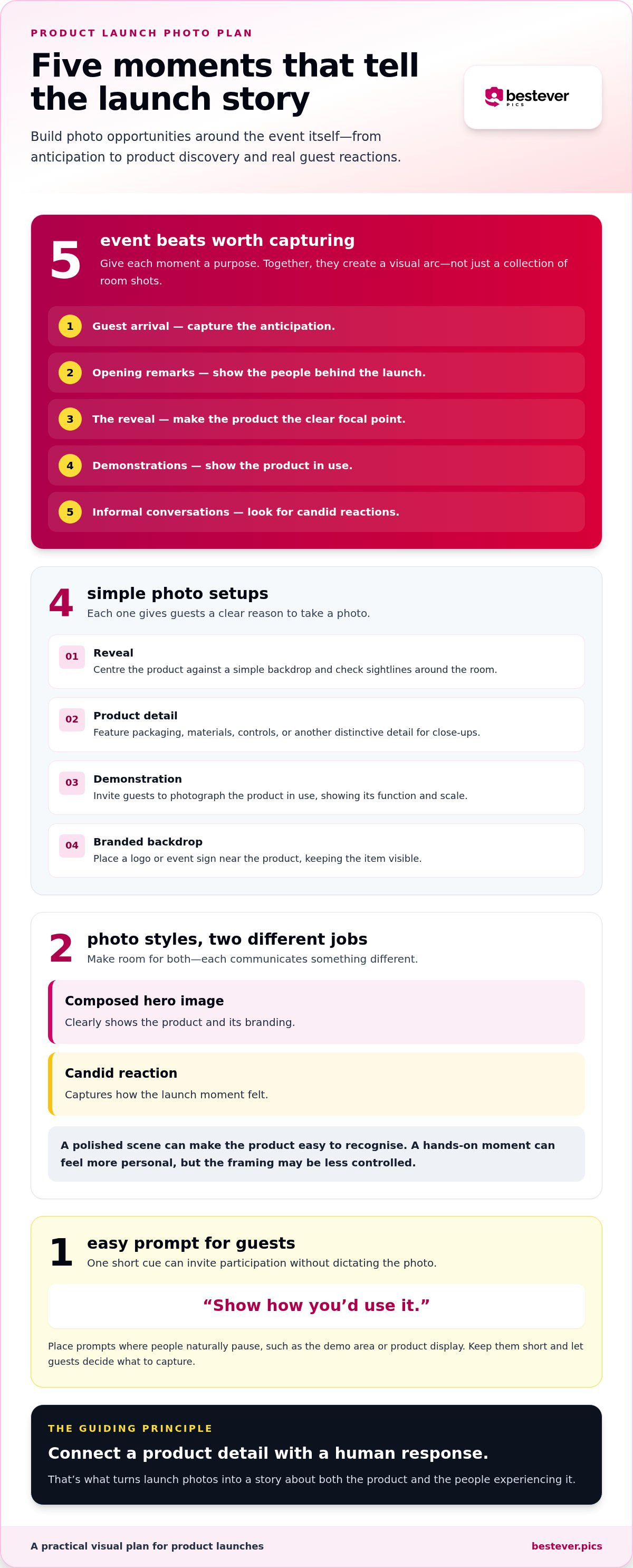
Map the key beats before choosing specific product launch event photo ideas: guest arrival, opening remarks, the reveal, demonstrations, and informal conversations. Each offers a different angle. Show the product in use, include a hand or familiar object to convey scale, and look for details that reveal texture, packaging, or how someone interacts with it.
Plan for both staged hero images and candid reactions. A composed shot can clearly show the product and its branding; a spontaneous expression can capture how the moment felt. They serve different purposes, so make space for both without asking guests to pose throughout the event.
How can photo ideas reinforce the launch identity?
Carry visual cues through the frame: brand colours, packaging, product details, and event signage. Keep some images product-led, with the item clearly visible, and let people and atmosphere lead others. Give guests one easy prompt, such as “show how you’d use it” or “capture your first reaction,” rather than a long list of instructions.
Place a prompt near a natural pause point, such as the demo area or product display. If a QR code helps guests find the photo-sharing gallery on Bestever.pics, make its sign part of the event’s visual system. Explore creative QR code display ideas for ways to make it feel intentional.
Keep the core plan lean. Prioritise arrival, reveal, and product interaction, then add optional activities only if they fit the venue, schedule, and team. A short run of show with clear photo moments often feels more natural than asking guests to stop for a new setup at every turn.
Product launch event photo ideas for the reveal, demos, and guest moments
Build photo opportunities around moments already in your run of show. Guests can capture the launch without being pulled away from the experience, and each image has a clear reason to exist.
What reveal and product-detail shots can guests capture?
For the reveal, give the product a clear focal point and keep the view unobstructed. A branded backdrop can frame the moment, but elaborate staging may compete with the item itself. Before guests arrive, check sightlines from different parts of the room, especially if the reveal happens on a stage or display table.
- Reveal: Keep the product centred against a simple backdrop. This gives guests a clear hero image that shows what launched.
- Detail: Set out packaging, materials, controls, or another distinctive feature for close-ups. A small sign can suggest, “Get a closer look.”
- Demonstration: Invite guests to photograph the product in use. A short demo gives them a natural moment to capture its function and scale.
- Branded backdrop: Place a logo or event sign near the product, not over it. This helps identify the launch while keeping the item visible.
Each setup has a trade-off. A polished scene can make the product easy to recognise, while a hands-on moment can feel more personal but produce less controlled framing. Choose based on what the image needs to communicate.
How can you prompt natural guest photos?
Keep prompts short and put them at the activity, not in a long speech. At a tasting, try “capture your first sip”; at a try-on or hands-on station, invite guests to show the product in use. These cues give people a starting point without dictating the final image.
For a group photo, announce one simple cue at a scheduled pause, such as gathering beside the launch display after the demonstration. For candid images, try “capture a moment that surprised you” and let guests decide what that means. Shopify’s product launch guide also discusses how brands can repost user-generated content, making guest photos useful to the launch story beyond the room.
For an example of how a shared album can collect guest contributions, see [LINK: private wedding photo gallery].
Choose product launch photo ideas that fit your audience and event format
The most effective product launch event photo ideas fit the way guests will actually experience the event. A close-up display may suit a press preview, while a hands-on station can work well for an audience invited to try the product. Trendy setups aren’t automatically useful: weigh guest involvement, setup effort, brand visibility, and how naturally each idea supports candid photos.
Which photo ideas suit a small launch or press preview?
In a smaller venue, choose a low-footprint setup that leaves room for conversation. A close-up product display, a founder or team moment, and a small-group demonstration can give guests several useful ways to capture the launch without creating a separate activity. Place a discreet prompt near the product, where it can guide photos without interrupting discussion.
Which ideas work for larger or recurring events?
Spread photo prompts across entry points and busy experience areas so guests aren’t funnelled into a single spot. For planners and venues running recurring launches, a repeatable photo-sharing process makes it easier to organise guest contributions from event to event. Explore [LINK: corporate event photo-sharing guide] for ideas that support wider participation.
| Event format | Concept to consider | Guest involvement and setup | Brand visibility and candid potential |
|---|---|---|---|
| Intimate preview | Product close-ups and a small demo | Personal interaction; light setup | Strong product focus; natural conversation moments |
| Press event | Clear reveal focal point and founder moment | Easy to capture; planned timing | Clear branding; reactions may feel more posed |
| Larger launch | Several prompts near different experience areas | More opportunities; requires clear placement | Brand cues across the venue; varied candid scenes |
Use the table as a starting point, then consider the product and the pace of the event. A product people need to handle calls for an easy interaction point; a brief stage reveal may benefit more from a clear focal area and a prompt nearby. Elaborate staging can add visual impact, but it takes space and may distract from the product. Choose the setup that helps guests understand what’s new and gives them room to capture it in their own way.
Turn product launch photo ideas into an easy event-day plan
A good photo plan should help the event flow, not give guests another schedule to follow. Turn your product launch event photo ideas into a few clear actions, then assign someone to keep them moving on the day.
- Choose the moments. Pick the launch beats you want guests to capture, such as the reveal, a product demonstration, or a relaxed conversation around the display.
- Assign locations. Set each photo moment where it fits naturally. Keep branded displays visible without blocking entrances, walkways, or access to the product.
- Write short prompts. Tell guests what to photograph and how to contribute. For example: “Capture the product in use. Scan here to add your photo.”
- Test the guest journey. Walk the route from arrival to the product experience. Check that signs are easy to spot, instructions are clear, and the sharing process works as expected.
Planning rule: Put each photo instruction where guests naturally pause or interact. A prompt beside a demonstration is easier to act on than one guests hear once during opening remarks.
How should you prepare photo spots and prompts?
Keep the setup readable at a glance. Put the sign close to the activity it refers to, but leave enough space for people to gather without crowding the entrance or product display. A QR code can open a web-based upload page in a browser, so guests don’t need to download an app. Explain that in plain language beside the code.
For more ideas on making the code easy to notice, browse these creative QR code display ideas. Make sure the design leaves enough space around the code and its instructions.
How can guests share photos without adding friction?
Choose a named photo host to keep an eye on the shared gallery and help guests who aren’t sure where to upload. That person can spot unclear instructions, point guests to the right sign, and keep the main host free to focus on the event.
Polished staging creates consistent brand images, while candid participation captures real reactions. Plan for both: keep one clear, well-lit product moment, then leave room for guests to take photos in their own way. For more ideas on organising guest contributions, see these best practices for collecting event photos.
See how a private guest photo gallery works
Build a shared product launch album guests can contribute to
A shared gallery brings attendee photos together with official event photography, giving you more than one view of the launch. Professional images can provide consistent coverage, while guest contributions capture spontaneous reactions and personal perspectives. They complement each other, but guest photos aren’t a replacement for planned professional coverage.
What should a launch photo gallery include?
Give the gallery a clear purpose: collect images that show the product, the reveal, and how people experienced the event. A balanced mix might include:
- Product details that show packaging, materials, or distinctive features.
- Reveal moments and the first reactions around them.
- Candid conversations and guest-created photos from demonstrations or hands-on areas.
How can hosts make photo sharing feel effortless?
Put the QR code where guests already pause, gather, or interact with the product. Keep the invitation beside it and make the action plain: “Scan to add your launch photos to the shared album.” Bestever.pics lets event attendees scan a host-created QR code to upload images to a shared digital album without downloading an app.
That removes an extra download step, though guests still need to notice the sign and follow the instructions. Keep the display visible without blocking the product experience, and ask your designated photo host to point it out when helpful. For a more detailed collection workflow, read these tips for collecting event photos.
With a shared album, guests can add their view of the launch alongside the official images. Keep the invitation simple, the QR code easy to find, and the purpose of the gallery clear. Explore a private event photo gallery for guest contributions.
Make your launch moments easy to capture and share
The strongest product launch event photo ideas do more than decorate a room. They help guests see the product clearly, try it for themselves, and capture real reactions. Choose a few moments that suit the event’s pace, then give each one a simple purpose so the photos tell a distinctive story.
Keep a balance of polished product images and candid guest perspectives. Official photography provides planned coverage, while guest photos add spontaneous views you might otherwise miss. A shared gallery can bring both together, and a host-created QR code lets guests contribute through a browser without downloading an app.
Make the invitation easy to spot and the upload steps clear. A web-based gallery works for corporate launches and other gatherings, giving guests a straightforward way to add their own images while the event is still fresh in their minds.
With a thoughtful plan and a simple way to collect photos, you can make the reveal easier to remember and more personal for everyone there.
Frequently Asked Questions
What are the best photo ideas for a product launch event?
The best product launch event photo ideas show both the product and the people experiencing it. Try a reveal backdrop, a close-up detail spot, a guided demo, a group-photo cue, and a prompt for candid reactions. Choose only the moments that suit your schedule and audience. A few inviting photo opportunities can feel more natural than asking guests to pose throughout the event.
How do you make a product launch event more photogenic?
Give guests clear focal points with a readable product display, intentional lighting, uncluttered backgrounds, and branded details that support the product. Before the event, check sightlines from guest height so people can see and photograph the main moment. Leave room for spontaneous interaction too. A polished setup helps create consistent images, while real product use and genuine reactions make the photos feel connected to the launch.
How can guests share photos from a product launch without downloading an app?
A web-based shared gallery can let guests scan a QR code and upload photos in their browser, without an extra app download. Place the code near a natural pause point, such as a product display, and add a short instruction explaining what to do after scanning. Test the code and upload steps before the event so guests can follow the process without needing a lengthy explanation.
What should a product launch photo booth include?
Start with a clear background, good lighting, and a visible connection to the product, such as its packaging or a display detail. Leave enough room for small groups, and position the setup so it doesn’t block entrances or the event’s main flow. A dedicated photo spot can create polished, repeatable images; candid photos elsewhere capture a less staged view. Choose a setup that suits your venue and audience.
How do you encourage guests to take photos at a launch event?
Give guests a clear, optional prompt at a moment when they’re already interacting with the product. For example, invite them to capture a first impression at a demonstration or show the product in use. Make group photos easy to arrange and explain where guests can share their images. Avoid repeated announcements that interrupt the programme; simple cues near the activity feel more natural.
Should you use a professional photographer or guest photos at a product launch?
They serve different purposes, so many hosts plan for both. A professional photographer can focus on planned brand imagery and key moments, while guest photos offer personal perspectives and spontaneous interactions. Decide which scenes need consistent, planned coverage, then use a shared gallery to gather attendee contributions. This gives each approach a clear role without asking guests to replace essential event photography.
How do you collect product launch photos in one place?
Invite guests to contribute to a shared digital album, then place the instructions where they naturally gather or interact. A QR code can open a web-based upload page, while a named host or staff member can help guests who need direction. Explain the gallery’s purpose and how to contribute. Before sharing images on public brand channels, review them for fit and context.


