


Article by
Gabi
Hi, I'm Gabi - Co-Founder of Bestever Pics. Thanks for visiting our blog. We are working hard to produce content which we hope resonates with you. Feel free to drop us a line on socials or via the contact form on the site.
Recent data shows that 85% of guests who scan a QR code for party photos will complete an upload, which is far higher than the 23% rate for clunky apps. It's frustrating to chase friends for weeks only to get grainy text photos, but using a QR code for party photos makes collecting high-quality memories effortless. This guide explains how a QR code for party photos removes guest friction and why a QR code for party photos is the best way to capture every candid moment.
Key Takeaways
- Learn why a QR code for party photos is the most efficient way to collect high-resolution candid shots without the compression issues of text messages or social media tags.
- Understand the "no-app" advantage that allows guests to upload instantly through their mobile browser, removing the friction of new downloads or account registrations.
- Discover creative ways to incorporate scan points into your event decor, from table cards to cocktail napkins, to maximize guest participation and photo volume.
- Find out how Bestever.pics provides a simple, father-daughter founded solution that lets you set up an unlimited digital gallery in just a few minutes.
- See why professional event planners prefer browser-based systems to avoid technical hurdles and ensure every guest can contribute regardless of their smartphone model.
Why You Need a QR Code for Party Photos in 2026
Traditional ways of gathering images usually end in a digital mess. Tagging on social media sounds easy until you realize half your guests have private accounts, and text threads destroy the resolution of every beautiful shot. A QR code for party photos fixes this by acting as a single, high-quality hub for every candid moment. It turns every guest into a secondary photographer who can contribute without the friction of app store visits.
Everyone knows how to point a phone camera at a code now. From kids at a birthday party to grandparents at a wedding, scanning has become a universal habit. This accessibility ensures you catch the "in-between" moments that a professional photographer might miss while they focus on the main stage events. You'll end up with a richer, more authentic story of your day. Since events are also the perfect place for meeting new people, those looking to connect with others in their immediate area might find Habydate to be a helpful resource.
The Death of the Disposable Camera
We've moved past the era of grainy film and expensive development fees. Digital galleries offer instant gratification, letting you see what's happening at Table 5 while you're still finishing dinner. Bestever.pics provides a high-resolution alternative that cuts out physical waste and saves you from the disappointment of dark, blurry prints. It's a modern upgrade for hosts who want digital photo sharing for modern events without the professional-grade price tag.
Solving the 'Send Me That Photo' Problem
Stop spending the two weeks after your event sending "please email me those pics" texts. When you use a QR code for party photos, the gallery fills up while the energy is still high and the drinks are still flowing. Understanding how QR codes work helps you see why they're so effective; they provide an immediate bridge between a physical moment and a digital memory. Your guests feel like they're part of the story, contributing to a collective album that's ready to view before the cleanup crew even arrives.
How Guest Photo Sharing via QR Code Actually Works
Setting up a QR code for party photos is actually faster than making your morning coffee. Most hosts worry about technical hurdles, but the modern process is entirely browser-based to ensure everyone can participate regardless of their tech skills. There are no app store downloads, usernames, or complicated passwords to remember. Your guests' photos go directly from their phone to a private, secure cloud where you maintain full control over every image. While general security is important, especially given warnings from the Federal Trade Commission regarding public codes, our private event links keep your memories safe and restricted to your invited circle.
Step 1: Create Your Private Album
You'll start by entering your event details to generate a unique scannable code in seconds. You can customize the landing page with your own colors or branding to make it feel like a natural part of the celebration. It's helpful to see how it works before you start so you can visualize the guest experience. This initial setup ensures that your QR code for party photos is ready to go long before the first guest arrives. You can even set up moderation rules if you want to review uploads before they go live to the whole group.
Step 2: Display Your Scannable Code
Once your code is generated, download the high-resolution file for printing. You can place it on menus, table cards, or large welcome signs where guests are likely to have their phones ready. Check out these creative display ideas to see how to integrate the code into your decor without it feeling out of place. High-traffic areas like the bar or the entrance are perfect spots to catch people while they're already documenting the night. Make sure the lighting is sufficient so the camera sensors can pick up the code quickly.
Step 3: Guests Scan and Upload
Guests just point their native camera app at the code and tap the link that pops up on their screen. They select their favorite shots from their camera roll and hit upload with zero registration or email signup required. The photos appear in your shared album immediately, creating a live stream of memories as they happen. If you're planning a big day, you might want a private wedding photo gallery with no app needed to keep things simple for everyone. This instant feedback loop often encourages more guests to upload their own perspectives throughout the event.
Ditching the App: Why Scanning Beats Downloading
Asking guests to download a dedicated app is a massive barrier to entry. Most people are protective of their storage space and data plans; they simply won't install software they plan to delete in three hours. A QR code for party photos removes this friction by using the tools guests already have. Browser-based uploads are universal and work on almost any smartphone regardless of the operating system. It's a faster, cleaner way to get the job done without annoying your friends or family.
Privacy is another major win for the browser-based model. Apps frequently request intrusive permissions like access to a guest's full contact list or GPS location. This makes people hesitate. When you use a scannable link, guests only grant temporary access to the specific photos they choose to share. It keeps the focus on the fun rather than a privacy settings menu. The speed of a quick browser upload ensures guests stay present at the party instead of troubleshooting a download on the dance floor.
Maximum Participation Rates
Simplicity is the secret to high engagement. Statistics show that 85% of guests who scan a code will complete at least one upload. Compare that to the mere 23% completion rate for app-based alternatives. You want your digital album to be inclusive. Bestever.pics focuses on a web-first architecture to make sure your great-aunt can join in as easily as your tech-savvy friends. This approach ensures you don't miss those candid shots from the back of the room that the pro photographer might overlook.
Corporate Security and IT Policies
Work functions present a unique set of technical challenges. Many employees use company-issued phones with strict security profiles that block unauthorized app store downloads. If you rely on an app, you're effectively locking out a huge portion of your attendees. A QR code for party photos bypasses these IT restrictions because it runs entirely within the mobile browser. This makes it the only reliable choice for corporate event photo sharing at scale. Professional planners can find more details on recurring event management and venue-specific features on our pro page.
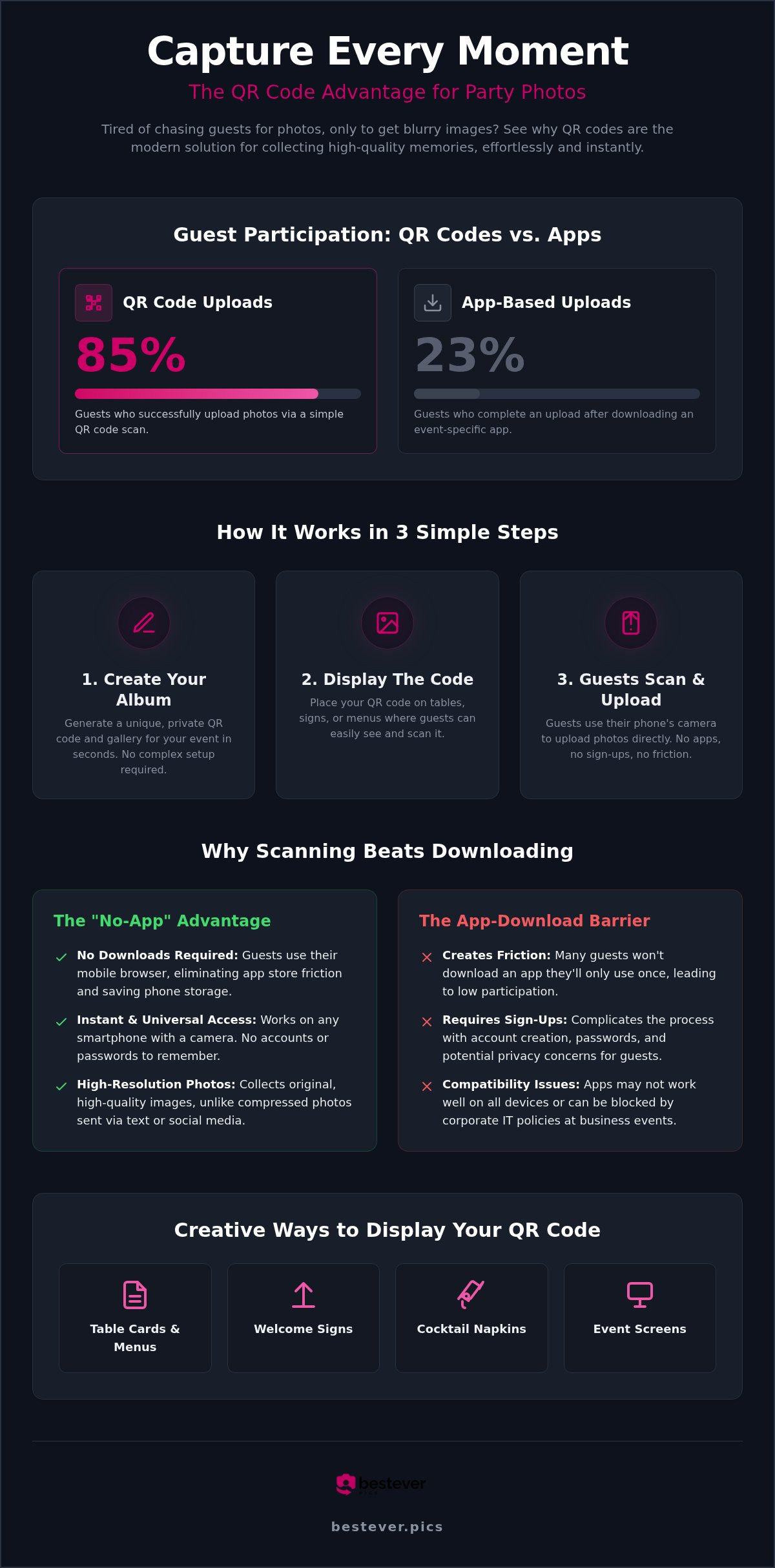
Creative Ways to Display Your Party QR Code
Don't just stick your code in a dusty 4x6 frame and hope for the best. To get the most out of your QR code for party photos, you need to treat it as a functional part of your decor. Research shows that placing codes in four or more locations can result in collecting 2.1 times more photos. You want to catch people where they're already reaching for their phones, like the bar or the lounge area.
Functional items are your secret weapon for engagement. Print your code on cocktail napkins or custom drink coasters. It's practical because guests have these items in front of them for most of the night. If you're hosting a larger event, consider using digital displays or projectors. Cycling the QR code next to a live preview of recent uploads creates a feedback loop that encourages others to join the fun. It transforms photo sharing from a chore into part of the evening's entertainment.
Wedding and Formal Event Ideas
For a more polished look, subtlety is key. You can place a small code on the back of ceremony programs or tucked into the corner of dinner menus. Another great option is printing small business cards to leave at every place setting. This gives guests a personal reminder they can keep in their pocket. If you want a central hub, set up a dedicated photo guestbook station with a beautiful large-scale sign and some props to get the creativity flowing.
Casual and Community Gathering Ideas
This gallery platform was built by father-daughter duo Steve and Chloe to make sure no host ever misses a memory again. It's designed for people who value their time and want a solution that just works. Whether you're hosting a small birthday or a massive festival, the underlying infrastructure handles thousands of uploads without a hitch. You can join thousands of happy hosts who've moved away from the stress of chasing images and toward effortless sharing using a QR code for party photos.
Setting up a QR code for party photos shouldn't feel like a technical chore. Every part of the process is optimized to ensure that your focus stays on your guests rather than your gallery settings. You'll get high-resolution results that look professional without any professional-grade complexity. This ensures your QR code for party photos captures every possible angle of the celebration.
The Human Side of Tech
We aren't a faceless corporation; we're a family business that loves a good party as much as you do. Our support is handled by real people who understand the unique pressure of event planning. If you have questions about privacy or photo resolution, you can find clear answers in the [LINK: faqs]. We believe that the most powerful technology should be the easiest to use, which is why we're always here to help.
Start Your Gallery Today
Pick a plan that fits your guest count and get your code in under a minute. You can explore the [LINK: digital photo sharing] guide for more tips on maximizing your event engagement. The first scan of your QR code for party photos is the start of a gallery you'll treasure for a lifetime. Don't let those candid moments disappear into a text thread; capture them all in one beautiful place today.
Capture Every Angle of Your Event
You've seen how simple it is to transform your celebration using a QR code for party photos. By removing the friction of app downloads, you're inviting every guest to share their unique perspective in stunning high resolution. Whether it's a small backyard birthday or a large corporate gala, these unposed, candid memories are often the ones you'll treasure most. You'll finally have a central hub for every laugh and dance move captured on the night.
Bestever.pics is already trusted by thousands of event hosts worldwide because it prioritizes a human, app-free experience that actually works. You won't need to spend your night acting as tech support or worrying about phone storage limits. Instead, you can focus on the people who matter while your digital gallery builds itself in the background. It's a practical, modern way to ensure no memory is left behind.
It's time to stop chasing friends for grainy text images and start enjoying your private gallery as it grows in real-time. We're excited to help you see your next event through everyone's eyes. Your guests will love how easy it is, and you'll love the results.
Frequently Asked Questions
Do my guests need to download an app to upload photos?
No, your guests don't need to download anything to use a QR code for party photos. They simply scan the code with their native camera app and upload directly through their mobile browser. This removes the friction that often stops people from participating. Since 85% of guests who scan a code complete an upload, this browser-based approach is much more effective than asking friends to install new software on their devices.
Is there a limit to how many photos guests can upload?
Bestever.pics offers unlimited high-resolution uploads for your event. Unlike some services that cap your gallery at 50 or 150 images, we want you to capture every single moment. This means your guests can contribute as many candid shots and videos as they like throughout the celebration. You won't have to worry about hitting a storage ceiling or missing out on a late-night dance floor memory because the album was full.
How long will my party photo gallery stay active?
Your gallery stays active long after the music stops. We understand these memories are for a lifetime, so we don't delete your photos once the party ends. You can revisit your digital album months or even years later to relive the highlights. This long-term access makes it easy to look back on milestones or share the link with family members who couldn't attend the event in person.
Can I download all the photos in high resolution after the event?
Yes, you can download every image in its original high-resolution quality. We don't compress your files like text messages or social media platforms do. You'll have full access to the high-quality files, making them perfect for printing physical albums or creating large wall art. The QR code for party photos ensures that the version you save is just as clear as the moment it was taken on your guest's phone.
What happens if my party venue has poor Wi-Fi or cell service?
If the venue has patchy signal, guests can still scan the code and keep the browser tab open. They can select their photos and hit upload once they're back in a 4G area or connected to home Wi-Fi. The link remains active after the event, so you can even send it out in "thank you" messages. This flexibility ensures that poor connectivity at a remote wedding or basement bar won't ruin your collection.
Is the Bestever.pics gallery private and secure?
Bestever.pics galleries are private and secure. Your photos aren't indexed by search engines; only people with your specific event link or QR code can view or upload to the album. You maintain full control over the content, with the ability to moderate or delete any unwanted images instantly. This private setup provides peace of mind that your personal celebration stays between you and your invited guests.
Can I use the same QR code for multiple days of an event?
You can absolutely use the same code for a multi-day celebration. Whether it's a full wedding weekend or a three-day corporate retreat, one link can serve as the central hub for the entire duration. This keeps all your memories in one organized place instead of splitting them across multiple galleries. It's a practical way to simplify the experience for guests who are attending several different sessions or parties over a few days.
Can guests see each other's photos in the gallery?
Yes, guests can see the photos others have uploaded, creating a fun and interactive live feed. It's like a digital guestbook that grows in real-time as the party progresses. This shared visibility often encourages more people to get involved when they see the great shots their friends are capturing. If you prefer more control, you can use moderation features to review images before they appear in the public-facing gallery for everyone to see.


