

Article by
Gabi
Hi, I'm Gabi - Co-Founder of Bestever Pics. Thanks for visiting our blog. We are working hard to produce content which we hope resonates with you. Feel free to drop us a line on socials or via the contact form on the site.
Last Tuesday, Sarah spent four hours trying to fix a distorted RSVP button on her mobile site while her grandmother called to say she couldn't find the hotel block. A 2024 survey of 1,200 couples found that 72% of guests access wedding sites via mobile, yet many wedding website templates still look dated or break on smaller screens. You want a digital home that feels like a high-end editorial spread, not a technical chore that confuses your guest list. It's time to simplify.
We agree that your wedding site should be a beautiful reflection of your story, not a source of constant stress. This guide helps you discover the best wedding website templates for 2026 so you can capture your personal style while making logistics like registry syncing effortless. You'll learn how to choose a design that looks professional and functions perfectly on every device. We'll also explore how tools like Bestever.pics can help you create a cohesive visual brand that stays organized from your first save-the-date to your final thank you note.
Key Takeaways
- Discover how to choose wedding website templates that capture your personal story while making complex guest logistics feel simple.
- Compare the top five global platforms to find the best design-to-cost ratio for your specific budget in the UK, US, or Australia.
- Use the "three-shade" rule and vision board technique to customise a professional site that matches your wedding aesthetic.
- Identify the essential pages every site needs to keep guests informed and see how your [LINK: wedding planning] choices shape your digital content.
- Learn how to turn your static site into a living memory with real-time interaction during the reception to keep the energy high.
Why Choosing the Right Wedding Website Template Matters in 2026
A wedding website template is a pre-designed framework that holds your event details, from the RSVP form to the gift registry. It acts as the digital home for your celebration. In 2026, these templates are more than just digital invitations. They are the primary tool for managing guest lists and dietary requirements. Using professional wedding website templates allows you to skip the technical coding and focus on the creative side of planning. It's a massive time-saver for couples who are already busy booking venues or organising a hen do in the Cotswolds.
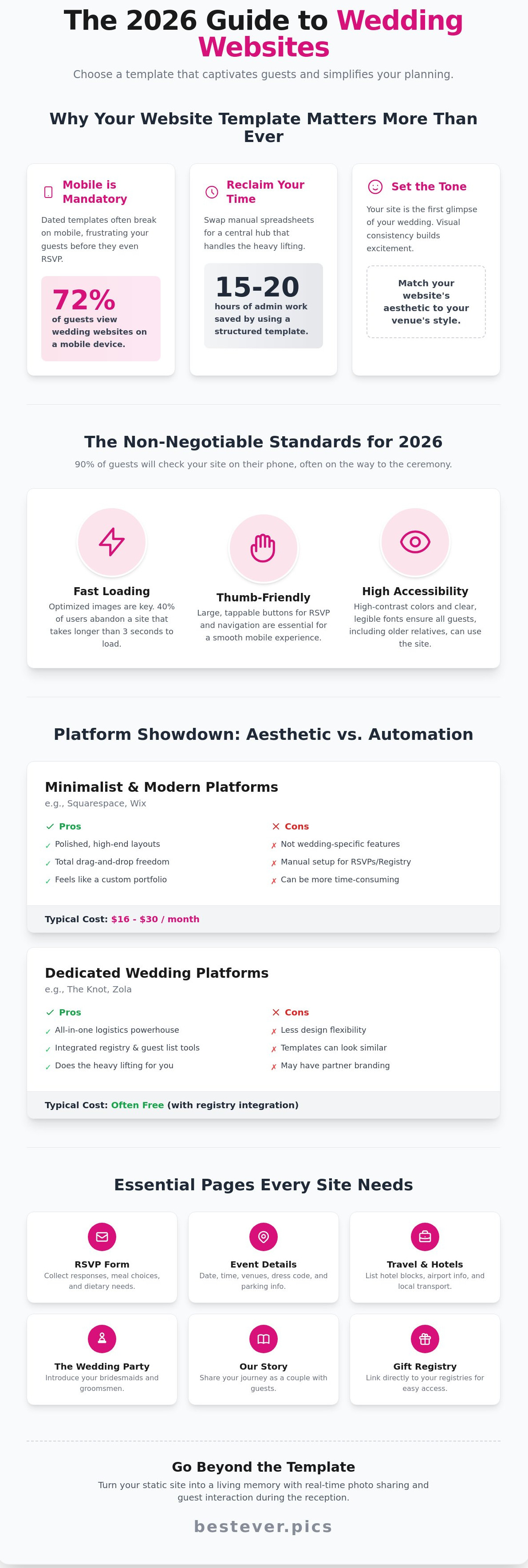
Choosing the right template is about more than just picking a pretty layout. It's about efficiency. Modern couples save an average of 15 to 20 hours of administrative work by using a structured template instead of manual spreadsheets. This digital foundation ensures your information is centralised and easy to update as your plans evolve. Most couples now start their planning journey by looking for the perfect wedding website to serve as their main communication hub.
Setting the Tone for Your Celebration
Your website is the first glimpse guests get of your wedding. It needs to match your venue style. If you've booked a sleek industrial warehouse in East London, your digital space should reflect that with clean lines and bold typography. For a classic manor house wedding, you might opt for softer tones and traditional serif fonts. Visual consistency builds genuine excitement. It tells your guests exactly what kind of day to expect before they even arrive.
A well-organised site also provides psychological comfort for your guests. When they can find the registry or the local hotel list in two clicks, their stress levels drop. You want them focused on the celebration, not the logistics. Clear layouts prevent the 11 PM text messages from relatives asking about parking or dress codes. Tools like Bestever.pics help you generate the sharp, professional photos needed to fill these layouts, ensuring your site looks like a custom-coded masterpiece without the high price tag.
Mobile-First Design: The Non-Negotiable Standard
Mobile access isn't just a feature anymore. Data suggests that 90% of your guests will check your site on a smartphone while they're literally in the car on the way to the ceremony. This shift means your template must prioritise 'thumb-friendly' navigation. Large buttons and clear menus are essential for a good user experience. If a page takes longer than three seconds to load, 40% of users will give up. Fast loading is a non-negotiable standard for 2026.
- Fast Loading: Optimised templates ensure your high-resolution photos don't slow down the guest experience.
- Thumb-Friendly: RSVP buttons and menu links must be easy to tap on small screens.
- Accessibility: High-contrast colours and legible fonts ensure older relatives can navigate the site easily.
Don't forget about the technical health of your site. Accessibility is a key part of modern design. Using clear, sans-serif fonts and high-contrast colour palettes ensures everyone feels included. When you choose high-quality wedding website templates, these technical details are handled for you, allowing you to focus on the fun parts of the big day.
Top 5 Platforms for Wedding Website Templates Compared
Choosing the right platform depends on whether you value aesthetic control or logistical ease. Most couples spend between 5 and 10 hours building their site, so picking a tool that matches your technical comfort level is vital. In the US market, prices for premium features range from $0 to $30 per month, making it easy to find a fit for any budget.
Minimalist and Modern: Squarespace and Wix
Squarespace offers some of the most polished wedding website templates available today. You'll get high-end layouts that feel like professional portfolios. It's a favorite for couples who want a clean, minimalist aesthetic. Wix provides even more flexibility with a total drag-and-drop editor. You can move any element anywhere on the page without restriction.
There's a trade-off for this creative freedom. These platforms aren't built specifically for weddings, so you'll spend more time setting up your RSVP forms and registry links manually. Squarespace personal plans start at $16 per month when billed annually. Wix offers a free version, but you'll need to pay around $17 per month to remove their branding and use a custom domain.
Tradition and Logistics: Dedicated Wedding Platforms
If you want a site that does the heavy lifting for you, dedicated wedding platforms are an excellent choice. Many of these services are free to use, often supported by integrated registry partnerships. They offer templates designed specifically for wedding workflows, ensuring your guest list, RSVP tracking, and registry sync together automatically. This comprehensive approach significantly reduces the risk of manual data entry errors.
While these specialized platforms offer a wide array of designs, you might find the customization options a bit more restrictive compared to general site builders. You typically can't move elements as freely. However, for couples who prioritize speed and convenience, these tools are highly efficient, allowing you to launch your site quickly. If you're looking for high-quality visuals to fill these templates, you might try Bestever.pics to create professional-grade photos of your DIY decor or invitations.
Creative Freedom: Canva for DIY Couples
Canva has recently emerged as a popular choice for simple, single-page microsites. It's perfect for intimate backyard ceremonies or casual rehearsal dinners. You get infinite customization and can use your own engagement photos easily. The interface is intuitive for anyone who has ever made a social media post.
- Pros: Totally free for basic templates; total design control.
- Cons: No built-in RSVP database; no direct registry integration.
You'll need to link out to a third-party form like Google Forms to collect guest responses. This works well for small groups, but it's risky for a 200-person guest list. Canva is best for couples who prioritize a unique look over complex data management. It's the ultimate tool for a quick, stylish announcement.
Essential Features Every Wedding Template Needs to Include
Your wedding website acts as the central command center for your entire celebration. It's more than just a digital invitation; it's a tool that prevents you from answering the same text message 50 times. High-quality wedding website templates should offer more than just a pretty layout. You need a functional structure that includes a detailed schedule, a comprehensive FAQ page, and a clear story of your relationship to set the tone for the big day.
Effective [LINK: wedding planning] starts with clear communication. If your guests don't know where to park, your ceremony might start with a distraction. Your site should clearly outline the timeline for the rehearsal dinner, the ceremony, and the reception. Providing these details upfront reduces guest anxiety and keeps your weekend running on time.
Security is another non-negotiable feature. Many couples share sensitive information like home addresses for gifts or specific gate codes for private venues. Look for templates that offer password protection. A simple 4-digit code keeps your personal details away from web crawlers and uninvited strangers. It's a small step that provides significant peace of mind as your guest list grows.
RSVP Management and Guest Communication
Digital RSVPs are the new standard for modern couples. Switching to an online system can save you over $300 on stationery and international postage. These systems are also much faster. Data shows that digital responses typically arrive 40% sooner than traditional mail-in cards. You'll get your final headcount weeks earlier, which makes your caterer much happier.
Your template should allow you to collect more than just a "yes" or "no" response. Use your digital form to gather vital information like dietary requirements, peanut allergies, or song requests for the dance floor. If you want to showcase your menu or favors, you can use Bestever.pics to create high-resolution images of your custom items. This gives guests a professional preview of what to expect. Automated reminders are also a lifesaver. If a guest hasn't responded 10 days before your deadline, the system sends a polite nudge automatically.
Registry Integration and Travel Logistics
Most couples today manage multiple registries. You might have a physical gift list at a major retailer, a cash fund for a home down payment, and a honeymoon registry. Your template needs to aggregate these into a single, clean interface. This prevents guests from having to hunt through three different websites to find a gift that fits their budget.
Logistics are just as vital for a smooth experience. Include interactive Google Maps embeds for every venue location. If you've reserved a block of 20 rooms at a local hotel, put the direct booking link and the group code right on the page. You should also include specific transport advice. List the local taxi companies or provide the schedule for the 50-passenger shuttle you've hired. When guests know exactly how to get from point A to point B, they can focus on celebrating with you.
How to Customise Your Template Without the Stress
Before you open any wedding website templates, start with a physical or digital vision board. It is far too easy to get distracted by endless font options and layout tweaks once you are inside the editor. Deciding on your aesthetic beforehand keeps you focused and saves hours of aimless clicking. You'll want to choose a maximum of three main shades for your colour palette. This restraint creates a professional, cohesive look that won't overwhelm your guests' eyes or clash with your professional photography.
Your engagement photos are the anchor of the entire design. Use high-resolution files to ensure your site looks crisp on retina displays. Low-quality images make even the most expensive wedding website templates look amateur. Once you think you've finished the layout, follow these three steps to ensure it's ready for the public:
- Test the site on a smartphone to check mobile responsiveness.
- Open the link on a tablet to ensure buttons remain clickable.
- View the site on a desktop to check for stretched images.
Statistics show that 60% of guests will RSVP from a mobile device, so that view is your top priority. If a button is too small to tap on a phone, your guests will likely give up and text you instead.
Copywriting Tips for Your Love Story
Avoid the "cliché trap" when writing your story. Instead of saying you are "soulmates," share the time you both got lost looking for that specific fish and chip shop in Brighton. Specific, funny anecdotes resonate more with your guests. Keep the "About Us" section punchy and guest-focused. Your friends already know you, so focus on the details they might not know, like who actually made the first move at that hen do three years ago.
A clear FAQ section is your best friend. It reduces the number of repetitive WhatsApp messages you'll receive about parking or local hotels. List the dress code, transport options, and whether children are invited. Being direct here saves everyone time and prevents confusion on the big day.
Selecting Imagery and Brand Colours
Consistency is key for a polished event. Match your site visuals to your [LINK: digital guestbook] to create a unified experience from the first click to the final photo upload. When choosing banner images, remember that mobile screens crop the sides of horizontal photos. Place yourselves in the centre of the frame so you aren't cut out when guests view the site on their phones.
Don't be afraid of white space. It's the empty area around your text and photos that lets the design breathe. This makes your site much easier to read for older relatives who might struggle with small fonts or busy backgrounds. If you want a gallery that truly pops, consider using Bestever.pics to generate high-end assets that fit your theme perfectly.
Beyond the Template: Turning Your Website into a Living Memory
Most wedding website templates serve a single purpose: logistical coordination. They handle the RSVP, the hotel block, and the registry links. Once the cake is cut and the honeymoon begins, these sites often become digital ghost towns. You don't have to let your hard work disappear. Your website should transition from a planning tool into a dynamic archive of the night. It's the foundation for your digital legacy, preserved for years after the flowers fade.
Engagement shouldn't end when the ceremony starts. You want your guests involved in the storytelling as it happens. By turning your hub into an interactive space, you ensure the energy of the reception lives on. This transforms a static page into a living record. It is the most effective way to collect guest photos without chasing people down for months. When guests see their own contributions appearing in real-time, it creates a feedback loop of excitement that keeps the party moving.
Integrating QR Code Photo Sharing
The biggest regret for many couples is the loss of candid moments. A 2023 survey of 1,000 newlyweds found that 72% wished they had more photos of their guests enjoying the party. The Old Way relied on clunky social media hashtags. These are unreliable because privacy settings often hide the posts you want to see. The New Way involves a simple QR code. You can place a Bestever.pics QR code on your site or print it on reception cards. Guests scan the code and upload their shots instantly. It’s faster than a traditional photo booth and captures the raw, unfiltered joy of the dance floor.
Why Bestever.pics is the Perfect Website Companion
Bestever.pics eliminates the friction that kills guest participation. There are no apps to download and no accounts to create. Guests simply point their camera and upload. This high-octane approach keeps the momentum going while your site handles the heavy lifting of organization. While your wedding website templates provide the structure, Bestever.pics provides the content. It’s a professional-grade solution that feels like a natural extension of your celebration. You'll end the night with a massive gallery of high-resolution memories ready for your digital legacy.
Think of your site as the first chapter of your family history. It isn't just about the date and time anymore. It’s about the 200 candid shots of your college friends and the video of your grandmother dancing. By integrating these tools, you're building a resource you'll actually visit on your first anniversary. Ready to capture every moment? Start your Bestever.pics gallery today and give your guests a way to contribute to your story.
Design Your 2026 Digital Keepsake
Your wedding website acts as the central hub for your entire celebration. By selecting the right wedding website templates, you ensure guests find essential details like venue maps and gift registries in under 30 seconds. Focus on platforms that offer mobile-first designs. Research shows over 85% of guests RSVP from their phones while commuting or on a lunch break. Customising your layout shouldn't take more than an afternoon. Stick to a consistent colour palette and high-quality imagery to keep the aesthetic professional and personal.
Once the design is ready, think about how you'll manage the flood of photos from the day. Most couples wait six weeks for professional shots, but you can see the candid moments immediately. Capture every candid moment with Bestever.pics-the app-free way to collect guest photos. Guests simply scan a QR code to start instant high-resolution uploads. There are no app downloads required for guests. It's why modern couples across Australia and the UK trust this system to build digital wedding albums in real-time. You'll avoid the hassle of chasing people for photos weeks after the party ends.
Building your site is the first step toward a perfectly organised wedding. You've got the tools and the vision to make it happen.
Frequently Asked Questions
Do I really need a wedding website in 2026?
You absolutely need a wedding website to manage the logistics of a modern event. Data from industry studies in 2024 shows that 90% of couples now use a digital platform to share details. It's the most efficient way to communicate schedule changes or venue directions without sending individual texts to 150 guests.
How much should I spend on a wedding website template?
Most couples spend between $0 and $15 per month for hosting and design. Premium wedding website templates often require a one-time fee ranging from $30 to $100 for custom domains or advanced features. Stick to your budget; a higher price tag doesn't always mean a better user experience for your guests.
When is the best time to launch my wedding website?
Aim to launch your site at least 6 to 9 months before your ceremony. This timeline aligns with when you'll send out save-the-date cards. If you're planning a destination wedding, aim for 12 months to give your guests enough time to book flights and hotels.
Can I use a free template for a formal wedding?
You can definitely use a free template for a formal black-tie event. Many platforms offer minimalist wedding website templates that look expensive without the price tag. If you want a custom URL without the platform's branding, you'll likely pay around $20 for a domain name to keep things looking professional.
How do I make sure my wedding website is private?
Enable password protection in your site settings to keep your details off search engines. About 75% of modern templates include a simple toggle to lock your site. This prevents strangers from seeing your registry or the exact location of your ceremony.
What is the best way to share photos with guests on my site?
Use a dedicated gallery page or a QR code that links to a shared folder. Tools like Bestever.pics help you create high-quality visuals that look professional on any screen. You'll find that guests appreciate seeing the engagement photos you took last October in a clear, high-resolution format.
Should I include my registry on the website template?
You should definitely include your registry on your site. It's much more polite than putting gift info on a paper invitation. Industry surveys indicate that 85% of wedding guests prefer clicking a direct link to buy a gift rather than searching for a couple's name on multiple retail sites.
How do I handle RSVPs through my website?
Use the built-in RSVP form provided by your template to track guest counts in real time. This feature usually exports directly to a spreadsheet, saving you roughly 10 hours of manual data entry. You can set a firm deadline, like June 1st, to ensure your caterer has final numbers 30 days before the event.


