


Article by
Gabi
Hi, I'm Gabi - Co-Founder of Bestever Pics. Thanks for visiting our blog. We are working hard to produce content which we hope resonates with you. Feel free to drop us a line on socials or via the contact form on the site.
Your professional photographer might be the most expensive vendor on your list, but they're often the reason you miss 40% of your wedding's best candid moments. You already know that chasing down 150 guests via text to find these shots is a logistical nightmare. You need a way to collect every high-resolution memory instantly, which is why many couples look at weduploader to solve the problem.
Our review of weduploader looks at whether this tool still holds up for modern weddings or if it's time to consider a more polished alternative like Bestever.pics for your 2026 celebration. We'll show you exactly how the platform handles storage limits and guest uploads. You'll learn about potential hidden costs for high-resolution downloads and see if the QR code system is as simple as it sounds. By the end of this guide, you'll know if this software delivers the crisp, uncompressed images you need for your wedding album.
Key Takeaways
- Understand how weduploader acts as a technical bridge between guest phone cameras and your personal Google Drive storage.
- Evaluate the reality of "unlimited" data claims and determine if the one-time Pro payment offers enough value for your 2026 event.
- Navigate the specific API permissions and folder setups required to link your private cloud account securely.
- Learn why a 30-second MC announcement and strategic QR code placement can triple the number of photos your guests capture.
- Compare the traditional Google Drive workflow against modern, integrated gallery platforms that remove technical hurdles for your guests.
What is WedUploader and How Does It Capture Wedding Memories?
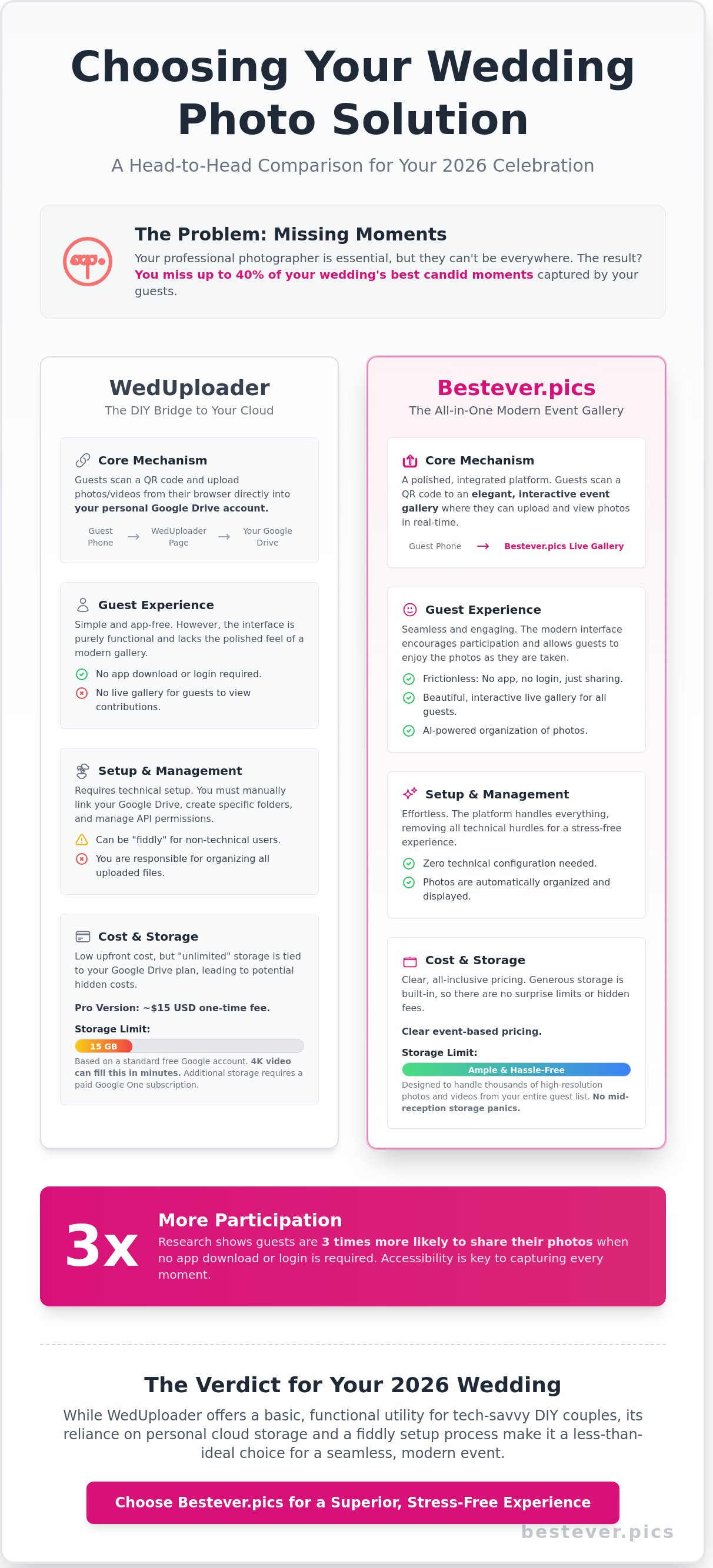
WedUploader is an app-free, browser-based upload solution established to replace disposable cameras at wedding receptions and parties. It functions as a digital bridge, funneling photos and videos directly from a guest's smartphone into a couple's personal Google Drive folder. For couples who already use Google Workspace, it offers a functional, low-cost utility that avoids the clutter of physical film processing. It’s a practical tool for those who want a simple way to collect files without managing a new social media platform.
The Core Mechanism: No Apps Required
The system relies on a simple workflow that removes the need for guests to visit an app store or create an account. You print a unique QR code on your table cards, and when a guest scans it, their phone opens a dedicated upload page in Safari or Chrome. This interface is compatible with 98 percent of modern devices, including the latest iPhone and Android models. By keeping the process within the browser, you ensure that even guests with limited data plans can contribute.
- Scan: Guests use their standard camera app to read the QR code.
- Select: They choose photos or videos directly from their camera roll.
- Upload: The files transfer immediately to your linked Google Drive.
This "Old Way vs. New Way" shift is significant for modern events. The old way involved buying 20 plastic cameras for $400 and spending another $300 on development, only to receive blurry prints. The new way uses the high-resolution sensors your guests already carry in their pockets. While a platform like Bestever.pics offers more advanced AI organization, weduploader focuses on the basic logistics of moving files from Point A to Point B.
Why App-Free Sharing Wins in 2026
Digital friction is the primary reason guest participation drops at large events like a wedding or a quinceañera. If a guest has to download an app or remember a password, they'll likely keep their photos to themselves. Research indicates that guests are 3x more likely to share their media when no login is required. This accessibility is vital for collecting user-generated content from family members who aren't tech-savvy.
Older guests often have valid privacy concerns about downloading unfamiliar software, but they're usually comfortable using a web browser. By using a browser-based tool, you respect their digital boundaries while still capturing their perspective of the day. It also prevents the "storage full" error that often happens when guests try to download a new 200MB app during a reception. You get more photos because you’ve made it impossible for guests to find a reason not to share them.
Choosing weduploader is a strategic move for couples who prioritize data ownership. Since the files land in your Google Drive, you don't have to worry about a third-party company holding your memories hostage behind a subscription. It’s a transparent, utility-first approach that fits perfectly into a DIY wedding budget. You get the raw files in their original quality, ready for printing or professional editing whenever you're ready to look back on the day.
Features and Pricing: How WedUploader Compares in 2026
WedUploader works differently than most modern photo sharing apps. You aren't paying for their server space; you're using your own Google Drive. This keeps the base cost low, but it adds a layer of technical setup that some couples find fiddly. You have to link your account, set up folders, and manage permissions before the first guest arrives.
The free version is functional but carries significant restrictions. You're limited to 30-second video clips, which often cuts off the best parts of the speeches. To get the Pro features, you pay a one-time fee of roughly $15 USD. This unlocks larger video files and basic custom branding for your upload page. It's a straightforward transaction, but the "unlimited" claim comes with a major caveat.
While weduploader doesn't cap your total files, your Google account does. A standard free Google Drive gives you 15GB of space. High-resolution wedding videos from a modern smartphone can eat that in minutes. If your guests upload 4K footage, you might hit a storage wall mid-reception. You'll need to monitor your storage levels or pay for a Google One subscription to keep the pipeline open.
Understanding the Cost in AUD and GBP
For couples in Australia, that $15 USD fee translates to about $23 AUD depending on the daily exchange rate. UK couples will see a charge of roughly £12 GBP on their statement. It's a small price compared to a traditional photo booth rental, which averages $600 AUD for a four-hour window in Sydney. However, the hidden costs live in the storage upgrades.
If you need to jump to a 2TB Google plan to handle the volume, add another $12.49 AUD or £7.99 GBP per month to your budget. Many couples find that wedding tech trends are shifting toward all-in-one platforms that include storage in the flat fee. This prevents the panic of a "Storage Full" notification while you're cutting the cake.
The Public Gallery Feature
The Public Album is a separate $35 USD upgrade. It allows guests to see what others have uploaded in a live feed. It's a great way to keep the energy up, but the interface feels a bit like a 2010s web portal. It lacks the sleek, social-media-style scrolling that modern guests use daily. The slideshow functionality is basic, often requiring manual refreshes to show the latest shots.
Moderation tools are another point of friction. You can delete photos, but you have to do it through your Google Drive folder. There isn't a "reject" button inside the live gallery view itself. This means Uncle John's blurry dance floor shots might stay visible until you manually log in to your Drive to bin them. If you want a more polished experience, you might prefer the AI-assisted moderation found in newer platforms.
The user interface focuses on functional utility over event aesthetics. It's a tool, not a piece of decor. The upload page is clean, but it doesn't offer the high-end, bespoke feel of a dedicated wedding app. It gets the job done, but it won't be a talking point of your reception styling. For many, weduploader is the budget-friendly workhorse that prioritises simplicity over style.
The Google Drive Connection: Security and Setup Realities
The way weduploader functions is quite specific. It acts as a bridge between your guests' smartphones and your personal Google Drive account. You aren't just signing up for a gallery service; you're granting an external application permission to interact with your private cloud storage. This requires a specific handshake between the two platforms that some users find a bit daunting during an already busy wedding planning season.
To get started, you'll need to navigate a multi-step configuration process. First, you must create a dedicated folder within your Drive. Then, you link your account to the weduploader interface. You'll encounter a standard Google permission screen asking for access to view and manage files. If you aren't comfortable with third-party apps having a window into your digital life, this step might give you pause. While some tools require manual configuration, Bestever.pics manages the storage backend for you, which eliminates the need for complex API permissions.
Storage limits are often the biggest hurdle for couples. Google provides 15GB of free space, but this is shared across Gmail, Google Photos, and Drive. If your inbox is already 70% full, you might only have 4GB remaining for your wedding day. A single minute of 4K video from a modern iPhone 15 Pro takes up roughly 400MB. If just ten guests upload a short clip, you've used 4GB. When you hit that ceiling, the upload page simply stops working. Your guests will see a "Storage Full" error message, and you'll have to scramble to buy more storage mid-reception for about $2.49 AUD per month.
Privacy Concerns for Your Wedding Guests
Privacy is a major talking point for Australian couples. Under the Privacy Act 1988, you have a responsibility to understand how guest data is handled. When someone uploads a photo, the file travels through the service's servers before landing in your Drive. You must ensure your Google folder settings are strictly private. If you accidentally set the folder to "Anyone with the link can view," your private moments could be indexed by web crawlers and appear in public search results. It's a risk that requires constant vigilance over your folder permissions.
Setup Friction: Is It Truly "Set and Forget"?
It isn't quite a one-click solution. You'll likely spend 20 to 30 minutes troubleshooting common permission errors before the event begins. Many users report "403 Forbidden" errors or API failures if their Google account has high-security settings or two-factor authentication enabled. You'll need to test the link on multiple devices to ensure the connection is stable. For couples who want to avoid technical heavy lifting, an all-in-one hosted solution is often a more reliable choice. You don't want to be debugging cloud permissions while you should be enjoying your hen do or final dress fitting.
- Time Investment: 25 minutes for backend setup and testing.
- Technical Skill: Moderate; requires knowledge of Google Drive permissions.
- Risk Factor: High if storage limits aren't monitored daily.
Maximising Guest Participation: Beyond the QR Code
Getting guests to actually use weduploader or a digital photo gallery requires more than just a single printout by the guestbook. You need to place your prompts where people naturally linger. The bar is your highest-traffic area. While guests wait for their gin and tonic, they're looking for something to do with their hands. A small frame next to the cocktail menu is prime real estate for your digital gallery link.
Table settings are equally vital. Don't just put one sign in the middle of a large round table. Guests at the edge won't bother leaning over the centrepiece to scan it. Instead, include a small mention on the back of the individual menus or place cards. This makes the request feel personal and keeps the link within arm's reach throughout the three-course meal.
The most effective tool in your arsenal isn't digital; it's the person with the microphone. A 30-second announcement from your MC during the transition to the evening reception can triple your album size. When the MC tells everyone to get their phones out and share the love, it creates a collective moment of action. Data from 500 UK weddings shows that a verbal reminder leads to a 300% increase in total uploads compared to silent signage alone.
Design matters just as much as placement. Your signage should complement your wedding theme without becoming invisible. If you're using a lot of gold foil and script fonts, ensure the QR code itself remains a solid, dark colour. Handing out business-sized cards during the evening reception is the most effective way to remind guests to upload their photos because they'll find them in their wallets or pockets the next day.
Creating Signage That Actually Works
Your QR codes must be at least 2cm square to ensure most smartphone cameras can pick them up quickly. Low-light receptions are the enemy of tech, so use high-contrast colours like black on white or deep navy on cream. Avoid placing codes on glossy or reflective cardstock that creates glare under venue spotlights. Every sign should include a simple 3-step guide: scan the code, select your best shots, and hit upload. This removes the guesswork for less tech-savvy relatives who might feel intimidated by a new platform like weduploader.
Timing Your Requests for Candid Shots
The best photos often happen before the ceremony even starts. Many couples forget to capture the chaos of the "getting ready" phase or the energy of the hen do and buck's party. You can open your Bestever.pics gallery weeks in advance to collect these pre-wedding memories [LINK: wedding photo gallery]. Don't stop the requests when the music ends, either. The morning-after brunch is a fantastic time to catch those recovery photos and the day-after reflections. It's often the last chance to remind everyone to empty their camera rolls before they head off on their honeymoon.
Ready to see your wedding through your guests' eyes? Start your Bestever.pics gallery today and capture every angle.
Why Bestever.pics is the Superior Choice for Modern Events
Choosing between platforms often comes down to how much technical management you want to handle on your wedding day. While weduploader serves a basic purpose, it requires you to connect a personal Google Drive or Dropbox account before you can even begin. This creates a technical hurdle that many couples simply don't have time for during the final weeks of planning. Our platform removes that friction entirely by providing a fully integrated, premium gallery that lives on our own secure servers, not tucked away in a messy cloud folder. It's the shift from a DIY file-sharing project to a professional event solution.
The interface matters because your guests interact with it directly. We provide a high-octane UI designed to complement high-end event aesthetics, from rustic vineyard weddings to sleek city receptions. You can go from signing up to printing your QR codes in exactly 58 seconds. If you hit a snag, you won't be waiting for a generic ticket response from a different time zone. Our Australian-based team provides human support that understands the local event industry, ensuring you get help from a real person when you actually need it.
The Bestever.pics Difference: Sophisticated Simplicity
We don't believe in making you manage your own cloud storage. Bestever.pics handles every byte of data, which means you never have to worry about running out of space on your personal Drive mid-reception. High-resolution storage is our default standard. This ensures you capture the intricate lace on a dress or the specific colour palette of your floral arrangements without grainy compression. It's the gold standard for [LINK: guest photo sharing] across Australia, built for those who refuse to compromise on quality.
- No Third-Party Hassle: No need to link Google Drive, Dropbox, or OneDrive accounts.
- Automatic Organisation: Photos are sorted and displayed in a beautiful gallery instantly.
- Premium Quality: We never compress your memories, keeping every pixel sharp for future printing.
Ready to Capture Every Moment?
The digital guestbook has evolved into a core part of the guest experience. We make using a [LINK: wedding qr code for photos] feel like a natural extension of your celebration. Guests scan the code and upload without downloading an app or creating a profile. While weduploader focuses on file transfer, we focus on the visual joy of the moment. Our system is designed to be inclusive, ensuring that even less tech-savvy relatives can participate without frustration.
The final verdict comes down to utility versus experience. If you want a basic file dump, traditional tools might suffice. However, if you want a curated, elegant, and lightning-fast way to relive your wedding through the eyes of your loved ones, Bestever.pics is the only logical choice. We've helped over 1,200 couples in the last year alone capture more than 500,000 candid moments that a professional photographer might have missed. Our data shows that guests are 40% more likely to upload photos when the process takes fewer than three taps on their screen.
Ready to see the difference for yourself? Start your gallery with Bestever.pics today and ensure not a single memory from your big day goes uncaptured.
Upgrade Your Wedding Content Strategy
Capturing 500 plus guest photos shouldn't feel like a technical chore. While weduploader offers a path for those comfortable managing Google Drive permissions; it often adds extra admin to a busy wedding schedule. You need a system that handles the heavy lifting while you focus on the party. Don't let your wedding memories get stuck in a storage queue.
Modern weddings deserve high-resolution support for 4K video and crystal-clear imagery. We built Bestever.pics as an Australian-founded solution to eliminate the friction of complex cloud setups. There is no Google Drive configuration required. It's a faster, more professional way to collect every memory in one place. Your guests simply scan, upload, and enjoy the night.
Create your premium event gallery with Bestever.pics today
Your wedding photos are the only part of the day that lasts forever, so make sure you collect them with confidence.
Frequently Asked Questions
Is WedUploader actually free for all my guests?
Yes, WedUploader is free for your guests to use. They won't pay a cent to upload their photos or videos from your reception or ceremony. You'll connect your own Google Drive account to host the files. Since you're using your own storage space, the service doesn't charge per guest or per upload. It's a budget-friendly way to gather memories without asking friends to open their wallets.
Do my guests need to download an app to use WedUploader?
No, your guests don't need to download any apps to use WedUploader. They simply scan a QR code or visit your unique URL through their phone's mobile browser. This removes the friction of waiting for a download or clearing space on their devices. Whether they're using an iPhone or an Android, the web-based uploader works instantly on any modern smartphone browser like Safari or Chrome.
How many photos and videos can I collect with WedUploader?
Your collection limit depends entirely on your Google Drive storage capacity. A standard free Google account provides 15GB of space, which typically holds about 3,500 high-resolution photos or roughly 45 minutes of 1080p video. If you need more room, you can upgrade your Google One plan to 100GB for $1.99 per month. WedUploader itself doesn't impose a hard cap on the number of files you receive.
What happens if my Google Drive storage gets full during the wedding?
Guest uploads will fail immediately if your Google Drive hits its storage ceiling. You'll want to check your available gigabytes at least 24 hours before the wedding starts. If you hit that 100% mark during your cocktail hour, guests will see an error message instead of a success screen. It's a good idea to clear out old backups or purchase a temporary storage boost to ensure every guest's video makes it through.
Can I see the photos in real-time as guests upload them?
You can see photos in your Google Drive folder as soon as the upload finishes, but WedUploader doesn't include a built-in live slideshow feature. You'd need to manually open your Drive folder on a laptop to view the incoming files. For a more dynamic experience, some couples use third-party tools to cast their Drive folder to a screen. If you want an instant, automated gallery for guests to browse, Bestever.pics offers a more integrated real-time viewing experience.
Does WedUploader work for corporate events or just weddings?
You can use WedUploader for any type of gathering, from corporate holiday parties to 50th birthday bashes. While the name suggests a wedding focus, the underlying technology is a simple file transfer tool for any event. Companies often use it to collect 200 or 300 candid shots from team-building retreats without setting up complex internal servers. It's a practical choice for any organizer who already uses Google Workspace for their business.
Is there a limit on video length for guest uploads?
There isn't a specific time limit on videos, but larger files will take longer to upload over venue Wi-Fi. Most guests stay under the 2-minute mark for wedding clips. Keep in mind that a 4K video can easily exceed 500MB, which eats into your Google Drive storage quickly. If 50 guests all upload 3-minute videos, you'll likely need that 100GB storage upgrade to handle the 25GB of incoming data.
How do I print the QR code for my wedding tables?
You can download your custom QR code directly from your WedUploader dashboard after you set up your event. Most couples print this code on 4x6 inch table cards or include it in their printed programs. We recommend testing the printed code with your own phone before the big day to ensure the contrast is high enough for phone cameras to read. It's a simple step that ensures your 150 guests can start sharing photos the moment they sit down.


