


Article by
Gabi
Hi, I'm Gabi - Co-Founder of Bestever Pics. Thanks for visiting our blog. We are working hard to produce content which we hope resonates with you. Feel free to drop us a line on socials or via the contact form on the site.
You've spent months planning the perfect ceremony, yet two weeks later, you're still texting relatives to see if they captured that one shot of the godparents. It's a frustrating cycle of blurry screenshots and expired download links that spoils the post-event glow. Setting up a Christening photo collection for guests shouldn't feel like a part-time job or a tech support nightmare for your extended family.
This guide shows you how to build a high-resolution digital album that works instantly, requires zero app downloads, and keeps your family's privacy locked down tight using bestever.pics. You'll discover how to use simple QR codes to turn every guest into a contributor, ensuring you never miss a single candid moment from the day. We'll also cover why browser-based tools see up to 60% higher participation than clunky apps, making your job as a host much easier. Stop chasing photos and start enjoying a centralized gallery of professional-grade memories that every generation can use with ease.
Key Takeaways
- Skip the frustration of app store downloads by using browser-based tools that let guests upload photos in seconds.
- Build a Christening photo collection for guests that preserves every candid shot in its original high-resolution quality.
- Identify the most effective locations at your reception to display QR codes for maximum guest participation.
- Protect your family's privacy with a secure digital space that doesn't require public social media posting or account creation.
- Save hours of time after the ceremony by letting your guests contribute to a centralized digital album in real-time.
Why Traditional Photo Sharing Fails at Family Milestones
The weeks following a christening ceremony often involve a tedious digital scavenger hunt. You're texting your sister, emailing your cousin, and scouring social media tags just to find a decent shot of the baby with their godparents. This manual chase adds a layer of unnecessary stress after you've spent months planning such a significant family milestone. A Christening photo collection for guests should be a joy to look through, not a chore to compile.
Privacy is another major hurdle that traditional methods fail to address. Uploading everything to social media might seem easy, but it exposes your children and infants to public platforms you might not fully trust. Plus, when you rely on guests to send photos via text, you're only seeing what they think you want. You end up missing out on hundreds of candid, behind-the-scenes moments that truly capture the day's spirit. Consider these common pitfalls:
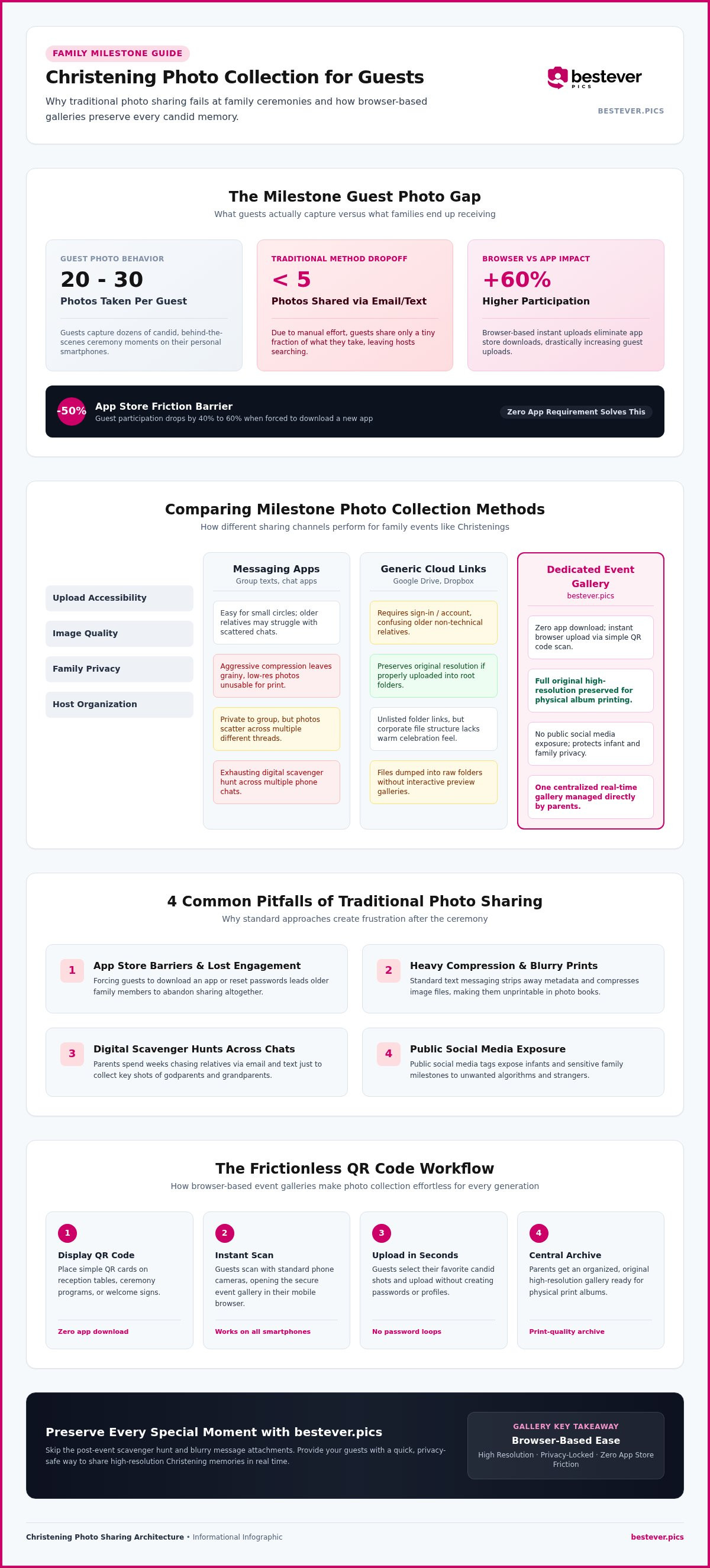
- Guest participation drops by 40% to 60% when they are forced to download a new app.
- The average guest takes 20 to 30 photos but shares fewer than five through traditional methods like email.
- Messaging apps aggressively compress files, making them look grainy if you ever try to print them for a physical album.
- Scattered group chats make it nearly impossible to find specific ceremony pictures a month later.
The Friction of Mandatory App Downloads
Forcing your guests to visit an app store is the fastest way to kill engagement. While your tech-savvy friends might manage it, older relatives often find the process overwhelming and simply give up. Account creation and "forgotten password" loops are immediate barriers for eager guests who just want to share a smile. You want your Great Aunt to share her unique perspective, not struggle with a login screen or phone storage issues.
Loss of Image Quality and Organization Chaos
Texting photos is convenient, but it's a disaster for long-term quality. These platforms strip away the data that makes a photo look crisp, leaving you with low-resolution files that look terrible on anything larger than a phone screen. By using a centralized gallery, you preserve every detail in its original high resolution. Following best practices for collecting event photos ensures you have a print-ready archive rather than a folder of blurry memories. A dedicated Christening photo collection for guests keeps everything in one place, so you aren't digging through six different group chats to find one specific shot.
Choosing the Right Christening Photo Collection for Guests
Finding the perfect platform requires balancing speed, simplicity, and absolute privacy. You want a system that works instantly across all smartphone operating systems without forcing guests to troubleshoot phone settings on the fly. For large family gatherings, look for solutions that offer unlimited uploads so you don't hit a sudden storage paywall mid-reception. A reliable system keeps total control in the hands of the parents, ensuring your child's special day is preserved safely. Setting up a dedicated Christening photo collection for guests guarantees that every candid smile is captured without compromising security.
Shared Cloud Folders vs Dedicated Event Galleries
Generic cloud links like Google Drive or Dropbox often confuse non-technical relatives during the upload process. They require guests to sign into a personal account, locate the right folder icon, and manually select files, which usually leads to people giving up. Dedicated event galleries offer a cleaner, more celebratory user interface designed specifically for instant photo sharing. You can explore how these specialized systems compare to traditional storage methods in this guide to digital photo sharing for modern events. When the interface looks like a welcoming digital album rather than a corporate file system, guest participation skyrockets. It transforms the upload process from a tech chore into an interactive part of the celebration. If you want to make the process effortless for your guests, consider setting up an unlisted gallery through a private event photo hub that skips the login steps entirely.
Privacy Controls for Family Milestone Media
Protecting your child's digital footprint is non-negotiable. Public social media tags expose sensitive family moments to algorithms and strangers, which clashes with modern research on parenting in the digital age regarding online safety. Ensure your chosen platform does not index family photos on public search engines. Look for secure, unlisted links or custom access codes that only your invited guests can scan and use. This approach lets you share memories freely with loved ones while completely locking out the rest of the web. Reviewing these safety features before the ceremony gives you peace of mind, knowing that your Christening photo collection for guests remains a private family treasure.
How to Set Up Your QR Code Photo Album in 5 Steps
Preparing a Christening photo collection for guests takes less time than choosing the reception menu. It's a straightforward process that removes the post-event stress of hunting down images across multiple messaging apps. You'll want to get this sorted a few weeks before the ceremony to ensure your signage is printed and ready. By following a simple structural process, you can build a digital home for your memories that even the least tech-savvy relatives will find easy to use.
Creating and Customizing Your Digital Album
Your first task is to build the foundation of your gallery. Start by selecting your event date and giving your gallery a clear, recognizable name like "Leo’s Christening Day." This helps guests feel confident they’ve reached the right place the moment they scan your code. Next, customize the landing page with a warm welcome message, perhaps thanking your family for traveling to be part of the day. Once you're happy with the look, hit generate to create your unique access code and download the high-resolution graphic asset for your physical signs.
- Step 1: Select your ceremony date and name your digital gallery clearly.
- Step 2: Customize the landing page with a personal welcome message for your family.
- Step 3: Generate your unique access code and download the high-resolution graphic asset for printing.
Launching and Testing Before the Ceremony
Testing the upload process yourself is a vital step you shouldn't skip. Grab a partner’s phone or a secondary mobile device to scan the code, ensuring it redirects straight to the browser gallery without any hurdles. This gives you a chance to see exactly what your guests will experience. A few days before the event, distribute the digital link to your "inner circle"-parents, siblings, or the godparents-so they can start the day with the link already in their pockets. You can find more preparation tips in our guide on best practices for collecting event photos to ensure a smooth experience for everyone.
- Step 4: Scan the generated code using a different phone to ensure immediate browser redirection.
- Step 5: Distribute the digital link to key family members early to build momentum.
Preparing physical signage is your final move. Place your QR codes on the order of service, at the entrance to the reception, and on every guest table. This constant visual reminder ensures your Christening photo collection for guests grows throughout the day as candid moments happen. When you provide clear, physical cues at the venue, you significantly increase the number of high-quality photos you'll receive by the time the cake is cut.
Where to Display Photo Sharing Codes at the Reception
Strategic placement ensures high engagement without disrupting the formal service. You want to combine digital convenience with traditional physical stationery to create a natural flow for your family. Clear instructions prompt guests to share their candid shots immediately while the excitement is still fresh. By making the process visible but not intrusive, you'll capture the day from every possible angle without needing to remind people constantly. Effective signage does the work for you, allowing you to focus on the celebration itself.
Welcome Signs and Table Placements
Large framed signs at the entrance of the reception hall act as your primary call to action. They set the tone for an interactive celebration the moment guests step inside. You can also integrate small, elegant cards into the table centerpiece arrangements. These cards sit naturally among the flowers and place settings, catching the eye during the meal or between courses. Always add a brief line explaining that no app is needed to participate. This removes the immediate tech barrier and encourages everyone from cousins to grandparents to contribute to your Christening photo collection for guests. When guests see the code multiple times, it reinforces the idea that their contributions are valued. It transforms them from passive observers into active participants in documenting the family history.
Order of Service Booklets and Keepsakes
The ceremony booklet is a perfect spot for a subtle prompt. Print the code on the back page so guests can scan it during the transition to the reception venue. You might also include the digital link inside thank you favors left for guests as they depart. This ensures people remember to upload those final, high-energy shots from the end of the party. Check out our guide on best practices for collecting event photos for optimal placement strategies. For those wanting a more polished look, explore these creative QR code display ideas that fit any theme. Providing multiple touchpoints throughout the day ensures your Christening photo collection for guests is as comprehensive as possible.
Streamline Your Special Day Memories with bestever.pics
Choosing bestever.pics means prioritizing your guests while securing high-quality memories for yourself. It eliminates the tech hurdles that usually stop people from sharing, turning a complex digital task into a two-second scan. You receive every photo in one organized dashboard with total control over your family's privacy and image moderation. It's the smartest way to build a Christening photo collection for guests without worrying about account logins or hidden fees.
Instant Uploads Without Tech Confusion
Participation is the engine of a great digital album because if the process feels like work, guests simply won't do it. With bestever.pics, grandparents contribute easily using their native smartphone camera app without needing to learn a new interface. There are zero download requirements, which keeps the focus entirely on the celebration rather than troubleshooting an app store. The clean interface ensures quick uploads even on spotty venue Wi-Fi, meaning you won't spend your day acting as tech support.
- Native camera integration works on any modern smartphone camera instantly.
- No app store visits mean zero friction for older family members during the reception.
- Browser-based technology bypasses the need for account creation, passwords, or email verification.
Preserving High-Resolution Candid Moments Forever
The real value of a Christening photo collection for guests is the ability to print those memories in a physical album later. Messaging apps often compress your files and ruin the resolution, but this platform keeps every pixel intact for professional-grade output. You can download the entire media collection with a single master click once the ceremony and reception have concluded. Review our sibling guide on digital guestbooks for more creative ways to preserve your family's history forever.
Your family history deserves better than a scattered collection of blurry texts and expired social media stories. By choosing a web-based gallery, you're investing in a system that respects your time and your guests' patience during the event. There are no subscription traps or recurring fees to worry about after the big day is over. Stop chasing relatives for photos and start enjoying a beautiful, high-resolution archive of your child's milestone.
Secure Your Family Memories Without the Stress
Planning a baptism involves enough moving parts without adding post-event photo hunting to your to-do list. Shifting away from compressed text threads and forced app store downloads makes it easy for every generation to share their unique perspective. Setting up a dedicated Christening photo collection for guests ensures you capture the quiet, candid moments that professional photographers often miss. With no app downloads required for guests and instant high-resolution downloads for parents, you preserve these fleeting memories in print-ready quality. It's a reliable, stress-free approach trusted by thousands of families worldwide to safeguard their most important milestones.
You deserve to enjoy your child's special day completely, knowing that every smile, laugh, and candid interaction is being safely gathered into a beautiful digital heirloom you'll cherish for a lifetime.
Frequently Asked Questions
Do guests need to download an app to upload photos?
Guests don't need to download any apps or visit an app store to share their pictures. The bestever.pics platform uses browser-based technology that works instantly through a smartphone's native camera app. This eliminates the friction of creating new accounts or remembering passwords during the reception. Attendees just scan your custom QR code and start uploading their favorite shots from the ceremony immediately without any technical hurdles.
Can older family members use the QR code easily?
Your older relatives will find this process incredibly simple since it relies on tools they already use every day. Most modern smartphones recognize QR codes directly through the camera, requiring no special setup or software installation. Since there are no complex login screens to navigate, grandparents can contribute to your Christening photo collection for guests without feeling overwhelmed. It's designed to be the friendliest option for every generation attending your milestone.
Is there a limit to how many photos guests can upload?
You can choose gallery options that offer unlimited uploads to ensure every single candid moment is captured. This is especially helpful for large family gatherings where dozens of guests are snapping pictures at the same time. You won't have to worry about hitting a storage cap mid-reception or asking guests to stop sharing their favorite memories. It provides a scalable way to build a comprehensive digital archive of your child's special day.
How do I ensure our family photos remain private?
Privacy is a top priority, so your digital gallery isn't indexed by public search engines or made available to the general web. Only people who have your unique QR code or private link can view or upload media to the album. This keeps your Christening photo collection for guests within your trusted circle of friends and family. You maintain full control over the dashboard, ensuring sensitive family moments stay off public social media feeds.
Can I download all the collected photos at once?
You can download your entire media collection with one master click once the ceremony and reception are finished. This saves you from the tedious task of saving individual images from various text threads, emails, or social media tags. The system packages everything into a high-resolution format that's ready for printing in a physical family album. It’s a fast, efficient way to move your digital memories into your permanent family archives.
Does the platform support video uploads from guests?
The platform supports video uploads, allowing guests to share short clips of the ceremony and heartfelt reception speeches. Seeing the movement and hearing the laughter from the day adds a wonderful dimension to your digital memory collection. Guests can upload these video files through the same simple browser interface used for their photos. It ensures you have a rich, multi-media record of the day without any extra technical hurdles for your attendees.


