


Article by
Gabi
Hi, I'm Gabi - Co-Founder of Bestever Pics. Thanks for visiting our blog. We are working hard to produce content which we hope resonates with you. Feel free to drop us a line on socials or via the contact form on the site.
What if the birthday surprise everyone remembers comes from photos guests take while you’re busy celebrating? Birthday qr code photo sharing gives friends a simple way to add candid moments to a shared album, instead of leaving you to chase pictures across group chats after the party.
This guide shows you how to prepare and test the upload flow, encourage guests to contribute without interrupting the celebration, and review their photos for a personal montage. The QR code gathers the moments; creating and editing the video is a separate step.
Key Takeaways
- Set up birthday qr code photo sharing so guests can add pictures without app downloads or extra steps.
- Place the code somewhere guests can spot it without interrupting the celebration.
- Compare QR uploads, group messages, and follow-up requests to choose a collection method that suits your party.
- Review the album and choose photos of people, candid moments, and key parts of the celebration for your montage.
- Keep the collection process simple so you can focus on hosting instead of chasing photos.
Why birthday QR code photo sharing makes a surprise montage easier
Guests capture the candle wish, the unexpected dance moves, and the birthday guest laughing with friends. Then everyone heads home, and those photos stay on their phones. Birthday qr code photo sharing gives guests one destination for adding pictures while the celebration is happening, so you have a collection to review later instead of relying on everyone to remember to send their favourites.
A QR code is a scannable pattern that directs a phone to online content. Guests can use their phone camera to scan it and open an upload page in a web browser. For a straightforward explanation of how QR codes work, see Wikipedia’s overview. A browser-based page can avoid asking guests to install a dedicated app before they contribute.
What does a birthday photo-sharing QR code do?
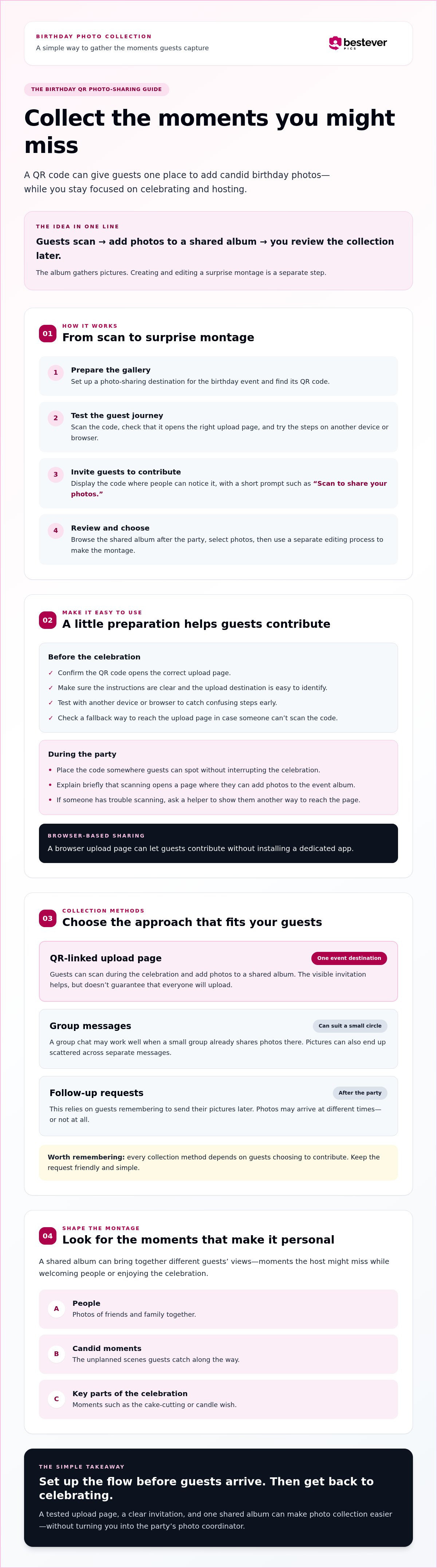
The guest flow is simple: scan the code, open the upload page, and add photos. Those contributions gather in a shared album, giving the organiser images to sort through after the party. The album collects photos; it isn’t a video-editing tool. You’ll still choose images and use a separate editing process to create the surprise montage.
If you’d like to see a related example of the scan-and-share approach, explore [LINK: wedding QR code photo-sharing guide].
Why collect photos before the party ends?
One shared destination can bring together different guests’ views: a family group photo, a friend capturing the cake-cutting, or a candid moment the host missed while welcoming people. That variety gives you more to choose from when shaping a montage around the people and moments that made the birthday feel personal.
Compare that with asking everyone to send pictures afterwards. Photos may arrive in separate messages, at different times, or not at all. A QR code makes the invitation to contribute visible during the celebration, but it can’t guarantee that guests will upload. Keep the request friendly and clear, and place the code where people can notice it without interrupting the party. For more ideas, see [LINK: creative QR code display ideas].
How birthday QR code photo sharing works from scan to shared album
Birthday QR code photo sharing connects a code to an online page where guests can add pictures to a shared album. The host prepares the gallery and code ahead of time; guests scan, upload, and carry on celebrating. Later, the organiser reviews the images and chooses which ones to use in a montage.
Prepare and test the birthday photo gallery
Choose a photo-sharing destination that lets invited guests submit event photos. Before you print or display its QR code, try the guest journey yourself. Check that scanning opens the right upload page, the instructions make sense, and you can tell where a photo should be added.
Test again using a second device or a different browser. That simple check can reveal a confusing step before guests encounter it at the party. If you’re considering an app-free gallery, [LINK: private photo gallery without app downloads] offers an example of the browser-based sharing flow to look for.
Help guests scan and contribute
Keep the invitation short and specific: “Scan to share your photos.” Add a line explaining that the code opens a page where guests can upload pictures to the event album. Clear instructions help people understand what happens next, without requiring you to pause hosting to explain the process one guest at a time.
Give guests a fallback, too. If someone can’t scan the code, ask a helper to show them another way to reach the upload page. Check that the alternative works before the celebration rather than troubleshooting in the middle of it.
Scan-to-upload means a guest scans the event QR code with a phone camera, opens its upload page in a browser, and adds photos to the shared album.
- Prepare: Set up a gallery for the birthday event and find its QR code.
- Test: Scan the code and follow the upload steps on your device, then check with another device or browser.
- Share: Display the code with a short invitation and explain where uploads go.
- Collect and review: Let guests contribute during the celebration, then browse the album later and select photos for your montage.
With the upload flow ready before guests arrive, you can spend less time managing contributions and more time hosting.
Birthday QR code photo sharing compared with other ways to collect pictures
There’s no single collection method that suits every birthday. A group chat can work well for a small circle that already shares photos there. A QR-linked upload page gives everyone one event destination, while post-party requests rely on guests remembering to send their pictures later. Each approach still depends on people choosing to contribute.
| Method | Guest steps | Organiser effort | How easily photos stay together |
|---|---|---|---|
| QR-linked browser upload | Scan the code, open the page, and add photos. | Set up and share the destination, then review contributions. | Uploads go to one shared event destination. |
| Group messages | Open the chat and send photos. | Monitor the conversation and keep track of images. | Photos can sit among messages and other party updates. |
| Post-party requests | Remember the request, find the photos, and send them later. | Follow up and gather pictures from separate conversations. | Contributions may arrive through different channels. |
QR code uploads versus group chats
Birthday qr code photo sharing gives guests a dedicated place to add pictures, which can make the collection easier to review than a busy chat thread. Group messages feel familiar, and they may be the simplest choice for a small gathering where everyone is already in one conversation. But party messages can quickly mix photo contributions with plans, jokes, and updates. Neither approach guarantees that guests will share.
QR code uploads versus post-party requests
After guests leave, they may get caught up in everyday life and forget to send the photos they took. A visible QR code makes the invitation to contribute while the party is still happening, but it can’t make anyone upload. A friendly reminder and a clear explanation of where pictures go can help guests decide to take part.
Choose based on what will feel easiest for your guests and manageable for you. If you want more practical ideas for keeping contributions organised, see how to collect guest photos without the stress.
How to set up birthday QR photo sharing guests will actually use
Make contributing visible, clear, and optional. Birthday QR code photo sharing works best as a small part of the party setup, not another task you have to manage all afternoon. Prepare the details before guests arrive, then let the code do the reminding while you enjoy the celebration.
Choose where and how to display the QR code
Pick a spot guests will naturally pass, such as the welcome table, a photo area, or a place near the refreshments. Keep the printed code clear, flat, and easy to scan, with enough open space around it. Avoid placing it where people need to stop in a doorway or interrupt a conversation to use it. For more placement inspiration, browse these creative QR code display ideas.
Make contributing feel easy for every guest
Pair the code with one friendly, direct prompt: “Scan to share your birthday photos.” If it suits the party, ask the birthday person or a trusted helper to mention the gallery briefly. Let guests know that scanning opens a page where they can add pictures to the shared album, so they understand what the code does before they use it.
Use this pre-party checklist:
- Choose a gallery where invited guests can submit birthday photos.
- Prepare the QR code and make sure the display points guests to the intended upload page.
- Write a short prompt that says what to do and where the pictures will go.
- Place the display somewhere noticeable but out of the way of the main celebration.
- Choose a check-in moment, such as a quiet pause between activities, to see whether contributions are coming in.
That last step matters. You don’t need to monitor uploads continuously or ask every guest to participate. A quick look during a natural break can help you notice if the sign has been moved or if people seem unsure, without pulling you away from hosting. Keep a simple backup instruction ready, such as asking a helper how to reach the upload page if someone can’t scan the code.
A calm setup gives guests an easy invitation and leaves you free to be part of the birthday. The photos will be there to review later, whether a few guests contribute or the album fills with different views of the day.
Turn collected birthday photos into a personal surprise video montage
The shared album gives you material to shape into a birthday story. Review the photos when you have time, then pick a small set of moments that shows more than the cake and decorations. The gallery gathers guest uploads; assembling them into a video requires a separate editing method.
Choose photos that make the montage feel personal
Start with the people. Look for pictures that show the birthday person with family and friends, then add spontaneous moments: a burst of laughter, an enthusiastic dance, or the look on someone’s face during the candles. Posed portraits can anchor the story, but candid photos often bring its personality to life.
As you review, sort possible picks into three groups:
- People: the birthday person with the guests who matter to them.
- Candid moments: unscripted reactions and interactions.
- Party timeline: arrivals, activities, cake, and the final goodbyes or group photos.
Then arrange your favourites into a natural beginning, middle, and ending. You might open with guests arriving, build through conversations and celebrations, and close with a group photo or a warm birthday message. Before including an image, consider whether everyone shown would be comfortable with it being part of the montage and who will see the finished video.
Plan the reveal and preserve the memories
Decide who’ll select the photos and put the montage together, and choose when the birthday person will see it. A quiet moment during the celebration can make the reveal feel personal; sharing it afterwards gives you more time to edit. Keep the surprise plan separate from the upload invitation so guests can contribute without giving away what you’re preparing.
Once you’ve chosen the collection approach, revisit the birthday QR photo sharing basics to keep the guest upload process clear. The photo collection and the video edit are separate steps, so choose an editing method that suits your plans and review how it handles the images you want to use.
If you’d like an app-free way to collect guest photos for a birthday or milestone, Bestever.pics offers web-based guest photo sharing. The shared album gives you photos to review, while the montage remains yours to create.
Make birthday photos easier to keep and share
Birthday QR code photo sharing gives you a practical way to gather pictures while guests are still together. A clear invitation and a tested upload path can make contributing feel straightforward, though each guest still chooses whether to share. It also lets you spend less of the celebration asking people to send photos later.
A web-based gallery lets guests upload without a required app download, while the shared album gives you a collection to review afterwards. Birthday and milestone events are supported use cases. Choose photos that capture the people and feeling of the celebration, then use a separate editing method to put together your montage.
Keep the plan simple: make sharing easy, review the images when you have time, and shape them into a personal surprise. The collection doesn’t need to be perfect to bring back the moments that mattered.
With a little preparation, you can stay present for the birthday and still bring everyone’s memories together. Enjoy making something the birthday person can revisit and treasure.
Frequently Asked Questions
Can guests upload birthday photos by scanning a QR code?
Yes, if the photo-sharing service linked to the code supports guest uploads. With birthday QR code photo sharing, guests scan the code using a phone, follow the upload page’s instructions, and select the pictures they want to share. Test the code before the party to confirm it opens the intended page. Add a brief note beside it explaining what happens after scanning. Guests can still choose whether or not to contribute.
Do guests need an app to share birthday photos with a QR code?
That depends on the photo-sharing service. A browser-based upload page can let guests add pictures without installing an app, while other services may require an app or account. Check the guest experience yourself on a phone before the event, rather than assuming the QR code leads to an app-free page. Make the instructions clear so guests know whether they’ll upload in a browser or need to take another step.
How do I make a QR code for birthday party photos?
Choose a photo-sharing destination that accepts guest uploads, then create or retrieve the QR code connected to its upload page. Scan it with your phone and check that it opens the right place and that the instructions make sense. Once tested, display the code with a short prompt, such as “Scan to share birthday photos.” For more guidance, see [LINK: how to create a QR code for events].
How do I get guests to share candid birthday photos?
Put the QR code somewhere visible where guests naturally pause, and add a friendly prompt that explains how to scan and upload. Ask the birthday person or a trusted helper to mention the gallery briefly, so you don’t have to supervise each contribution. Keep expectations realistic: some guests may not share, and reminders can’t guarantee uploads. Make the invitation easy to notice, then focus on enjoying the celebration.
Can I use guests’ photos to make a birthday video montage?
Yes, guest photos can give you material for a personal birthday montage, but the shared gallery and video editing are separate steps. Review the collected images, choose the ones that fit the story you want to tell, and use an editing method that suits your needs. Before including a photo, consider whether it’s appropriate for the montage’s intended audience. A gallery gathers contributions; it doesn’t automatically create the video.
What is the easiest way to collect photos from a birthday party?
The easiest method depends on your guests and how comfortable they are with the steps. A QR code that opens a clear upload page can keep contributions together and reduce the need to chase photos in separate messages. A group chat may suit a small, familiar group. Whichever option you choose, test it ahead of time and give guests a simple fallback, such as asking a helper for the upload link.
Where should I put a birthday photo-sharing QR code?
Choose a visible spot guests can approach easily, such as a welcome table or a designated photo area. Add a short instruction explaining that they can scan the code to share birthday pictures. Keep the code uncovered, well lit, and easy to reach with a phone camera. Avoid placing it in a busy passageway where guests may feel in the way. If the venue has sign rules, check with the organiser first.


