

Article by
Gabi
Hi, I'm Gabi - Co-Founder of Bestever Pics. Thanks for visiting our blog. We are working hard to produce content which we hope resonates with you. Feel free to drop us a line on socials or via the contact form on the site.
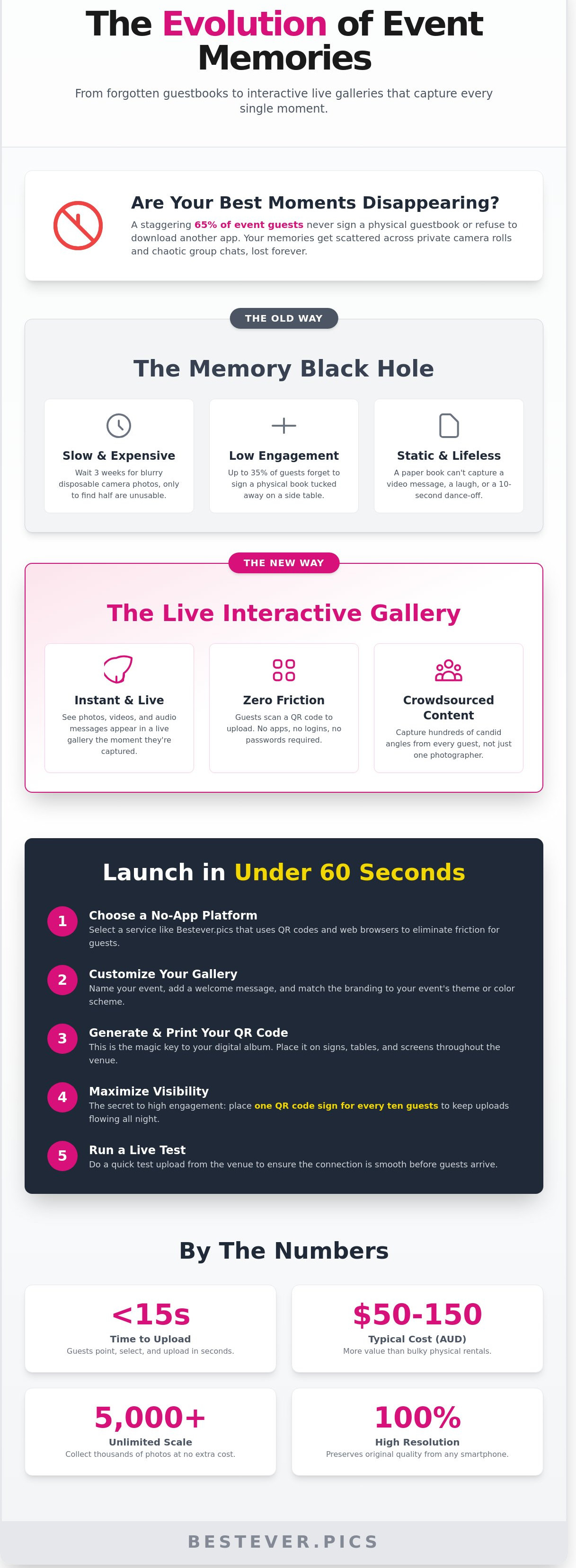
Last Saturday at a wedding in Sydney, Sarah spent four hours scrolling through a chaotic WhatsApp group just to find one clear photo of her nan. It's a common frustration when 65% of guests at Australian events forget to sign a physical book or refuse to download yet another bulky app. Using a **digital guestbook for events** is the only way to ensure those memories don't get lost in a group chat forever.
You've likely felt that same disappointment seeing your best moments disappear into private camera rolls or expire on a fleeting social media story. It's exhausting to chase friends for high-res files weeks after the party ends. You want a single place where every guest can contribute without the technical headache.
This guide shows you how to set up a **digital guestbook for events** that captures every candid shot without a single app download. You'll learn how to use tools like Bestever.pics to create a QR-based gallery that even your least tech-savvy relatives can use in under five seconds. We'll walk through the setup, privacy controls, and the best ways to display your live gallery to keep the energy high all night.
Key Takeaways
- Launch your digital guestbook for events in under 60 seconds using a setup that requires zero app downloads or account logins.
- Capture the real atmosphere of your night by combining candid photos, videos, and audio recordings into one live, interactive gallery.
- Cut costs with a digital alternative that typically ranges from $50 to $150 AUD, offering better value than bulky physical rentals.
- Drive guest engagement by placing one QR code sign for every ten people to keep the uploads flowing throughout the celebration.
- See how Bestever.pics simplifies the sharing process, making it easy for every guest to contribute their best shots the moment they happen.
What is a Digital Guestbook for Events?
A digital guestbook for events is a web-based gallery where guests upload candid photos, videos, and notes via QR codes. It replaces physical books with a live, cloud-hosted album accessible from any smartphone. This setup ensures you capture every angle of your celebration without requiring guests to download a single app.
The "Old Way" of capturing memories relied on paper books and disposable cameras. You'd often wait three weeks for film processing only to find half the shots were blurry or ruined by a stray thumb. It was expensive and slow. The "New Way" uses a digital guestbook for events to turn every guest into a professional-grade contributor. Whether you’re managing a Gold Coast Schoolies party or a weekend hen do in London, the result is the same: instant, high-resolution media that lives forever in the cloud.
This shift isn't just about convenience; it's about volume and variety. Traditional methods limit you to what one or two hired photographers can see. A digital setup crowdsources the perspective of every person in the room. You get the messy, joyful, and authentic moments that usually happen when the cameras aren't looking. It's the inevitable evolution of event hosting.
Moving Beyond Paper and Pens
Physical guestbooks have a major flaw because they're static. Industry data suggests up to 35% of guests forget to sign them because they're tucked away on a side table near the exit. Ink smudges, pages get skipped, and you're left with a book that lacks any visual life. Digital versions remove these barriers. You get unlimited video messages and candid shots from the middle of the dance floor. It's about capturing the "live" energy of the room. You can't hear a best friend's laugh or see a 10-second dance-off on a piece of paper.
The Tech Behind the QR Code
Modern platforms prioritize speed and accessibility. You won't find clunky app downloads or registration forms here. Guests simply point their smartphone camera at a printed QR code, select their favourite media, and hit upload. It takes less than 15 seconds. By 2026, browser-based hosting is the global standard for event tech. It provides instant cloud storage, ensuring your memories are secure before the DJ plays the final song. Bestever.pics makes this high-tech process feel completely effortless for every generation of guest.
- Instant Access: No waiting for film or professional edits.
- Zero Friction: No apps, no accounts, and no passwords required.
- Unlimited Scale: Collect 50 or 5,000 photos without extra costs.
The technical backbone of a digital guestbook for events ensures that high-resolution files are preserved without compression. This means your guest's 48-megapixel smartphone shots look just as sharp on your 4K home screen later. It’s sophisticated simplicity designed for the fast-paced needs of modern celebrations.
How to Set Up Your Digital Guestbook in 5 Steps
You don't need a software engineering degree to get your tech ready. Most organisers have their digital guestbook for events live in under 60 seconds. It's about removing friction for your guests while ensuring you capture every candid moment from the night.
- Step 1: Choose a platform that requires no app downloads. If a guest has to visit an app store, they won't participate.
- Step 2: Customise your digital gallery. Match the interface to your event branding or specific colour scheme.
- Step 3: Generate your unique event QR code. This is the bridge between the physical room and your digital collection.
- Step 4: Design your physical signage. High visibility is the secret to a high engagement rate.
- Step 5: Run a live test. Upload a photo from the venue to check the local connection speeds.
Creating Your Digital Space
Start by naming your gallery something recognisable like "The Miller Wedding" or "TechCon 2026." Set your privacy controls based on the event type; private galleries work best for intimate hen dos, while open galleries suit large public festivals. If you're managing a corporate function with 500 plus attendees, ensure you have an unlimited upload limit. You can use Bestever.pics to create a professional gallery instantly, which handles high-volume uploads without crashing.
Customising the Experience
Write a punchy welcome message that guests see the moment they scan your code. This is the perfect spot to include a specific hashtag or a quick thank-you note. Align the digital interface with your corporate brand by using specific HEX codes for buttons and backgrounds. For high-profile events or awards nights, always enable a moderation queue. This allows you to vet every photo before it appears on a live screen, preventing any unwanted "pranks" from reaching the main stage.
Testing Before the Big Day
Your setup must pass the "Grandma Test." If a guest can't figure out how to upload a photo in two clicks, the process is too complicated. Print your QR code and test it at various sizes, from a 10cm table card to a large A1 poster. A code that looks crisp on a screen might blur when printed on textured cardstock. Finally, check the venue's connectivity. Upload a 10-second video on both the guest Wi-Fi and a 5G connection to ensure the digital guestbook for events performs smoothly regardless of the signal strength.
Choosing Your Format: Photo, Video, or Audio?
Text-only guestbooks often result in polite but predictable messages. A multi-media digital guestbook for events captures the raw energy of your celebration in a way that words on a page simply can't. It's about preserving the atmosphere. Think about the difference between reading "we had a great time" and seeing a video of your best mate's terrible dance moves at 11:00 PM.
Cost is a major factor for most hosts. Traditional photo booth rentals in Australian cities like Brisbane or Perth often cost upwards of $600 AUD for a four-hour window. Digital guestbooks typically range from $50 to $150 AUD. They run for the entire event, not just a few hours. This makes them a practical choice for budget-conscious planners who refuse to sacrifice quality.
The Visual Appeal of Photos
Photos are the most popular medium because they're instant and familiar. While professional photographers handle the staged shots, your guests capture the candid, unscripted moments that happen at the table or on the dance floor. You can use a live slideshow feature to project these images onto a screen in real time. This creates a feedback loop; guests see their faces on screen and feel inspired to upload more.
Bestever.pics ensures these memories stay crisp. The platform handles high-resolution uploads without the aggressive compression that ruins photo quality on social media. If you're planning a ceremony, you might want to look into a [LINK: wedding qr code for photos] to see how visual guestbooks specifically transform weddings.
The Impact of Video and Audio
Video and audio messages provide a level of intimacy that static images lack. They capture the specific pitch of a laugh or the shaky voice of a sentimental speech. While some hosts look at hiring vintage "audio guestbook" phones, these can be expensive to rent and ship; they often cost over $250 AUD for a single night.
A digital video guestbook provides the same emotional payoff without the logistics of hardware. Guests use their own phones to record messages, which means no queues and no broken handsets. At the end of the night, you receive every file in a single, organised folder. It's a simple way to keep the energy of your event alive forever.
Ensuring Guest Participation: The Practical Strategy
Your biggest worry isn't the technology. It's the "ghost town" effect where nobody scans the code. Guests don't ignore your digital guestbook for events because they're disinterested; they ignore it because they're busy socialising. To fix this, you need a visibility strategy that leaves nothing to chance.
Successful event planners follow the 1:10 rule. You must place at least one physical sign for every ten guests to ensure a QR code is always within their line of sight. This density prevents bottlenecks and keeps the reminder fresh. When people see others scanning, they're 40% more likely to join in themselves.
Your MC or host carries the responsibility for driving engagement. They should mention the guestbook at least three times: during the welcome, before the main meal, and right before the dance floor opens. Use active language. Instead of saying "there is a link," tell them to "grab your phones and capture this moment." This creates a psychological trigger that turns a passive sign into an active task.
Physical Signage and Placement
Placement is everything for a digital guestbook for events. Don't hide your codes in dark corners. Position them where guests naturally linger, such as the bar, buffet lines, and table centrepieces. In Australian sports clubs, QR code coasters are the highest-converting signage type because they put the tech directly under a guest's drink. Use high-contrast black and white designs. This ensures phones can read the code even in the moody, low-light environment of a cocktail lounge or reception centre.
Timing Your Announcements
The first 30 minutes and the last 30 minutes are your "Golden Windows." Guests arrive with high energy and leave with high nostalgia. Capitalise on this by launching a quick photo challenge or scavenger hunt. Ask guests to find the "best dressed" or "funniest dancer" to gamify the experience. Always send a follow-up link the next morning via email or SMS. This simple step often captures an additional 25% of photos that guests took but forgot to upload during the party excitement.
Ready to see how easy it is to collect every memory? You can set up your guestbook with Bestever.pics in under two minutes.
Why Bestever.pics is the Leading 2026 Choice
Bestever.pics wasn't born in a corporate boardroom. It started with a father and daughter who wanted a better way to capture memories at a family wedding without the clunkiness of old-school tech. They saw guests struggling with disposable cameras and complicated logins. This personal origin story is why the platform feels so different today. It’s built for real people who want to celebrate, not troubleshoot software. Whether you are hosting a wedding in Singapore or a corporate gala in Canada, you get local support and a tool designed by people who actually attend events.
This human-centric approach is what makes Bestever.pics a visionary expert in the space. The "No App, No Account, No Hassle" philosophy ensures that technology never gets in the way of a good time. It’s a sophisticated yet simple solution for anyone looking to set up a digital guestbook for events. By focusing on accessibility, the platform has grown into a global leader, supporting thousands of celebrations across different time zones and cultures.
App-Free Uploading for All Guests
Forcing guests to download a new app is the fastest way to kill engagement. Research shows that removing the "download" barrier increases photo participation by up to 300%. Bestever.pics runs entirely in the mobile browser, which is specifically optimized for the hardware in 2026 smartphones. Guests simply scan a QR code and start sharing. They don't need to create accounts or remember passwords. This keeps your friends and family in the moment rather than staring at an app store loading bar.
Real-Time Moderation and Privacy
Privacy is a major concern for modern hosts who want to keep their celebrations intimate. Bestever.pics ensures your photos stay off public social media algorithms and away from data harvesters. You own every image shared. The platform also allows you to view and manage photos in real-time. If a blurry shot or an accidental pocket-dial photo appears, you can remove it with one tap. This keeps your digital guestbook for events looking professional and polished throughout the night.
When the event ends, the work is already done for you. There is no need to chase guests for weeks to get copies of their photos. A simple one-click download gives the host every high-resolution memory in a single organized folder. It’s a practical, stress-free way to ensure no moment is lost to a private camera roll. [LINK: Photo sharing tips]
Ready to capture every angle of your next celebration without the app-store headache? Visit Bestever.pics to set up your gallery in under two minutes and see why thousands of hosts trust us to preserve their most important memories.


