

Article by
Gabi
Hi, I'm Gabi - Co-Founder of Bestever Pics. Thanks for visiting our blog. We are working hard to produce content which we hope resonates with you. Feel free to drop us a line on socials or via the contact form on the site.
Stop chasing guests for photos that never arrive. Most candid memories vanish because your sharing process has too much friction. You need a high-performance event qr code for image upload that captures everything in real time.
We all know the frustration of checking a wedding or quinceañera hashtag only to find it's empty or filled with low-quality screenshots. You deserve a single, high-res digital album that populates itself without forcing anyone to create an account or download software. This guide walks you through the 2026 blueprint for zero-friction photo sharing. We'll show you how bestever.pics and modern QR tech can transform your next event into a self-curating gallery of candid shots. Get ready to eliminate the tech barriers and start collecting the memories you actually want to keep.
Key Takeaways
- Stop losing candid memories to clunky apps and broken hashtags by switching to a friction-free sharing method.
- Learn how an event qr code for image upload allows guests to contribute high-res photos instantly using just their smartphone camera.
- Save money and space by turning every guest's phone into a roaming photo booth that captures the moments a stationary setup misses.
- Follow our simple step-by-step guide to setting up your digital album and customizing it for your specific celebration.
- Discover the best placement strategies and announcement tips to ensure your gallery is overflowing with photos by the next morning.
The End of the App Era: Why Guest Friction Kills Memories
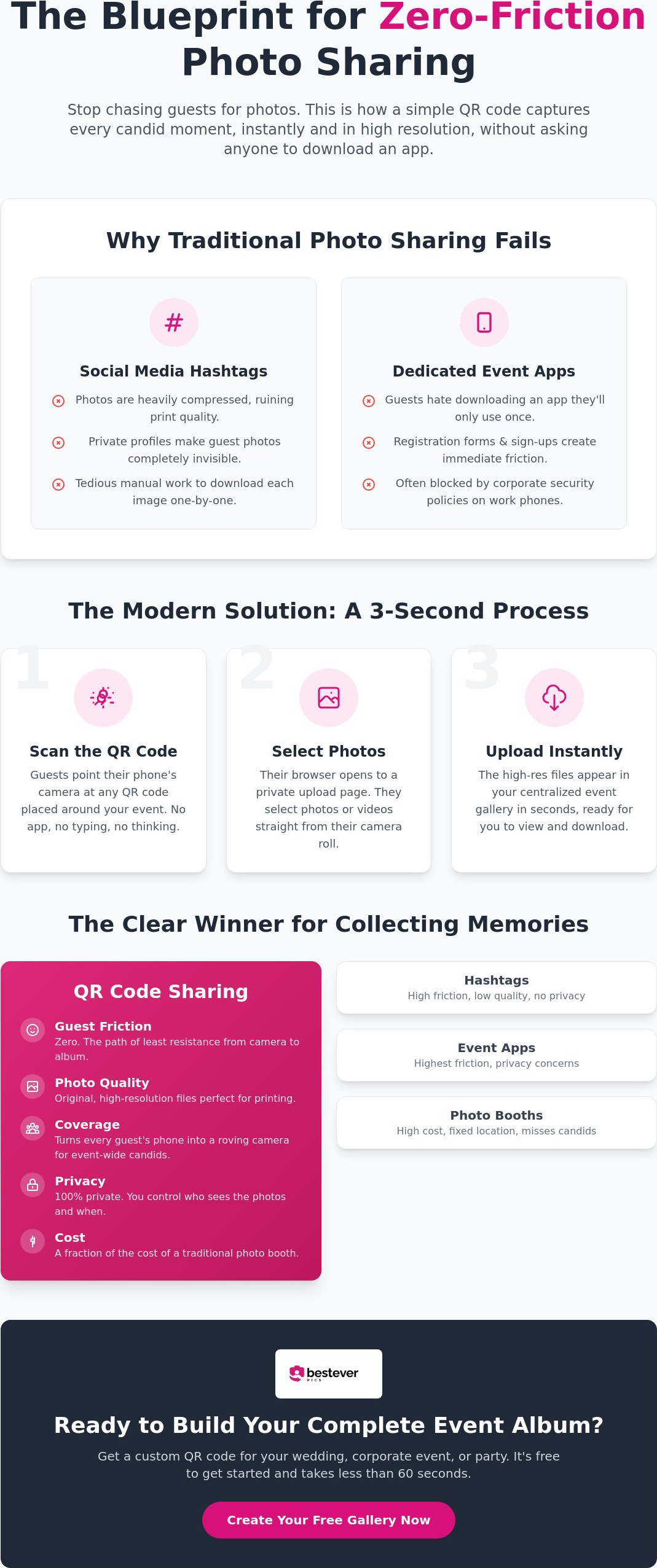
Traditional photo sharing is officially broken. It demands too much effort from your guests at a time when they should be celebrating. If a process takes more than five seconds, you've already lost the shot. An event qr code for image upload removes every barrier between the phone's camera and your master album. It's the only way to ensure those raw, candid moments actually make it home with you.
Think about the typical guest experience. They see a beautiful moment, snap a photo, and then nothing happens. They don't want to hunt for a hashtag or wait for a 50MB app to download on shaky venue Wi-Fi. We live in a world of instant gratification. Your photo collection strategy needs to match that reality or risk coming up empty the next morning.
The Problem with Social Media Hashtags
Hashtags were a clever workaround a decade ago, but they've become unreliable and messy. Private profile settings mean that even if a guest uses your specific tag, the photo remains invisible to you. You're left with a fraction of the actual memories captured. Even worse, social platforms aggressively compress images to save data. This destroys the quality of your favorite memories, making them useless for high-quality prints or physical albums.
- Hashtags often pull in unrelated content from strangers across the globe.
- Downloading photos one by one from a feed is a tedious, manual chore.
- Privacy restrictions create a permanent wall between you and your guest's best shots.
Why App-Based Sharing is a Relic of the Past
Guests resent being forced to use their limited phone storage for a one-time event app. Registration forms and email sign-ups lead to immediate abandonment before the first photo is even taken. For corporate events, the barrier is even higher; many guests use company phones with strict security policies that prevent unauthorized downloads. Web-based uploads are the inevitable evolution of digital photo sharing for modern events.
The QR code has returned as the ultimate bridge for media collection. It's fast, familiar, and requires zero commitment from the user. By utilizing an event qr code for image upload, you respect your guests' time and privacy while securing every high-res file. It's about creating a path of least resistance so the focus remains on the fun, not the tech. This is how you build a complete gallery that tells the full story of your night.
How an Event QR Code for Image Upload Works
The tech behind an event qr code for image upload is remarkably simple but powerful. It starts with a dynamic QR code. Unlike static codes that never change, a dynamic code acts as a flexible gateway to your digital album. Once you've generated your code, you can print it on anything from bar menus to large welcome signs. It's the ultimate bridge between the physical party and your digital memories.
The magic happens the moment a guest points their phone camera at the code. This triggers an instant "handshake" between their device and a secure mobile upload page. There's no registration. No passwords to forget. Guests simply select their favorite photos or videos from their camera roll and hit send. Within seconds, those files land in your centralized gallery, ready for you to view, download, or share.
The Browser-Based Advantage
Privacy and Security in 2026
Privacy is where this system truly beats social media platforms. You own the data. You control the access. While it's always smart to stay informed about potential security issues with QR codes in public spaces, a private event gallery is a walled garden. Your guests' faces aren't being scraped by ad networks or sold to third parties. These cloud-based event albums provide an encrypted vault for your memories, ensuring your private moments stay exactly that—private. You maintain the power to approve photos before they appear or keep the entire collection hidden until the next morning.
If you're ready to see how this fits your next celebration, you can check out our simple setup process to get started in minutes. It's the most efficient way to ensure no memory gets left behind on a guest's phone.
Comparing QR Codes to Traditional Photo Booths
Traditional photo booths have their charm, but they're often stuck in a corner. Guests have to leave the dance floor, find the booth, and wait in a line that moves at a snail's pace. An event qr code for image upload flips this script. It turns every guest's smartphone into a roaming photo booth that follows the action wherever it goes. You aren't limited to a single backdrop or a box of dusty props. Instead, you capture the raw, unposed moments that happen at the dinner table, the bar, or the very center of the dance floor.
While a physical booth might capture a few hundred photos in a night, a digital gallery has no such limits. You'll get every candid laugh without worrying about running out of paper or ink. Think about the "back of the room" problem. A photo booth captures people who are specifically looking for a photo; a QR code captures the people who are just living in the moment. You'll see the messy cake-cutting, the late-night dance battles, and the quiet conversations that a stationary camera would never reach.
- Captures 360-degree coverage of the entire venue simultaneously.
- Eliminates long queues that pull guests away from the party.
- Provides instant access to high-resolution files for the host.
- Works under strict corporate IT policies where apps are restricted.
Cost Efficiency for DIY Hosts
Budgeting for a wedding or a big birthday bash is a constant balancing act. A physical photo booth rental can easily eat up a significant portion of your decor budget. Digital sharing costs a small fraction of that price. You're effectively getting a second shooter's worth of content for the cost of a few drinks at the bar. Plus, your guests walk away with high-resolution digital keepsakes they can actually use, rather than a strip of thermal paper that gets lost in a coat pocket. For more ways to save while keeping the quality high, check out our guide on digital photo sharing for modern events.
Scalability for Pro Planners
For professional planners and venue managers, the logistical weight of physical equipment is a constant headache. Using an event qr code for image upload allows you to manage multiple activations from a single, streamlined dashboard. There's no heavy lifting or on-site tech support required. Corporate clients especially love this because it's IT-friendly. Many work events have strict bans on app installs due to security risks, so a browser-based system is often the only compliant way to collect media. Branded upload pages add that final layer of sophistication that high-end clients expect, making the technology feel like a bespoke part of their brand experience.
How to Create an Event QR Code for Image Upload
Setting up your event qr code for image upload is a fast, five-step sprint. You don't need a degree in computer science to get this right. It's about choosing the right tools and placing them where they can't be missed. Follow this blueprint to turn your venue into a high-speed media hub using an event qr code for image upload that guests will actually use.
- Step 1: Choose your platform. Pick a service that offers high-resolution storage and requires no guest registration. If it forces an app download, it's a barrier you don't need.
- Step 2: Customise your details. Input your event name, date, and a friendly welcome message. This tells guests they're in the right place the moment they scan.
- Step 3: Generate and download. Grab your unique QR code in a high-quality print format like a PNG or SVG. This ensures the code stays crisp and scannable even on large signs.
- Step 4: Design your materials. Use branding templates to match your event's aesthetic. Whether it's a rustic wedding or a sleek corporate launch, your signage should look intentional.
- Step 5: Print and place. Put your codes in high-traffic zones. Think bar menus, table cards, and even the back of the ceremony program.
Customising the Guest Experience
Your upload screen is a digital welcome mat. Don't leave it generic. Personalise the interface with your specific event colours or a high-res photo of the hosts. This builds instant trust and makes the tech feel like a bespoke part of the day. For longer events like a weekend-long hen do or a three-day conference, set up custom folders. You can separate shots into categories like 'The Ceremony' or 'The Dance Floor' to keep your master album organised. You can create your QR code and set these preferences in just a few clicks.
Testing Before the Big Day
Success lies in the details. Always perform a test scan with multiple phone types before the guests arrive to verify your event qr code for image upload works in the room. Venue lighting can be unpredictable, especially in dim reception halls or during late-night parties. Ensure there's enough contrast on your printed signs so the camera picks up the code instantly. If you plan to run a live slideshow, verify the venue's Wi-Fi or cellular upload speed. You want the photos to pop up on the screen in seconds, not minutes. Check your storage capacity early to ensure you can handle thousands of high-res files without a hitch.
Start building your collection now by setting up a private wedding photo gallery that works for everyone. It's the simplest way to ensure every candid moment is captured and stored safely for years to come.
Professional Strategies for High Guest Engagement
Visibility is the secret to a packed digital album. You've already done the hard work of setting up the technology; now you need to make it impossible for guests to ignore. A strategically placed event qr code for image upload acts as a constant, visual nudge for everyone to join in. Focus on high-traffic zones where people naturally reach for their phones, like the bar or the seating chart.
Don't rely on the signs alone to do the heavy lifting. A quick ten-second shoutout from your MC or DJ can increase participation by a huge margin. People often just need a reminder that you actually want their "behind-the-scenes" shots. When guests see their own photos appearing on a live slideshow, it creates a "fame factor" that turns photo sharing into a fun, social game. This momentum ensures your event qr code for image upload stays busy throughout the entire celebration.
- Place codes near the exit so guests can upload their final snaps as they head home.
- Include a code on the back of name badges for corporate networking events.
- Add a QR code to the back of the ceremony program or on the wedding favor tags.
- Use floor decals in front of the bar or photo backdrops to catch the eye.
Creative Display Ideas
Think beyond the standard paper sign. Incorporate your QR code into floral centerpieces or use large floor decals for high-energy corporate events. For a modern twist, set up a digital guestbook station where the code is the centerpiece. Check out these creative qr code display ideas to find a style that fits your aesthetic. Whether it's a sleek acrylic sign or a rustic wooden frame, make sure the code has high contrast for easy scanning.
Post-Event Follow-Up
The fun shouldn't stop when the music ends. Send a thank-you email the next morning with a direct link to the full gallery so everyone can relive the highlights. You can use the best candid shots for your physical thank-you cards or a quick social media recap. Modern platforms simplify the download process for hosts, allowing you to grab everything in one high-res zip file. It's the perfect way to close the loop on a successful celebration and preserve every memory for years to come.
Capture Every Moment Before the Music Stops
You've seen why traditional hashtags and clunky apps are failing hosts in 2026. By choosing an event qr code for image upload, you're opting for a path of zero friction and maximum participation. You get to keep every high-resolution laugh and candid dance floor moment without the stress of chasing guests for files weeks after the party. It's about securing those raw, unposed memories that usually stay trapped on someone else's phone.
Create your custom event QR code for image upload with bestever.pics today and start building a gallery that captures the real story of your celebration. Your future self will thank you when you're looking through those perfect shots the very next morning. Let's make your next event truly unforgettable and capture every single smile.
Frequently Asked Questions
How do guests upload photos using the QR code?
Guests open their smartphone camera, scan the printed code, and a secure browser page opens instantly. They select photos or videos directly from their camera roll and hit upload. This fast process takes less than ten seconds from start to finish. Since there's no need to download an app or create an account, even your less tech-savvy guests will find it simple to use.
Do guests need to download an app to share photos?
No, guests don't need to download anything to use an event qr code for image upload. The system is entirely web-based and utilizes the mobile browser already installed on every phone. This approach removes typical barriers like app store searches or forgotten passwords. It ensures your guests spend their time celebrating rather than troubleshooting software or worrying about phone storage.
Does the QR code work on both iPhone and Android?
Yes, the system is fully compatible with all modern smartphones including iPhone and Android. It uses standard QR technology that native camera apps recognize instantly. Because the upload happens in a standard mobile browser, the experience is identical for every guest. You won't need to provide technical support or worry about the specific devices your friends and family are carrying.
Is there a limit to how many photos guests can upload?
Professional packages are designed for high-volume celebrations and usually offer unlimited photo and video storage. You won't have to worry about a storage cap being reached in the middle of your party. This allows you to collect thousands of high-resolution files from every angle of the venue. It's a major upgrade over free generators that often limit your collection mid-event.
Can I print the QR code on my own stationery?
Absolutely, you can download your unique QR code as a high-resolution image file to use on any printed material. This makes it easy to include your event qr code for image upload on wedding invitations, bar menus, or table cards. You can even add it to large-scale signage at a corporate conference or school formal. Just ensure there's high contrast so the code remains easy for any phone to scan.
What happens to the photos after the event ends?
Your photos are safely stored in a private, secure digital gallery that you manage as the host. You can view them in real-time during the event or wait until the next morning to relive the highlights. You have the power to share the link with guests or download the entire collection in high resolution. This makes it easy to save everything to your computer for professional printing or social media recaps.


