

Article by
Gabi
Hi, I'm Gabi - Co-Founder of Bestever Pics. Thanks for visiting our blog. We are working hard to produce content which we hope resonates with you. Feel free to drop us a line on socials or via the contact form on the site.
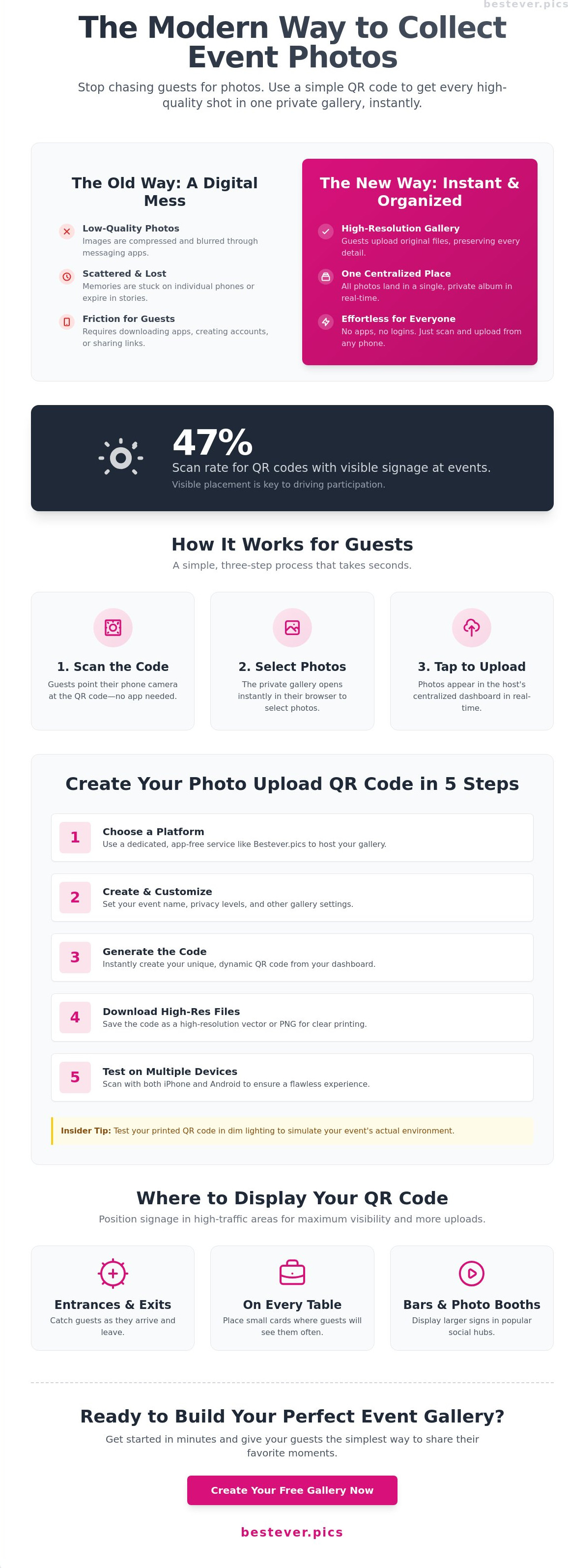
Stop begging your guests to send their photos weeks after the party ends. Most hosts settle for a messy mix of blurry WhatsApp snaps and expired Instagram stories. Learning how to make a qr code to upload photos is the only way to bypass the low-resolution trap and get every high-quality shot in one place instantly. It works because it's simple; research shows that QR codes with visible signage see a 47% scan rate at events.
You know the feeling of seeing a guest snap a perfect candid, only to realize you'll likely never see the file. It's an outdated way to handle memories. We've all been there, chasing people for links that never arrive or forcing them to download apps they'll delete five minutes later. This guide reveals the fastest way to create a custom QR code that lets guests upload their gallery without any friction.
At Bestever.pics, we believe the best technology stays out of the way. We'll walk you through the simple steps to set up your digital gallery and generate a code that guests actually want to use. You'll transform your event from a scattered digital mess into a complete, high-resolution album in minutes.
Key Takeaways
- Eliminate the friction of app downloads by using a web-based portal that opens instantly in any mobile browser.
- Learn how to make a qr code to upload photos in five simple steps to build a high-resolution gallery for your guests.
- Bypass the login requirements of traditional storage links to ensure every guest can contribute without hitting a wall.
- Drive more uploads by positioning your signage in high-visibility areas like bars and entryways.
- Pick a plan that fits your pace, whether it's a one-off celebration or a full calendar of professional events.
What is a photo upload QR code and how does it work?
Think of a photo upload QR code as a high-speed digital bridge. It connects the physical reality of your event to a secure, private cloud gallery. Instead of guests hoarding photos on their personal devices, a quick scan of the QR code redirects them to a web-based portal. It's immediate. It's efficient. It's the inevitable evolution of how we collect memories. Understanding how it works is the first step toward a stress-free event.
When a guest points their camera at the code, their phone's default browser handles the rest. There is no manual URL entry and no searching for a specific username. Guests simply select their best shots from their camera roll and tap upload. You won't have to worry about low-resolution compression from messaging apps because the files arrive in their original quality. Learning how to make a qr code to upload photos is about more than just technology; it's about making participation effortless for everyone from your tech-savvy cousins to your grandma.
On the back end, the host manages everything from a centralized dashboard. You get a real-time stream of content as it happens. Understanding how to make a qr code to upload photos gives you total control over your event's visual legacy. It's about centralizing the chaos of hundreds of individual camera rolls into one professional-grade output. An insider knows that the best galleries aren't just storage; they're live feeds of the moments you missed while busy hosting.
The difference between static and dynamic QR codes
Static codes are essentially "burnt" into place. If the destination URL changes or the gallery moves, your printed materials become useless paper. Dynamic codes are the modern professional standard. They allow you to swap the underlying link even after you've printed hundreds of table cards. In 2026, planners choose dynamic codes for this flexibility, ensuring the guest experience remains flawless even if logistics shift at the last minute. It's a key part of digital photo sharing for modern events.
Why app-free sharing is the 2026 standard
We've reached a point of "app fatigue" where guests simply won't download software for a single afternoon. If there's a barrier to entry, people will opt out. Web-based portals work across every operating system, from the latest iPhone to older Android models. This universal accessibility ensures your participation rates skyrocket. App-free sharing is the ultimate friction-killer for events because it removes the "download and delete" cycle that stops guests from contributing.
How to make a QR code to upload photos in 5 steps
Speed is everything when you're planning an event. You don't have time to wrestle with complex software or broken links. Learning how to make a qr code to upload photos is a straightforward process that puts you in the driver's seat of your event's content. Follow these five steps to get your gallery live in minutes.
- Select a dedicated platform: Use a service like Bestever.pics to host your album. This ensures your guests have a professional, app-free interface.
- Create and customize: Set up your event details and adjust your private gallery settings to match your needs.
- Generate the code: Use the platform's dashboard to create your unique QR code instantly.
- Download high-resolution files: Always grab the high-res version to ensure the code stays scannable when printed on large signs.
- Test on multiple devices: Scan the code with both iPhone and Android to verify the guest experience is flawless.
This streamlined approach replaces the old "text me the photos" method that always results in lost files or blurry images. If you're planning a celebration, you can set up your private wedding gallery right now to see how simple it really is. An insider observation is that testing your code under dim lighting is the best way to simulate the actual environment of a reception or evening party.
Setting up your digital gallery
Start with a name that leaves no room for confusion. Whether it's "The Miller Wedding" or "Corporate Summer Gala," clarity helps guests know they're in the right place. You'll also need to decide on your privacy levels. Some hosts prefer a public view where everyone sees every upload, while others opt for host-only access to vet the photos first. If you want to wrap things up after the event, set an upload deadline. This keeps your gallery organized and prevents random uploads weeks after the party has ended.
Customizing your QR code design
Your QR code should look like a part of your event, not an afterthought. Add your brand colors or a simple logo to the center to make it pop. Just remember that scanability depends on contrast. Keep the code dark and the background light to avoid technical hiccups at the venue. While you're at it, be aware of the security risks of QR codes when using generic third-party generators. Using a trusted platform like Bestever.pics mitigates these risks by keeping your data within a secure ecosystem. Always download your final design in a vector format. This allows you to scale the code for massive welcome signs without losing the sharp edges required for a successful scan.
Why traditional storage links fall short for events
Many planners start by linking a QR code to a free Google Drive or Dropbox folder. It seems like a smart shortcut until the party actually starts. You've done the work to learn how to make a qr code to upload photos, but your guests are suddenly hitting a wall. If a guest sees a login screen, 70% of them will close the tab and move on. They're there to celebrate, not to hunt for their cloud storage passwords or wait for a verification email.
Legacy folders also suffer from a lack of visual appeal. Instead of a vibrant gallery, your guests see a sterile list of filenames like "IMG_882.heic" and "DCIM_04.jpg." This corporate look drains the excitement from the sharing process. You need a platform that treats your photos like memories, not just data points in a spreadsheet. Without built-in moderation tools, these open folders are also prone to accidental deletions that can ruin your collection in seconds.
The friction of account creation
Requiring an email address is a massive hurdle for your guests. Every extra tap on a screen reduces the number of photos you'll actually receive. The Bestever.pics way is built on the idea that the best technology is invisible. We've eliminated the sign-in process entirely, allowing for instant uploads that keep the focus on the event. When you compare this to legacy folder-sharing, the difference in engagement is staggering. Professional-grade output requires a dedicated event platform that understands the need for speed.
Privacy and security considerations
"Open" folders are essentially a digital wild west. In a standard shared link, there's often no built-in moderation to prevent a guest from accidentally deleting someone else's shots. You shouldn't have to worry about a guest's clumsy thumb-slip erasing your favorite candid of the night. Dedicated platforms handle the heavy lifting by managing permissions automatically. You stay in control as the sole owner of the collection while guests enjoy a friction-free experience. If you're still curious about the technical details, our frequently asked questions cover the specifics of how we keep your data safe. Understanding how to make a qr code to upload photos is only half the battle; the other half is ensuring that the destination is secure and user-friendly.
Best practices for displaying your QR code
You have successfully learned how to make a qr code to upload photos, but your work isn't finished until that code is in front of your guests. Strategic placement is the engine that drives engagement. If your code is hidden in a dark corner or buried at the bottom of a busy program, your upload count will suffer. You need to treat your QR code like a VIP guest, giving it the best seat in the house.
Place your codes at eye level on welcome signs and bar menus to catch attention immediately. The bar is particularly effective because guests often have their phones in hand while waiting for a drink. You should also use table talkers to provide constant, subtle reminders throughout the evening. A well-placed "call to action" like "Share your best shots with us!" provides the final nudge guests need to participate. It's a simple way to improve your event photo collection without pestering people.
Don't forget the power of the follow-up. Including the code on the back of your thank-you cards allows guests to contribute photos they might've forgotten during the excitement of the event. This is especially useful for destinations with spotty reception, like a remote winery or a rural village fete. It gives everyone a second chance to share their high-resolution memories once they're back on a stable Wi-Fi connection. Get your custom QR code today and start collecting those high-resolution memories before they disappear.
Creative display ideas for weddings
Think beyond the standard paper sign. You can incorporate your code into various creative QR code display ideas to keep the aesthetic cohesive. Try printing codes on personalized cocktail napkins or small favor tags attached to gifts. If you want to go high-tech, use digital frames at the reception to cycle between the QR code and a live feed of the photos already uploaded. It creates a feedback loop that encourages more guests to join the fun as they see their own faces appearing on the big screen.
Getting the lighting right
Technical execution is just as important as the design. Avoid placing codes in dark corners where smartphone cameras will struggle to focus or hunt for exposure. Watch out for glare on glossy paper or glass frames, which can render a code unscannable from certain angles. An insider observation is that guests are most likely to upload while waiting at the bar or during the transition between the ceremony and the reception. Test the scan distance yourself to ensure guests don't have to stand on chairs or lean over tables to get a clear shot of the code.
Start collecting memories with Bestever.pics
You have the strategy and the placement plan. Now you need the engine to power it all. Bestever.pics isn't just an alternative to old-school folders; it's the inevitable evolution of event photography. Now that you know how to make a qr code to upload photos, it's time to choose a partner that values your time as much as your memories. We provide a sophisticated yet simple way to manage your event photos without the digital clutter.
Our Standard plan is the go-to choice for one-time celebrations like weddings and milestone birthdays. It's designed for people who want a professional result without a steep learning curve. For businesses, wineries, and corporate groups running three or more events per year, our Pro subscription is the standard. It focuses on attendee engagement and building a library of social assets that you can use long after the guests have gone home.
The Bestever.pics way is built on a single, powerful promise: zero apps, zero accounts, just memories. We've stripped away the login screens and the download requirements that kill guest participation. You get a streamlined, high-octane process that prioritizes the user experience. It's about giving you the creative freedom to host your event while we handle the technical heavy lifting in the background.
Why hosts love our app-free approach
Hosts love us because we keep digital photo sharing for modern events organized and accessible. The speed of our platform is a major factor; guests go from a scan to a successful upload in under 10 seconds. There's no hesitation or friction to slow them down. We're also committed to quality, providing high-resolution downloads for every single photo. Your memories deserve to be seen in full detail, not compressed into blurry thumbnails.
Ready to create your code?
If you're still wondering how to make a qr code to upload photos, head over to our how it works page to see the simplicity in action. We've built a system that supports everything from rowdy Hen dos to traditional village fetes. It's a digital-native solution for anyone who understands the fast-paced needs of modern markets. Get started today to tick one more thing off your planning list and ensure you never miss a single candid shot again.
Take Control of Your Event's Visual Legacy
You've seen how simple it is to bridge the gap between a physical party and a digital album. By ditching the account logins and app downloads, you're making it impossible for guests to ignore your gallery. You've mastered how to make a qr code to upload photos and learned exactly where to place it for the highest engagement. Now, it's just about execution. No more chasing blurry WhatsApp threads or expired stories; just one high-resolution home for every candid moment.
Bestever.pics is trusted by thousands of event hosts worldwide because we prioritize the guest experience. We provide full high-resolution photo and video support so you don't have to settle for low-quality screenshots. It's time to stop worrying about who captured what and start seeing your event through everyone's eyes. You've got the tools to build a professional-grade archive in minutes.
Create your custom Bestever.pics photo gallery now and secure your memories in one place. Your guests are ready to share; give them the fastest way to do it.
Frequently Asked Questions
Do my guests need to download an app to upload photos?
No, your guests don't need to download anything. They simply scan the code and the upload portal opens in their phone's native browser. This removes the friction that usually stops people from sharing. It's the fastest way to get photos from a crowd without forcing them to clear space for a new app.
Is there a limit to how many photos guests can upload?
Upload limits depend on the plan you choose for your event. Our Standard plan handles most private celebrations with ease, while the Pro subscription offers expanded capacity for larger corporate groups. You can scale your gallery to fit the size of your guest list perfectly and ensure every moment is captured.
How long does the QR code stay active after my event?
Your QR code remains active for the duration specified in your selected package. Most hosts keep their galleries open for a few weeks to allow for post-event contributions from those who forgot to scan on the night. You can check your specific deadline in your Bestever.pics dashboard at any time.
Can I see the photos as they are being uploaded in real-time?
Yes, you can watch your gallery grow in real-time. As soon as a guest hits the upload button, the image appears in your host dashboard. This is a great way to monitor the energy of the event or even feed the photos into a live slideshow during the reception.
What happens if a guest uploads an inappropriate photo?
You have total control over the content in your gallery. If an inappropriate or accidental shot appears, you can delete it instantly from your host account. This moderation layer ensures your collection stays curated and professional throughout the entire event, giving you peace of mind while you host.
Can I download all the photos at once in high resolution?
You can download your entire collection with a single click once the event is over. Every file is stored in its original high-resolution format, so you won't lose quality like you would with messaging apps. This makes it easy to print your favorites or share them on social media later.
Will this work for guests with older smartphones?
Yes, this system works on any smartphone with a modern web browser. Whether your guests are using the latest iPhone or an older Android model, the scanning process remains the same. Learning how to make a qr code to upload photos is only useful if it's accessible to everyone; our web-based approach ensures no one is left out.
Do guests need to create an account to share their pictures?
No, guests don't need to create an account or provide an email address. We've eliminated the sign-up process to keep things moving fast. Once you've mastered how to make a qr code to upload photos, you'll see that the lack of accounts is the primary reason guest participation stays so high.


