

Article by
Gabi
Hi, I'm Gabi - Co-Founder of Bestever Pics. Thanks for visiting our blog. We are working hard to produce content which we hope resonates with you. Feel free to drop us a line on socials or via the contact form on the site.
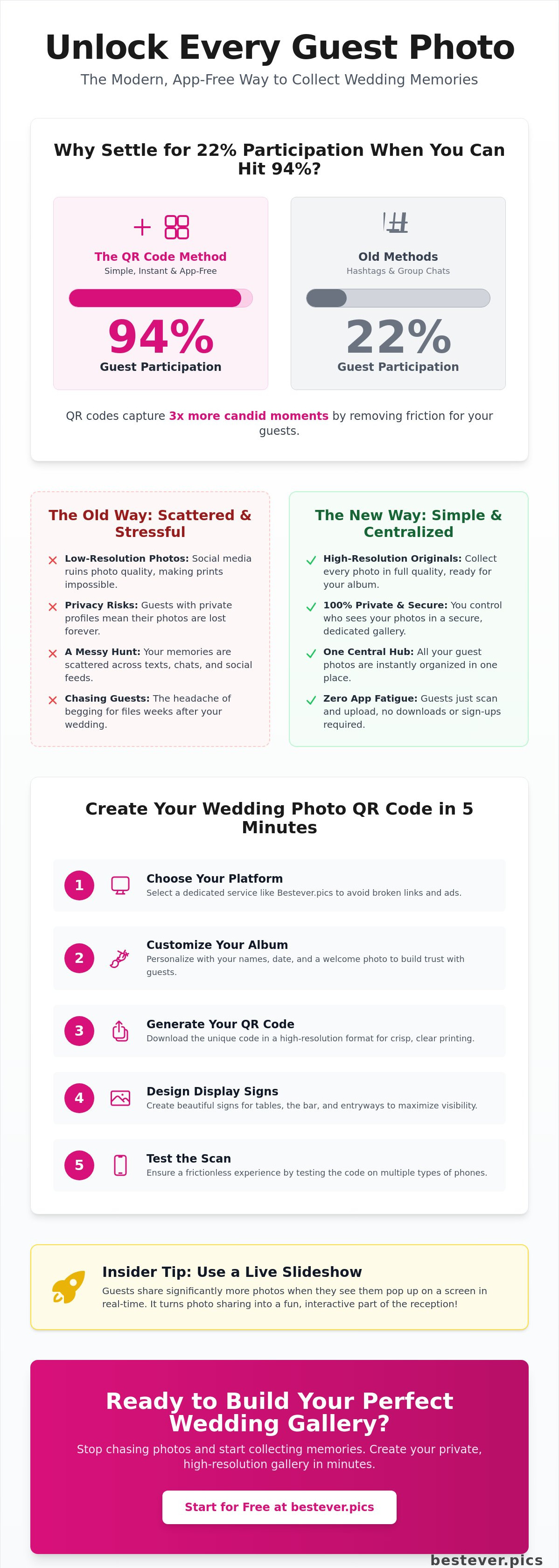
Why settle for 22% guest participation when you can hit 94%? Recent testing shows that using qr codes for wedding photos captures three times more candid moments than a messy hashtag or a shared group chat ever could. It is the inevitable evolution of the modern wedding, replacing outdated methods with a high-speed, digital-first approach.
We know the frustration of chasing guests via text or watching your favorite memories disappear into a low-quality message thread. You want every angle of the dance floor without the headache of begging for files weeks after the big day. This guide teaches you how to collect every high-resolution guest photo instantly while keeping the process entirely app-free.
We'll cover how to set up your Bestever.pics digital album, create professional display signs, and manage your gallery with zero friction. An insider tip we've noticed is that guests engage far more when they see their photos pop up on a live slideshow in real-time. Let's transform your wedding memories from a scattered mess into a professional-grade digital collection.
Key Takeaways
- Boost guest participation to 94% by ditching bulky app downloads for a frictionless, browser-based experience.
- Create your custom qr codes for wedding photos in five minutes to start collecting high-resolution memories immediately.
- Master strategic code placement to ensure guests share their best candid shots during the cocktail hour and reception.
- Solve storage and privacy issues with a centralized digital hub that keeps your photos private and organized.
- Select the Standard gallery for a single celebration or upgrade to a Pro subscription if you are managing multiple events.
What Are QR Codes for Wedding Photos?
QR codes for wedding photos are scannable patterns that link guests directly to a private digital album. Instead of texting photos, guests scan the code with their smartphone camera and upload images instantly. This eliminates the need for hashtags or app downloads, creating a centralized hub for every candid moment captured by your loved ones.
If you are wondering What is a QR Code? in a practical sense, it is simply a high-speed portal. It removes every barrier between a guest's camera roll and your digital archive. We've seen a massive surge in 2026 toward "unfiltered" wedding galleries where authenticity beats perfection every time. Couples are prioritizing raw, candid energy over curated social media feeds. Using qr codes for wedding photos allows you to capture that energy without the friction of legacy technology.
It's important to understand the difference between a generic QR code and a dedicated photo sharing platform. A basic code might just link to a static folder, which often leads to broken links or confusing permissions. A dedicated platform handles the entire experience, from the upload interface to the gallery view. Insider observation: We have found that guests are significantly more likely to share their best shots when they don't have to create an account or sign in. It is about making the process as invisible as possible so the focus stays on the celebration.
The End of the Wedding Hashtag
Instagram's privacy settings are the primary culprit for the death of the hashtag. If your best mate has a private profile, their post won't show up in your hashtag search. You're essentially locked out of your own wedding memories. Then there's the quality issue. Social media platforms strip away the data that makes a photo look crisp. By the time you screenshot a guest's post, you're left with a low-res mess that's impossible to print for a physical album. You deserve the original, high-resolution files, not a grainy copy.
How Digital Galleries Work in 2026
Everything lives in a secure cloud, but you don't need a degree in computer science to navigate it. Bestever.pics creates a private, secure space where your memories are protected from the public eye. It's a closed loop. Guests scan, they upload, and you own the results. It is a far cry from the public-facing nature of social media, giving you total control over who sees those wild moments from the dance floor. This modern approach ensures your qr codes for wedding photos lead to a professional-grade gallery that stays active long after the last dance.
How to Create Your Wedding Photo QR Code in 5 Steps
Ready to build your digital guestbook? Setting up qr codes for wedding photos takes less time than choosing your table linens. Follow these five steps to ensure your gallery is live, secure, and ready for action.
- Step 1: Select a dedicated guest photo sharing platform like Bestever.pics.
- Step 2: Customize your digital album with your names, date, and a cover photo.
- Step 3: Generate your unique QR code and download it in a high-resolution format.
- Step 4: Design your physical signage using templates in a tool like Canva.
- Step 5: Test the scan on multiple devices to ensure a frictionless experience for every guest.
Choosing Your Platform
Start with a platform built for events. While free generators exist, they often come with hidden costs like expiring links or intrusive ads that ruin the vibe. Understanding QR code security and best practices is vital for protecting your guests' data and ensuring the link doesn't lead to a dead end. Stick with a dedicated service like Bestever.pics to ensure your link stays active for the full 3 months after your celebration. You can find the perfect setup for your big day by browsing Bestever.pics products.
Customizing the Guest Experience
Personalize the portal to build trust. Upload a photo from your engagement shoot and add a warm welcome message. This isn't just about aesthetics; it confirms to guests they are in the right place. Create specific albums for the ceremony, cocktail hour, and reception. This keeps your digital collection organized from the start and makes browsing the final gallery much more enjoyable. Match the interface colors to your wedding palette to keep the branding consistent across every digital and physical touchpoint.
Testing the Link
Execute the 'Grandma Test' before you print a single sign. If your least tech-savvy relative cannot upload a photo in two taps, the system is too complex. Test the scan on both iPhone and Android devices. Ensure the code works in various lighting conditions. A scanable code must have enough contrast to be read even in the dim, moody lighting of a reception dance floor. Don't risk a hundred printed signs failing because the font was too thin or the background was too dark.
Strategic Placement for Maximum Guest Engagement
Creating the code is only half the battle. You need people to actually use it. If a guest has to walk across the room to find a code, they simply won't do it. This is the Golden Rule of event tech. One large sign at the entrance is a rookie mistake because it gets lost in the shuffle of guests finding their seats and greeting friends. You need to meet your guests where they already are.
Strategic placement is about identifying high-traffic zones and moments of stillness. Insider observation: Guests are most likely to upload photos during "downtime" like the cocktail hour or while waiting for dinner service. They have their phones out. They are relaxed. This is your prime window of opportunity to capture those candid shots. Integrating qr codes for wedding photos into functional items ensures the tech feels like part of the experience rather than an afterthought.
The Reception Entrance and Bar
The bar is the highest-traffic area in the room. Everyone visits it eventually. Use sleek 5x7 acrylic signs that blend with your decor but remain highly visible. Place a code near the traditional guest book station to bridge the gap between old-school signatures and modern digital memories. When placing these, consider authoritative guidance on QR code security to ensure your guests feel safe scanning in a public venue. It builds trust and encourages participation from even your most tech-cautious relatives.
Table Settings and Menus
Put the code where their eyes already are. Subtly include the QR code on the back of your menu cards or on favor tags. You can also gamify the process with a "Table Challenge." Ask each table to capture a specific moment, such as the best dancer or the funniest facial expression during the speeches. This drives engagement and ensures your gallery isn't just 500 photos of the centerpieces. For more inspiration on how to style these, check out these creative QR code display ideas.
Digital Displays and Live Slideshows
Nothing drives uploads like instant gratification. Use a projector to run a live feed of uploaded photos throughout the night. When guests see their own shots appear on the big screen, it triggers a powerful sense of FOMO. Others will want to see their photos up there too. Bestever.pics supports live slideshow features, turning your guest gallery into part of the evening's entertainment. It transforms passive observers into active content creators who are eager to document every second of the party.
Solving the App Fatigue Problem and Other Tech Hurdles
Technology should work for your guests, not the other way around. The biggest mistake couples make is choosing a platform that requires a download. App fatigue is real. It is the number one reason guest photo participation drops from a potential 94% down to a dismal 22%. People are there to celebrate, not to troubleshoot a forgotten App Store password or clear storage space for a bulky application.
When you use qr codes for wedding photos that link to a browser-based gallery, you remove every psychological barrier. There is no "I have no storage on my phone" objection because nothing is being installed. Guests scan, select their favorite shots, and hit upload. It is a three-second process that keeps them on the dance floor instead of in the settings menu. You can bypass these hurdles entirely with a private wedding photo gallery that works directly in the mobile browser.
Why Apps Kill Engagement
Friction is the enemy of participation. Asking a guest to download an app during a party is a big ask. It feels intrusive and raises immediate privacy concerns. Most people don't want to give a third-party app full access to their camera roll or location data. Bestever.pics solves this by utilizing a "No-App" web interface. It feels like a natural extension of the phone's native camera, providing a secure and familiar environment for sharing memories without the baggage of a permanent download.
WiFi and Connectivity Solutions
Dead zones can ruin even the best-laid plans. If your venue is a rustic barn or a basement ballroom, cellular data might be spotty. Always provide the venue WiFi password directly on your QR code signage. This simple step ensures everyone can connect instantly. Most modern smartphones are also clever enough to cache the link. To ensure success from a distance, make sure your QR code is at least 2cm square for table talkers and larger for wall-mounted signs.
Lighting and Print Quality
Reception lighting is notoriously difficult for scanners. Avoid glossy paper at all costs. It creates a glare that blinds smartphone cameras, making the code unreadable. Stick to matte finishes and high-contrast designs. A simple black-on-white code is still the gold standard for visibility in dim environments. If you are using qr codes for wedding photos on dark or textured backgrounds, ensure there is a clear "quiet zone" of white space around the code to help the camera focus quickly.
Why Bestever.pics is the Smart Choice for 2026 Couples
Bestever.pics didn't start in a sterile corporate boardroom. It began with Steve and Chloe, a father-daughter duo who were tired of seeing beautiful wedding memories vanish into the void of expired links and low-res texts. They built this platform to be the inevitable evolution of event sharing. It is a tool designed by people who actually attend weddings, ensuring that using qr codes for wedding photos feels like a gift to your guests rather than a chore.
The Frictionless Experience
Speed is our obsession. We built the interface for the high-energy environment of a reception, where nobody has time for a login screen. Guests scan, pick their best shots, and upload. That's it. There is no registration and no data mining. We've also added social layers that make the gallery feel alive. Guests can leave comments and likes on each other's photos, turning your digital album into a real-time conversation. Whether it is a quick snap or a 4K video of the speeches, the platform handles it all without breaking a sweat.
Standard vs. Pro Features
We offer two distinct paths depending on your needs. The Standard package is the premier choice for couples who want a rock-solid, one-time gallery for their big day. It provides everything you need to collect and protect your memories. If you are a wedding planner or a venue manager looking to increase attendee engagement across dozens of events, our Bestever.pics pro subscription is the better fit. Pro users, like the team at McCaffrey's Winery, use these galleries to build powerful social assets while providing a premium experience for every guest who walks through their doors.
Preserving Your Memories
Capture Every Angle of Your Big Day
You now have the blueprint for a perfect digital guestbook. By ditching the apps and choosing a browser-based solution, you ensure that high guest participation isn't just a goal; it is your reality. You won't need to spend your honeymoon begging for files or squinting at grainy screenshots from a group chat.
Implementing qr codes for wedding photos means high-resolution memories are delivered directly to you in real-time. With unlimited storage and a no-app-required promise, you can trust that every candid laugh and wild dance move is captured safely. Thousands of couples worldwide have already made the switch to this streamlined, professional-grade output.
Your celebration deserves to be remembered in full detail. Take the first step toward your perfect digital album today. We can't wait to see your gallery come to life.
Frequently Asked Questions
Do my guests need to download an app to share photos?
No, your guests never have to download a bulky app or manage a new login. We have eliminated that friction entirely to ensure participation stays as high as possible. Guests simply scan the code with their native camera app and upload directly through their mobile browser. It is the fastest way to collect memories without forcing anyone to remember another password during the party.
How long do the QR codes for wedding photos stay active?
Your qr codes for wedding photos remain fully active for 3 months after your event date. This gives you and your guests plenty of time to upload every last candid shot from the reception or the morning after. You don't have to worry about links expiring the day after the celebration. It is a reliable window for gathering every high-resolution file from your loved ones.
Can I see the photos guests upload in real-time?
Yes, you can view every upload as it happens throughout the night. The platform features a real-time live slideshow that you can project onto any screen at your venue. Seeing photos pop up instantly creates a sense of excitement and encourages other guests to join the fun. It transforms your digital gallery into a dynamic part of the evening's entertainment.
Is there a limit to how many photos guests can upload?
There are no limits on the number of photos or guests for your event. Whether you have 50 guests or 500, everyone can upload as much content as they capture on their phones. This unlimited capacity ensures you don't miss a single dance floor moment or a heartfelt speech. We prioritize both volume and quality so your digital archive is truly complete.
What happens if the wedding venue has poor cell service?
Most modern smartphones cache the link once it is scanned, but poor signal can still be a hurdle. We recommend printing the venue WiFi password directly on your QR code signage to ensure instant connectivity for everyone. This simple step keeps the upload process moving quickly even in remote garden locations or basement ballrooms. It is about removing every possible barrier to guest participation.
Can I print the QR code on my wedding invitations?
Yes, printing the code on your physical invitations is a brilliant way to build anticipation. It allows guests to start uploading photos from pre-wedding events like the rehearsal dinner or the morning of the ceremony. Just ensure you use a high-resolution version of the code to maintain perfect scanability. It sets the digital-first tone for your celebration before the first guest even arrives at the venue.
Is the photo gallery private or can anyone see it?
Your gallery is a private, secure space designed specifically for you and your guests. Only people with access to the unique link or qr codes for wedding photos can view or upload to the album. This keeps your memories away from public social media algorithms and privacy concerns. You maintain total control over your digital assets and decide who gets to see those raw, unfiltered moments.
How do I get the photos off the platform after the wedding?
You can download your entire collection as a single, high-resolution zip file once the honeymoon is over. This ensures you have every original file ready for your physical albums or professional prints. The process is quick and preserves the full quality of every image captured by your guests. It is the ultimate way to secure your legacy without relying on grainy social media screenshots.


