


Article by
Gabi
Hi, I'm Gabi - Co-Founder of Bestever Pics. Thanks for visiting our blog. We are working hard to produce content which we hope resonates with you. Feel free to drop us a line on socials or via the contact form on the site.
Some of the most memorable event photos come from the people who were there. Learning how to get user-generated content from events starts with making it easy for guests to contribute candid photos and videos, without an app download or an interruption to the celebration.
Without a clear invitation, guests may forget to share their photos, leave files scattered across personal devices, or miss a request while the event is underway.
This guide covers how to plan a low-friction collection process before, during, and after an event, compare sharing methods, and organize submissions for guests to revisit. The steps work for a backyard wedding, a school event, or a recurring work gathering.
Key Takeaways
- Set one clear goal for attendee content, and treat candid photos and videos as a complement to professional event coverage.
- Plan how to get user-generated content from events by choosing a collection method, writing simple instructions, and assigning someone to manage submissions.
- Compare collection options by guest effort, setup, discoverability, and how easily you can organize content afterward.
- Use visible signs and natural reminders to invite contributions without pulling attention away from the event.
- Review and group submissions, explain how you’ll use them, and ask permission before reusing attendee content.
How to Get User-Generated Content from Events: Start with a Clear Goal
Event user-generated content, or UGC, includes photos, videos, and posts created and shared by attendees. These contributions show a gathering from guests’ perspectives, from spontaneous conversations to people joining an activity. For a broader overview of user-generated content, see Wikipedia’s explanation of the format and its role online.
Guest content can complement professional event coverage, not replace it. Before choosing a collection method, decide what you want submissions to do. You might want to help attendees save memories, show how people took part, or capture community moments to share later. A specific goal helps you choose a useful prompt and gives guests a reason to contribute.
Make the next step just as clear. A focused request paired with an easy way to contribute is more useful than asking people to “share everything.” For a look at digital sharing options for different gatherings, visit digital photo sharing for modern events.
Which event moments should attendees capture?
Match the prompt to the occasion. At a wedding, invite guests to capture a joyful interaction between tables. At a birthday, ask for a favorite moment from the celebration. At a community event, suggest a photo of people taking part in a shared activity. A specific cue helps guests notice moments they might otherwise keep only on their phones.
Keep the request open enough for people to respond naturally. “Share a moment that made you smile” gives guests direction without making them responsible for documenting the whole event. That balance encourages candid perspectives while letting everyone stay present.
Who needs a simple guest-content plan?
A plan can help DIY couples, birthday hosts, and organizers of school or community gatherings collect photos without adding another job to an already busy day. It can also help corporate event marketers and hosts gather attendee perspectives alongside formal event coverage.
Planners and venues benefit from a repeatable approach across multiple gatherings. Set a goal for each event, prepare a suitable prompt, and decide who’ll oversee contributions. To understand how to get user-generated content from events, start with the moment you hope to preserve, then make sharing it straightforward.
How to Get User-Generated Content from Events Before Guests Arrive
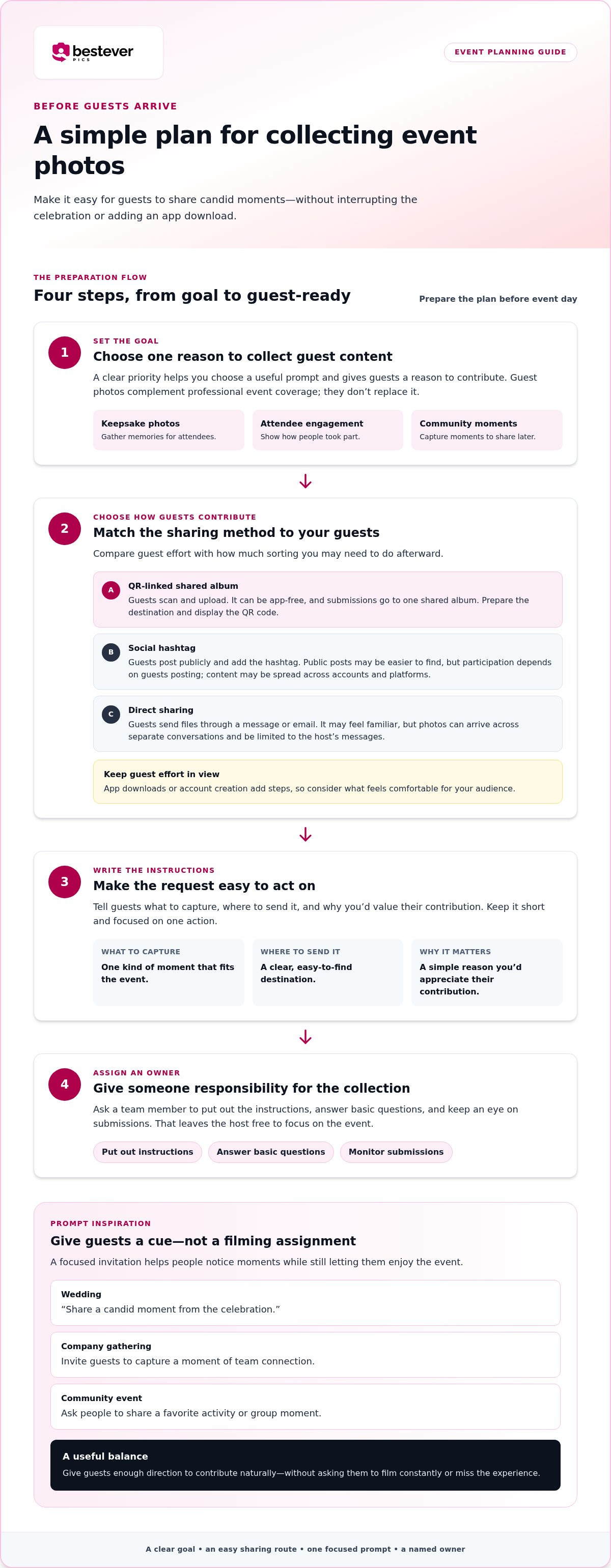
Preparation means you won’t have to chase photos while welcoming guests or keeping the event on schedule. Decide what you want to collect, how people will contribute, and who’ll oversee the process. That gives guests a clear invitation and keeps the plan manageable for the host.
- Define the goal. Choose one priority, such as gathering keepsake photos, showing attendee engagement, or capturing moments across your community.
- Select a contribution method. Match it to your audience and event. A QR code that opens a shared album gives guests a direct upload path without requiring an app download.
- Prepare the instructions. Tell guests what to capture, where to send it, and why you’d value their contribution. Keep the request short and focused on one action.
- Assign an owner. Ask someone on the team to put out the instructions, answer basic questions, and keep an eye on submissions. This lets the host focus on the event.
Write a guest prompt people can act on
Make the invitation specific, friendly, and easy to follow. At a wedding, try, “Share a candid moment from the celebration.” For a company gathering, invite guests to capture a moment of team connection. At a community event, ask people to share a favorite activity or group moment.
A focused prompt gives guests a starting point without asking them to film constantly or miss the experience. Make sure it suits the gathering and the way you hope to use the content. For more ideas on fitting guest contributions into your plans, read this guide to event marketing strategy.
Choose where guests will send their content
Each method has trade-offs. Shared albums gather submissions in one place, while direct messages may feel familiar but leave photos spread across conversations. Social hashtags make public posts easier to spot, but they won’t collect every attendee’s content.
QR-based uploads can take guests to a shared album with a quick scan. App downloads or account creation add steps, so consider what feels comfortable for your audience. Compare guest effort with the amount of sorting you’ll need to do afterward.
For more practical planning advice, see best practices for collecting event photos. If a QR-linked gallery suits your wedding, explore app-free wedding photo sharing. Choose the approach that fits your guests and gives you a clear way to gather their photos.
Compare Event UGC Collection Methods by Guest Effort and Use
The right collection method depends on who’s attending, how the event runs, and what you plan to do with the content. A casual birthday, a company event with app restrictions, and a public community gathering may call for different approaches. Compare the practical trade-offs before you choose.
| Method | Guest effort | Setup needs | Discoverability | Post-event organization |
|---|---|---|---|---|
| QR-linked album | Scan and upload; can be app-free | Prepare a shared destination and display the QR code | Private to the people invited to contribute | Submissions go to one shared album |
| Social hashtag | Post publicly and add the correct hashtag | Choose and share a clear hashtag | Public posts may be easier to find, but participation depends on guests posting | Posts may be spread across accounts and platforms |
| Direct sharing | Send content through a message or email | Tell guests where to send their files | Limited to the host’s conversations | Files can arrive in separate threads and need sorting |
| Staffed photo capture | Share a moment with someone on site | Assign a team member or arrange a staffed setup | Content is collected through the person taking photos | One person can gather files, but the host still needs a handoff plan |
When do QR codes and shared albums make sense?
A visible QR code can take guests straight to a shared upload destination. It suits people who’d rather not install another app and gives attendees a clear place to contribute. It also keeps submitted images together instead of scattered across personal messages. See how digital photo sharing for modern events can work for different gatherings.
When might hashtags or direct sharing fit better?
Hashtags can work when public posts are part of the event experience and attendees are comfortable sharing openly. They’re less suited to collecting every guest’s photos, since some people won’t post or may use the tag inconsistently. Direct messages feel familiar, but can leave the host sorting files from multiple conversations. Staffed photo capture may help guests who want guidance, though it takes someone’s attention during the event.
When deciding how to get user-generated content from events, weigh both the guest experience and the work you’ll face afterward. A method that feels easy to use but leaves you with scattered files may not suit your plans. Choose the balance that fits your audience and event format.
How to Encourage Event Guests to Contribute During and After
Make contributing easy to notice, easy to understand, and entirely optional. A calm invitation works better than repeated announcements that pull guests away from the moment.
- Place instructions where guests naturally pause. Put a short sign near arrival, dining, activity, or departure areas. Choose spots that suit your event rather than covering every surface with reminders.
- Introduce the request briefly. Ask the emcee, organizer, or host to mention it during a welcome or transition. One warm sentence is enough: “If you’ve captured a moment you’d like to share, here’s where to send it.”
- Remind guests naturally. A reminder during a break or before a shared activity can bring the option back to mind without interrupting speeches, performances, or conversation.
- Thank contributors. Close with appreciation, and let guests know how you plan to share or use the collection.
Make the upload invitation visible without interrupting the event
Keep signage simple: one clear instruction, the kind of moment you’re inviting guests to capture, and a scannable QR code if you’re using one. Place it where people have time to look, such as beside the welcome table or near the exit, rather than somewhere it competes with the main event. For inspiration, see these creative QR code display ideas.
Follow up while the event is still fresh
Afterward, send a concise note through a channel attendees already use. Thank them, share the contribution route if it’s still open, and explain where the collection will be shared or how it may be used. For recurring events, record who sends that reminder and when, so the next organizer can follow the same process.
Be thoughtful about privacy. Tell guests how you intend to use their submissions, don’t assume an uploaded photo is automatically intended for public promotion, and respect anyone who asks you not to share their image. If you want to reuse a guest’s photo beyond the collection’s stated purpose, ask permission first.
Small, well-timed invitations help guests participate without turning the event into a content assignment. That’s a practical part of how to get user-generated content from events while keeping the gathering itself at the centre.
Turn Event UGC into a Useful, Repeatable Collection
Once submissions arrive, review them before sharing the collection. Group useful moments into simple categories, such as candid interactions, activities, or behind-the-scenes scenes, so attendees can find the photos they want to revisit. If you’re using a shared album, tell guests where to view it.
Organize submissions and close the loop with guests
Use a straightforward review process: check what’s been submitted, sort photos and videos into useful groups, and note anything you’d like to follow up on. Thank contributors and tell attendees how they can revisit the collection. Before using a guest’s content in a public post, promotion, or another new context, explain your plans and ask permission where appropriate. Respect a guest’s preference if they’d rather their image not be shared.
Following through helps make the collection a thoughtful part of the event experience. It also gives you a clearer picture of how to get user-generated content from events in a way guests feel comfortable with.
Build a repeatable workflow for planners and venues
For a one-off celebration, a short checklist may be all you need. Planners and venues running recurring events can record what worked and reuse the process, adapting the details for each audience.
- Save the goal and guest prompt that best suited the event.
- Note where signs were placed and which locations guests noticed.
- Record who introduced the invitation and when reminders went out.
- Afterward, capture what made submissions easy to review and share.
A simple after-action review helps you spot friction before the next gathering. Record whether guests could find the upload instructions, which collection method they used, and where the review process took extra effort. Keep the checklist focused on steps that will make the next event easier to organize.
Use what you learned to make the next collection clearer, more organized, and easier for guests to contribute to.
Make Guest Contributions Part of the Experience
Good event content starts with a clear purpose and a prompt guests can act on. Choose a collection method that fits your audience, make sharing straightforward, then review and organize submissions so people can enjoy the moments they helped capture.
That’s the heart of how to get user-generated content from events: invite, don’t interrupt. A custom QR code can take guests to a shared album where they can contribute without downloading an app. It’s an option for weddings, corporate events, and community gatherings, while hashtags or direct sharing may suit other audiences and plans.
Keep the invitation warm and the follow-up thoughtful. Thank contributors, explain how you’ll use their photos, and ask permission before sharing them in a new context. For recurring events, note what worked so the next collection takes less guesswork.
Start with one simple prompt and a clear way to share. The candid moments your guests capture can become a meaningful part of the memories everyone takes home.
Frequently Asked Questions
How do you get guests to share photos from an event?
Give guests one clear invitation and a simple place to send their photos. Choose a specific prompt, such as “Share a candid moment from the celebration,” and display the instructions where people naturally pause. Mention the invitation briefly during a welcome or break, then send a friendly follow-up through an event channel guests already use. To get user-generated content from events, make contributing feel optional and easy.
What is the easiest way to collect photos from event guests?
The easiest method depends on what your guests are comfortable using and how you want to organize photos afterward. A shared digital album accessed through a QR code gives guests a clear destination and gathers submissions in one place. Social hashtags can work for public sharing, while direct messages may suit a small gathering. Consider guest effort as well as the time you’ll need to sort content later.
Can guests upload event photos without downloading an app?
Yes. With a web-based sharing option, guests can scan a custom QR code and upload photos to a shared digital album without downloading an app. This can help attendees who don’t want another app on their phones, or guests at work events where app downloads may be restricted. Put the QR code beside a short instruction so guests know what it opens and what to do next.
How do you encourage guests to create user-generated content?
Invite guests to capture a moment that suits the event, rather than asking them to post constantly. A wedding prompt might focus on a candid celebration moment; a community gathering could invite photos of a shared activity. Keep the request warm and specific, explain why you’d value their perspective, and thank people who contribute. A natural reminder during a pause can help without interrupting the event.
What should an event photo-sharing QR code say?
Keep the wording short and action-focused. For example: “Scan to share your event photos” or “Scan to add a favorite moment to our album.” If you want a particular type of content, name it in a few words, such as “Share a candid celebration moment.” Make sure guests understand that scanning opens the photo-sharing destination, and explain how you plan to use or share their contributions.
How can businesses collect user-generated content at recurring events?
Use a repeatable checklist that records the event goal, guest prompt, collection method, sign locations, reminder timing, and the person responsible. Review the process after each gathering and note where guests needed help or instructions were easy to miss. Keep the workflow simple enough to reuse, while adapting the prompt and collection details to each event’s audience.
What should you do with user-generated content after an event?
Review submissions, group useful photos or videos into clear categories, and tell attendees where they can revisit the collection. Thank contributors and explain how you’ll use the content. Don’t assume that a photo shared for an event album is also approved for public promotion. Ask permission before using it in a new context, and respect anyone’s preference not to have their image shared.


