


Article by
Gabi
Hi, I'm Gabi - Co-Founder of Bestever Pics. Thanks for visiting our blog. We are working hard to produce content which we hope resonates with you. Feel free to drop us a line on socials or via the contact form on the site.
What if guests could enjoy the photographer’s polished gallery and share the spontaneous moments they captured too? The best way to share candid event photos starts with a clear destination. Links buried in chats, app downloads, or account sign-ups can make sharing feel like a chore.
You want guests to view and save finished images easily, while candid shots from friends and family land somewhere organised. This guide compares practical ways to share professional photos and collect guest contributions, with steps for choosing access, setting expectations, and testing the experience.
An app-free QR gallery, such as guest photo sharing from Bestever.pics, gives guests a simple upload route alongside the photographer’s work.
Key Takeaways
- Choose how guests will view and save the finished professional gallery before deciding how to collect their own photos.
- Compare links, email, messaging threads, social posts, shared folders, and event galleries for access, organisation, privacy, and guest uploads.
- The best way to share candid event photos depends on your guests, privacy preferences, and whether you want them to contribute.
- Keep the photographer’s gallery instructions separate from your invitation to share candid shots, so each request is clear.
- Make any upload invitation visible and optional, and test the guest experience on a phone before the event.
Best Way to Share Professional Photos with Guests
Hosts usually want two things from event photos: a polished set of finished images guests can revisit, and the unplanned moments friends and family catch along the way. The best way to share candid event photos is to plan these as related but separate parts of the experience.
Professional photo sharing delivers edited images to an intended guest audience, while guest photo collection invites attendees to add their own pictures to a shared destination. That distinction matters. Guests should know whether they’re opening a gallery to view or save finished images, or sending in new photos of their own. The broader idea of photo sharing includes both viewing and distributing images, but an event workflow should make each action clear.
What guests need from a professional event gallery
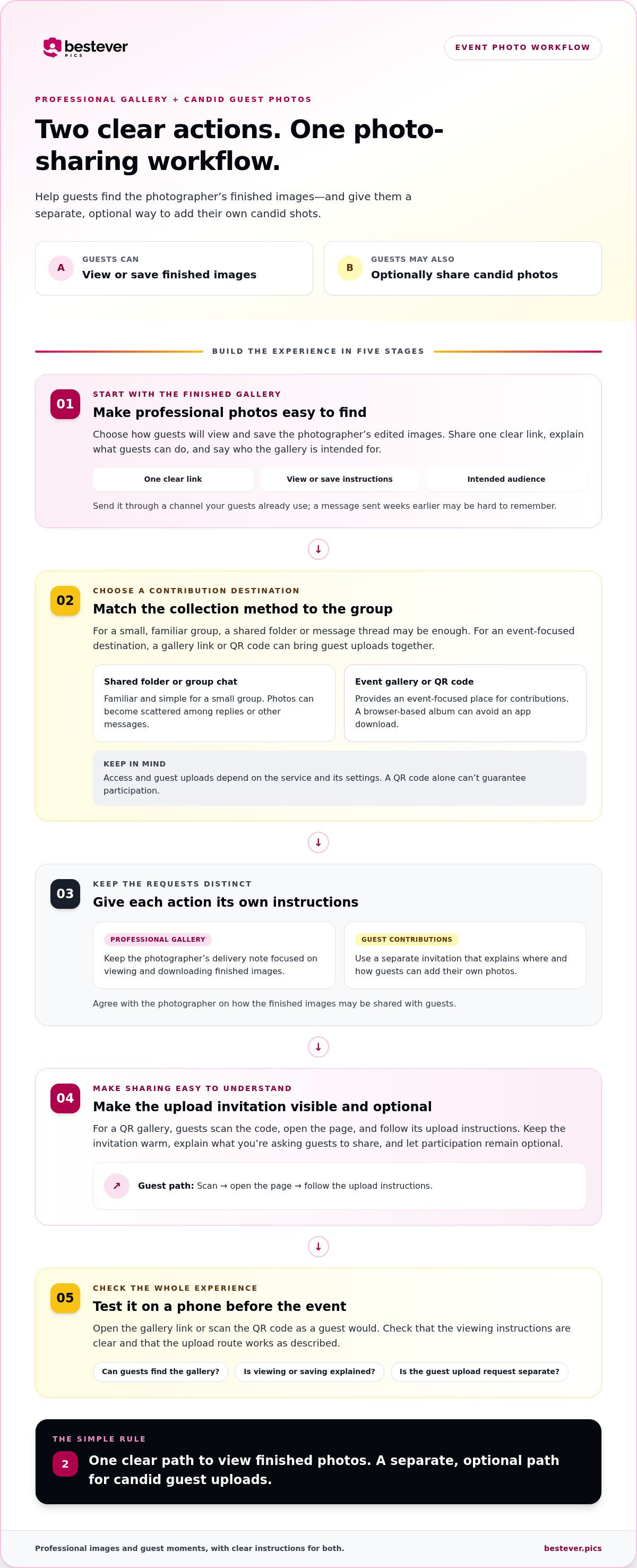
Make the gallery easy to find and straightforward to use. Share one clear link, explain how guests can view or save the images, and say who the gallery is intended for. Don’t assume everyone will remember a message sent weeks after the event; send the link through a channel your guests already use.
Keep the photographer’s delivery note focused on viewing and downloading edited images. If you’d also like guests to contribute, give that request its own instructions and destination. For practical guest photo-taking guidance, check out our helpful wedding photography tips for guests to share with attendees before the celebration.
Why candid event photos belong alongside professional images
A photographer focuses on the planned coverage and key moments. Guests may capture a friend’s reaction during a speech, a quick catch-up between relatives, or a funny detail from their table. Those personal viewpoints add another layer to the event story rather than replacing the photographer’s finished work.
There’s a trade-off: guest photos vary in timing, composition, lighting, and image quality. Some may be blurry, repeated, or miss the moment altogether. A shared album can gather contributions in one place, but it can’t guarantee that every guest will upload or that every image will be worth keeping.
For weddings, make the two paths distinct: send guests the professional gallery when it’s ready, and invite candid contributions through a private wedding photo gallery utilizing QR codes for wedding photo sharing. A web-based event album lets guests upload from a browser without downloading an app. Keep the invitation warm and optional, and explain what you’re asking guests to share. By following best practices for collecting event photos alongside these wedding photography tips for guests, attendees can capture thoughtful moments without getting in the photographer’s way.
Compare ways to share professional photos and collect candid event photos
Each sharing method solves a different part of the job. Some make it easy to send finished images; others give guests a place to contribute. The best way to share candid event photos depends on your audience, privacy expectations, and whether you want guests to upload.
| Method | Access | Organisation | Privacy | Guest uploads |
|---|---|---|---|---|
| Direct link | Quick to open | One destination, if kept easy to find | Depends on the service and settings | Only if uploads are enabled |
| Familiar, but guests must find the message | Can get buried in an inbox | Usually shared with recipients | Not usually organised for collecting photos | |
| Message thread | Easy for an existing group | Images mix with conversation and other files | Limited to thread members | Guests can send images, but they may be hard to gather |
| Social post | Convenient for people who use the platform | Photos sit alongside other posts | Depends on account and post settings | Guests may post or tag, but contributions can be scattered |
| Shared folder | Simple for a small group familiar with it | Files share one folder | Depends on sharing settings | Possible when contributors have permission |
| Event gallery | One event-focused link or QR code | Professional images and guest uploads can have clear destinations | Depends on gallery access settings | Designed for contributions when enabled |
When a shared folder or message thread is enough
For a small gathering with a familiar guest list, a shared folder or group chat may be all you need. People already know where to go, and there’s little setup. The trade-off appears as photos arrive: files can be scattered across replies, links may need repeating, and event details can disappear among everyday messages. A shared folder keeps files together, but the upload request may still need a separate explanation.
When a QR photo gallery fits the event better
A displayed QR code gives guests a direct route to an online event album: scan, open the page, and follow the upload instructions. Browser-based access without an app download removes one common hurdle, though a QR code alone can’t guarantee participation. For a wedding, see [LINK: QR codes for wedding photo sharing] ideas, or consider [LINK: private wedding photo gallery] for an event-focused destination.
Keep the professional gallery’s sharing instructions clear, too. Agree with your photographer on how finished images may be shared with guests; the U.S. Copyright Office explains copyright protection for photographs. A clear plan helps guests access the images while respecting the photographer’s work.
How to share professional photos and invite candid guest uploads
A smooth workflow gives guests two clear actions: view the photographer’s finished gallery, and optionally add their own candid shots. Keep those instructions separate, then test the full experience before sharing it. A quick test can catch a broken link, an unclear prompt, or a page that’s awkward to use on a phone.
Prepare the gallery and access instructions
Choose an album that suits your event and the audience who’ll see it. Decide whether guests should only view finished photos or contribute their own, and explain who the album is for. A QR code can direct guests to a web-based album without requiring an app download. For more ideas, see [LINK: best practices for collecting event photos].
- Set up the destinations. Decide where the photographer’s edited images will live and where guest uploads should go. They can be part of one event experience, but label each action clearly.
- Write two short instructions. For the professional gallery, explain where to view or save the finished images. For candid contributions, say where to scan or click and what guests can upload. Keep each request easy to understand at a glance.
- Test on a phone. Open the link or scan the QR code as a guest would. Check that it leads to the right place and that the next step is clear. Ask someone unfamiliar with the setup to try it too.
- Place the upload invitation thoughtfully. Add the QR code or link to an invitation, table display, or event sign where guests have a moment to look. Avoid crowding it with unrelated details.
- Share the finished gallery when ready. Send the viewing link through a channel your guests already use. Keep this message focused on the photographer’s finished work, rather than mixing it with a request to upload.
Share the finished gallery before and after the event
Before the event, introduce the guest upload option with a warm, optional prompt. For example: “Want to share a moment we might have missed? Scan here to add your photos.” A sign near the entrance or a note on the tables can help guests notice the option without making participation feel like an obligation.
After the photographer’s images are ready, send a separate message with the gallery link and simple viewing instructions. If you plan to repost or use a guest’s image beyond sharing it with attendees, review guidance on using copyrighted images and consider asking the photographer or image-maker for permission. To see one way a private gallery can work for a wedding, visit the private wedding photo gallery.
Make candid event photo sharing easy without overpromising participation
A QR code makes an album easier to reach, but it can’t make guests curious or available to upload. The best way to share candid event photos is to remove needless steps, explain the invitation clearly, and let people decide whether they want to join in. Some guests will contribute; others will simply enjoy the event.
Reduce friction for guests on the day
Write instructions for someone who hasn’t used your album before. Instead of relying on “Scan here,” add a short explanation such as, “Scan to add a photo from today.” If you display a QR code, include a typed link too when there’s room. Guests can choose whichever route feels easier, and nobody has to guess what the code does.
Keep the upload path browser-based where possible, rather than asking guests to download an app or create another account. Before the event, scan the code and open the typed link on a phone. Check that both reach the right page and that the upload request makes sense without extra explanation.
Set expectations for privacy and image sharing
Tell guests who the album is intended for and how they can access it. Describe the sharing plan plainly, such as whether you’ll share the link with event attendees, and avoid promising privacy or security protections beyond what the gallery provides. If guests have questions about access or sharing, point them to these frequently asked questions about photo sharing.
A shared album brings contributions together, but it doesn’t sort them for you. Hosts may still need to review the images, remove duplicates from their own saved collection, and organise favourites. Set a realistic expectation: the album is a place to contribute, not a promise that every image will be suitable to share or keep.
Before guests arrive, check:
- The wording says what guests can do and makes uploading optional.
- The QR code and typed link both work on a phone.
- The invitation explains who the album is for.
- The prompt is visible where guests naturally pause, such as a welcome table or event sign.
Keep the invitation friendly and low-pressure. “Add a photo if you’d like” is enough; one clear prompt is more helpful than repeated reminders. For a wedding, an event gallery can give guests a shared place to add their moments.
Choose a sharing workflow that fits your event and keeps memories together
The best workflow depends on what you want guests to do, how familiar they are with the sharing method, and who should see the photos. A small family gathering may need only a direct link to the finished gallery. A wedding or community event where guests’ perspectives matter may benefit from a separate contribution-friendly album as well.
A simple decision framework for hosts and organisers
Start with the main goal, then add only what the event needs:
- Finished photos are the priority: Send the professional gallery link to the intended guests, with clear instructions for viewing and saving images.
- Guest contributions matter: Choose an album that gives guests a clear way to upload their own photos, and explain that contributing is optional.
- You want both: Pair the photographer’s finished gallery with a distinct invitation for candid uploads. Guests can appreciate the polished images and add personal moments without confusing the two.
For a wedding, this combined approach keeps the photographer’s work central while making room for snapshots from family and friends. For a birthday, school event, or community gathering, consider whether guests will recognise the sharing method and whether the host has time to review incoming images. Wedding planners and venues managing recurring events may also benefit from a repeatable setup, since a familiar process is easier to use across different gatherings.
What to do next after choosing your sharing method
Write one short instruction for guests, such as, “View the finished photos here” or “Add a candid photo if you’d like.” Decide where the link or QR code will appear, then test the guest journey on a phone before sending event materials or displaying it. A little preparation helps prevent a last-minute scramble to replace an unclear sign or link.
For more context on planning a wedding photo experience, read about modern wedding photo sharing. The best way to share candid event photos is the one that fits your guests and keeps the two photo experiences easy to understand.
Bring every side of your event story together
Choose a clear home for the photographer’s finished images, then decide whether you’d also like guests to contribute candid moments. Keeping those two actions distinct helps guests know whether to view and save photos or add their own. A simple link or QR code can make the guest upload route easier to find, but keep the invitation optional and the access instructions clear.
For weddings, corporate events, and community gatherings, a web-based album with custom QR codes gives guests a way to upload photos without downloading an app. Share the professional gallery when it’s ready and invite guest contributions separately, giving polished images and personal snapshots their own place in the event story. The best way to share candid event photos is the one your guests can understand and use with little effort.
Start with a private wedding gallery and make your sharing plan easy to follow.
With a thoughtful setup, you can spend less time chasing photos and more time enjoying the memories your guests help capture.
Frequently Asked Questions
What is the best way to share professional photos with guests?
Share the finished gallery through one clear link and explain how guests can view or save the edited images. If you also want candid photos, give guests a separate, clearly labelled way to contribute them. This keeps the photographer’s finished work distinct from guest uploads while making both easy to find. Choose a sharing method that suits your audience and the level of privacy you want for the event.
How can I share event photos without making guests download an app?
Use a web-based gallery that guests can open in a browser. For guest contributions, a custom QR code can take them to a shared digital album without an app download. Add a typed link alongside the code when possible, and include a plain-language prompt explaining what guests can do there. Test the link and QR code on a phone before sharing them, so you can spot confusing instructions or access issues.
Can guests upload candid photos to a professional photo gallery?
Yes, if the sharing setup supports guest contributions. Some galleries are intended only for viewing finished professional images, while guest photo-sharing albums let attendees add their own pictures. Make the distinction clear in your instructions: tell guests where to view the photographer’s work and where to upload candids. Guest photos complement professional coverage with personal perspectives, but their quality and usefulness can vary.
How do I get guests to share candid event photos?
Make the invitation easy to notice and understand, but keep it optional. Display a QR code where guests have a moment to pause, and include a short prompt such as, “Add a photo from today if you’d like.” A typed link gives guests another route to the album. Clear instructions reduce guesswork, though no setup can ensure that every guest will choose to contribute.
Is a shared album better than sending photos in a group chat?
A shared album can keep event contributions together, while a group chat may be more familiar for a small group that already shares messages. In a busy thread, photos can get mixed in with conversation and become harder to find later. An album gives the event a more focused destination, but it may still need a host to review and organise contributions. Pick the option that fits your group’s habits.
How should I share wedding photos with guests privately?
Use a wedding gallery intended for the guests you want to reach, and share its link directly with that audience rather than posting it publicly. Explain who the gallery is for and how guests can view the images. Avoid making promises about privacy or security unless you know they’re accurate. If you’re also collecting candid photos, give that upload invitation clear instructions and keep it distinct from the professional gallery message.
Should professional event photos and guest photos go in the same album?
They can sit within one event experience, but make each collection or action easy to distinguish. Guests should know which images are the photographer’s finished work and where they can submit their own photos. Separate destinations can help keep the roles clear; a combined event album may feel more convenient if it labels them well. Choose the arrangement that makes viewing and uploading straightforward for your guests.


