

Article by
Gabi
Hi, I'm Gabi - Co-Founder of Bestever Pics. Thanks for visiting our blog. We are working hard to produce content which we hope resonates with you. Feel free to drop us a line on socials or via the contact form on the site.
The most authentic moments of your wedding are currently trapped on your guests' smartphones. You want to see those candid, high-energy shots on the big screen while the party is still in full swing. Finding the right wedding reception photo sharing ideas shouldn't feel like a chore during your planning process.
We know the typical hurdles that stop this from happening. Most guests refuse to download new apps, and you certainly don't want to spend your honeymoon chasing down digital files or fixing technical glitches. Using a platform like Bestever.pics, you'll discover how to turn these photos into a stunning, real-time slideshow with zero technical stress. This guide explores the best wedding reception photo sharing ideas to help you build a digital keepsake that updates automatically as the night unfolds.
Key Takeaways
- Learn how to turn candid guest photos into a live, real-time slideshow that updates instantly while your party is still happening.
- Explore the most effective wedding reception photo sharing ideas, including how QR codes let guests upload content without downloading an app.
- Follow a simple five-step process to set up your digital gallery and customize how your photos appear on the big screen.
- Get practical tips on hardware selection to ensure your slideshow is bright, clear, and perfectly placed within your venue.
- Find out how to create a lasting digital keepsake that's ready for you to download and enjoy the moment your reception ends.
Why a Live Slideshow of Guest Photos is a Wedding Essential
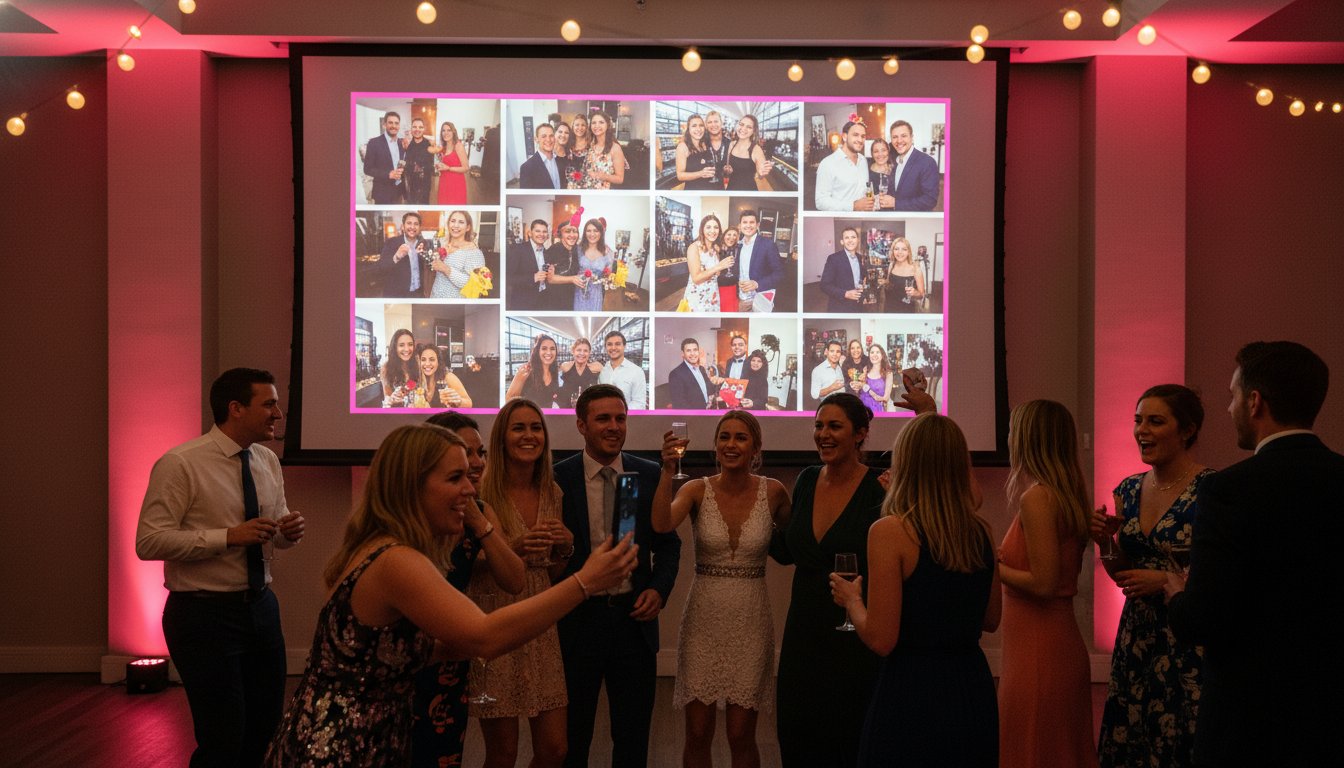
A live wedding slideshow is a dynamic, real-time feed of photos and videos uploaded by your guests throughout the celebration. It's the digital heartbeat of your reception. Instead of a static loop of photos from your engagement shoot, you get a living gallery that evolves every minute. This turns every guest into a temporary wedding photographer for the night. They capture the angles your professional pro might miss, like the laughter at Table 7 or the high-energy chaos of the dance floor.
The real magic happens through the "wow" factor. When a guest snaps a candid shot and sees it appear on the screen seconds later, it creates an instant spark of excitement. While professional photography provides the polished, high-end memories you'll frame, guest-contributed content provides the raw, unfiltered energy of the party. Modern photo sharing platforms make this transition from phone to screen instantaneous. It’s one of the most powerful wedding reception photo sharing ideas for couples who want to bridge the gap between tradition and tech.
Boosting Guest Engagement Through Visuals
There's a noticeable energy shift in the room when guests see themselves displayed on a large screen. It’s an immediate dopamine hit that encourages more participation. Even the most tech-averse or shy guests often find themselves reaching for their phones to join the fun. This live feed serves as a natural icebreaker. Guests who have never met suddenly have a reason to talk as they laugh at a funny photo that just popped up. It keeps the momentum high during the transitions between dinner and dancing.
The Shift from Pre-made to Real-time
Childhood montages are losing their grip on modern weddings. They're nostalgic, but they often pause the party's flow. Real-time event feeds do the opposite. They amplify the "here and now" energy of the reception. This is a "set and forget" solution for busy couples. You don't need to spend hours curating a slideshow weeks in advance. The content creates itself. By using these wedding reception photo sharing ideas, you ensure the focus stays on the celebration you've spent months planning. It captures the spirit of the day as it actually happens, creating a more authentic experience for everyone involved.
Choosing the Right Platform for Your Guest Slideshow
Picking the right tech is the foundation of a great guest experience. You need speed, simplicity, and total control over what appears on screen. Most legacy systems fail because they ask too much of the user. In 2026, the standard for frictionless [LINK: wedding photo sharing] is the QR code. It is fast, familiar, and works on every modern smartphone. If the upload process takes more than a few seconds, you lose the guest's attention. You want a platform that prioritizes a lightning-fast browser experience over everything else. Many traditional wedding reception photo sharing ideas rely on guests doing extra work, which usually leads to empty galleries.
The Death of the Wedding Photo App
Guests are tired of downloading single-use apps for every event they attend. It is called "app fatigue," and it is the fastest way to kill your engagement levels. When a guest has to search the app store, enter a long password, and create a profile, they usually just give up. They will stick to their own social media instead. Web-based galleries solve this problem instantly. By scanning a simple code, guests upload directly from their mobile browser. This saves their phone battery and prevents them from having to delete other apps just to make room for yours. It also protects their privacy, as they don't have to hand over an email address or personal data just to share a snap of the cake cutting.
Essential Features for a Live Feed
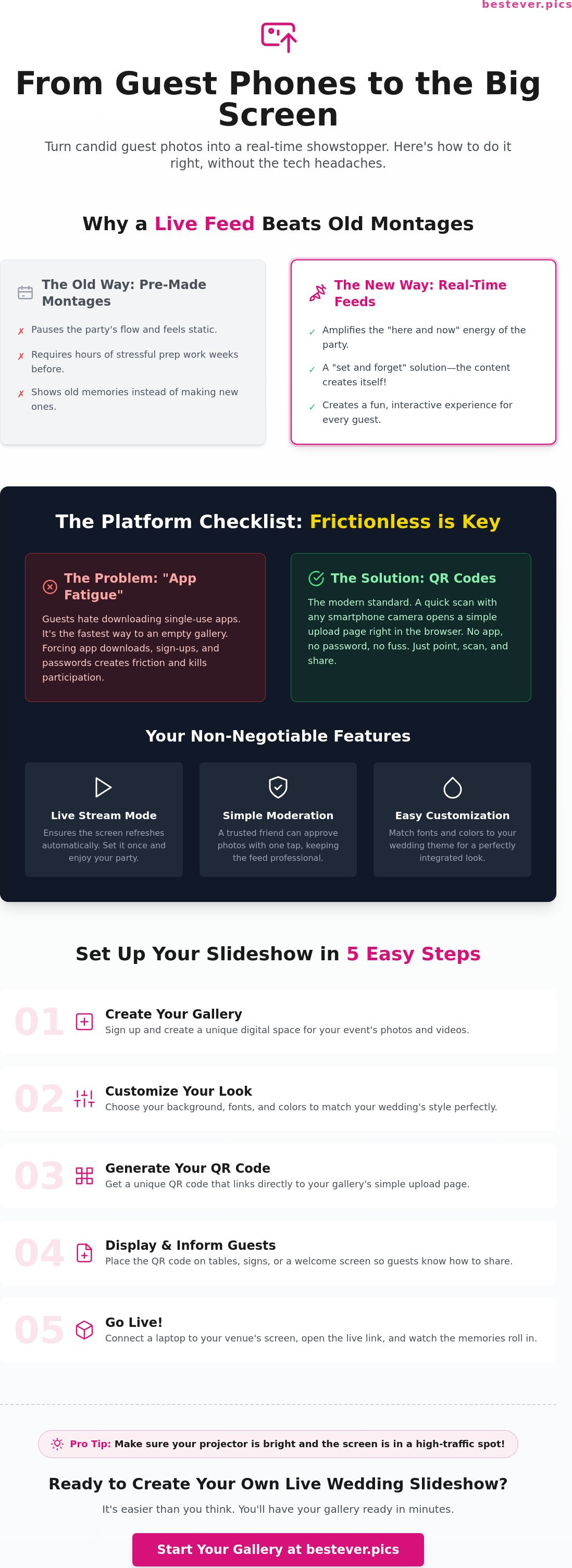
Your slideshow needs to be a "set and forget" feature that runs itself. You should look for a platform that offers a dedicated "Live Stream" mode. This ensures the screen refreshes automatically whenever a new photo is approved by your moderator. You don't want to be tethered to a laptop while you're trying to enjoy your first dance. When evaluating different wedding reception photo sharing ideas, moderation is a non-negotiable safety net for any live event. A private dashboard allows a trusted friend or your wedding planner to vet incoming photos with a single tap. This keeps the feed professional and filters out blurry test shots or accidental duplicates. You can also use customization settings to match the slideshow's fonts and background colors to your specific wedding theme. Using a professional service like Bestever.pics helps you create a polished look that feels like a natural part of your venue's decor. Whether you are using a large LED wall or a simple projector, these features ensure your guest photos look their absolute best.
How to Set Up Your Wedding Guest Slideshow in 5 Steps
Setting up your live feed shouldn't require a tech degree or hours of manual labor. While some DIY wedding reception photo sharing ideas involve complex manual refreshing and clunky cable management, modern solutions handle the heavy lifting for you. You can have a professional-grade display ready in minutes. It is about working smarter, not harder. Follow these steps to get your gallery from your phone to the big screen without the stress.
Step 1 & 2: Preparing the Digital Space
First, choose a platform that handles high-speed uploads. A service like Bestever.pics allows you to create your gallery in about 60 seconds. It’s remarkably fast. Once your account is live, you'll customize your settings. Ensure you select a 16:9 layout to fit most venue projectors or LED screens. This prevents awkward black bars on the sides of your images. Choose transitions that are smooth but quick. You want the energy to stay high. Always do a test run before the ceremony. Upload five or six photos from your own phone to check the transition speed and moderation dashboard. It's better to find a glitch now than during your speeches.
Step 3 & 4: Physical Setup and Connectivity
Next, you need to make sure guests actually see the instructions. Print your QR codes on high-quality cardstock that matches your wedding stationery. Place them where people naturally linger. The bar, entryways, and cocktail hour tables are prime real estate. If guests don't see the code, they won't use it. To [LINK: collect guest photos] effectively, you need a stable internet connection. Check the venue's Wi-Fi strength during your rehearsal. Walk the room with your phone. If the signal is weak near the bar or dance floor, bring a mobile hotspot as a backup. Connect your laptop to the venue’s display system via HDMI or a wireless casting device. Test the video feed once more to ensure the connection is solid.
Step 5: Launch and Automate
Finally, launch the live link in your browser. Hit the full-screen button and let it rip. The system is designed to run automatically. It will pull in new, approved photos and cycle through them without any manual input. You don't need to touch the laptop for the rest of the night. This is one of the most hands-off wedding reception photo sharing ideas available. It allows you to stay present in the moment while the technology captures the memories for you. The feed will continue to grow as the party heats up, providing instant entertainment for everyone in the room.
Display Tips: Making Your Slideshow Look Professional
Choosing the right hardware is just as important as the software you use. You want your guest photos to look crisp, not like a blurry memory. When you're exploring different wedding reception photo sharing ideas, remember that hardware dictates the guest experience. Projectors offer a classic, cinematic vibe that works perfectly in dimmed ballrooms. However, LED walls are the modern standard for brightness. They stay clear even when the house lights are up or if you're hosting an outdoor reception under the sun.
Placement is a strategic game. Avoid putting the screen directly behind the head table. It creates a distracting glare in your professional photographer's shots and can wash out your faces in the wedding album. Position the display in a high-traffic corner or near the bar instead. This keeps the energy moving without pulling focus away from the main events. Finding the right wedding reception photo sharing ideas involves thinking about the physical space as much as the digital one.
Venue Hardware Checklist
Talk to your venue coordinator at least two weeks before the big day. You need to confirm their setup can handle your feed. Most modern venues are equipped for this, but it's better to be sure.
- Check for HDMI ports or wireless casting options like Chromecast or AirPlay.
- Verify the aspect ratio is 16:9 to prevent those ugly black bars on the side of your images.
- Ask about the sound system if you want your slideshow transitions to sync with a specific background playlist.
- Test the brightness levels during the time of day your reception actually starts.
Timing Your Slideshow Throughout the Night
You don't need the screen running at full speed for the entire six hours. Start the feed during cocktail hour. It acts as a perfect icebreaker for guests who are still warming up. It gives them something to do while they wait for their first drink. Switch the display to a static "Please Silence Your Phones" slide during the formal dinner and speeches. You want the room's attention on the speakers, not the screen. Once the dance floor opens, flip the live stream back on. This is when the best candid shots happen. You'll see the party's energy reflected back at you in real-time. If you want to ensure your display looks professional without the technical headache, start your live wedding slideshow today.
Effortless Live Slideshows with Bestever.pics
Bestever.pics simplifies the entire process by removing the technical barriers that usually stop guests from sharing. You've already handled the big logistics; your photo sharing should be the easiest part of the night. Gallery creation takes less than 60 seconds. You get a live link that is ready to be projected immediately. It is straightforward and reliable.
The "no apps, no logins" philosophy is what sets this apart. We've all seen guests struggle with complicated technology at events. Bestever.pics removes that hurdle entirely. Guests scan a code and upload in seconds. This ensures you get high participation levels from every table. It’s a standout choice among wedding reception photo sharing ideas because it prioritizes the guest experience above all else.
Real-time Moderation and Control
You don't have to worry about what might pop up on the big screen. The moderation dashboard is accessible right from your smartphone. If a photo is blurry or inappropriate, you can hide it instantly. You can even appoint a trusted bridesmaid or groomsman to manage the feed for you. This allows you to stick to your [LINK: wedding planning] goals without being tethered to a laptop. You can also customize the aesthetic of the slideshow to ensure it complements your venue's lighting and decor perfectly.
Beyond the Wedding Day
Once the reception is over, the gallery serves a new purpose. It becomes a permanent [LINK: digital guestbook] that captures the unfiltered joy of your guests. You can send the link to relatives who were stuck at home or overseas. It's a great way to let them experience the highlights of the night. You'll have a complete collection of candid moments that your professional photographer might have missed.
Every image is stored in high resolution. You aren't limited to small, compressed files. You can download the entire collection to use in your physical wedding albums or to share on your social media profiles. It turns your wedding reception photo sharing ideas into a lasting digital archive. You'll have those memories saved in original quality, ready to be enjoyed for years to come.
Ready to turn your guest photos into a live experience? Create your wedding gallery with Bestever.pics today and start collecting memories in seconds.
Meta Description: Discover how to create a live wedding slideshow of guest photos in 2026. Use Bestever.pics for real-time sharing, easy QR code uploads, and no app downloads.
Capture Every Angle of Your Celebration
Your wedding is a once-in-a-lifetime event, and the best moments often happen when you aren't looking. By implementing modern wedding reception photo sharing ideas, you turn every guest's phone into a portal for candid memories. You've seen how simple it is to ditch the clunky apps and technical stress for a streamlined, real-time feed. It’s about more than just a screen; it’s about sharing the joy of the night with everyone in the room.
You don't need to be a tech expert to make this happen. Thousands of couples have already used our system to drive high guest engagement without the hassle of registrations or downloads. You can set up your live gallery in under 60 seconds and spend the rest of your night on the dance floor. It’s a practical, high-energy way to ensure your favorite memories are captured and preserved forever.
Launch your live wedding slideshow with Bestever.pics today and start collecting those unforgettable candid shots. You'll love seeing your wedding through the eyes of your favorite people.
Meta Description: Learn how to create a real-time wedding slideshow of guest photos in 2026. Discover the best wedding reception photo sharing ideas for high guest engagement.
Frequently Asked Questions
Do guests need to download an app to contribute to the slideshow?
No, your guests don't need to download any mobile apps or register for an account. They simply scan the QR code with their phone's camera and upload photos directly through their web browser. This frictionless approach is the most effective way to implement wedding reception photo sharing ideas. It ensures that everyone from your tech-savvy friends to your grandparents can join in without frustration.
Can I moderate the photos before they appear on the big screen?
Yes, you have complete control over every image that appears on the display. You can access a private moderation dashboard from any smartphone or tablet to approve or hide photos in real-time. This allows you to filter out blurry test shots or accidental duplicates before they ever hit the big screen. You can even assign this task to a trusted friend or your event coordinator.
What happens if the venue Wi-Fi is slow or unreliable?
If the venue Wi-Fi is patchy, the system is designed to be resilient. Guests can often use their own 4G or 5G data to upload images since the file sizes are optimised for speed. For the main display, we recommend having a mobile hotspot as a backup plan. This ensures the live feed stays active even if the local network goes down during the party.
Can I include videos in my wedding guest slideshow?
Yes, you can definitely include short video clips alongside your photos. This adds an extra layer of energy to your wedding reception photo sharing ideas. Guests can capture the laughter during speeches or the chaos of the dance floor and see it play back instantly. It turns your static slideshow into a high-octane highlight reel that evolves throughout the entire celebration.
How many photos can a live slideshow handle at once?
There is no strict limit on the number of photos the live slideshow can handle. The system is built to manage thousands of uploads without slowing down or crashing. As new photos arrive, they are added to the rotation automatically. The software handles the sorting and transitions so the display remains fresh and engaging for the duration of your reception.
Is there a way to save the slideshow after the wedding ends?
Yes, you'll have a permanent digital archive of every photo and video captured by your guests. After the wedding ends, you can download the entire collection in high resolution with a single click. This allows you to print physical albums or share the best candid moments on social media. It's a far more reliable way to collect memories than chasing guests for months.
Will the QR code work for both iPhone and Android users?
The QR code system is completely universal. It works perfectly on both iPhone and Android devices without requiring any special settings or third-party software. As long as the phone has a camera and a web browser, the guest can contribute. This cross-platform compatibility is essential for ensuring that no one is left out of the sharing experience during your reception.
Can I display the slideshow on multiple screens at the same time?
Yes, you can launch the live slideshow link on multiple screens simultaneously. You just need a device with a web browser connected to each display. This is a great solution for large venues with multiple rooms or separate outdoor spaces like a marquee. It ensures that your guests can see the latest candid moments no matter where they are standing.


