

Article by
Gabi
Hi, I'm Gabi - Co-Founder of Bestever Pics. Thanks for visiting our blog. We are working hard to produce content which we hope resonates with you. Feel free to drop us a line on socials or via the contact form on the site.
An effective wedding photo online upload process shouldn't be a bulky app; it acts as a simple bridge between the guest's camera and your digital album. Forcing your friends to download software for a single day is the fastest way to ensure you never see their best snaps. It's frustrating to spend weeks after the honeymoon chasing cousins for blurry, low-resolution shots sent via text. You want every candid moment from your ceremony or quinceañera, but you don't want to spend your first month of marriage acting as a digital debt collector.
We'll show you how to use QR codes and browser-based folders to gather high-resolution images in seconds. This guide covers the best ways to set up a digital home for your memories so you can focus on the party, not the tech support. Bestever.pics offers a straightforward way to manage these collections without making your guests jump through hoops.
Key Takeaways
- Stop wasting your honeymoon chasing guests for blurry photos sent over text or social media.
- Choose browser-based QR codes over apps to avoid the friction that stops guests from sharing their shots.
- Understand how a wedding photo online upload system preserves image quality that messaging apps often destroy.
- Master the "First Look" strategy to get your upload links in front of guests before the ceremony begins.
- Discover how Bestever.pics lets you create a private digital hub for your event memories in under a minute.
The Stress of Chasing Guest Photos After the Wedding
You've just returned from the honeymoon. The tan is starting to fade, and the professional gallery is still eight weeks away. You're scrolling through your phone, desperate to relive the night. All you find are a few dark shots from the rehearsal dinner and some grainy videos sent via text. It's a letdown. You realize that while your photographer captured the big moments, you've missed about 90% of the candid ones. Relying on a manual wedding photo online upload process after the event is a recipe for frustration.
Without a central wedding photo online upload strategy, your memories are scattered across dozens of different phones. Some are in a WhatsApp group. Others are buried in a bridesmaid's camera roll. This creates a massive administrative burden during your first month of marriage. Instead of relaxing, you're sending "can you send me that?" texts to fifty different people. It's an awkward, time-consuming chase that rarely results in a complete collection. You shouldn't have to work this hard to see your own wedding.
Why hashtags are a thing of the past
Ten years ago, a custom hashtag was the gold standard. Today, it's a graveyard for lost content. Privacy settings are much stricter now. If a guest has a private profile, their post won't show up in your hashtag feed even if they use the right tag. You also can't easily download high-resolution files from social media platforms. You're left with a low-quality screenshot of a photo instead of the real thing. The algorithm problem is real too; platforms decide what you see, meaning many guest memories simply never cross your screen.
The 'text me that photo' trap
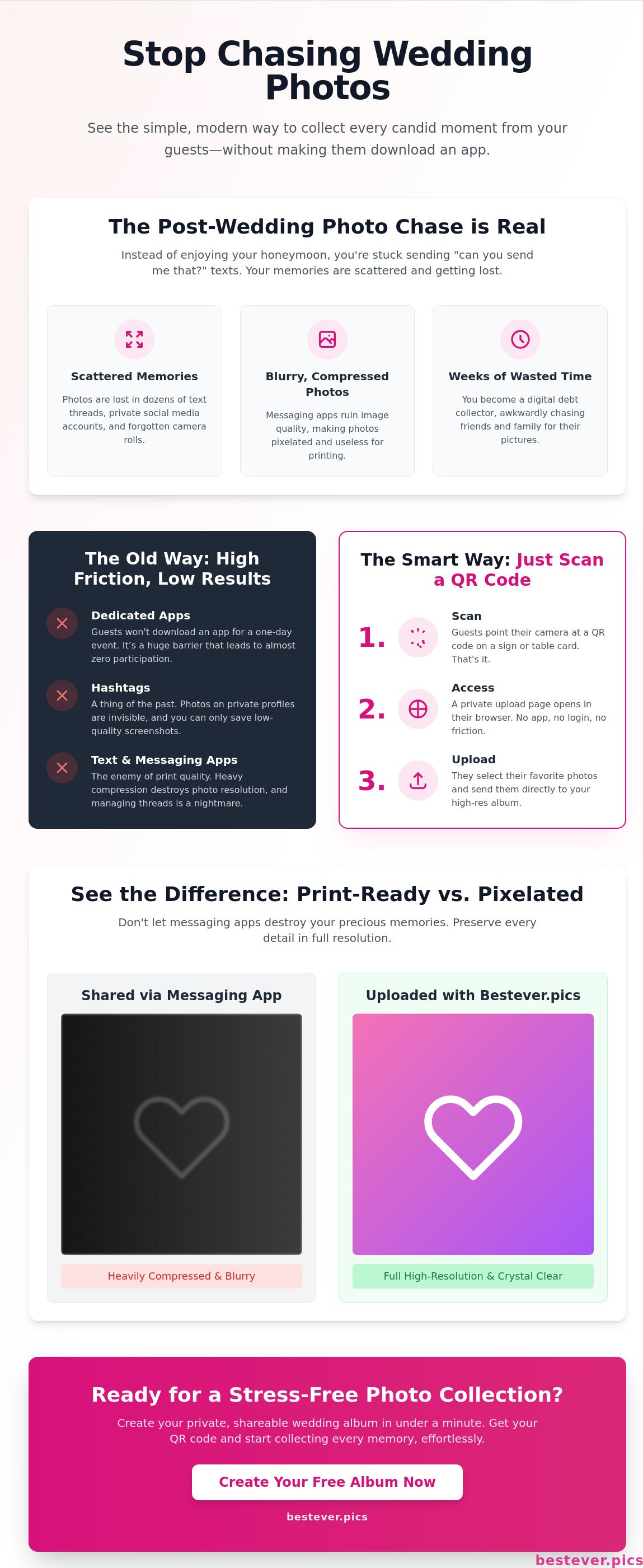
Messaging apps are the enemy of print quality. When a friend sends a photo via SMS or Messenger, the app compresses the file to save data. This ruins the resolution. If you try to print that photo for a physical album or a framed gift, it will look pixelated and cheap. To get a better grasp of the technical side, you can read about what image sharing is and how digital files are distributed. High-resolution files are essential for long-term memories.
Beyond the quality issues, managing fragmented threads is a nightmare. You'll spend hours saving individual files, trying to remember who sent what, and hoping you didn't miss a gem in a deleted thread. This is especially true for large events like a quinceañera or a 200-person reception. Fragmented sharing turns your celebration into a data entry project. You need a single, high-quality destination for everything.
A wedding photo online upload system is a web-based platform that allows guests to instantly share their photos and videos to a central digital album by scanning a QR code. This process requires no app downloads or account registration for the user, making it a simple and effective way to collect memories from every guest.
What is a Wedding Photo Online Upload System?
Think of this system as your event's digital headquarters. Instead of photos living on a dozen different social media feeds or getting lost in text threads, they land in one secure folder you control. It's a practical solution that removes the middleman between the guest's lens and your screen. You don't need to be a software engineer to set it up, and your guests don't need to be tech-savvy to use it. You own the high-resolution files from day one, meaning you aren't at the mercy of a social media platform's compression or privacy updates.
How the QR code upload loop works
The beauty of this technology lies in its simplicity. It replaces the "text me that later" conversation with a three-second action. Here's how the loop functions during your reception or quinceañera:
- Step 1: Scan. The guest finds a custom QR code on their table card or a sign at the bar and scans it with their phone camera.
- Step 2: Access. Their mobile browser immediately opens your private event page. There are no forms to fill out or profiles to create.
- Step 3: Upload. They choose their favorite shots from their gallery, tap upload, and the photos are safely stored in your album.
Why 'No App Required' is the secret to success
Guest participation lives or dies by how easy the process is. If you ask a guest to download a new app, sign up with an email, and verify their account, they'll likely give up before they even start. People are protective of their phone storage and their data. By using a browser-based wedding photo online upload, you remove every barrier to entry.
Compatibility is another major win. Whether your aunt is using an older Android or your college roommate has the latest iPhone, a web-based system just works. There are no version mismatch errors or storage space warnings that pop up when someone tries to download a bulky app. You can even set up a wedding QR code photo album in about a minute, ensuring that every guest can contribute regardless of their device.
Choosing the Best Way to Collect Photos: Apps vs. QR Codes
You've likely seen the cards at receptions or quinceañeras asking you to download a specific app. While these platforms often promise fancy filters or live feeds, they rarely deliver the results you want. The reason is simple: app fatigue. Most people won't pause their night to clear space on their phone, find their App Store password, and wait for a download. It's a massive hurdle that kills momentum. A browser-based wedding photo online upload eliminates this entirely. It's the difference between getting five photos from your tech-savvy cousin and getting five hundred from everyone in the room.
Some couples try the DIY route using "free" cloud storage folders like Google Drive or Dropbox. While these don't cost money upfront, the hidden cost is guest friction. These platforms almost always require the user to have an account and be logged in to contribute. If your Great Aunt doesn't have a Google account, she's locked out. Professional systems bypass this requirement. They prioritize accessibility, ensuring that the technology stays invisible while the memories take center stage.
App-based platforms vs. browser uploads
Apps might offer more bells and whistles, but they consistently see lower participation rates compared to web-based links. Guests are there to celebrate, not manage their phone's software. Using modern wedding photo sharing techniques via a browser ensures you capture more authentic, in-the-moment shots. When the barrier to entry is just a quick scan, people are far more likely to snap a photo and send it instantly. You'll get the raw, unedited joy of the dance floor rather than a few curated shots sent weeks later.
- Instant Access: No downloads means no waiting.
- Higher Participation: Simple processes lead to 2x more guest contributions.
- Better Quality: Browser uploads maintain the original resolution of the guest's camera.
Privacy and storage considerations
Privacy is a major concern when you're asking guests to share personal moments. Avoid platforms that sell guest data or require intrusive marketing sign-ups just to view an album. You want a system where you own the data and control who sees it. Long-term storage is another factor to watch out for. Some "free" services or basic apps have albums that expire after 30 days. This creates a panic to download everything before it vanishes forever. Look for a wedding photo online upload service that offers unlimited storage and permanent hosting so your memories are safe for years, not just weeks.
Security doesn't have to be complicated. A private, password-protected link or a unique QR code provides enough security for most events without making the process feel like a bank vault. This balance of ease and protection is what makes professional platforms like Bestever.pics stand out from generic cloud folders.
How to Get Your Guests to Actually Upload Their Photos
Having a great wedding photo online upload system is only half the battle. If your guests don't know it exists, your digital album will stay empty. Success depends about 20% on the technology and 80% on how you present it to your friends and family. You need to make the process feel like part of the celebration rather than a technical chore. By using strategic visual cues and early introductions, you can ensure everyone from your tech-savvy cousins to your grandparents knows exactly what to do.
The "First Look" strategy is your best tool for high participation. Don't wait until the cake cutting to mention the album. Introduce the concept as early as possible. Whether it is a formal UK reception or a vibrant US quinceañera, the strategy remains the same: visibility is everything. If you make the process obvious from the moment they arrive, you'll see a massive spike in contributions throughout the night. You can follow our guide on [LINK: collect guest photos] to maximize your gallery size and ensure no moment goes uncaptured.
Strategic QR code placement
Strategic QR code placement is your best friend. Don't just stick one sign by the guest book and hope for the best. Place codes on the back of the ceremony programs. This captures those beautiful "waiting for the bride" shots that usually stay hidden on guest phones. You should also include a small card in your invitation suite or save-the-date. This sets the expectation early so guests are ready to snap away the moment they arrive. Don't forget the bar; it's the most high-traffic area in any venue. While guests wait for a drink, they'll naturally look for something to do with their hands, making it the perfect spot for a wedding photo online upload prompt.
The power of the 'Table Talker'
A well-placed "Table Talker" sign is incredibly effective for keeping the momentum going during dinner. Signage needs to be functional first. While a beautiful script font looks great on an invite, it can be hard to read in the dim lighting of a reception hall. Use clear, bold text for the "Scan Me" instruction and include a simple 3-step guide: Scan, Select, Share. If your venue has screens, running a live slideshow of guest uploads creates an instant feedback loop that encourages others to join in the fun.
Don't be afraid to use your MC or DJ to give a 30-second call to action during a lull in the music. Hearing a human voice explain the process makes it feel more personal and less like a technical requirement. This is especially helpful for older guests who might need that extra bit of verbal encouragement to try something new. If you're ready to start gathering these memories without the stress, you can set up your guest photo sharing album in under a minute and get back to planning the rest of your big day.
Why Bestever.pics is the Simple Solution for Your Wedding
This platform started as a project between a father and daughter who wanted a better way to save family memories. They realized that a wedding photo online upload shouldn't be a technical chore for you or your guests. Instead of a complex app, they built a practical, browser-based tool that works on any smartphone. It's a human approach to technology that prioritizes your memories over complicated software. You'll find that the interface feels like a natural part of your event rather than a distracting third-party service.
The system focuses entirely on accessibility to ensure every guest can participate. You won't have to worry about whether your friends use an iPhone or an Android. It just works. Because there are no downloads required, you'll see a much higher volume of photos than you would with traditional methods. It's about making the process invisible so the focus stays on the celebration. You get a professional-grade repository for your files without the technical complexity.
Creating your gallery in 60 seconds
You won't need to spend your morning configuring complex settings or reading manuals. You'll simply name your event, pick a cover photo, and your digital hub is ready to go. It's that fast. The system generates a high-resolution QR code instantly that you can send to your stationer or print on your own signage. It's a efficient process that fits into even the busiest wedding planning schedule. You'll also have access to straightforward privacy controls and moderation tools to keep your album secure from uninvited viewers.
Customization is built into the core of the experience. You can tailor the look of your upload page to match your wedding theme or color palette. This ensures that when guests scan the code at your reception or quinceañera, the transition feels polished and intentional. It's these small details that help your guests feel comfortable sharing their personal photos. You're providing a safe, branded space for everyone to contribute to the story of your day.
Capturing candid moments the pro misses
Your professional photographer focuses on the big moments, but they can't be at every table at once. Your guests are the ones who see the quiet jokes, the unexpected reunions, and the raw energy on the dance floor. This [LINK: digital guestbook] approach captures the authentic 'behind the scenes' of your celebration. You'll be able to relive the laughter and the unposed bloopers long before the official gallery arrives in your inbox. Every moment is saved.
Think of these photos as the heartbeat of your reception. While the pro captures the art, your guests capture the emotion and the fun from their unique perspectives. You'll discover gems that happened while you were busy cutting the cake or greeting other guests. Having all these high-resolution files in one place makes it easy to create a truly comprehensive wedding album later. It's the best way to ensure no part of your story goes untold.
Secure Your Wedding Memories Today
You've seen why traditional hashtags and clunky apps fail to capture the real magic of your big day. By prioritizing ease of use and high-resolution quality, you ensure that every candid laugh and late-night dance move is preserved. A streamlined wedding photo online upload process takes the stress out of your post-wedding weeks; it leaves you with a complete gallery instead of a long list of guests to chase for files. You deserve to enjoy your honeymoon without worrying about missing a single perspective from the reception.
It's time to move beyond fragmented text threads and blurry social media screenshots. Bestever.pics is trusted by thousands of couples worldwide to handle their most precious moments with sophisticated simplicity. You'll get unlimited high-resolution uploads and a beautiful digital home for your memories without requiring a single app download from your guests. Start your Bestever.pics wedding gallery today and capture every moment! Your future self will thank you for making the process so simple for everyone involved. Enjoy your celebration knowing every memory is being safely collected.
Frequently Asked Questions
Do my guests need to download an app to upload photos?
No, your guests don't need to download any apps or software to contribute. They simply scan your unique QR code, and their phone's native browser opens the upload page instantly. This removes the friction that usually stops people from sharing their photos during a busy reception or quinceañera. It's a much faster process that ensures even your less tech-savvy relatives can participate without any frustration.
Is there a limit to how many photos my wedding guests can upload?
You'll enjoy unlimited photo and video uploads with our professional plans. This means you don't have to worry about hitting a storage wall halfway through the night, even if you have hundreds of guests snapping away. Every guest can contribute as many memories as they like, ensuring you capture the full story of your event from every possible angle. Your wedding photo online upload remains active and ready for every single shot.
Will the photos be high resolution or compressed like on social media?
The photos are stored in their original, high-resolution format without the heavy compression found on social media. Messaging apps and social platforms often shrink files to save data, which ruins the quality for printing. Our system preserves the full resolution of the guest's camera. You'll be able to print these candid shots in large formats for your physical wedding albums without worrying about blurriness or pixelation.
How do I print the QR code for my wedding reception?
You can download your unique QR code as a high-resolution image file directly from your Bestever.pics dashboard. Most couples choose to include this image on their table cards, ceremony programs, or large signs at the bar. Since it's a standard high-quality file, you can send it to any professional printer or even use your home printer. We recommend testing the code once it's printed to ensure it scans easily in different lighting conditions.
Can I see the photos during the wedding or do I have to wait?
You can see every photo the moment it's uploaded to your gallery. There is no waiting period or processing delay, so you can check in on the candid action whenever you have a quiet moment. Many couples also use our live slideshow feature to project these guest photos onto a screen in real-time. This creates a fun feedback loop that encourages even more guests to join in and share their perspectives.
What happens if someone uploads an inappropriate photo?
You have total control over your gallery and can delete any unwanted photos with a single tap. Most professional systems also offer moderation tools that let you review photos before they appear in a live slideshow or public feed. This ensures your digital guestbook stays family-friendly throughout the night. You can even appoint a trusted bridesmaid or groomsman as a moderator to handle this task while you enjoy the party.
Is my wedding photo gallery private or can anyone see it?
Your gallery is private and only accessible to people who have your specific link or QR code. Unlike social media hashtags, these photos aren't indexed by search engines or visible to the general public. You own the data and control the privacy settings from your dashboard. It's a secure way to collect wedding photo online upload contributions without exposing your personal memories to strangers on the internet.
Does Bestever.pics work on both iPhone and Android devices?
Yes, Bestever.pics works perfectly on both iPhone and Android devices without any compatibility issues. Because the system is browser-based, it doesn't matter what operating system or phone model your guests are using. As long as they have a working camera and a mobile internet connection, they can scan and upload in seconds. This universal compatibility is exactly why browser-based systems see much higher participation rates than platform-specific apps.


