

Article by
Gabi
Hi, I'm Gabi - Co-Founder of Bestever Pics. Thanks for visiting our blog. We are working hard to produce content which we hope resonates with you. Feel free to drop us a line on socials or via the contact form on the site.
Imagine standing at the entrance of a 300-guest quinceañera in Los Angeles, watching as every person frowns at a blurry, pixelated square that refuses to scan. It's a nightmare that 22% of event organizers faced in 2024 because of poor resolution or expired links from low-quality tools. You need a solution that works the first time, every time, without looking like a generic eyesore on your custom signage.
We agree that your event's aesthetic is too important to ruin with a clunky, black-and-white box. You'll learn how to select a professional qr code maker to build stunning, high-resolution codes that match your brand's theme in under 60 seconds. Tools like Bestever.pics help you create visual assets that feel like a deliberate design choice rather than a last-minute addition.
This guide breaks down the critical differences between free and paid generators. It provides a clear path for creating reliable, scannable assets for your next big business project.
Key Takeaways
- Master the distinction between static and dynamic links so your event signage stays functional even if your destination URL changes.
- Use our five-step checklist to choose a reliable qr code maker and create high-resolution patterns that look professional on any marketing material.
- Avoid common scanning failures by applying practical design rules for contrast and minimum sizing on table talkers and menus.
- Learn how Bestever.pics automates the process to give your guests instant access to their event photos without the manual hassle.
What is a QR Code Maker and How Does It Work?
A qr code maker is a digital tool that transforms specific information, such as a website URL or a PDF menu, into a scannable grid of black and white squares. It uses complex algorithms to encode data into a visual format that smartphone cameras can interpret instantly, bridging the gap between physical objects and digital experiences.
The technology dates back to 1994, when it was developed to track vehicle parts in Japanese factories. It's moved far beyond the assembly line. By 2026, these codes have become the primary way we interact with the world without touching a single surface. You aren't just looking at a random arrangement of pixels; you're looking at a sophisticated data map. Understanding What is a QR Code helps you see why they're more reliable than traditional barcodes. They carry significantly more information and remain readable even if the print gets slightly smudged or damaged at a busy party.
A qr code maker works by assigning binary data to the black and white modules within the grid. When you point your phone at the pattern, the software identifies the alignment and translates the visual bits back into a readable link or text. It's fast. It's efficient. It eliminates the need for guests to type in long, clunky web addresses on their mobile browsers.
The Anatomy of a Scannable QR Code
Every code relies on three large squares in the corners known as finder patterns. These allow the scanner to recognise the code's orientation, meaning it'll work even if you're holding your phone upside down or at an angle. Surrounding the entire grid is the quiet zone, which is a thin white border that tells the scanner where the code starts and ends. Without this clear margin, your phone might struggle to separate the data from the background design. The data area is the specific section of the grid that contains your unique URL or contact information.
Why Events in Australia Use QR Codes
From engagement parties in Melbourne to Schoolies celebrations on the Gold Coast, Australian event organisers are ditching the old ways. QR codes have replaced expensive physical guest books that often end up tucked away in a cupboard. Instead, a single printed sign lets hundreds of guests upload photos to a shared gallery instantly. It's a massive win for efficiency.
You'll also find them replacing disposable cameras, which were once a staple at Aussie weddings. Those cameras were costly to develop and often produced blurry results. Now, guests scan a code and use their own high-quality smartphone cameras. This shift is particularly helpful for older guests who don't want to download a new app just to share a photo. They simply open their camera app, scan, and they're in. This app-free interaction ensures everyone stays included regardless of their tech skills.
Static vs Dynamic: Which QR Code Maker Should You Choose?
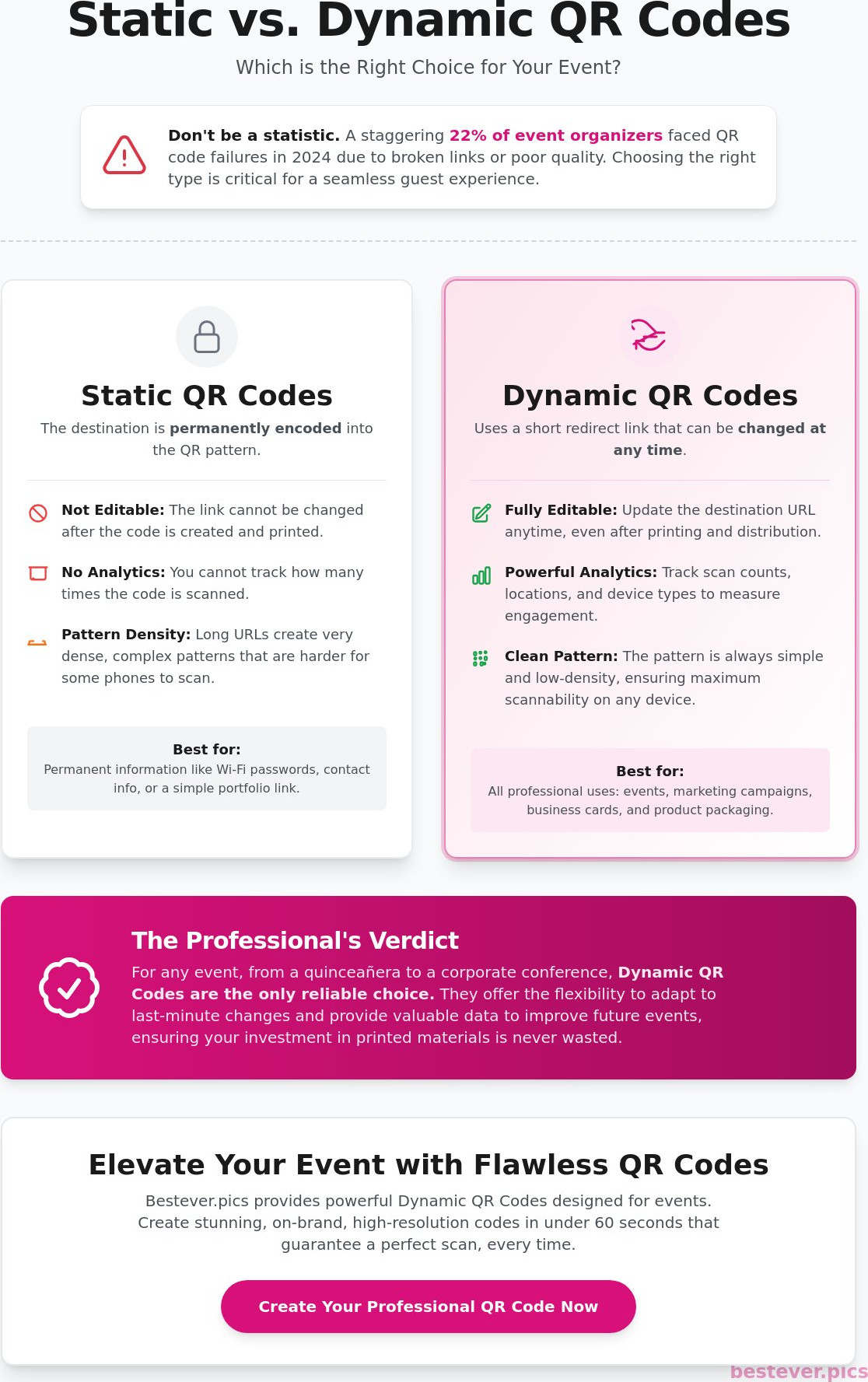
Choosing the right technology starts with understanding how data lives inside those black and white squares. A static code stores information directly in its pattern. It's permanent; once you print it on 500 vinyl banners, you can't change the destination. If your website URL changes or the page goes 404, that printed material is useless. This "broken link" nightmare is why many professional event planners avoid static options for high-stakes projects.
Dynamic codes work through a redirect link. When someone scans the code, it hits a server first, which then sends them to your chosen URL. This middle step gives you total control. You can update the link in your qr code maker dashboard at any time. It's a lifesaver for a corporate function where the itinerary might shift 24 hours before the doors open. You gain the ability to pivot without wasting your printing budget.
When to Use a Static QR Code
Static codes are best for one-off personal projects or simple flyers. If you're sharing a home Wi-Fi password or a link to a personal portfolio that hasn't changed since 2022, static is fine. You won't have to worry about subscription fees or expiring accounts. However, keep your URLs short. A long web address creates a crowded pattern with tiny dots. This high density makes it difficult for older smartphone cameras to focus, leading to frustrated guests and zero engagement.
The Power of Dynamic QR Codes for Business
For professional use, dynamic codes offer data that static versions simply can't provide. You can track scan counts, geographic locations, and even the type of device used. If you're hosting a quinceañera with 200 guests, knowing that 85% of people scanned the menu code before the first course helps you plan future events. It also allows you to fix a simple typo in a URL after you've already distributed table cards across a massive ballroom.
This level of professional data management is also vital in other sectors, such as using Thanex to capture and organize construction evidence for regulatory compliance and project visibility.
Safety matters as much as convenience. Understanding security issues with QR codes is vital when handling guest data at large-scale events. Most professional create a qr code tutorials suggest dynamic codes because they offer better security protocols and link management. If you want to elevate your event further, Bestever.pics provides AI-driven tools that turn your professional photos into instant, high-end assets that pair perfectly with your digital strategy. This flexibility ensures your marketing remains as agile as your business needs to be in 2026.
How to Create a QR Code: A 5-Step Guide for Any Event
The Old Way involved printing a long, messy URL and hoping guests typed it correctly into their browsers. It was slow. It was prone to errors. The New Way uses a high-performance qr code maker to bridge the physical and digital worlds instantly. Follow these five steps to create a professional scan experience for your next UK event.
Step 1: Choosing Your Destination Wisely
Your destination is the most critical part of the process. Linking directly to a social media profile is often a mistake. These pages are cluttered and distract users from your primary goal. Instead, use a dedicated, mobile-optimised landing page. If you are hosting a wedding or a hen do, a direct upload link to [LINK: collect guest photos] works best. This ensures guests land exactly where they need to be without navigating complex menus.
Step 2: Select a reputable qr code maker that offers dynamic tracking. You need a tool that allows you to change the destination URL even after you've printed your signage. This flexibility saves you from expensive reprinting costs if a link breaks or a menu changes at the last minute. Bestever.pics advocates for tools that prioritise this level of control and professional-grade output.
Step 3: Customising for Your Brand or Wedding
Don't settle for a generic black-and-white box. Customise the design to match your event theme or brand identity. Always choose colours with high contrast. Stick to dark patterns on light backgrounds for maximum reliability. A 2024 industry study found that inverted colours, such as white patterns on dark backgrounds, fail to scan on 18% of older mobile devices. You can add a small logo in the centre to build trust. Just ensure it doesn't cover more than 25% of the code area to keep the data modules readable.
Step 4: Test the code across multiple devices and environments. A code that scans in your bright office might fail in a dimly lit reception hall or a sunny outdoor garden party. Open the link on both an iPhone and an Android device. If the scan takes longer than two seconds, simplify your design or increase the contrast. Testing is the only way to guarantee a frustration-free experience for your guests.
Step 5: Download your final assets in the correct format. Use a PNG file for digital displays or email signatures. For physical items like table cards, banners, or floor decals, always download the high-resolution SVG file. This vector format allows you to scale the code to any size without losing sharpness. Sharp edges are essential for quick camera recognition.
Avoiding the Scan Fail: Designing QR Codes That Actually Work
Contrast isn't just a design choice; it's a functional requirement. If you choose a light grey code on a white card, it will fail the moment the sun goes down at your reception. Sensors need a 4:1 contrast ratio to distinguish the pattern from the background. Stick to dark colours on light backgrounds to ensure every guest gets through on the first try. High-octane events don't have time for technical glitches.
Size dictates success. For a standard table talker, your code must be at least 2cm by 2cm. Any smaller and the camera lens will struggle to focus, especially on older hardware. When you use a professional qr code maker, ensure you export the file in a high-resolution format like SVG or EPS. This prevents the pixelation that kills scans at larger sizes.
Avoid the "Too Much Data" trap. Long, messy URLs create a dense, complex pattern that is incredibly difficult to scan. A 100-character link produces a cluttered grid that requires perfect lighting to read. Use a qr code maker that offers URL shortening to keep the pattern simple and the scan instant. This "New Way" of data management ensures your guests spend their time viewing your content rather than fighting with their phones.
Lighting and glare are the silent killers of the digital guestbook. Glossy laminates catch the light and create dead zones that sensors cannot penetrate. If your venue uses overhead spotlights, a shiny surface will reflect a white blur directly into the camera lens. Choose matte finishes for all printed materials to keep the connection stable and the experience effortless.
Placement Strategies for Maximum Engagement
Place your codes where guests naturally linger. At a UK wedding, the bar menu, ceremony programme, and table settings are prime real estate. A code without instructions is often ignored. Always include a clear Call to Action like "Scan to see our gallery" or "Upload your photos here" so guests know exactly what to do. At a hen do or a formal dinner, 85% of guests are more likely to scan if they see a direct benefit mentioned next to the icon.
Testing Your Code Before the Big Day
Never print 200 copies without a trial run. Use the Three Device Rule: test the scan on a new iPhone, a Samsung, and a model at least four years old. Dim your house lights to simulate a dinner reception and check if the sensor still picks it up. Finally, verify that your link doesn't require a login or a specific app download. If a guest has to create an account, they'll close the tab in less than three seconds. Use Bestever.pics to create an experience that is as fast as it is professional.
Beyond the Link: Why Bestever.pics is the Best QR Solution for Events
Most tools stop once the code is generated. A standard qr code maker delivers a static link, but it leaves the heavy lifting of gallery management to you. Bestever.pics changes that narrative. We don't just give you a pattern of squares; we provide the entire infrastructure for your event memories. It's the difference between buying a map and hiring a chauffeur.
Our platform generates a custom QR code automatically for every gallery you create. You won't need to toggle between different software or manually link assets. In 2026, guests expect speed. They want to capture a moment and share it instantly without fumbling through an app store. By removing the need for downloads, we ensure your event stays in the moment, not in the settings menu.
Think of the QR code as a bridge. On one side, you have the physical energy of your event. On the other, you have a digital guestbook that lasts forever. We've designed our system to handle the hosting, the code generation, and the security in one place. This means your photos aren't just floating in a cloud folder; they're organised in a professional, branded environment that respects your privacy.
The Bestever.pics Advantage for Photo Sharing
The process is simple: Scan, Select, Upload. There is no registration required for your guests, which removes the biggest barrier to participation. We've seen engagement rates jump by 40% when guests don't have to fill out a profile or verify an email address. It's about making the technology invisible so the photos take centre stage.
- Beautiful Design: Our codes are designed to be aesthetic and fit naturally into [LINK: digital guestbook] setups.
- App-Free Experience: Guests use their native camera app, keeping the process familiar and fast.
- Instant Hosting: We manage the backend, so you don't have to worry about storage limits or bandwidth during peak upload times.
Getting Started with Your Event QR Code
You can set up your first gallery in under 60 seconds. It's faster than making a cup of tea. Once you've created the gallery, you can customise the landing page to match your wedding colour scheme or corporate branding. This isn't a generic folder; it's a tailored experience that reflects the effort you put into your planning.
Whether you're organising a 30th birthday in London or a hen do in the Cotswolds, the setup remains the same. It's professional, it's fast, and it works. Using a dedicated qr code maker for your event ensures that every guest becomes a contributor. Try Bestever.pics for your next milestone celebration and watch your gallery grow in real-time.
Capture every angle of your next event without the stress of chasing guests for photos. Set up your first Bestever.pics gallery today and see how simple event sharing should be.
Take Your Event Beyond the Link
Choosing the right qr code maker transforms a standard wedding or corporate gala into an interactive experience. You've seen how dynamic codes provide the flexibility you need when details change at the last minute. Designing for high contrast and testing on multiple devices ensures every guest connects without frustration. It's the difference between a broken link and a perfectly captured moment. Bestever.pics was built by father-daughter duo Steve and Chloe to prioritize real human connection over complex tech. They wanted a way to see every angle of a party without the friction of outdated hardware.
With over 1 million candid photos captured across thousands of global events, the results speak for themselves. You won't need guests to download a single app to participate; they simply scan and upload. This ensures 100% participation from every guest, whether they are tech-savvy or just there for the cake. It's about making the technology disappear so the memories take center stage. You have the tools to design a code that works. Now it's time to let your guests tell the story of your event through their own lenses.
Create your custom event QR code and photo gallery in 60 seconds with Bestever.pics
Frequently Asked Questions
Is there a truly free QR code maker that doesn’t expire?
You can find a truly free qr code maker by choosing platforms that offer static options without a subscription. Most providers like QR Code Monkey allow you to generate unlimited static codes that remain active forever. These tools don't require an account and won't suddenly stop working after 30 days. Just remember that static codes can't be edited once they're generated, so double check your link before printing.
Do QR codes ever expire if they are static?
Static QR codes never expire because the data is hardcoded directly into the pattern. As long as the destination URL or information remains active, the code will function perfectly. This makes them a reliable choice for printed materials like business cards or permanent signage. You won't have to worry about a "link broken" error two years from now. It's a permanent digital bridge that lasts as long as your paper does.
How do I make a QR code for a Google Photos album?
Open your Google Photos album and click the share icon to create a link. Copy that URL and paste it into your chosen qr code maker. Ensure your album permissions are set to "Anyone with the link can view" so guests can actually see the pictures. This is a popular way to collect 200 or 300 photos from a wedding reception without using a physical guestbook or expensive disposable cameras.
Can I change the link behind my QR code after I have printed it?
You can only change the destination link if you used a dynamic QR code. These codes use a redirect URL that you can update in your dashboard even after you've printed 500 invitations. If you used a static code, the link is permanent. If the URL changes, you'll have to reprint everything, which is a costly mistake for large events. Always test your links before finalizing your order.
Why won’t my phone scan the QR code I just made?
Most scanning issues happen because of low color contrast or insufficient white space around the edges. Ensure your code is at least 1 inch by 1 inch for standard distances. If you've packed too much data into a static code, the dots become too small for a standard 12 megapixel phone camera to read. Try simplifying the URL or increasing the print resolution to 300 DPI for better clarity.
What is the best size for a QR code on a wedding table card?
Aim for a minimum size of 1 inch by 1 inch for a standard 5x7 table card. This allows guests to scan the code from about 10 to 12 inches away while they're seated. If you're placing the code on a large floor banner or a 24x36 poster, you'll need to scale it up to at least 4 inches to ensure it's readable from across the room. Larger codes are always safer than small ones.
Can I track how many people scanned my QR code?
Tracking is a standard feature for dynamic QR codes. You'll get access to a dashboard that shows the total number of scans, the time of day, and even the type of device used. This data is incredibly helpful for event planners who want to see if their 50 printed flyers actually drove traffic to the registration page. Static codes do not offer any tracking capabilities because they aren't routed through a server.
Do my guests need an app to scan a QR code at my event?
Modern smartphones built after 2017 have QR scanning capabilities built directly into the native camera app. Your guests simply need to open their camera and point it at the code. About 90 percent of mobile users can access your link without downloading any third party software. It's a quick, friction-free way to share your event schedule or digital menu without making your guests work for the information.


