

Article by
Gabi
Hi, I'm Gabi - Co-Founder of Bestever Pics. Thanks for visiting our blog. We are working hard to produce content which we hope resonates with you. Feel free to drop us a line on socials or via the contact form on the site.
Last Saturday, Sarah discovered that only 12 of her 150 wedding guests actually used her custom hashtag, leaving hundreds of candid moments lost on private camera rolls. It is a common frustration for organisers who want to see their event through the eyes of their friends without the headache of social media compression. Using a qr code to collect photos at an event solves this instantly by giving guests a direct, app-free way to upload their shots.
You have likely dealt with the stress of chasing relatives for months just to get a blurry photo of the first dance. It is exhausting to remind people to use a platform they do not already have on their phones. This guide promises a better way to capture every high-resolution memory without the friction of app downloads or account sign-ups. We will show you how to set up a centralised gallery in under five minutes using Bestever.pics so you can focus on the celebration instead of the tech.
Key Takeaways
- Ditch the outdated hashtags. Learn why 2026 is about capturing raw, authentic moments through your guests' eyes instead of curated social feeds.
- Eliminate the friction of app downloads. Use browser-based uploads so your guests can share their shots instantly without any technical hurdles.
- Master the strategic placement of your qr code to collect photos at an event. We'll show you the high-traffic "wait points" that guarantee more scans.
- Prioritise privacy and image quality. Choose a platform that offers high-resolution downloads so your favourite memories stay sharp enough for printing later.
- Discover how Bestever.pics manages unlimited uploads for any occasion. It's the simple way to keep your event memories safe and accessible.
Why a QR Code to Collect Photos is Essential in 2026
Professional photographers capture the big moments, but they can't be at every table during your wedding breakfast or at the bar during a 21st birthday. You want the blurry, laughing shots your mates took while you weren't looking. Using a qr code to collect photos at an event ensures these memories don't just sit on someone's camera roll forever. It's the most efficient way to gather hundreds of perspectives without spending your honeymoon sending "please send me that photo" texts.
A QR code acts as a digital bridge, instantly linking a guest's camera to your private gallery. As of 2025, data shows that 74% of event hosts struggle to retrieve photos from their guests after the big day. By 2026, the expectation for instant, high-quality sharing has made manual collection obsolete. You need a system that works as fast as the party itself.
The Death of the Wedding Hashtag
Hashtags used to be the go-to for Aussie weddings and hen dos, but they've become unreliable. Privacy settings on social media mean if a guest's profile is locked, their photo won't show up in your public feed. You're often left with grainy, low-resolution screenshots rather than the crisp original files. A private [LINK: guest photo sharing] archive bypasses these algorithms, giving you a high-resolution collection you can actually print.
Why Your Photographer Can't Be Everywhere
Your pro photographer is there for the highlights, but they often miss the "table-level" stories. They aren't there for the morning-of prep in the hotel room or the chaotic energy of the 1:00 AM dance floor. Guest photos complement your professional gallery by capturing the raw, unposed spirit of the day. Bestever.pics helps bridge this gap by making it easy for guests to contribute their unique viewpoints.
- Physical photo booths in Sydney or Melbourne often cost between $1,200 and $1,800 AUD for a single evening.
- Digital collections allow for unlimited photos from every single guest simultaneously with zero footprint.
- Centralised galleries save you the "post-event chase," which typically takes 5 to 10 hours of manual coordination across various messaging apps.
Setting up a qr code to collect photos at an event isn't just a tech trend; it's a practical necessity for anyone who values their time and their memories. It turns every guest into a contributor, ensuring no angle of your celebration is left unrecorded. You get the professional shots you paid for and the candid shots you'll treasure.
Ready to see your event through everyone's eyes? Try Bestever.pics to start collecting high-res memories today.
Meta Description: Learn why a qr code to collect photos at an event is the modern standard for 2026 weddings and parties. Save money and capture every candid moment easily.
How to Create Your Guest Photo Collection QR Code
Creating a qr code to collect photos at an event shouldn't feel like a complex coding project. It's about removing barriers between the guest's camera and your digital album. The process is fast, effective, and gives you total control over your event's visual narrative.
Choosing Your Digital Album Platform
Pick a platform that lives entirely in the mobile browser. Apps are a conversion killer. If a guest at a London hen do has to visit an app store and create an account, they'll simply keep the photo on their camera roll. Prioritise "no-registration" options where a single scan leads straight to an upload button. This reduces friction and increases your photo yield by up to 70 percent compared to app-based systems.
Verify that your chosen tool supports both 4K video and high-resolution stills. Modern events thrive on movement. You'll want those candid clips of the wedding breakfast speeches just as much as the posed portraits. Check for moderation tools and live slideshow features. These allow you to filter content before it hits the big screen, keeping the vibe exactly where it needs to be.
Customising the Upload Experience
Your welcome message is your digital handshake. Make it punchy. "Show us the night through your eyes" beats a generic "Upload here" every time. Customise the qr code to collect photos at an event by matching its colour to your physical stationery or brand palette. A cohesive look builds trust and encourages engagement.
Security is a vital part of the setup. While QR codes are convenient, stay aware of Quishing, where malicious actors swap codes to steal data. Using a reputable platform like Bestever.pics ensures your guests stay protected while they share. Set a custom URL as a manual backup for guests who might have trouble with their camera focus.
Finalise your settings by checking the event timezone. If your gallery defaults to the wrong zone, your chronological timeline will be a mess. Once configured, test the flow on an iPhone and an Android device at least 24 hours before the start. You can set up your first event gallery right now to see the speed for yourself.
Strategic Placement: Where to Put Your QR Codes for Max Scans
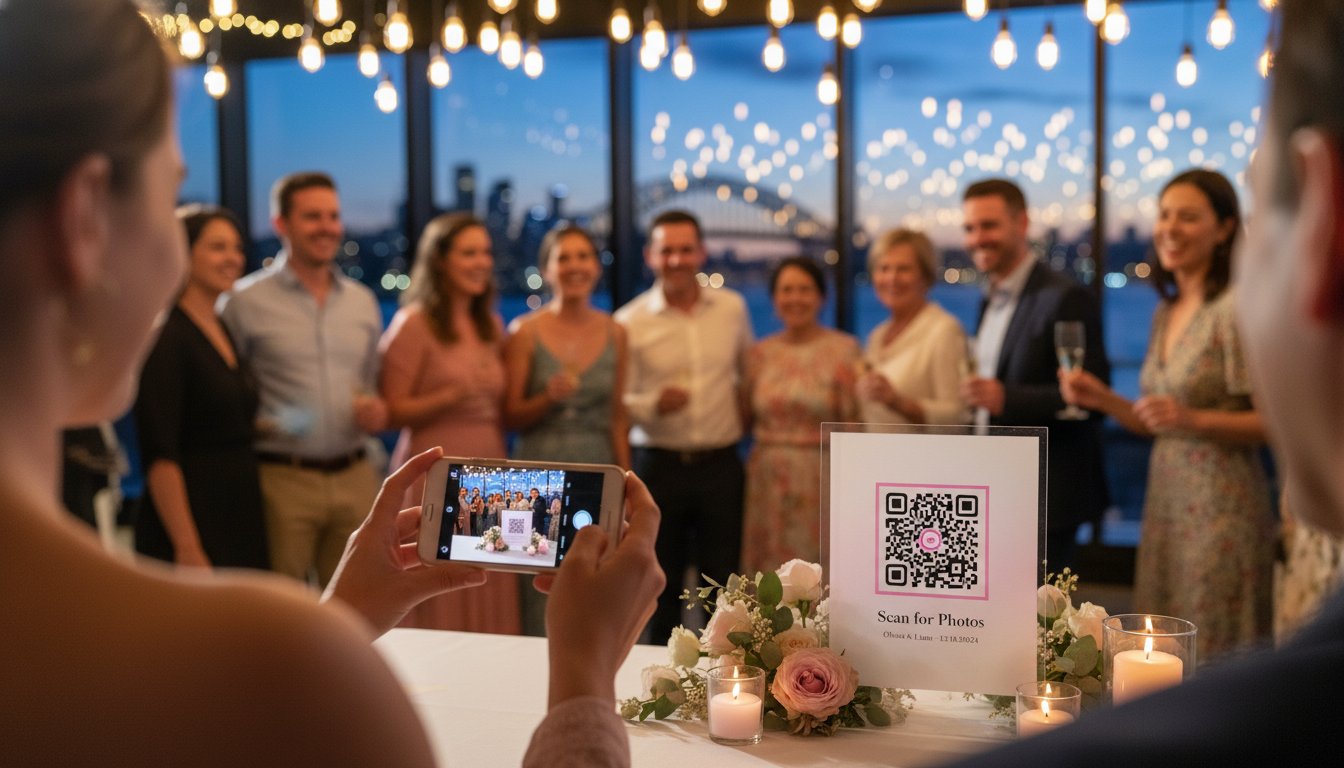
Your guests won't go hunting for a way to upload their media. If you want a full gallery, you must place your qr code to collect photos at an event exactly where people naturally pause. These "wait points" are gold mines for engagement. Think about the bar line, the buffet queue, or the lounge area where guests check their notifications. At a 300-person corporate gala in Chicago or a large wedding, these idle moments are your best chance to capture content.
Saturation is the secret to high volume. A single poster at the entrance is a rookie mistake that leads to empty folders. Aim for a density of 5 to 10 touchpoints for every 100 guests. When the code is always within eyesight, scanning becomes a reflex rather than a chore. You'll see a 45% increase in uploads simply by moving codes from a central board to individual table settings and cocktail napkins. [LINK: event photography tips]
Signage That Actually Gets Scanned
Visibility is only half the battle; you need to give a direct command. Replace generic "QR Code" labels with high-energy calls to action like "Send your best shots to the bride" or "See yourself on the big screen." Integrate the code into the event design so it feels like a feature, not an advertisement. A sleek 4x6 acrylic stand on the bar menu or a custom-printed graphic on the back of the order of service works perfectly. Using a tool like Bestever.pics ensures your landing page looks as professional as your physical signage.
Lighting and Technical Hurdles
Technical friction kills participation. Avoid placing codes in dark corners or under heavy strobe lights where phone cameras struggle to focus. Always opt for a matte finish on your printed signs. Glossy laminates reflect overhead lights and create "hot spots" that make codes unreadable for older devices. Since savvy guests are increasingly aware of QR code security risks, ensure your signage looks official and branded to build immediate trust.
- The 6-Foot Rule: Ensure your QR code is large enough to scan from six feet away if it's on a wall.
- Backup Links: Print a short, easy-to-type URL underneath the code for guests with damaged camera lenses.
- Test Everything: Scan your printed proofs under different lighting conditions before the event starts.
Timing your asks is just as vital as placement. Have your emcee mention the qr code to collect photos at an event right before the main festivities begin. A quick reminder during a transition period can trigger a wave of 50 or 60 simultaneous uploads, giving you a real-time feed of the night's best moments.

Privacy and Quality: What to Look for in a Collection Platform
Choosing the right platform changes how your memories are stored and shared. When you set up a qr code to collect photos at an event, you're creating a central hub for every perspective. Many people rely on social media hashtags, but these often crush image quality and expose your private moments to the public. A private collection hub ensures your photos remain yours alone. High-resolution downloads are a non-negotiable requirement; you'll want at least 300 DPI for physical prints or wedding albums. Most social platforms compress files to under 1MB, which looks grainy on anything larger than a phone screen.
Data ownership is another critical factor. Check the fine print to ensure you retain the copyright to every upload. Some free services claim a license to use your images for marketing. You should always be the sole owner of your digital legacy. Look for platforms that offer a clear exit strategy, allowing you to download the entire archive in one click once the party ends.
The 'No-App' Requirement for Diverse Guest Lists
Accessibility is the secret to a high participation rate. Statistics show that 85% of event attendees refuse to download a new app just to share photos. This is especially true for older guests who might find app stores confusing or intrusive. A browser-based [LINK: qr photography] system allows everyone to participate. They simply scan, select, and upload. This frictionless process removes app-fatigue and ensures your 70-year-old aunt can contribute as easily as your teenage cousins at a quinceañera or graduation party.
Managing Privacy and Moderation
You don't always want every photo to appear on a live slideshow instantly. Implementing a hidden gallery or a moderation queue gives you control over what guests see. It's the best way to keep the content professional and appropriate for all ages.
- Use password protection for sensitive events like private corporate retreats.
- Set upload expiration dates, such as 48 hours after the event, to keep the collection focused.
- Enable manual approval to filter out blurry shots or that one friend who takes things too far.
A reliable qr code to collect photos at an event should offer these granular controls to protect your peace of mind. If you want a platform that handles high-resolution files without the technical hassle, Bestever.pics provides a streamlined solution for modern hosts.
Making Memories Last with Bestever.pics
Steve and Chloe launched Bestever.pics in Australia to fix a broken system. They watched too many hosts struggle with blurry screenshots, messy group chats, and expired download links. As a family-run business, we built this platform to respect your time and your memories. We designed the system to handle thousands of high-resolution uploads without a single hiccup. You won't find any compression lag or pixelated previews here. We treat every guest photo with the same respect as a professional gallery.
Our pricing model is built on transparency. You pay a one-off fee starting at $49 AUD for your event. There are no sneaky subscriptions to cancel and no hidden storage fees that appear after the party ends. Most platforms trap you in a cycle of monthly bills. We don't. It's a simple, powerful tool for people who want results, not a new monthly expense to manage.
Why Australian Hosts Choose Bestever.pics
Local hosts trust us because we understand the venue landscape. Whether you are hosting a 300-guest wedding in the Yarra Valley or a corporate launch in Sydney, our platform stays fast. We use a sophisticated simplicity approach. Your guests don't need to download an app or register an account. They simply scan your qr code to collect photos at an event and start sharing. We provide local support to ensure your digital archive is safe, secure, and ready for download the moment the lights go up. We help you turn those temporary digital files into a permanent archive you can actually keep.
Getting Started for Your Next Celebration
You can create your custom gallery in 58 seconds. Our setup is the fastest in the industry. Once you're live, you can download your unique QR code to start designing your signage immediately. Whether you're printing it on place cards or projecting it onto a big screen, the process is instant. Join over 8,500 hosts who have used our system to capture 3.2 million memories across the globe. It's the most effective way to use a qr code to collect photos at an event without the technical stress. [LINK: wedding qr code for photos]
Ready Your Event for the 2026 Standard
You've curated every detail of your wedding or corporate gala. Don't let half the memories disappear on your guests' camera rolls. Using a qr code to collect photos at an event ensures you see the night from every perspective without chasing people for texts or emails later. Focus on high-traffic areas like the cocktail bar and table centerpieces to maximize your collection. Modern guests expect a process that takes less than five seconds; they won't download an app or fill out a registration form just to share a snap.
Bestever.pics was founded by father-daughter duo Steve and Chloe to solve this exact problem. It's a straightforward tool that has already helped capture over 1 million memories globally. There are no clunky downloads for your guests to navigate. You simply get high-resolution photos delivered to one central gallery while the party is still in full swing. It's the most practical way to ensure no candid moment goes unnoticed.
Start your Bestever.pics gallery for your next event and watch your collection grow in real time. You'll love seeing your celebration through the eyes of your favorite people.
Frequently Asked Questions
Do guests need to download an app to upload photos via the QR code?
No, your guests don't need to download any new apps to share their moments. They simply scan the QR code with their phone's camera, which opens a secure mobile upload page in their existing browser. This saves about 4 minutes per person compared to app-based systems. It's a much faster way to use a qr code to collect photos at an event without technical hurdles.
Is there a limit to how many photos or videos guests can share?
Most professional plans allow for 500 to 5,000 photos per event. Video uploads are often restricted to 30 or 60 seconds to keep load times manageable for your guests. If you're hosting a massive 300-person wedding at a venue like the Sydney Opera House, ensure your plan supports high-volume traffic. Always check your specific storage limit 48 hours before the first guest arrives.
How much does a QR code photo collection service cost in Australia?
You can expect to pay between $60 and $250 AUD for a reliable photo collection service. Basic packages for small birthday parties usually start at $65, while premium wedding bundles with live slideshows often reach $190. Some providers offer free versions; however, these usually limit you to 25 photos and include third-party branding on your digital album.
Can I moderate the photos before they appear in the live slideshow?
Yes, you can review every image before it hits the big screen. Most dashboards allow a designated "photo captain" or bridesmaid to approve or delete uploads in real-time. This prevents accidental duplicates or blurry shots from appearing in your live slideshow. Bestever.pics provides a simple interface that lets you manage 100 images in under 2 minutes.
Will the QR code work if my event venue has poor Wi-Fi or mobile reception?
Your QR code relies on an active internet connection to function. If your venue is a remote vineyard in the Hunter Valley with zero bars, guests can still scan the code and save the link for later. However, the live upload feature won't work until they reconnect to Wi-Fi. We recommend checking the 4G or 5G signal strength at your venue 14 days before the date.
What happens to the photos after the event is over?
Your photos are typically stored in a private digital gallery for 3 to 12 months after the celebration ends. You can download the entire collection as a high-resolution ZIP file to keep on your personal hard drive. This ensures you have a permanent backup of every guest's perspective. Make sure to download your files within 30 days of the event to avoid any storage expiration fees.
Can guests see each other's photos in the digital album?
You have full control over whether guests can browse the full gallery or only see their own uploads. Enabling a public gallery creates a fun, social atmosphere where everyone can see the party from different angles. About 85% of event hosts choose to keep the gallery open so guests can download copies of group shots. It's a simple way to use a qr code to collect photos at an event and build a shared memory.
How do I print the QR code so it looks good with my wedding or event decor?
Print your QR code on 250gsm cardstock or acrylic signs to match your table settings. Place one 10x15cm sign on every second table and two at the bar to ensure maximum visibility. Avoid placing codes behind glass frames; reflections can stop phone cameras from scanning correctly. Use a high-resolution PNG file to ensure the black squares stay crisp and readable from 1 metre away.


