

Article by
Gabi
Hi, I'm Gabi - Co-Founder of Bestever Pics. Thanks for visiting our blog. We are working hard to produce content which we hope resonates with you. Feel free to drop us a line on socials or via the contact form on the site.
What if your paper invitation did more than just sit on a fridge? You spend months perfecting the stationery, only to end up chasing RSVPs through texts or hunting for guest photos across five different apps. It's a fragmented mess that kills the post-wedding glow. Using a qr code wedding invitation solves this by turning your physical mail into a live digital portal.
Most guests intend to RSVP, but the friction of finding a pen and a postbox often stops them in their tracks. With the average wedding now hosting 145 guests, you need a way to collect every candid moment without begging for email attachments. This guide shows you exactly how to transform your suite into an interactive tool for instant photo sharing. We'll walk through the steps to build a shared digital album that stays organized from the first scan to the last dance.
Key Takeaways
- Declutter your stationery suite by replacing bulky paper inserts with a scannable link for RSVPs and event details.
- A qr code wedding invitation transforms your physical mail into an interactive hub for instant guest photo sharing.
- Choose dynamic codes instead of static ones to keep your digital links flexible and editable after your invitations hit the post.
- Protect your design by placing the scan point on the reverse side at a minimum width of 2cm for reliable performance.
- Boost engagement with Bestever.pics by providing an app-free way for guests to contribute to your private wedding gallery instantly.
What is a QR Code Wedding Invitation?
A qr code wedding invitation is a high-performance stationery piece that uses a scannable barcode to connect your guests to your digital wedding hub. It's the end of the "paper trail" era. Instead of stuffing your envelopes with maps, RSVP cards, and registry info, you use one elegant square to handle it all. To grasp the mechanics, What is a QR code is basically a data-rich image that smartphones read instantly to trigger an action, like opening a website. It's fast, sophisticated, and exactly what 2026 weddings require to stay organized.
The Evolution of Wedding Stationery
Traditional wedding suites are becoming legacy tech. They're expensive, heavy, and frankly, a bit of a headache to manage. Why print a detailed map when a scan can open Google Maps directly on a guest's phone? Modern couples are ditching the "information card" for a single, streamlined digital bridge. This shift isn't just about saving paper; it's about creating an interactive experience. Your invite becomes a living document that grows with your planning process, keeping everyone in the loop without a single extra stamp.
Core Benefits for Modern Couples
Speed is the ultimate benefit here. You want answers, and you want them now. A qr code wedding invitation removes every barrier between your guest and their RSVP. They don't need to find a pen or hunt for a postbox. They scan, click, and they're done. This tech also acts as the perfect setup for your private wedding photo gallery, ensuring guests are ready to contribute photos the second they arrive.
- Budget control: You'll save significantly on printing costs and postage by reducing the physical weight of your invitation suite.
- Dynamic updates: If you need to change the ceremony time or update dietary options, you can edit the digital destination instantly.
- Zero app fatigue: Guests don't want to download another app for a one-day event. These codes work directly through the native camera app on any modern smartphone.
- Instant data: Collect RSVP numbers and meal choices in a centralized spreadsheet the moment guests submit them.
Insider observation: We've noticed that couples who use digital RSVPs see a much faster response rate because it matches how people communicate today. It turns a chore into a three-second task. When you use Bestever.pics, you're setting the stage for a high-energy celebration that starts long before the first toast. It's the smartest move you can make for your 2026 planning timeline.
Strategic Benefits of a QR Code Wedding Invitation
A qr code wedding invitation isn't just a shortcut. It's a strategic command center for your entire event. Most couples focus solely on the RSVP, but that's only half the story. By integrating a scan point early, you bridge the gap between your physical stationery and your wedding photo sharing strategy before the first guest even arrives. It turns a static piece of cardstock into a high-speed portal for information.
Boosting RSVP Response Rates
Chasing guests for replies is the least glamorous part of wedding planning. Traditional cards get buried under junk mail or lost in the post. A digital scan removes the friction entirely. Guests tap their phone, select their beef or salmon, and you get an instant notification. It's about data precision. You'll have an accurate guest count for your caterer weeks earlier than usual, which is vital for managing your budget and deadlines.
The Live Photo Sharing Advantage
Waiting months for professional gallery proofs is a legacy problem you don't have to accept. Your guests are already taking photos on their phones. Why let those memories stay trapped in individual camera rolls? A qr code wedding invitation invites guests to document the entire journey. From the Hen do to the travel to the venue, every scan builds a shared digital archive. It creates a massive community feel before the ceremony even starts.
Insider observation: Guests are significantly more likely to share photos when the instructions are printed directly on the invitation rather than just a sign at the bar. It sets the expectation for engagement early. If you want to see your day through your friends' eyes without the app fatigue of a complex download, setting up a private wedding photo gallery is the most effective move you can make. It's about capturing the authentic, unposed moments that a professional photographer might miss while they're busy with the formal portraits.
How to Create a QR Code for Your Wedding Invitations
Creating your qr code wedding invitation is a high-stakes task that requires precision. You don't want to post 150 envelopes only to realize the link is broken or the resolution is blurry. The most critical decision you'll make is choosing a dynamic code over a static one. Static codes are hard-coded; if your URL changes, the card is useless. Dynamic codes allow you to swap the destination link anytime, even after the invites are in the mail. It's the only way to safeguard your investment and your sanity.
Step-by-Step Setup Guide
- Lock in your destination. Decide if you're sending guests to an RSVP form, a wedding website, or your Bestever.pics gallery. Have the final URL copied and ready.
- Select a pro-grade generator. Avoid "free trial" generators that deactivate your code after 14 days. You need a reliable service that provides high-resolution PNG or SVG files to ensure crisp lines when printed.
- Brand the code. Don't settle for standard black and white. Use your wedding's hex codes to match the invitation palette. Sophisticated simplicity is the goal here.
- Export for print. Always download the highest resolution possible. Vector files like SVGs are best because they won't pixelate, regardless of how much you resize them for your stationery.
Testing and Quality Control
Quality control is where most couples fail. You must test the scan on both iOS and Android devices. Screen brightness and camera quality vary across different phone models, and you need to ensure the code works for every guest on your list. Print a sample at home on the actual paper stock you plan to use before committing to a professional print run.
- Test the distance. Ensure the code scans easily from a natural holding distance of about 20cm to 30cm.
- Check mobile optimization. The destination page must load fast and look perfect on a small screen. If the page is clunky, guests will give up.
- Verify permissions. Ensure the link isn't locked behind a password that guests haven't received yet. It should be a one-tap experience.
Insider observation: Textured or "hammered" paper stocks can scatter light, which often makes it nearly impossible for older smartphone sensors to lock onto the pixels. If you're set on a heavy texture, keep the code on a smooth, dedicated insert or the flat back of the card to guarantee a 100% scan success rate. It's a small detail that prevents a major guest headache.
Design Best Practices: How to Include QR Codes Beautifully
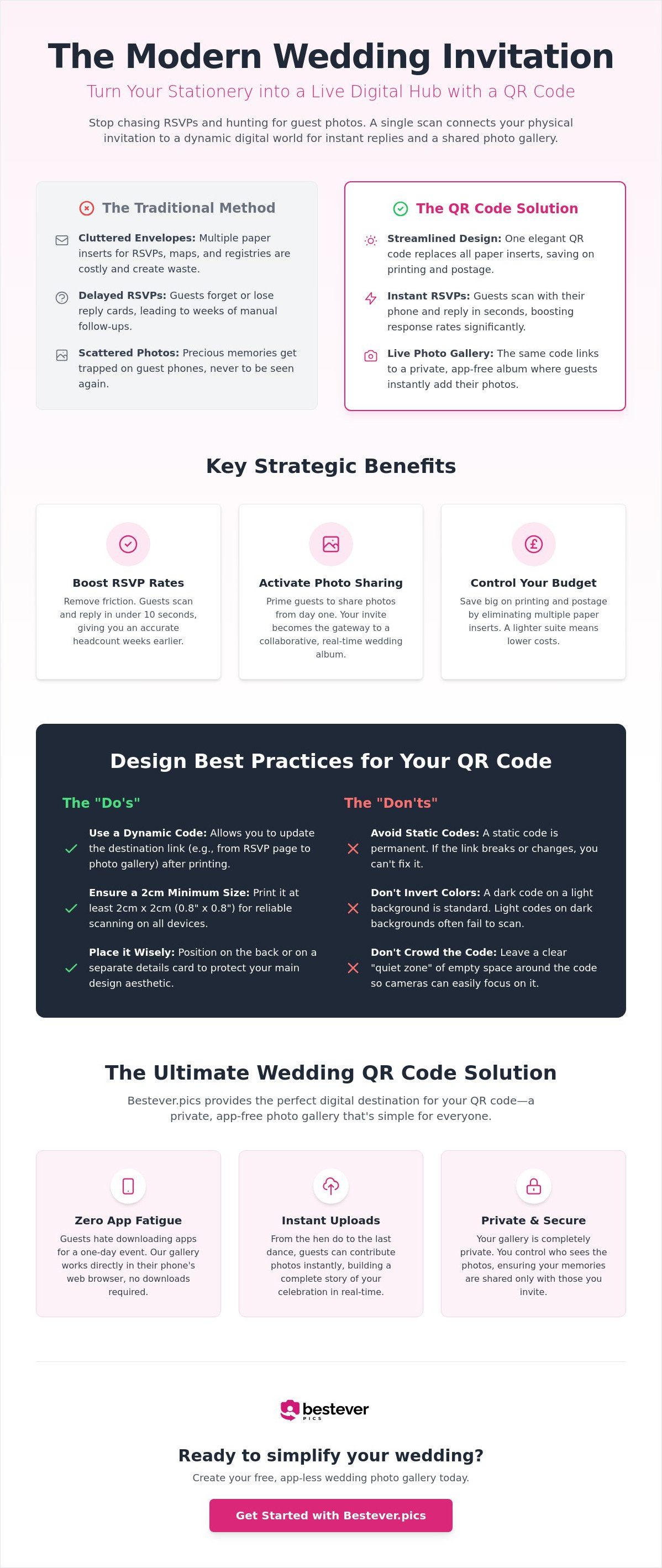
Design matters. You've spent thousands on letterpress or custom illustrations, so you don't want a "tech-tacky" barcode clashing with your aesthetic. Integrating a qr code wedding invitation requires a balance between visibility and elegance. If done correctly, it feels like a high-end feature rather than an afterthought. You want your stationery to look like a piece of art while functioning like a high-speed digital portal.
Placement and Sizing
The back of the invitation is the gold standard for clean design. It keeps the front reserved for your names and the formal details while providing a dedicated space for the tech. If your suite is more traditional, consider a small, heavy-stock insert card. This "details card" can house the code and your travel info without cluttering the main event. For Save the Dates, you can be bolder with placement since the tone is usually more casual and informative.
Insider observation: A QR code works best when it is at least 2cm wide to ensure quick scanning. Any smaller and the camera sensor struggles to focus on the individual pixels, especially in dim lighting. Always maintain a "Safe Zone" of at least 5mm around the code. This margin prevents the scanner from getting confused by nearby text or borders. If you're using a dark ink color, ensure the background is light enough to provide the high contrast the camera needs to lock on.
Call-to-Action Messaging
Don't assume your guests know what to do. Even with a tech-savvy crowd, a clear instruction increases engagement significantly. Use punchy, active language that tells them exactly what happens after the scan. "Scan to RSVP" is functional, but "Share Your Photos Here" creates immediate excitement for the big day. You need to make the destination clear so guests feel confident clicking the link.
Visual cues are just as important as the text. Adding a tiny camera icon near the code signals that this square is for your private wedding photo gallery. It bridges the gap for older guests or grandparents who might be hesitant to scan a mystery box. Keep your instructions short and sweet. Use phrases like:
- "Help us capture the magic"
- "Our digital guestbook"
- "Scan for maps and more"
By following these rules, your qr code wedding invitation stays sophisticated. You avoid the clutter of too many paper inserts while giving guests a direct line to your celebration. It's about combining old-world charm with modern efficiency to ensure your 2026 wedding is as organized as it is beautiful.
Why Bestever.pics is the Ultimate Wedding QR Code Solution
Your qr code wedding invitation is the first impression your guests have of your tech-forward celebration. Don't ruin it by forcing them to download a clunky app or create yet another password-protected account. Bestever.pics eliminates the friction that usually kills guest participation. It's the most direct way to turn every smartphone at your wedding into a high-powered content creation tool for your private archive.
The magic happens when the barrier to entry disappears. Most platforms require guests to navigate an app store, wait for a download, and verify an email address. By the time they've done all that, the moment has passed. With our system, a single scan takes them straight to the upload screen. It's about speed, reliability, and ensuring you don't miss a single candid shot from the dance floor or the dinner table.
The App-Free Advantage
Guests are significantly more likely to share their photos when the process takes seconds rather than minutes. In fact, removing the app requirement can increase participation by 5x compared to legacy platforms. You'll see the wedding through your guests' eyes by the next morning, long before your professional photographer sends over the first teaser. We prioritize high-quality storage, so those 48-megapixel shots from modern iPhones stay crystal clear in your private wedding photo gallery.
Getting Started with Bestever.pics
Setting up your gallery takes less than 60 seconds. You don't need a degree in computer science to create a professional-grade digital hub. Our dashboard is built for speed, letting you manage your photos with ease and keep the focus on your celebration. Once your gallery is live, you can download your unique QR code instantly to include on your qr code wedding invitation.
- Instant setup: Go from zero to a live gallery in under a minute.
- Theme matching: Customize the look of your digital gallery to align with your wedding's aesthetic.
- One-click downloads: Get your high-resolution code without any hidden fees or trial traps.
- Full control: Review and manage every photo submitted through your intuitive admin dashboard.
Insider observation: We've found that couples who place their QR codes on both the invitation and the reception tables see the highest volume of uploads. It reminds guests that their perspective matters. Bestever.pics isn't just a storage tool; it's the gateway to a live, shared memory bank that captures the energy of your day in real-time. It's the only logical choice for couples who value their time and their guests' experience.
Your Interactive Wedding Journey Starts Here
You now have the blueprint to turn your qr code wedding invitation into a high-performance digital hub. By ditching the bulky paper inserts and choosing a dynamic, well-designed code, you simplify the guest experience and maximize engagement. It's about more than just logistics; it's about building a live archive of your celebration from the very first scan. You've seen how easy it is to bridge the gap between tradition and tech.
Don't let your guests' best photos get buried in private camera rolls or lost to app fatigue. Thousands of 2026 couples trust Bestever.pics because we provide a sophisticated, app-free experience with unlimited photo uploads. It's fast, reliable, and keeps the focus on the fun. Create your wedding QR code with Bestever.pics today and start collecting memories instantly. Your future self will thank you for the beautifully organized digital album.
Frequently Asked Questions
Do QR codes on wedding invitations look tacky?
QR codes look sophisticated when you treat them as a design element rather than an afterthought. Place your code on the reverse side of the card or a dedicated insert to keep the main invite clean. Use a high-contrast color that matches your ink palette. When done right, your qr code wedding invitation feels like a premium, high-tech feature that signals a well-organized event to your guests.
Will my older guests know how to use a QR code?
Most guests are already familiar with scanning codes from restaurants and travel. For older family members, a tiny text cue like "Open your camera and point it here" removes any guesswork instantly. It's actually much simpler for them than finding a stamp and a postbox. If you're worried about specific guests, a quick mention at a family dinner will get them up to speed in seconds.
Do I need a special app to create a wedding QR code?
You don't need any technical skills or software downloads to build your portal. Bestever.pics allows you to generate a high-resolution code directly from your dashboard in under a minute. Avoid generic "free trial" generators found in search results; these often expire and break your link after the invitations are already in the mail. Stick to a dedicated event platform to ensure your guests can always access the gallery.
Can I change the link on my QR code after the invitations are printed?
You can definitely update the destination link if you use a dynamic QR code. This is a lifesaver if your wedding website URL changes or you decide to switch RSVP platforms after printing. Static codes are permanent and can't be edited, so always double-check that you're using a dynamic version. This flexibility gives you total control over your guest experience right up until the wedding day starts.
What is the best size for a QR code on a wedding invite?
A width of at least 2cm is the industry standard for a reliable scan. While you might want to shrink it to save space, anything smaller risks frustrating your guests with focus issues. Keep a clear margin of about 5mm around the square to help smartphone sensors lock on instantly. Testing a home-printed sample on your chosen paper stock is the best way to verify it works in different lighting.
Does it cost money to generate a QR code for my wedding?
Static codes are often free, but dynamic codes typically require a small investment for the hosting and editing capabilities. While the initial cost might be higher than a "free" version, the security of knowing your link won't expire is worth the peace of mind. Investing in a professional service ensures your qr code wedding invitation remains functional throughout your entire planning timeline and well after the ceremony ends.
Can a QR code be used for both RSVPs and photo sharing?
One code can easily act as a gateway to multiple destinations. Link the code to a mobile-optimized landing page that features clear buttons for "RSVP Here" and "Upload Photos." This keeps your stationery suite minimal while providing a centralized hub for every guest interaction. It's a high-efficiency move that ensures your guests have everything they need in a single, scannable location without any clutter.
What happens if my guest doesn’t have a smartphone?
While the vast majority of guests carry smartphones, it's smart to have a backup for the rare guest without one. Include a short, easy-to-type URL or a phone number for traditional RSVPs on the back of the card. This ensures total inclusivity while still letting most of your guests enjoy the speed of the digital scan. It's about being practical without sacrificing your modern, streamlined vision for the day.


